Does SoundCloud Count Your Own Plays? No, and Here Is What It Counts Instead
Before You Read On
SoundCloud does not count plays from your own account on your own tracks, and it says so plainly in its Insights documentation. Everything else you may have read about this, from a 30-second minimum to IP tracking and verification screens, is either borrowed from other platforms or invented. What SoundCloud actually counts is a click of the play button by any listener other than you, including repeat plays from the same fan, autoplay and station plays, and offline plays from Go subscribers that can arrive up to 30 days late. The reason your number looks wrong is almost always timing, not filtering, and this article walks through both.
Schaffe einen Austausch rund um deine Songs.
Echte Kommentare von echten Hörern. Sorgen Sie bei jeder Veröffentlichung für Interaktion.
The Official Answer: Self-Plays Are Excluded
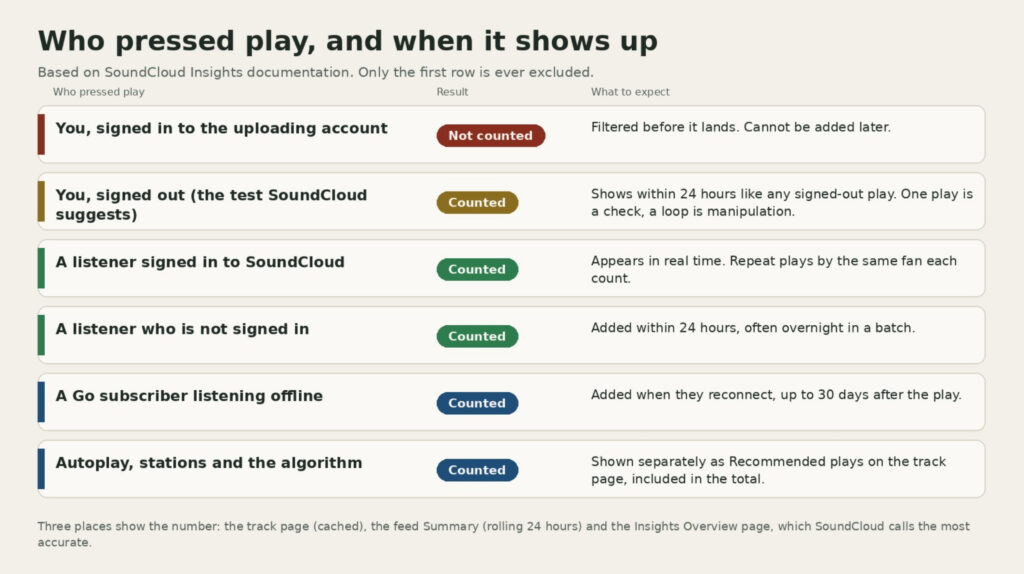
SoundCloud’s Insights glossary defines a play as a click of the play button and then adds the exception in one sentence: self-plays on your own tracks are not counted, since those are your own plays. The Insights troubleshooting page repeats it for anyone wondering why their count is stuck. If you are signed into your account and play your own track, that play is not recorded, and plays cannot be removed from a track’s Insights afterwards, which is exactly why they are filtered before they land.
The mechanism is the account, not the device or the connection. SoundCloud knows which account uploaded the track and which account pressed play, and when they match, the play is dropped. There is no reference anywhere in SoundCloud’s documentation to IP addresses, device fingerprints or human verification checks deciding what counts. The verification screens some people hit when loading the site are a general bot protection layer for the website and have nothing to do with play counting.
SoundCloud itself suggests the one legitimate self-play test. If you want to check that your Insights are updating, play the track while signed out, then sign back in and see whether the count moved. That single logged-out play will register, because at that moment SoundCloud cannot tie the listener to the uploader. It is a diagnostic, not a growth method, and the section on looping below explains where the line is.
What SoundCloud Does Count
Once a listener is not you, the rules are generous. The glossary ties a play to the click of the play button and does not mention a minimum listening time, so a fan who skips after ten seconds still counts. The Individual Track Insights module on desktop even has a Repeat listeners panel showing fans who played your track more than once, which only makes sense if each of those plays is counted. The same module separates Recommended plays, meaning plays that came from SoundCloud’s algorithm through stations and the autoplay queue, and those count toward the total too.
Timing is where the surprises live. Plays from listeners who are signed in appear in real time. Plays from listeners who are not signed in are added within 24 hours. Plays from SoundCloud Go subscribers who listened offline are added when the listener reconnects, which SoundCloud says can be up to 30 days after the play happened. Those three clocks run at once, so a track can gain plays today from something a fan did on a flight three weeks ago.
Insights is also shown in three places that update differently. The number under the waveform on the track page is cached and can lag. The Insights Summary on your feed shows a rolling 24-hour window that shifts every hour, so the figure can go down as well as up. The Insights Overview page is the one SoundCloud calls the most accurate spot, and it is where disagreements between the other two should be settled.
Why Your Play Count Looks Wrong
Put the exclusions and the clocks together and most “SoundCloud is miscounting” complaints explain themselves. The count did not move after you previewed your own upload because you were signed in. It jumped overnight because logged-out plays from the previous day were added in a batch. It gained plays on a private track you never shared because the collaborator you sent the secret link to is not you, so their plays count, and so does a logged-out play from your own second device. It dropped by a few in the Summary because the 24-hour window rolled past yesterday’s peak.
If the Overview page still shows nothing after a day and you have had real listeners, the troubleshooting page’s first suggestion is a cache refresh, and its second is the signed-out test described above. Insights for a deleted track remain on the Overview page under the label Deleted or disabled track, so a missing track is not a missing count. Our guide on how to get more plays on SoundCloud covers what to do once you trust the number.
Looping Your Own Track While Logged Out
Because a single signed-out play registers, people ask whether leaving the track on repeat in a private window, or cycling through a VPN, would build a count. Technically those plays may be recorded, since SoundCloud cannot match an anonymous listener to your account. Practically, it is a bad trade.
SoundCloud’s Terms of Use prohibit using any technique or service, automated or otherwise, designed to misrepresent the popularity of your content, and self-looping is a textbook case. The October 2025 update to the Monetization Terms of Service reaffirmed that artificial streaming is not permitted and said SoundCloud may reset stream counts on tracks affected by automated, artificial or fraudulent activity. For monetized artists that matters twice over, because fan-powered royalties are paid from the subscription and ad revenue of the specific listeners who played your music, and a loop running on your own laptop brings no revenue to share. Our breakdown of how SoundCloud pays per stream explains why only real fans move that figure.
There is also a reputational cost. SoundCloud shows your top 50 listeners and the websites and apps your plays came from to Artist Pro subscribers, and labels, promoters and curators who look at a track with 20,000 plays, two likes and no comments draw the obvious conclusion. Plays without any engagement around them are a signal in the wrong direction.
Erweitere deine SoundCloud-Fangemeinde.
Echte Follower von echten Hörern. Bauen Sie sich im Laufe der Zeit ein glaubwürdiges Künstlerprofil auf.
What Counts as Growth That Sticks
The plays that help are the ones attached to a listener who might come back. Reposts put a track in other people’s streams, playlists and station placements feed the Recommended plays number, and SoundCloud’s own Amplify tool, available to Artist and Artist Pro subscribers, pushes a track to listeners the algorithm thinks will like it. Some creators also add paid promotion while a release is fresh. BuzzVoice supplies SoundCloud-Spiele delivered gradually from real accounts rather than bots, and our honest look at SoundCloud-Plays kaufen sets out when that helps a track and when it does not. Whatever route you take, the measure that matters is whether likes, reposts and comments grow alongside the count, because that is the pattern real listening produces.
Häufig gestellte Fragen
Does SoundCloud count multiple plays from the same listener?
Yes. SoundCloud’s track Insights include a Repeat listeners panel for fans who played a track more than once, and nothing in its documentation caps plays per account. The only listener whose plays are excluded is the uploader.
Does playing my track from a second account count?
The second account is a different listener as far as the counter is concerned, so the play will probably register. It is still your own activity dressed up as a fan’s, which is the behaviour the Terms of Use describe as misrepresenting popularity, and it adds nothing to royalties.
Why does my private track have plays?
Anyone with the secret link can play a private track, including collaborators, mastering engineers and your own phone while signed out. Private only controls who can find the track, not whether plays on it are counted.

BuzzVoice
BuzzVoice ist die beste Anlaufstelle, wenn Sie sofortige Engagement-Dienste in den sozialen Medien benötigen. BuzzVoice bietet eine große Auswahl an Paketen für Instagram, Youtube, Facebook, Twitter, Soundcloud und Tiktok.