How to View Your Old Instagram Stories (and Which Ones Are Gone for Good)
Where to Look First
| What you are trying to find | Where it is |
| Your own Story from last week, last year or 2019 | Your private Stories archive, reached from the profile menu. Only you can see it. |
| A Story you archived early or deleted by mistake | Recently deleted, under Your activity. Thirty days for archived Stories, 24 hours for Stories that were never archived. |
| Someone else’s expired Story | Their Highlights, or your Mentions tray if the Story tagged you. There is no other way, and no app changes that. |
| Stories posted while archiving was switched off | Nowhere. Instagram does not save them retroactively and support cannot restore them. |
Instagram Stories leave public view after 24 hours, but for most accounts they do not leave Instagram. Every Story you post is saved to a private archive the moment it expires, where it stays until you delete it or your account is closed. The archive is the answer for your own content. For anyone else’s content the answer is shorter and less satisfying, and this guide covers both, plus the two situations where a Story really is gone.
Stimola la conversazione sui tuoi post.
Commenti reali su Instagram che stimolano il coinvolgimento e aumentano la portata.
Your Own Old Stories Live in the Archive
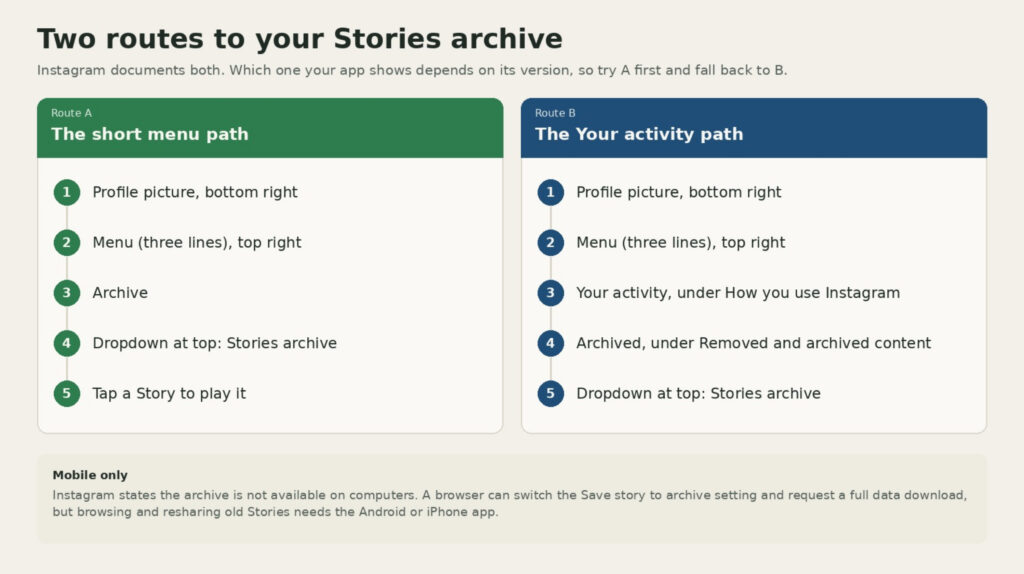
The archive is a date-sorted, private feed of every Story you have published since archiving was turned on. Instagram’s help pages describe two routes to it, and which one you see depends on your app version, so try the first and fall back to the second.
- Open Instagram and tap your profile picture in the bottom right.
- Tap the menu button (three lines) in the top right.
- Tap Archive. If you do not see it, tap Your activity under How you use Instagram, then tap Archived under Removed and archived content.
- Check the dropdown at the top of the screen. It needs to say Stories archive, not Posts archive or Live archive.
- Scroll down to go further back in time, then tap any Story to play it.
Two details from Instagram’s own documentation are worth knowing before you start scrolling. The archive is a mobile feature, so you can toggle the setting from a browser but you cannot browse or reshare old Stories there. And some archived Stories are altered to save storage: a photo Story that used a music or GIF sticker will still appear, but the music will not play and the GIF may be frozen. Those changes are permanent, and resharing the Story will not bring the audio back. Video Stories that were never shared to Feed or Reels are not affected.
If the Archive Is Empty or Missing
An empty archive almost always has one of four causes, and three of them are fixable in under a minute.
The first is the dropdown. If it reads Posts archive, you are looking at hidden grid posts, not Stories, so switch it. The second is the account. People who manage a personal profile and a brand page often open the archive on the wrong one, so check the username at the top of the profile. The third is the saving toggle. Instagram turns it on by default, but it can be switched off by accident or by an older app version. To check it, go to your profile, tap the menu, open Your activity and then Archived, tap Options in the top right, tap Settings, and make sure Save story to archive is on.
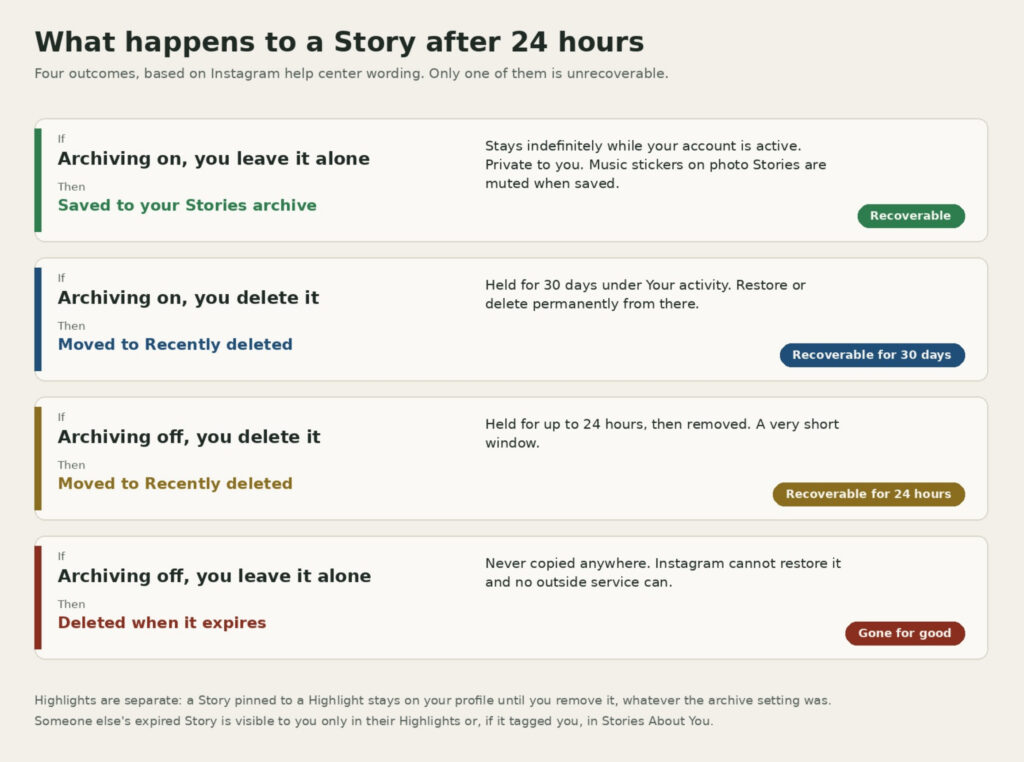
The fourth cause has no fix. Stories posted while that toggle was off were deleted after 24 hours and were never copied anywhere, so Instagram cannot recover them and neither can any outside service. Instagram also notes that Stories archive and Highlights are not available on every account, which is rare but explains the occasional profile where the Archive option simply does not exist.
One more place to check before giving up: Highlights. If you pinned a Story to a Highlight circle on your profile before it expired, it is still there regardless of what the archive shows. Our guide to making an Instagram Story last longer covers Highlights in more depth.
Deleted a Story by Mistake? Try Recently Deleted
Deleting a Story is not the same as letting it expire. Instagram’s help center explains that deleted content moves to a Recently deleted folder, where archived Stories wait 30 days and Stories that were never archived wait up to 24 hours before they are removed for good.
To restore one, go to your profile, tap the menu, tap Your activity, then tap Recently deleted under Removed and archived content. Tap Stories at the top, open the Story you want back, tap Options and choose Restore, then confirm. If the folder is empty, the Story is either older than the window or was never deleted in the first place, in which case the archive is still the place to look.
Maximize your post reach.
Real Instagram impressions that broaden your audience and lift the algorithm.
Other People’s Old Stories
This is the question most people actually searched for, and the answer has not changed in years. Instagram does not give anyone access to another account’s archive, and once a Story leaves someone’s tray it is visible to you in exactly two cases.
The first is Highlights. If the account owner saved the Story to one of the circles under their bio, you can tap it and watch it for as long as they keep it there. On a private account you need to be an approved follower to see Highlights at all. The second is Mentions. If the Story tagged your account, Instagram collects it in Stories About You, reached from the Mentions section of your inbox, and you can view, reply to or reshare it there.
Nothing else works. The anonymous viewer sites that show public Stories while they are live only fetch what Instagram is currently serving, and they have no archive of expired Stories. Our review of anonymous Instagram Story viewers explains how those tools operate and why anything promising private or expired Stories is a scam. The honest route, if the Story mattered, is to ask the person to reshare it from their archive.

What You Can Do With an Old Story Once You Find It
Opening an archived Story shows three options along the bottom: Share, Highlight and a More menu. Share lets you post it to your current Story again, which is how most people bring back an anniversary or a popular clip. Highlight adds it to an existing or new Highlight circle on your profile. The More menu holds Save photo or Save video, which downloads a copy to your phone.
If you want everything at once rather than one Story at a time, request a copy of your information through Accounts Center, under Your information and permissions, and choose Download your information. The export includes your Stories as media files and arrives as a download link once Instagram has prepared it, which can take a few days for older accounts. It is the only bulk download Instagram offers, and it has the advantage of running from a desktop browser.
Reshared archive Stories often reach fewer people than the original did, since many followers have already seen them, so creators who rely on throwbacks usually pair them with a fresh sticker, poll or caption. BuzzVoice also supplies Instagram visualizzazioni delivered gradually from real accounts for creators who want a steadier floor under reposted content, though the archive itself is free and private and needs nothing added to work.
Domande frequenti
How do you view someone’s Instagram Story after 24 hours?
Only through their Highlights, or through Stories About You in your Mentions if the Story tagged you. Instagram does not expose anyone else’s archive, and no third-party service has access to expired Stories.
I archived a Story before the 24 hours were up. How do I get it back?
It is in your Stories archive, not lost. Archiving early simply moves it there ahead of schedule. Open the archive, tap the Story and use Share to post it to your current Story again.
Can I see my old Instagram Stories on a computer?
No. Instagram’s help pages state that the archive is not available on computers. You can turn the Save story to archive setting on or off from a browser, and you can request a full download of your information from a browser, but browsing and resharing old Stories requires the Android or iPhone app.
Per quanto tempo le Storie rimangono in archivio?
Indefinitely, as long as your account stays active and you do not delete them. The archive has no expiry date, which is why profiles that have archived since the feature launched can scroll back years. Our glossary of Instagram features and actions explains how the Stories archive differs from the Posts archive.a

BuzzVoice
BuzzVoice è il posto migliore dove andare quando si ha bisogno di servizi di engagement immediato sui social media. Offre un'ampia gamma di pacchetti per Instagram, Youtube, Facebook, Twitter, Soundcloud e Tiktok.