How to Pin a Comment on TikTok in a Few Seconds
If you’re a content creator on TikTok, you know that interacting with your followers is crucial. One of the most effective ways to highlight important comments or promote a discussion is by using the comment pinning feature. How do you pin a comment on TikTok? It’s simple! With a few taps, you can pin any comment to the top of the comment section, increasing visibility and encouraging more interactions.
In this article, we’ll show you how to do this quickly and easily. Plus, if you’re looking to take your engagement to the next level, BuzzVoice provides tools to help you efficiently manage and analyze your TikTok comments.
Boost your views and reach more followers without waiting for the algorithm. With Buzzvoice, you can instantly promote your content!
What Does Pinning a Comment Do on TikTok?
Puts the comment at the top
The pinning feature on TikTok lets you keep a comment at the top of the section, making it the first thing people see when they check out your video. This gives it more attention and ensures that it stands out to your audience.Increases visibility
Pinned comments naturally grab more attention because they’re highlighted and easily seen. It’s a great way to showcase compliments, ask interesting questions, or share important information that you want everyone to notice.Boosts more interactions
By pinning a comment, you can spark conversations or encourage more interaction from your followers. This can lead to increased engagement, more comments, and ultimately more views on your video, helping you grow your presence on TikTok.
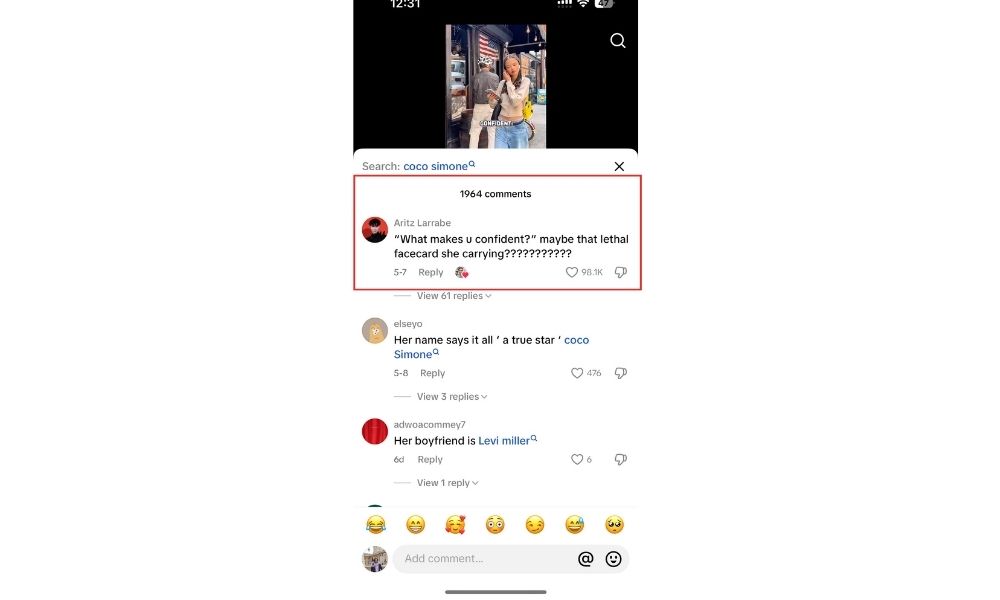
Introduction to Pinning Comments
Pinning comments on TikTok is a feature that allows users to highlight specific comments on their videos, making them more visible to their audience. This feature is useful for managing comments, engaging with viewers, and building a strong connection with the community.
By pinning a comment, users can showcase funny remarks, address common questions, or provide additional information that enhances the content of their video. The comment pinning feature is available on both Android and iPhone devices, as well as on PC, making it accessible to all users.
Step-by-Step: How to Pin a Comment on TikTok
If you’re not sure how to use this feature yet, follow this simple tutorial. To make it easier to understand, we’ll break down the process into steps.
Step 1 – Open the TikTok AppFirst, open the TikTok app on your device and navigate to the video where you want to pin the comment.
Note for Android users: On an android device, ensure you have the latest version of the TikTok app to access the pin comment feature.
Step 2 – Go to Your VideoTap on the video where you received the comments you want to highlight. It can be any video that has interactions in the comment section.
Step 3 – Locate the Comment You Want to PinLook for the comment you want to pin. It could be a compliment from a follower, an interesting question, or even one of your replies that deserves attention.
Step 4 – Long Press the CommentPress and hold the comment you want to pin. This will open a menu with various options related to the comment, such as reply, like, or pin.
Step 5 – Tap “Pin Comment”The option “Pin Comment” will appear in the menu. Simply tap it, and the comment will be pinned at the top of the comment section.
Note: If a comment is already pinned, the new one will replace the previous one.
Why Use the Pin Feature?
Highlight a Valuable Question or Compliment
The pinning feature is a great way to draw attention to comments that add value to the conversation, such as a specific comment with interesting questions, compliments, or positive feedback. By pinning these types of comments, you not only acknowledge the contributor but also encourage others to engage in meaningful discussions.
Promote Your Own Reply or Call to Action (CTA)
If you reply to a follower with something important or if you want to encourage more engagement with a CTA (such as “like this video if you agree!”), pinning your own response can be an excellent strategy. It keeps your message at the forefront, motivating followers to take action.
Encourage Positive Discussions
Pinning comments that foster a constructive conversation can help boost interaction on your videos. This can create a more active and engaged community, leading to more views and followers. By using this feature strategically, you can foster a positive environment that encourages deeper engagement and connection.
Engagement Strategies with the Pinning Feature
In addition to being a useful tool for highlighting specific comments, the pinning feature can also be incorporated into your TikTok engagement strategy. Here are some tips on how to use it strategically:
Engaging with Your Audience
Pinning a comment from a follower shows that you value their opinion. This can encourage more followers to comment on your videos in the hope of being highlighted. It’s a great way to build a community that feels appreciated and motivated to interact more. Pinning comments can also enhance the viewer experience by fostering a positive and engaging atmosphere in the comment section.
Using CTAs (Call to Action)
If you’d like your followers to take a specific action—such as visiting your profile or watching more videos—pin a comment with a clear call to action. This increases the chances of more followers following your instructions and engaging with your content further. Additionally, you can use pinned comments to promote other content channels, such as your YouTube channel, blog, or podcast, thereby broadening your reach and visibility.
Quick and Highlighted Responses
If you respond to frequently asked questions or provide important information about the video, pinning these responses can help clear up doubts quickly. It saves time for your audience and encourages more comments from others with similar questions or thoughts.
TikTok Creator Tools and Engagement Tips
TikTok offers several creator tools that can be used to optimize engagement with your videos. Beyond the comment pinning feature, other tools such as data analytics and follower interaction resources are essential to increasing the visibility and engagement of your content. Here are a few quick tips to improve engagement on TikTok:
Use Strategic Hashtags: Utilize popular and relevant hashtags to increase the visibility of your video.
Respond to Comments: Showing that you’re active in the comment section can encourage more interactions and keep the conversation flowing.
Collaborate with other creators to broaden your reach and expose your content to new audiences.
Create Interactive Content: Run challenges or polls that encourage followers to comment and interact with your videos.
Additionally, BuzzVoice offers services to help you optimize your TikTok presence, including comment management and engagement analysis. Check out our services to learn how we can help boost your content’s visibility!
Comment Section Management
Comment section management is crucial for creating a positive and engaging atmosphere on TikTok. The comment section is where users interact with each other and with the content creator, making it an essential part of the TikTok experience. By pinning comments, users can highlight important information, showcase funny remarks, or address common questions.
The comment section can also be managed by responding to comments, blocking users who spam or harass others, and using the “Report” feature to remove inappropriate content. Effective comment section management helps to build a strong and supportive community, which is essential for creators who want to grow their audience and increase engagement.
Troubleshooting Pinning
Troubleshooting pinning issues on TikTok can be frustrating, but there are simple steps to resolve common problems. If a user is unable to pin a comment, they should check their internet connection and ensure that they have the latest version of the TikTok app.
They can also try logging out and logging back in to refresh their account. If the issue persists, users can contact TikTok support for assistance. Additionally, users can check the TikTok website for updates on known issues or maintenance that may be affecting the comment pinning feature. By following these troubleshooting steps, users can quickly resolve pinning issues and continue to engage with their audience.
Final Thoughts
Pinning comments on TikTok is a quick and effective tool for managing interactions on your videos. Whether it’s to highlight a compliment, promote your own response, or encourage positive discussions, this feature can be a powerful ally in your content strategy. By using this feature intelligently, you can increase engagement and strengthen your presence on the platform.
FAQs About TikTok Comments
Can I pin more than one comment?
No, TikTok allows you to pin only one comment at a time. If you choose to pin a new comment, it will replace the one that was previously pinned. This feature is designed to help you highlight the most relevant or important comment at a given moment, but keep in mind that only one comment can be pinned at the top of the section at a time.
Can others see when I pin a comment?
Yes, when you pin a comment, it becomes visible to everyone who accesses the comment section of your video. Pinned comments are always placed at the top, making them the first thing people see when they view the video’s interactions. This feature lets you highlight comments for all users, making sure they stand out to anyone interacting with your content.
How do I unpin a comment?
To unpin a comment, simply tap and hold the pinned comment in the comment section. A menu will appear with the option ‘Unpin Comment.’ Select it to remove the comment from the top of the section, making room for a new one to be pinned. It’s a quick and easy process that lets you manage your comment section effectively.
If you’re aiming to boost your TikTok presence and increase engagement with your videos, BuzzVoice offers tools that can help you manage comments and analyze user interactions. With our services, you can better understand your audience, improve your engagement strategy, and grow your following. Discover more about how we can assist you!

BuzzVoice
BuzzVoice is the best place to go when you need instant engagement services on social media. Offering a wide variety of packages for Instagram, Youtube, Facebook, Twitter, Soundcloud & Tiktok.