Can You Remove Followers on X (Twitter)? And How?
Yes, you can remove followers on Twitter now, called X, without blocking them. This feature lets you quietly clean up your follower list by removing unwanted or inactive users without sending any notifications to them.
As of 2026, social media users are more concerned than ever with digital boundaries, privacy, and audience control. In response, X has introduced more flexible follower management tools to help users curate their space. Whether you’re dealing with spam accounts, ghost followers, or just want a more engaged audience, the ability to remove Twitter followers without blocking is a powerful feature.
This silent removal option works across desktop and mobile, and it’s ideal for those who want to distance themselves from certain followers without confrontation.
Get noticed X, grow your followers, gain more likes and retweets and turn heads online with BuzzVoice! We help you boost visibility and build real engagement on social media fast!
Can You Remove Followers on Twitter (X)?
Yes. Twitter’s native “Remove follower“ feature allows you to delete someone from your followers list silently. It was first rolled out in 2021 and is now available globally via desktop and mobile. You can remove Twitter followers directly from the Twitter website on both desktop and mobile browser versions in a few clicks.
The person won’t be notified
They can still see your tweets (if public) or refollow you
Your follower count decreases instantly
Removing unwanted accounts, such as fake, bot, or inactive users, can help improve your follower ratio and the authenticity of your audience.
This option is especially helpful when you want to avoid confrontation or awkwardness that may come with blocking. However, if you want a more permanent solution, a hard block (or hard block users) will prevent the blocked user from viewing your profile or engaging with your tweets.
How to Remove a Follower on Twitter (Step-by-Step)
Introduction to Twitter Follower Management
Managing your Twitter followers is a key part of keeping your Twitter account healthy, relevant, and engaging. With so many users on the platform, it’s easy for your follower list to become cluttered with unwanted Twitter followers, such as spam accounts, inactive users, or people who post irrelevant tweets. These unwanted followers can dilute your engagement, lower your follower quality, and even expose your tweets to audiences you’d rather avoid.
A well-managed follower list helps you maintain a more authentic audience, improve your engagement rates, and ensure your tweets reach users who genuinely care about your content. Whether you’re looking to remove inactive users, block spam accounts, or simply tidy up your follower list, taking control of your Twitter followers is essential for building a strong online presence.
There are several ways to go about removing unwanted followers on Twitter, from using the platform’s built-in features to more advanced methods.
On Desktop:
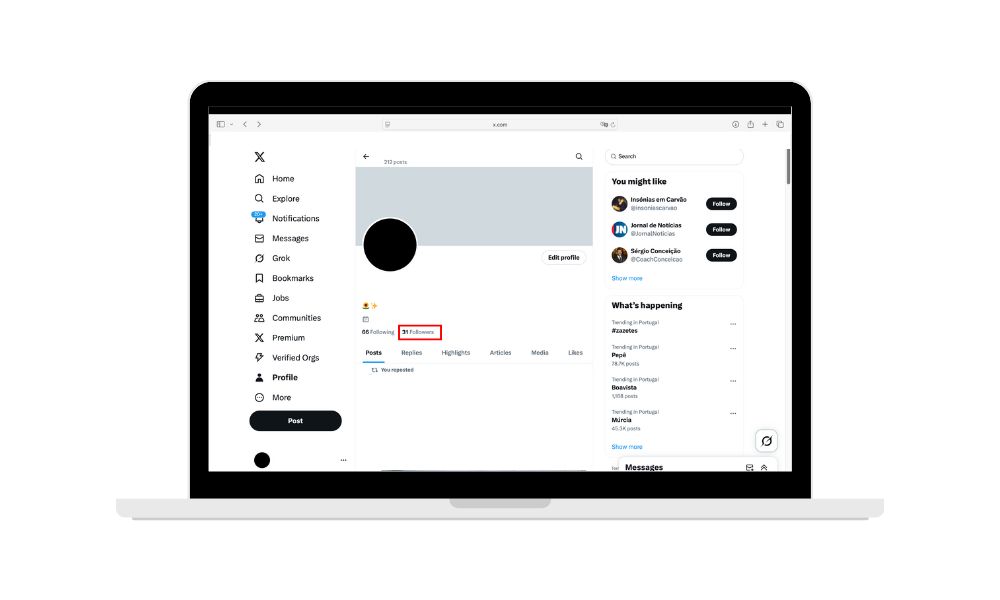
Go to your profile by clicking your profile icon or profile picture located on the left sidebar (left side) of the Twitter website.
Click on your Followers list.
Find the user you want to remove.
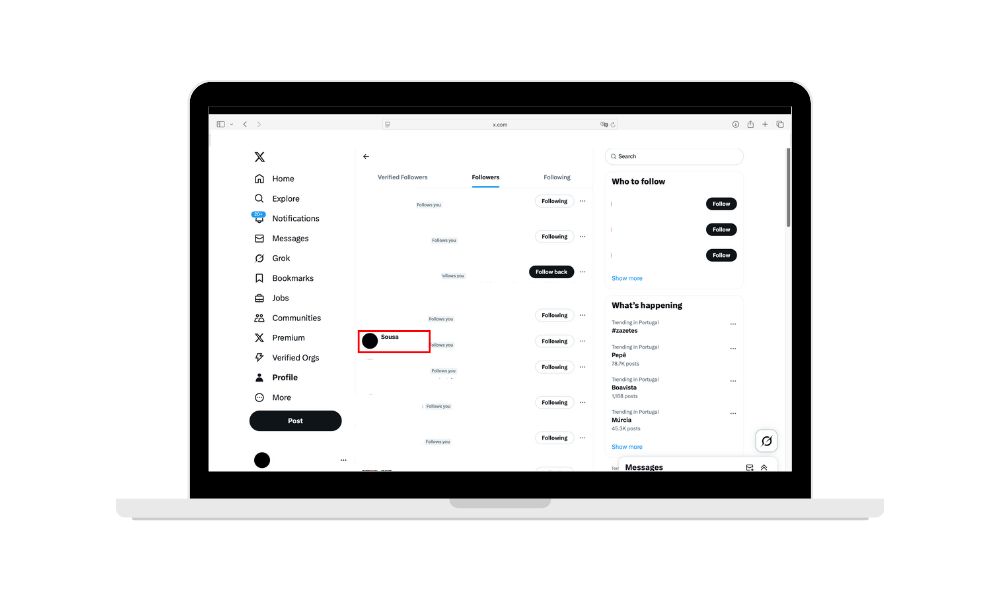
Click the three-dot drop-down menu (pop-up menu) (•••) next to their name.
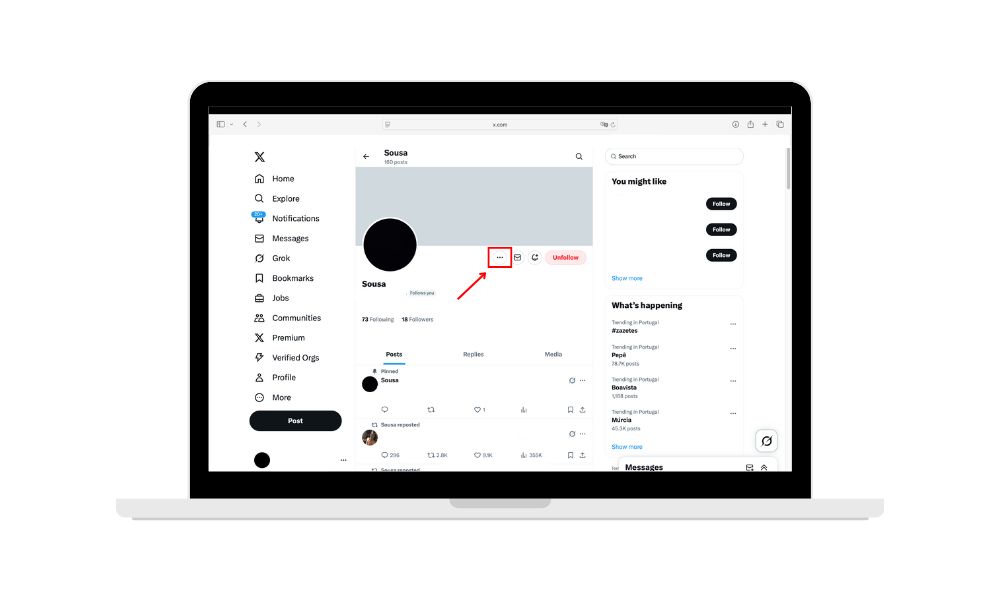
5. Select Remove this follower and confirm.
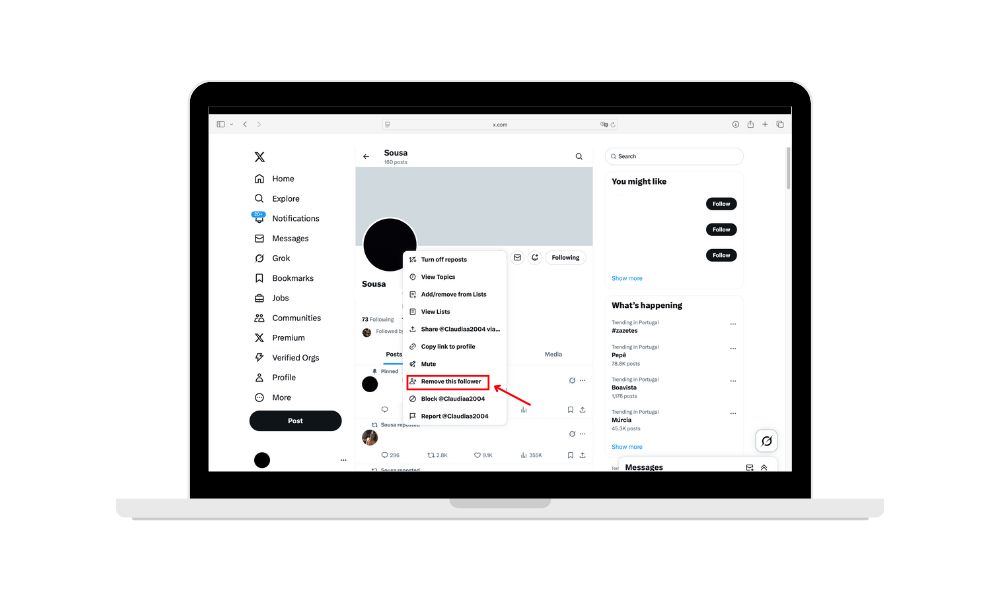
These steps apply to managing Twitter followers on desktop.
On Mobile App:
Note: The Twitter app does not currently support direct removal of followers. To remove followers on a mobile device, you need to use a mobile browser or access the mobile browser version of Twitter. This allows you to manage your Twitter followers on mobile, as the feature is not available in the Twitter app itself.
Open your mobile browser and go to the Twitter (X) website on your mobile device
Log in and go to your profile
Tap your Followers list
Tap the follower’s profile
Tap the three-dot menu (•••)
Select Remove follower and confirm
Related: How To See Comments On Twitter (X) in 2026
These steps allow you to manage Twitter followers on mobile by using the mobile browser version of Twitter.
Will They Know You Removed Them?
No, Twitter (X) does not notify users when you remove them as a follower. The action is completely silent — there’s no alert, email, or message sent to them.
However, there are a few ways someone might realize they’ve been removed:
They could notice the “Follow” button reappearing on your profile, indicating they are no longer following you.
If your profile is private, they will lose access to your tweets and won’t be able to view your content unless you approve a new follow request.
If they use a third-party tool that tracks follow/unfollow events, they may notice the change.
Your name will also disappear from their “Following” list, which some users regularly check.
Tip: To reduce the chance of being noticed, time your removals with other cleanup actions or changes to your content strategy.
What’s the Difference Between Removing and Blocking?
|
Action |
Effect on the Other User |
Do They Get Notified? |
|---|---|---|
|
Remove |
They are unfollowed silently |
No |
|
Block |
They can’t follow you or view your content |
Yes |
Use Remove for a soft boundary
Use Block for a hard stop
Soft Block Method: Quietly Removing Followers
If you want to remove unwanted Twitter followers without drawing attention, the soft block method is a discreet and effective solution. This approach allows you to quietly remove followers by blocking a user and then immediately unblocking them. When you do this, the user is automatically removed from your followers list, but they won’t receive any notification that you’ve taken action.
To use the soft block method, simply open Twitter and navigate to the unwanted user’s profile. Tap the three dots in the top right corner to open the menu, select “Block,” and then immediately unblock the user. This process forces the follower to unfollow you, making it a great option for removing multiple followers or unwanted users quickly and quietly.
The soft block method is especially useful if you want to manage your follower list without causing any awkwardness or confrontation. It’s a popular choice for users who want to keep their Twitter account free from spam accounts, fake accounts, or users who post irrelevant tweets, all while maintaining a positive online environment.
Why You Might Want to Remove Followers
Removing followers gives you more control over your personal space and brand:
Protect your privacy
Remove bots or spam accounts
Eliminate inactive followers
Avoid the awkwardness of blocking someone you know
- Improve engagement rates by having more relevant followers
Remove certain users or unwanted Twitter accounts to improve your account security and relevance
Removing inactive accounts and managing multiple users or multiple accounts can help improve your follower ratio and overall engagement. Managing your followers can also help control who can send you direct messages.
Tips to Maintain a Healthy Twitter Audience
Here’s how to keep your Twitter clean and optimized in 2026:
1. Audit Your Followers Regularly
Go through your followers list monthly or quarterly to identify accounts that add no value or may be harming your engagement. You can log follower activity and review each username to identify which accounts to remove or monitor.
Look for:
Accounts with no profile photo or bio
Followers who haven’t tweeted in over 6 months
Irrelevant accounts (e.g., not in your niche or target audience)
By visiting a person’s profile or their profile page, you can decide whether to mute users (creating muted users) or remove them from your followers list.
By removing these, your engagement rate improves, and Twitter’s algorithm is more likely to surface your content to active users. If you simply want to hide someone’s tweets from your feed without unfollowing or blocking, consider muting users instead.
2. Use Audience Management Tools
If you have thousands of followers, manual checks can be slow — use specialized tools:
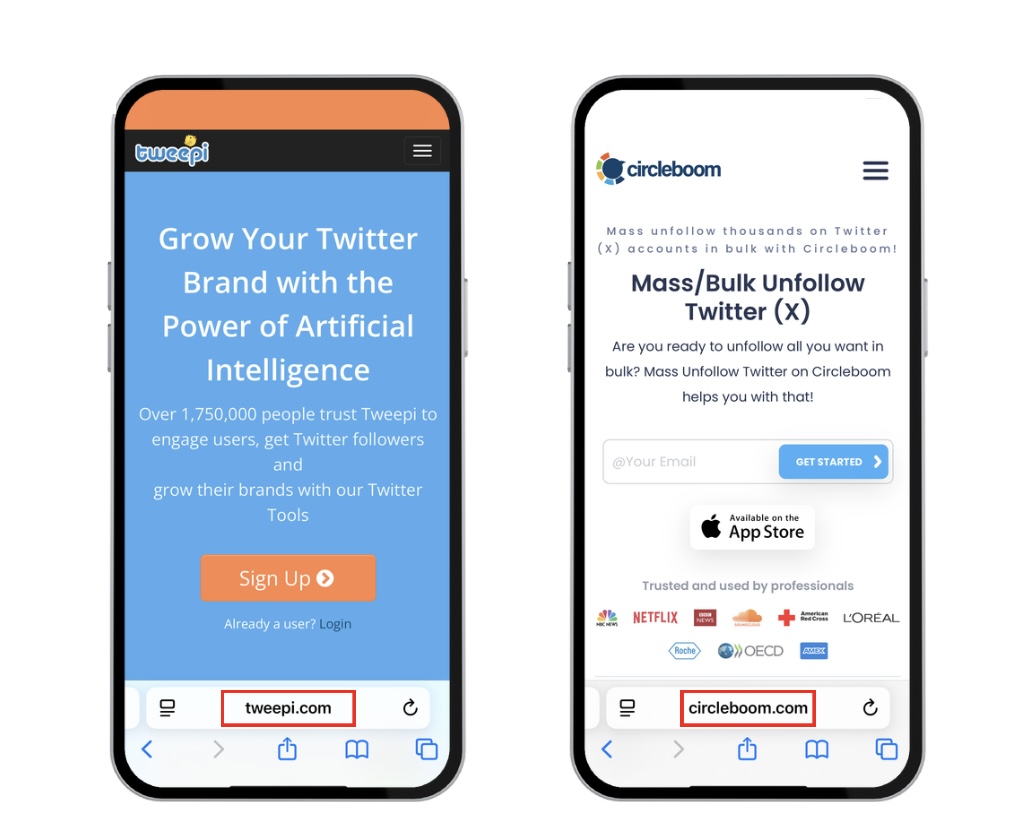
Tweepi offers AI-powered suggestions to unfollow or remove low-engagement users.
Circleboom helps detect fake, spammy, or inactive followers and supports bulk actions.
Many tools also allow advanced filters (language, location, engagement) to help you curate followers aligned with your goals.
Audience management tools can help you remove Twitter followers, unwanted accounts, and efficiently manage multiple users or multiple accounts, making it easier to clean up your follower list in bulk.
Pro Tip: Always review the tool’s access permissions and avoid apps that require full control of your account.
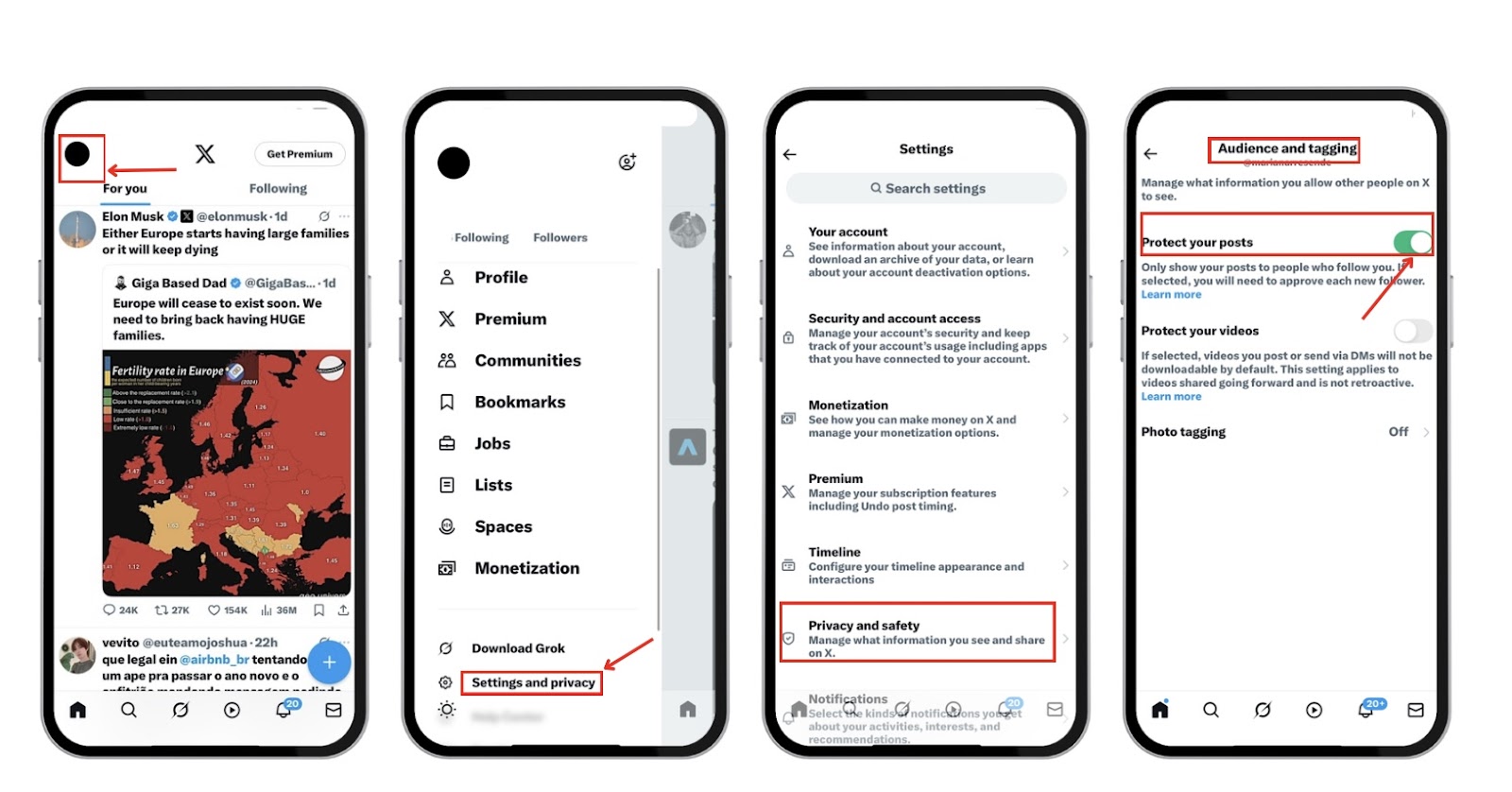
3. Consider Protecting Your Tweets
Turning on tweet protection ensures that only approved users can see your content and follow you.
Go to:
Settings > Privacy and Safety > Audience and Tagging > Protect your posts
When active:
New followers must send a request you can accept or reject
Removed followers can’t refollow unless approved again
Your tweets are hidden from search engines and non-followers
This is ideal for users who want a safe, troll-free experience, especially public figures or niche creators managing sensitive topics.
Take your Tweets to the next level with BuzzVoice—gain real followers and stand out on Twitter with more likes and engagement!
Before vs After: Real-World Follower Cleanup
|
Before Cleanup |
After Cleanup |
|
5,000 followers |
3,600 followers |
|
Engagement: 0.8% |
Engagement: 2.1% |
|
Spam/bot accounts |
Removed 1,400 |
Insight: Quality > quantity. A smaller, engaged audience is better for growth and interaction.
Final Thoughts
The ability to remove followers on Twitter without blocking is one of the platform’s most user-centric updates in years. Whether you’re a creator, a business, or just someone who wants peace of mind online, this feature is your go-to for quietly setting boundaries.
Use it regularly.
Combine it with engagement audits.
Consider protected tweets for ultimate control.
With these tools, 2026 can be your calmest Twitter year yet.
For those wanting to boost their Twitter impact, BuzzVoice offers tailored growth and engagement strategies to help you gain followers and increase tweet interactions faster. Let’s dive in.
FAQs
Can I remove multiple followers at once?
Twitter doesn’t support bulk removals natively. However, third-party tools like Circleboom or Tweepi allow bulk analysis and cleanup. Some of these tools let you remove multiple users or multiple accounts at once, making it easier to manage large follower lists efficiently. Be careful with these apps — always check their API access permissions and reviews.
Can someone remove me from following me again?
Yes. Removing a follower only unfollows them. If your profile is public, they can follow you again anytime. To prevent this, consider switching to a protected account or blocking the user if necessary.
What happens to my old tweets when I remove someone?
When you remove a follower, your tweets no longer appear in their timeline or feed. However, they can still view your tweets by visiting your profile page manually, unless your account is set to private. If you want to completely hide your tweets from them, you need to either protect your account or block the user.
Can I stop people from following me completely?
Yes, you can stop people from following you by switching your account to Protected mode, which requires users to send a follow request that you must approve. This gives you full control over who joins your audience. For added control, regularly review new requests and use removal or block features as needed. If you want to permanently prevent certain users from following you or viewing your content, you can use the hard block option to hard block users, which restricts them from seeing your profile, following you, or engaging with your tweets.