Can People See What You Like on X (Twitter)? Explained
In 2026, Twitter,now known as X, remains one of the most open social platforms out there. But with that openness comes a common question: Can people see what you like on Twitter? The answer is yes by default; your likes are public and visible on your profile for anyone to explore. Whether you’re liking memes, opinions, or brand posts, your activity can say a lot about you online.
Understanding how Twitter likes work and how to manage their visibility is key to keeping your digital footprint under control. In this guide, we’ll explain exactly who can see your likes, how to adjust your privacy settings, and smart ways to protect your activity while still engaging with the content you enjoy.
Take your Twitter presence to the next level, balancing privacy, visibility, and growth with BuzzVoice. It can help you build an authentic and impactful profile by buying followers, likes, and automatic engagement. Because in 2026, it’s not just about what you like it’s about how you manage what others see.
Can People See What You Like on Twitter?
Yes, your likes are public by default unless you have a Twitter account private.
Anyone can visit your profile, click on your “Likes” tab, and view every post you’ve liked. This includes tweets from friends, brands, or even random accounts. Your likes are also visible through the algorithm, meaning they can influence what shows up in other people’s feeds.
If your account is private, only your approved followers can see your likes, replies, and retweets. However, even then, any public tweet you like will still show your username under its “liked by” section for those who can view it.
So, while Twitter doesn’t broadcast your likes the same way it promotes your tweets, they’re still part of your public footprint on the platform.
Related: 7 Tips: How to Get Followers on Twitter (X) in 2026
How to Hide Likes on Twitter
Unfortunately, there’s no native way to completely hide your likes, not even for Twitter Blue subscribers. The only true method is to make your account private.
Here’s how:
Go to Settings and Privacy in your Twitter/X account.
Select Privacy and Safety.
Tap Audience and Tagging.
Turn on Protect your posts.
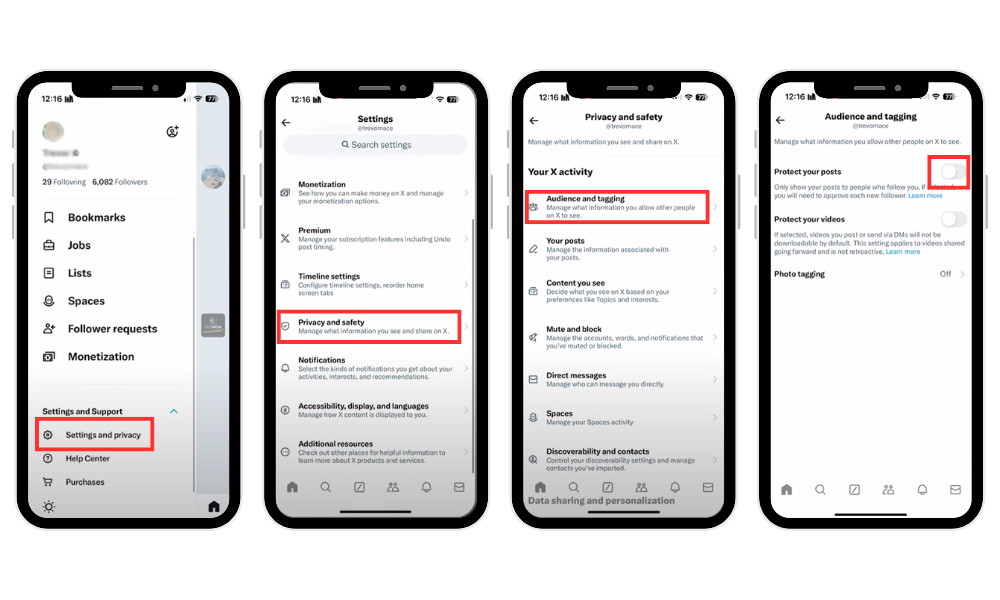
Once your account is private:
Only approved followers can see your likes.
Your profile and tweets won’t appear in public search results.
Non-followers won’t see your activity or interactions.
There’s also a common myth that Twitter Blue users can hide likes, but that’s false. Blue subscribers enjoy longer posts, video uploads, and editing features, but not private likes.
Related: How To Make Money on Twitter (5 Ways)
Can People See What You Like on Their Tweets?
Yes, when you like someone’s tweet, they’ll receive a notification showing your username. This applies to both public and private accounts (though only if the other person can view your profile).
Additionally, your likes can affect visibility. Twitter’s algorithm often boosts tweets that receive engagement, meaning your likes could help that post appear in others’ feeds, especially if they follow you. So while a simple like may seem harmless, it can have a ripple effect across the platform.
If you have a Twitter account with a good reach but want more followers, likes, and comments on other social media platforms, check out BuzzVoice services.
Related: Can You Remove Followers on X (Twitter)? And How?
Why Likes Are Important on Twitter
Likes play a bigger role on Twitter than you might think. They don’t just signal appreciation, they help the algorithm learn what content you enjoy and want to see more of. The like count, or the count of likes on a tweet, is a key metric for measuring Twitter activity and engagement.
Here’s why they matter:
Algorithmic influence: The more you like specific content, the more similar tweets appear on your feed.
Engagement signals: Likes help creators, brands, and influencers gauge audience reactions by looking at the like count.
Social bookmarking: Many users treat likes as a quick way to save tweets they want to revisit later.
The notification system is a feature designed to keep users informed about their engagement, including likes and retweets. For marketers or brands, likes also serve as a subtle engagement strategy. A well-placed like can help maintain visibility without cluttering your followers’ feeds.
Tips for Managing Your Twitter Privacy
If you’re concerned about who sees your likes, here are a few smart ways to stay in control:
Use bookmarks instead of likes. Bookmarks are private; no one can see what you save.
Adjust your privacy and safety settings. Explore the “Privacy and Safety” feature under settings to control visibility, mentions, and discoverability.
Use the app to manage privacy. The Twitter app allows you to delete liked posts, adjust privacy settings, and hide your likes for more privacy.
Manually remove old likes. You can manually unlike tweets one by one, or use trusted third-party tools to bulk-delete them for more privacy over your Twitter activity.
Create a new private Twitter account. If you want even more privacy, create a separate, private account for personal browsing or sensitive interests.
Think before you like. If a tweet feels too personal or controversial, use bookmarks or screenshots instead of liking more posts.
Log out or ensure you are logged in. When managing your Twitter activity, make sure you are logged in to the correct account, and log out when finished for added security.
For example, hiding your liked posts or making them hidden through privacy features can protect your privacy by preventing others from seeing your interests or activity. Using these features helps you control your liked posts and overall privacy. A mindful approach helps maintain your privacy while still enjoying what Twitter has to offer.
Related: Best Time to Post on X (Twitter) in 2026
Conclusion
Yes, people can see what you like on Twitter; your likes are public by default, and they help shape how others interact with you online. If privacy is important, consider switching your account to private or using bookmarks to save posts discreetly.
Managing your engagement wisely helps protect your personal brand and ensures your Twitter experience stays enjoyable and authentic.
And if you want to go beyond privacy and grow your presence the smart way, BuzzVoice can help you boost visibility, engagement, and follower growth while keeping your digital footprint intentional. Because in 2026, it’s not just about what you like, it’s about how you manage your online identity.
FAQ
Can I hide my likes on Twitter?
No, not completely. Twitter doesn’t currently offer a dedicated “Twitter likes private” feature for a public account; your likes remain visible to other users and any public user.
However, X’s engineering team recently introduced a new hiding likes feature within the last week, allowing you to keep your likes hidden from other users even if you have a public account. This feature is designed to help Twitter users protect their privacy and reduce unwanted attention to their activity.
Do people get notified when I like their tweets?
Yes, users receive notifications or pop-up notifications when you like their tweet or a retweet, unless their notifications are filtered or turned off. This notification system is a feature of the Twitter app designed to keep users informed about their Twitter activity.
Are Twitter likes public on private accounts?
If your account is private, only your approved followers can see your likes; your likes are private, and hidden likes are not visible to any public user or other users who are not approved. This hiding-like feature is designed to protect your privacy and protect your tweets, ensuring that your activity remains hidden from the broader community of Twitter users.
For example, if you have a private Twitter account and your tweets are private, only your approved followers will see your liked tweets, keeping your interactions hidden from public view. This feature helps you manage your privacy and control who can see your activity on Twitter.
Can I remove all my Twitter likes?
Yes. You can manually delete liked posts one by one or use third-party tools and features within the app to clear your like history and manage your Twitter activity.

BuzzVoice
BuzzVoice is the best place to go when you need instant engagement services on social media. Offering a wide variety of packages for Instagram, Youtube, Facebook, Twitter, Soundcloud & Tiktok.
![How Long Can Twitter Videos Be? [year] Guide](https://buzzvoice.com/app/uploads/2026/08/How-Long-Can-Twitter-Videos-Be-2026-Guide-4-573x338.jpg)