How to Know If Someone Restricted You on Instagram
Have you ever felt like someone is ignoring you on Instagram, but you can still see their profile and posts? If you’re suddenly not getting replies, and your comments seem invisible, you might be restricted.
Instagram’s “Restrict” feature is a subtle way for users to limit how others interact with them without making it obvious. Unlike blocking, you’re not entirely shut out, which makes it harder to notice.
In this guide, you’ll learn what restriction really means, how to recognize the signs, and how to confirm your user’s activity status.
- Restriction is a “soft block”: You can still see their profile and content, but your comments and DMs are quietly limited or hidden.
- Key signs include hidden comments and ignored messages: Your comments may only be visible to you, and DMs go to message requests without read receipts.
- You won’t see their activity status anymore: If their “active now” suddenly disappears while everything else looks normal, restriction is possible.
- The only way to confirm is through testing: Checking comment visibility from another account or asking a friend to verify is the strongest clue.
If you’re looking to leverage your profile on Instagram with likes, views and comments, make sure to check out BuzzVoice’s Instagram services.
What Does ‘Restricted’ Mean on Instagram?
Instagram introduced the Restrict feature to offer users a softer alternative to blocking. When someone restricts you, it doesn’t sever all contact. You can still see their content, send messages, and interact with their profile. But behind the scenes, your actions are filtered or hidden. Unlike a blocked user, a restricted user can still access the person’s profile and view their posts, but their comments and messages may be hidden or limited.
How Restriction Differs from Blocking or Muting
|
Feature |
Can See Profile |
Can Comment |
Can Message |
Gets Notifications |
Visible Comments |
|
Block |
X |
X |
X |
X |
X |
|
Mute |
Yes |
Yes |
Yes |
Yes |
Yes |
|
Restrict |
Yes |
Yes |
Yes |
X |
X |
- Block completely severs the connection. You disappear from each other’s feeds and DMs, and a blocked user cannot view your profile, posts, or send messages.
- Mute hides their posts or stories from your feed. They’ll never know.
- Restrict is a middle ground: the other person doesn’t know they’ve been restricted, but their engagement is limited.
Related Article: Why Can’t I See the Comments on Instagram?
What Happens When You’re Restricted
When someone restricts you:
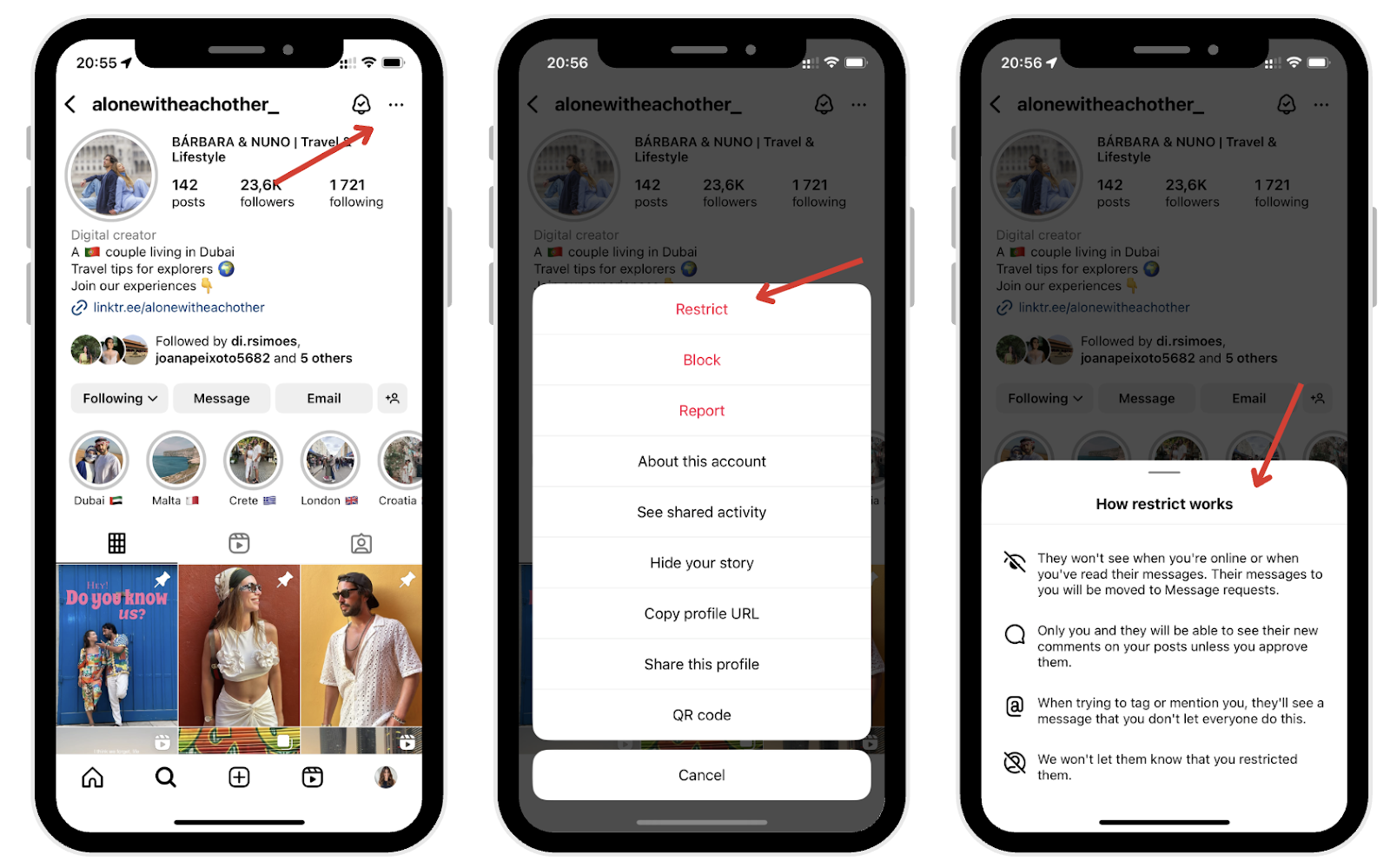
· Your comments on the user’s post are only visible to you and the profile owner; others won’t see them unless they approve them manually.
· Your direct messages go to their Message Requests, not their main inbox. They won’t get notifications, and can read without triggering a read receipt. If your messages remain unread for an extended period, it may indicate a restriction.
· You won’t see the person’s activity status or if they’ve read your messages.
· They’ll still appear to engage normally, but any actual interaction will be one-sided.
Certain profile details, such as the profile picture, remain visible, and the restriction does not remove your access to their Instagram content. You can still see their profile picture.
It’s a quiet digital boundary without a confrontation.
5 Clues To Know If Someone Restricted You on Instagram
Because Instagram doesn’t notify you, recognizing restrictions requires paying close attention. Here are some strong indicators: these are the telltale signs of Instagram restrictions.
1. Your Comments Don’t Show Up Publicly
If you leave a comment on their post and suspect something’s off, ask a trusted friend to check that post. If they don’t see your comment, chances are it’s been restricted.
This is one of the most common and revealing signs.
2. You Can Message Them, but Get No Response
DMs might still say “Delivered,” but they now live in their Message Request folder, not their main inbox.
If they previously responded quickly but now don’t reply at all (and your messages stay unread for an extended period) it could mean you’ve been restricted.
3. Their Activity Status Is Always Missing
Instagram lets users show when they were last active. If this used to be visible and is suddenly gone, and you can still view their content, restriction is a possibility.
Important: They might’ve just disabled activity status entirely (using the show activity status feature), so this alone isn’t proof.
4. You Still See Their Content but Feel Ignored
You’re not blocked: you can view instagram posts, videos, posts, stories, reels. But it’s like shouting into a void: no replies, no likes back, no engagement from them. You’re watching but not being seen.
This passive silence is a telltale symptom of restriction.
Ways to Confirm If You’re Restricted
You won’t get a pop-up saying, “You’ve been restricted.” But here are practical ways to confirm it for yourself: You can use the search bar to find the person’s Instagram profile by entering their username and check for signs of restriction.
1. Use a Friend’s Account
Log in with a different account or ask a friend to visit the post on the profile page where you left a comment and ask them if they can see it. If they don’t, you’ve likely been restricted.
Make sure both accounts follow the person if their profile is private.
Related Article: How To Find Out Who Owns An Instagram Account
2. Comment Visibility Test
Post a neutral, harmless comment on the user’s post (e.g., “Nice shot!”). Then check from another account to see if it appears. If it doesn’t, that’s a strong indicator.
Bonus tip: comment on older posts, too. Sometimes restrictions are applied retroactively.
Related: How To Know If Someone Restricted You On Instagram 2026
3. Message and Activity Checks
Send a few DMs spaced out over several days. If none are read or receive a read receipt and you never see “Active now” again, there’s a pattern forming.
You can also react to stories or use quick replies—these usually prompt a response. If not, they may have quietly drawn the line.
Instagram Stories and Group Chats: What Changes When You’re Restricted?
When someone restricts you on Instagram, the way you interact with their Instagram stories and group chats changes in subtle but important ways. Even though you can still view their Instagram stories as usual, your ability to engage with them is limited by the Instagram restriction feature.
For example, if you reply to their story with a direct message, your message will be sent to their request folder instead of their main inbox. This means the restricted person may not see your message right away, and you won’t receive notifications if they read or respond.
In group chats, the restriction feature works a bit differently. You can still participate in group conversations, but if you send a message, the person who restricted you may not receive notifications about your messages. Your messages will still be visible in the chat, but the restricted person’s experience is more controlled—they can choose whether or not to engage with you.
If you’re unsure whether someone restricts you, try sending a message or commenting on their post from a different Instagram account, or ask a friend to check if your interactions are visible.
This can help you determine if the Instagram restriction is affecting your account. Understanding these changes can help you navigate your Instagram experience more confidently and respect the boundaries set by other Instagram users.
Why People Use the Restrict Feature on Instagram
Instagram created Restrict to help users deal with uncomfortable interactions more gracefully. The feature allows you to restrict users, so you can restrict someone on Instagram to manage your interactions and control how they engage with your content.
Here’s why someone might use it:
1. Privacy Without Confrontation
Blocking someone can cause tension. Restricting offers a peaceful alternative, as it gives people space while avoiding drama or confrontation.
For example, a coworker, classmate, or acquaintance might get restricted if they become intrusive, but you don’t want to burn bridges.
2. Avoiding Spam, Harassment, or Trolling
Public figures, influencers, and everyday users often face spammy or toxic behavior. Restrict allows them to filter harmful content without alerting the sender.
It’s especially useful for protecting mental health and reducing digital noise.
3. Managing Boundaries Subtly
Sometimes you just want less interaction without ending a connection. Restriction lets you do this while maintaining surface-level harmony.
Best Practices for Online Safety on Instagram
Staying safe on Instagram starts with understanding and using the platform’s built-in features to manage your interactions. The Instagram app offers several tools, like the restrict option, blocking, and muting, to help you control who can interact with your Instagram account and how.
If you notice signs that someone restricts you, such as a hidden online status or delayed responses to your messages, it’s a good idea to review your Instagram settings.
To protect yourself from unwanted interactions or online harassment, consider limiting who can comment on your posts, hiding your stories from specific users, or setting your account to private.
These steps can help you maintain control over your Instagram experience and reduce the risk of negative encounters. Be especially cautious when interacting with new accounts or users who seem suspicious, as this can help prevent issues before they start.
Regularly checking your Instagram account settings ensures you’re aware of who can see your content and interact with you. If you ever feel uncomfortable, don’t hesitate to use the restrict option, blocking, or muting features to safeguard your online status and well-being. By staying proactive and mindful of your interactions, you can enjoy a safer, more positive experience on Instagram.
Final Thoughts
You won’t receive a notification if someone restricts you, but you’ll feel it: a mix of invisible comments, ignored messages, and missing status updates are all signs.
If you suspect you’ve been restricted, respect the boundary. It’s often not personal, it’s about someone protecting their space online. Instead of pushing for engagement, step back and reflect. Social media is as much about managing energy as it is about sharing content.
With BuzzVoice you can get organic-like engagement and more followers, without being restricted from Instagram.
FAQs About Being Restricted on Instagram
Can I still see posts if I’m restricted?
Yes, you’ll still be able to view the user’s posts and Instagram content, such as posts and stories, by visiting their Instagram profile—the restriction doesn’t block visibility.
Will I be notified if someone restricts me?
No, Instagram doesn’t inform users when they’re restricted. It’s designed to be private and discreet.
What’s the difference between mute and restrict?
Muting affects what you see (you stop seeing their posts/stories), while restriction limits what they can do or what others see of their interactions with you.
Can restricted users still send DMs?
Yes, but direct messages from a restricted user will go to your Message Requests folder and won’t trigger read receipts or notifications.
How do I restrict someone else on Instagram?
Go to their profile by using the search bar to find the user you want to restrict. Once on their profile page, look for the three dots in the top right corner. Restricting someone involves tapping the three dots, then choosing “Restrict.” You can also do it from your message inbox or by swiping on a comment.

BuzzVoice
BuzzVoice is the best place to go when you need instant engagement services on social media. Offering a wide variety of packages for Instagram, Youtube, Facebook, Twitter, Soundcloud & Tiktok.