How to See Who Shared Your TikTok Video?(Complete Guide)
TikTok has become a powerful platform where creators, brands, and everyday users connect with a global audience. With millions of TikTok videos uploaded every day, sharing plays a huge role in how content spreads across the app and beyond. Naturally, many creators feel curious and want to know how to see who shared your TikTok video.
If you’ve ever checked your notifications, opened your TikTok analytics, or tapped the share arrow hoping to find the sender or recipient of a share, you’re not alone. This article explains what TikTok allows, what it doesn’t, and how you can still analyze sharing activity to grow your account.
By the end of this guide, you’ll fully understand TikTok’s privacy system, how shares work across multiple platforms like Instagram, Facebook, SMS, and WhatsApp, and how to use insights to improve your content strategy.
If you want to increase your TikTok video reach, gain more shares, and make your content look more trusted and credible, buy TikTok services from BuzzVoice. BuzzVoice offers safe, reliable growth solutions and you can also purchase additional services like views, likes, comments, and followers to boost your overall TikTok performance.
Understanding TikTok’s Sharing Feature
TikTok allows users to share videos both inside the TikTok app and outside the platform. Sharing is one of the strongest signals in the TikTok algorithm and often leads to more video views, followers, likes, and comments.
However, TikTok also prioritizes user privacy, which affects how much information creators can see about shares.
How TikTok Sharing Works
When a user taps the arrow (share icon) on a video, a pop up menu appears with multiple sharing options. These options allow users to connect with people in different ways.
TikTok sharing generally works in two main forms:
1. In-App Sharing (Private Messages)
- Users can send your TikTok video through private messages inside the app.
- The video is shared directly with another TikTok user.
- The creator does not receive notifications showing who shared it.
2. External Sharing (Multiple Platforms)
TikTok videos can be shared as a link or embedded post to:
- Twitter (X)
- SMS
These shares help TikTok content reach a wider world outside the platform.
Even though these actions increase your share count, TikTok does not show the specific person or sender who shared your video.
In a Reddit thread discussing cross-posting, a user shared that posting the same content on TikTok, Instagram, Facebook, and Twitter can increase reach up to three times. They explained that videos which don’t perform well on TikTok often gain strong results on other platforms, making cross-posting a smart growth strategy.
Related: How To Share Tiktok To Facebook Story?
Can You See Who Shared Your TikTok Video?
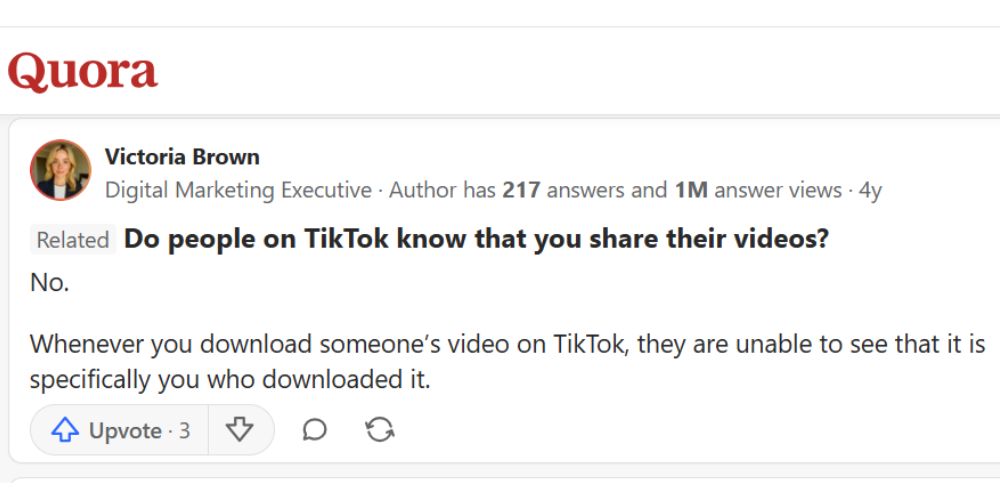
You cannot see who specifically shared your TikTok video, and this is one of the most common questions creators ask. TikTok does not reveal the name of the user, their profile, the platform they shared the video to, or the recipient of the message. Whether your video is shared through private messages, Instagram, Facebook, SMS, email, or any other platform, TikTok keeps this information private. Instead of showing individual users, the app only displays the total share count and overall performance through TikTok analytics, ensuring user privacy while still helping creators understand how their content is being shared.
Why TikTok Doesn’t Show This Information
TikTok’s privacy policy is designed to protect users. Many users share content privately and expect anonymity. Showing who shared a post could violate privacy settings, especially for users with a private account.
Because of this:
- TikTok does not send notifications identifying sharers
- TikTok only shows total number of shares
- TikTok analytics focuses on performance, not personal data
💡 Pro Tip: Build credibility fast with BuzzVoice. More Tiktok followers mean stronger authority, better visibility, and trust in your profile.
How to See the Total Number of TikTok Shares
Although you can’t see who shared your video, you can see how many times it was shared. This data is extremely helpful for analyzing content performance.
Step-by-Step: Check Share Count on TikTok
Open TikTok
- Launch the TikTok app on your device
- Make sure you are logged into your account
Tap Profile
- Tap Profile from the bottom navigation bar
- This opens your profile tab
Select the Video
- Choose the TikTok video you want to review
- Tap the video to open it
Find the Share Icon
- Look on the right side of the screen
- You’ll see the three dots
- Now click on Analytics
- You will see arrow icon
- The number next to it shows the share count
This number represents the total number of times your video has been shared across TikTok and external platforms.
Using TikTok Analytics for Share Insights
For deeper analysis of your video performance, TikTok analytics is the most helpful tool available. It allows creators to understand how often their content is being shared and how audiences interact with it.
How to Access TikTok Analytics:
- Tap Profile at the bottom of the TikTok app
- Tap the hamburger menu in the top right corner
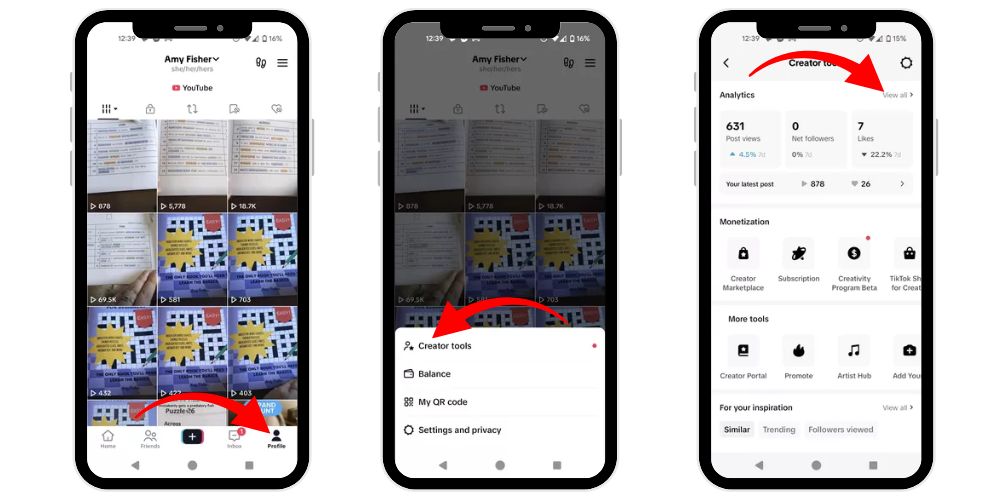
- Tap Settings and privacy
- Select Creator tools
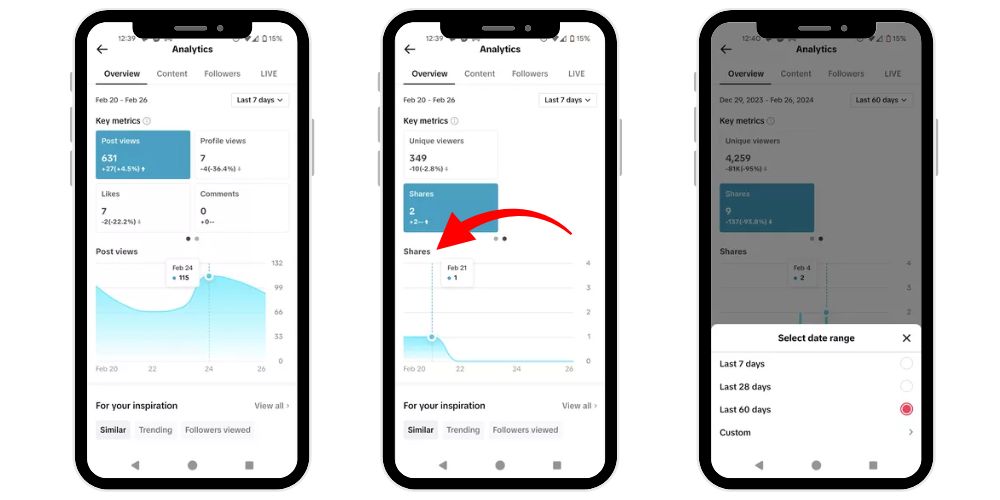
- Tap Analytics
Note: TikTok analytics works best when your account is set to public. Once inside the analytics dashboard, go to the Key metrics section, swipe left, and tap Shares to view how many times your video has been shared.
What TikTok Analytics Shows
In the analytics dashboard, you can analyze your video performance in detail, including:
- Shares – How many times your video was shared
- Video Views – Total views received
- Likes – Audience engagement
- Comments – Conversations created
- Followers growth – How sharing helped your account
While analytics does not show the sender or recipient, it helps creators understand what type of content people want to share.
Public Account vs Private Account: Sharing Differences
Your account privacy settings directly affect sharing.
Public Account
- Anyone can view and share your TikTok videos
- Videos can be shared on Instagram, Facebook, SMS, and email
- Best for creators, brands, and audience growth
Private Account
- Only approved followers can view content
- Sharing is limited
- Some users may not be able to share your post at all
How to Make Your Account Public
- Tap Profile
- Tap the top right corner menu
- Tap Settings and privacy
- Tap Privacy
- Toggle off Private account
This change allows people to share your content more freely.
How to Enable Sharing on Individual TikTok Videos
Even with a public account, each video has its own privacy settings.
Enable Sharing Before Posting
- Create and edit your video
- Before you post, tap Who can view this video
- Choose:
- Only Me
- Friends
- Everyone (recommended)
Change Privacy After Posting
- Go to Profile
- Tap the three dots
- Tap Privacy settings
- Adjust sharing options by click on Reuse content
TikTok allows creators to control how their content is shared, even after posting.
Other Ways TikTok Videos Can Be Shared
Sharing doesn’t only mean pressing the arrow button.
Additional Sharing Methods
- Duet – Other users create content alongside your video
- Stitch – Users clip part of your video into theirs
- Copy Link – Shared through SMS, email, Reddit, or websites
- External Apps – Instagram stories, Facebook posts, messages
These methods expand your content reach while still respecting privacy.
Why TikTok Doesn’t Show Who Shared Your Video
Many creators feel curious or even frustrated by this limitation. However, TikTok’s approach is intentional.
Privacy Comes First
- Users expect anonymity
- Private messages stay private
- Sharing does not expose sender identity
Focus on Performance, Not People
TikTok wants creators to:
- Analyze content
- Improve engagement
- Grow followers organically
Instead of tracking a person, TikTok shows numbers, trends, and insights.
Related: How to Share TikTok to Instagram Story
Tips for Getting More Shares on Your TikTok Videos
Here are 7 proven tips to increase shares naturally:
- Create relatable content: Make videos that reflect real-life situations, emotions, or opinions people agree with and feel motivated to share.
- Use trending sounds: Popular sounds and trends increase discoverability, making users more likely to share your TikTok with friends.
- Ask viewers to share: A clear call to action reminds viewers to share your video if they found it entertaining.
- Post at the right time: Upload when your audience is most active to maximize visibility and sharing potential.
- Focus on value: Educational, inspiring, or problem-solving content encourages viewers to share it with others.
- Engage in comments: Replying to comments builds interaction, signals activity to the algorithm, and increases reach and shares.
- Optimize captions: Use clear, compelling captions that explain the video’s value and encourage viewers to take action.
💡 Pro Tip: BuzzVoice provides Tiktok views that strengthen credibility, increase reach, and make your content appear more engaging instantly.
Benefits of TikTok Video Sharing
Sharing brings long-term growth. Here are 5 major benefits:
- Higher video views: When users share your TikTok video, it reaches new audiences beyond your followers, increasing views and improving overall content visibility across the platform.
- Follower growth: Shared videos attract users who discover your content for the first time and decide to follow your profile for more similar posts.
- Better algorithm reach: TikTok’s algorithm favors videos that get shared often, pushing them to more users and increasing the chances of appearing on the For You page.
- More engagement: Increased sharing leads to higher likes and comments, helping your video appear more interactive and trustworthy to both viewers and the TikTok algorithm.
- Cross-platform visibility: TikTok video sharing allows your content to spread on Instagram, Facebook, and other platforms, expanding your brand presence beyond the app.
Conclusion
Understanding how TikTok sharing works helps creators focus on what truly matters: performance, reach, and audience growth. While TikTok does not allow you to see who shared your video due to privacy rules, the share count and analytics still provide valuable insights. By using TikTok analytics, creating share-worthy content, and cross-posting on multiple platforms, creators can significantly increase visibility, video views, followers, and engagement. Shares play a major role in how the TikTok algorithm evaluates content, making them a powerful growth signal. Instead of worrying about individual users, focus on creating valuable, relatable, and engaging videos that people naturally want to share.
FAQs
Why can’t I share my TikTok video?
If you can’t share your TikTok video, it’s likely set to private or limited by privacy settings. Change your account or video privacy to public to allow sharing and enable the share count to appear.
Does TikTok send notifications when someone shares your video?
No, TikTok does not send notifications when someone shares your video. Even with a Pro or Creator account, sharing activity remains private due to TikTok’s strict privacy policies.
Can I see who has saved my TikTok video?
No, TikTok does not allow creators to see who saved their videos. You can only view total engagement metrics like likes, comments, views, and shares through TikTok analytics.
How do I share a TikTok video on Facebook without a link?
To share a TikTok video on Facebook without a link, tap the share arrow, select Facebook from the menu, and post directly. TikTok handles the embed automatically.
Can you see if someone screen shares your TikTok?
No, TikTok does not notify you if someone screen records or screen shares your video. There is no feature to track screen-sharing activity on TikTok.

BuzzVoice
BuzzVoice is the best place to go when you need instant engagement services on social media. Offering a wide variety of packages for Instagram, Youtube, Facebook, Twitter, Soundcloud & Tiktok.