X (Twitter) Post Image Size Guide
In the constantly evolving landscape of social media, mastering the nuances of Twitter (now X) can make all the difference in your content’s success. One critical aspect often overlooked is Twitter post size, getting your images, videos, and other media formatted correctly for the platform. Optimizing your posts with the right dimensions is more important than ever to maximize visibility, engagement, and follower growth.
Whether you’re a marketer, influencer, creator, or business owner, this article walks you through everything you need to know about the ideal tweet character count, Twitter image size 2026, Twitter video size, banner dimensions, and other key X post specs. Let’s dive in.
For those wanting to boost their Twitter impact, BuzzVoice offers tailored growth and engagement strategies to help you gain followers and increase retweets and likes faster. Let’s dive in.
Why Twitter Post Size Matters in 2026
At first glance, post size might seem like a small detail, but in 2026, it can make or break your success on Twitter (X). With more users competing for attention and the platform prioritizing visual content, how you format your posts has a direct impact on performance. Here’s why it matters more than you might think:
Correct sizing improves visibility and engagement
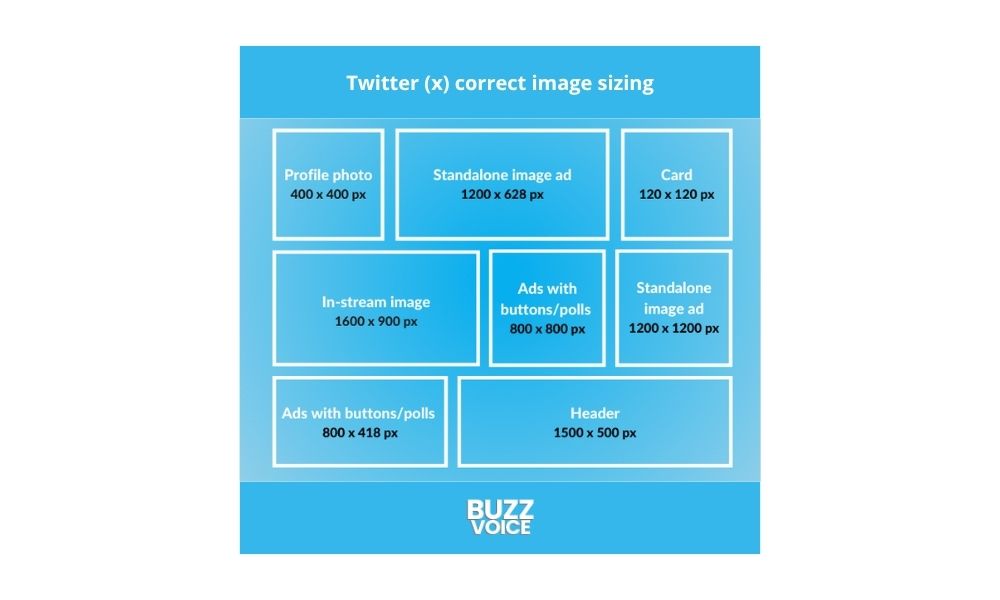
When your images and videos are correctly sized, they display perfectly in feeds without awkward cropping or blurry distortion. Twitter’s timeline is packed with content, so visuals that stand out are more likely to catch users’ eyes and encourage clicks, likes, retweets, or replies.
If your image is blurry or cuts off important elements, people will scroll past without engaging. The platform’s algorithm also favors content that generates more engagement, so correct sizing indirectly helps your tweets reach a wider audience.
To avoid blurry or pixelated images, always meet the minimum size and minimum resolution requirements for images and videos—this ensures your media looks sharp and professional across all devices.
Prevents awkward cropping or blurry content

Twitter automatically crops images in previews, especially in timelines and mobile feeds. Uploading images outside the recommended dimensions leads to Twitter forcing its own crop, which can cut out logos, faces, or text.
Similarly, uploading images with too low a resolution can cause them to appear pixelated or blurry, which reflects poorly on your brand or personal profile. Knowing the right Twitter media dimensions and sticking to them ensures your content appears exactly as you intended.
Helps optimize for mobile vs. desktop views
More than 60% of Twitter’s active users access the platform via mobile devices, making mobile optimization crucial. Because mobile screens are smaller and have different aspect ratios than desktops, tailoring your images and videos to mobile ensures they display clearly and attractively. This not only improves the viewing experience but also keeps users engaged longer, increasing the chances of likes, retweets, and clicks.
Following media best practices for Twitter helps ensure your posts display optimally and achieve the highest possible engagement.
Ideal Image Sizes for Twitter (X) Posts
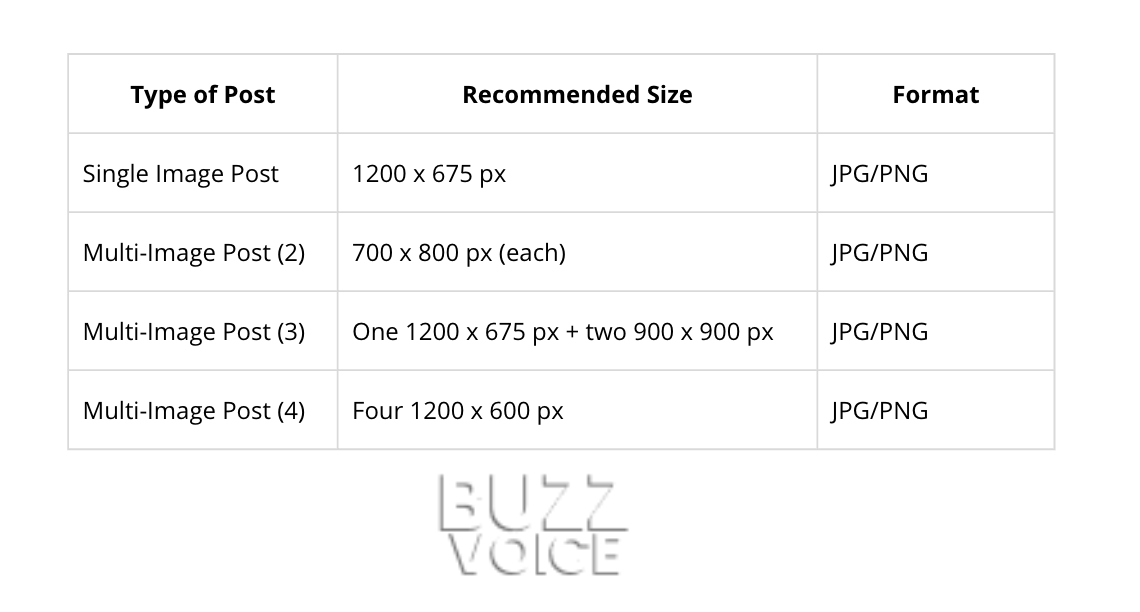
One of the most common questions users ask is: What’s the perfect image size for Twitter? Since Twitter supports a variety of image formats, single images, carousels, and multi-image posts, different image sizes are supported for each type. For multi-image posts, Twitter allows users to include up to four images per tweet, which are displayed in a grid format.
A good rule of thumb is to stick to a 9:16 aspect ratio whenever possible. This helps your images display cleanly in the feed without awkward cropping. Whether you’re uploading photos or creating graphics, using 9:16 templates can make sure your visuals always look sharp and professional. Using the same aspect ratio for all images in a multi-image post ensures a consistent and professional appearance.
For optimal results, always refer to Twitter’s official image guidelines.
Here’s a detailed breakdown of recommended sizes:
Twitter (X) Video Post Size and Specs
Video content has become a major driver of engagement on Twitter, capturing attention and encouraging interaction like never before. To maximize its impact in 2026, it’s essential to understand and follow Twitter’s video size requirements and technical specifications, ensuring your videos look great and perform well across all devices.
Beyond mastering the technical details, partnering with trusted services like BuzzVoice can help you grow your following, boost engagement, and elevate your Twitter presence, making sure your content reaches the right audience effectively.
Recommended video dimensions:
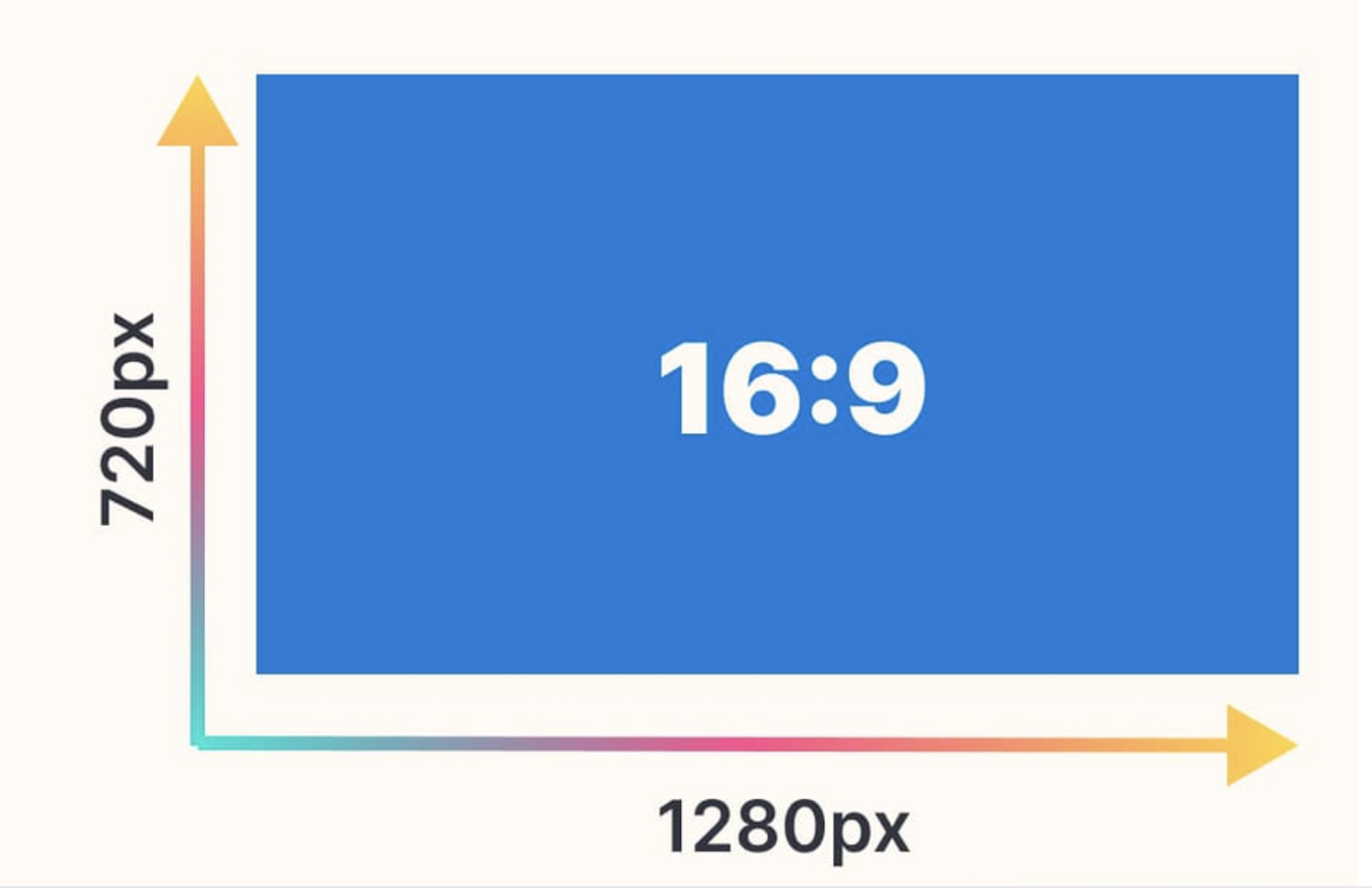
The recommended video dimensions are 1280 x 720 pixels with a 16:9 aspect ratio, considered the gold standard for Twitter. This size ensures your videos fit perfectly within Twitter’s video player, avoiding black bars or awkward cropping for a seamless viewing experience. 1280 x 720 pixels is also the recommended video resolution for optimal quality on Twitter.
File size and length limits:
The maximum file size for Twitter videos is 512MB. Regular users can upload videos up to 2 minutes and 20 seconds long, while Blue subscribers have the advantage of sharing longer videos—up to 60 minutes in length. The maximum allowed video length is a key consideration for content creators planning their posts.
Supported formats:
MP4 files using the H.264 codec are preferred for their excellent compatibility and efficient compression, ensuring smooth playback across devices. MOV files are also accepted, though they’re less commonly used on Twitter. Adhering to Twitter’s video specs ensures your videos play smoothly and are compatible with the platform.
Video ads are a powerful tool for social media advertising on Twitter. To create effective video ad content, use the recommended video dimensions and pay attention to engaging thumbnails and image sizes. For standalone image ads, Twitter recommends using 1200 x 1200 pixels for square images and 1200 x 628 pixels for landscape images. Ad images for website cards and lead generation cards should also follow these dimensions to ensure optimal display and engagement.
Twitter Text & Link Post Limits
Understanding Twitter’s character limits and following best practices for text formatting are essential steps to crafting tweets that not only capture attention but also encourage more engagement. By keeping your messages concise and readable, you increase the chances that your audience will interact, share, and respond to your content.
Character limit:
The standard character limit on Twitter remains 280 characters for most users. Blue subscribers, however, can post much longer tweets, up to 25,000 characters, but keep in mind that longer posts may not perform as well organically in terms of reach and engagement.
Hashtags:
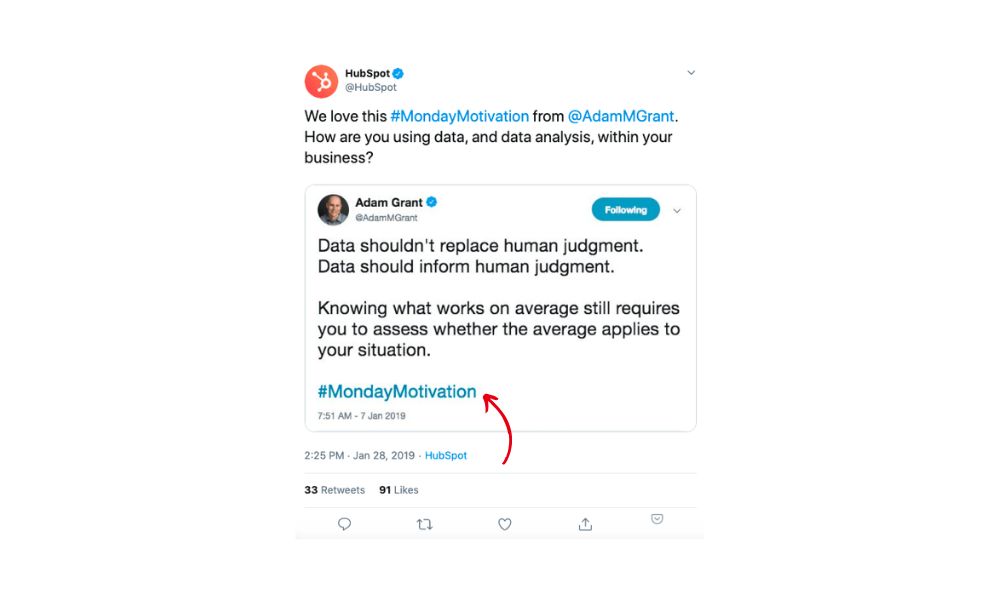
Using 1 to 2 hashtags per tweet strikes the perfect balance for boosting discoverability without cluttering your message. This approach helps your content reach a wider audience while keeping it clear and engaging.
Link previews:

Twitter automatically generates link previews, complete with thumbnails and meta descriptions, whenever the linked site supports Twitter Cards. These enhanced previews not only make your tweets more visually appealing but also provide additional context that helps capture your audience’s attention quickly, encouraging higher click-through rates and engagement.
Well-designed link previews can also motivate users to click through and engage with your content, especially when they are visually compelling and communicate the value of the link.
Line breaks:
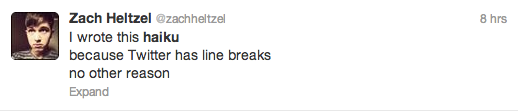
Using line breaks can improve the readability of your tweets, making them easier to follow. However, avoid long blocks of text since Twitter may collapse them behind a “Show more” link, which can reduce engagement by hiding part of your message.
Related: How to see comments on Twitter
Profile & Banner Image Sizes (Bonus)
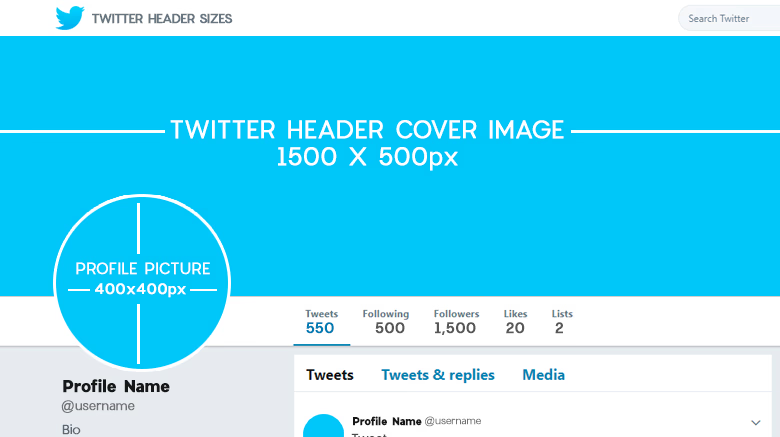
Your profile and banner images are key to building trust and recognition on Twitter. Your profile picture (also known as a profile image) is the main image representing your brand or personal identity on Twitter. Correct sizing ensures your visuals remain sharp and professional, which directly impacts how users perceive your brand.
When setting up your Twitter header photo or cover photo, following the recommended header dimensions ensures optimal display across all devices. Including your brand logo in your profile picture or cover photos helps reinforce brand recognition and consistency. Optimizing these images for your business page is essential to maintain a professional appearance.
Well-optimized images prevent cropping issues that can hide important details or distort your logo, maintaining brand consistency. This clarity encourages more profile visits and follower trust, both crucial for growth and engagement in 2026’s competitive social landscape.
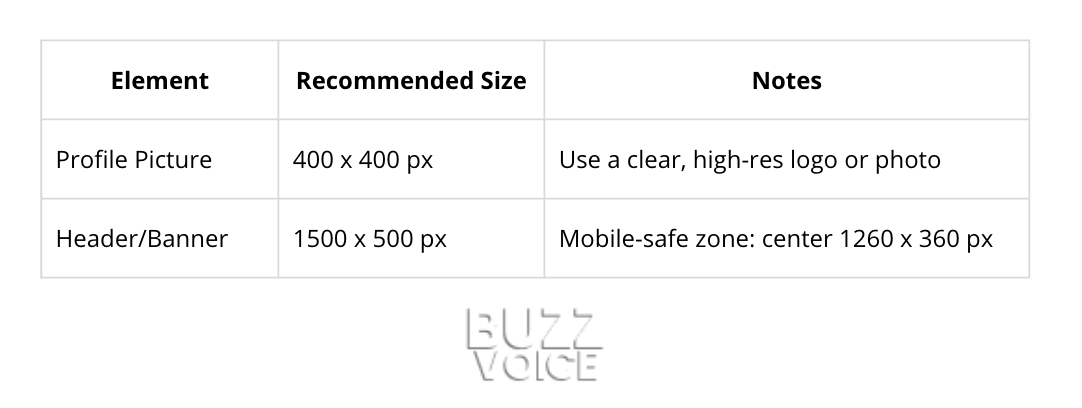
Here’s a detailed breakdown of recommended sizes:
Optimizing Company Pages on Twitter (X)
For businesses and organizations, company pages on X are a powerful tool for building brand recognition and connecting with your audience. The first step to a visually appealing company page is ensuring your profile photo is sized at the recommended 400 x 400 pixels, maintaining a crisp and professional appearance.
Your header photo, which acts as the banner image at the top of your page, should be 1500 x 500 pixels with a 3:1 aspect ratio to display correctly on all devices.
Beyond these basics, leveraging features like Twitter Cards and Carousel Ads can help your company pages stand out with engaging, interactive content. Carousel ads allow you to showcase multiple images in a single post, while Twitter Cards enhance your tweets with rich media previews.
By using the correct aspect ratio and high-quality images, your company page will not only look visually appealing but also drive more engagement and conversions. Consistently updating your images and taking advantage of X’s latest features ensures your brand remains relevant and memorable in a crowded social media landscape.
Tips to Optimize Twitter Media in 2026
Posting the right size is just the start. To maximize impact, you need to refine your Twitter media by focusing on clarity, composition, and accessibility, ensuring every social media image looks professional and engages your audience effectively. An effective social media image can significantly boost your brand visibility and user engagement.
Here’s how to polish your Twitter media for maximum impact:
- Center key content: Keep important elements like text and logos away from the edges since Twitter often crops images in timeline previews, ensuring nothing vital gets cut off.
- Add ALT text: Include clear, descriptive ALT text for every image to improve accessibility for visually impaired users and enhance your SEO performance.
- Use contrast and branding: Boost your visuals by using high contrast and subtly incorporating your logo or brand colors to make your content instantly recognizable.
- Use high-quality image files: Upload properly sized image files to avoid pixelation and ensure your visuals remain sharp and professional across all devices.
- Leverage animated GIFs: Use animated GIFs in your in-stream images to enhance engagement and draw attention, but remember that animated GIFs are not supported for banner images.
- Preview before posting: Always check how your tweet appears on both desktop and mobile devices to spot any cropping or quality issues before publishing.
- Test and adapt: Social media trends shift fast, so regularly analyze your performance data and adjust your media strategy to stay ahead and keep engagement high.
For optimal results, always follow media best practices recommended by Twitter and other platforms.
Final Thoughts
The right Twitter post size is a powerful lever to improve your content’s performance in 2026. Optimizing your posts according to the latest social media image sizes and following a comprehensive Twitter image size guide can significantly improve your content’s performance. From images to videos and text, each element needs to be optimized for clarity, appeal, and engagement.
Adhering to the recommended Twitter image size, understanding X post specs, and crafting concise messages will help you build a stronger presence and grow your audience faster. When referencing Twitter (formerly Twitter, now X Twitter), it’s important to stay updated on the platform’s evolving branding and best practices.
To take your Twitter strategy even further, consider leveraging services like BuzzVoice. They specialize in tailored social media growth and engagement strategies that amplify your reach, help you gain authentic followers, and boost interactions on your tweets, ensuring your great content gets the attention it deserves.
FAQs
Why does Twitter crop my images?
Twitter crops images to fit the timeline and mobile screen layouts. If your image isn’t sized to the recommended dimensions or key elements are near the edges, important parts may get cut off. Always preview your images on multiple devices before posting.
Can I upload higher resolution media?
Yes, Twitter allows higher resolution uploads, but it automatically compresses large files to speed up loading. To keep quality sharp, upload images and videos at the recommended sizes and formats.
What’s the best size for Twitter thumbnails or previews?
The ideal size for thumbnails is 1200 x 675 pixels with a 16:9 aspect ratio. This ensures consistent display across desktop and mobile without awkward cropping or distortion. This will improve click-through rates by presenting clean, professional visuals.
How do I keep images sharp after uploading?
Use high-quality JPG or PNG files sized correctly before uploading. Avoid resizing images within Twitter because it can reduce clarity. Preview your posts on different devices to check quality. Adding ALT text also improves accessibility and engagement.

BuzzVoice
BuzzVoice is the best place to go when you need instant engagement services on social media. Offering a wide variety of packages for Instagram, Youtube, Facebook, Twitter, Soundcloud & Tiktok.
![How Long Can Twitter Videos Be? [year] Guide](https://buzzvoice.com/app/uploads/2026/08/How-Long-Can-Twitter-Videos-Be-2026-Guide-4-573x338.jpg)