What Counts as a View on YouTube? Simple Guide
YouTube has become more than just a video-sharing platform — it’s a serious income stream for creators, brands, and businesses in 2026. Whether you’re uploading tutorials, entertainment, commentary, or vlogs, every view counts. But what counts as a view on YouTube?
If you’re aiming to grow faster, get more visibility, or even start monetizing your content, understanding how YouTube counts views is essential. It affects your video’s performance, reach, and revenue potential. From how long someone must watch to whether replays matter, the rules aren’t always obvious — and that’s where this guide comes in.
In this complete breakdown, we’ll explain what counts as a view on YouTube, how to avoid fake views, what doesn’t count, and how to make sure your content gets the recognition it deserves.
Struggling to get more YouTube views while the algorithm keeps you waiting? Don’t let your content go unseen. With BuzzVoice, you can instantly boost your YouTube views, increase engagement, and get discovered by a wider audience — all with real, high-quality traffic that respects YouTube’s rules.
What Counts as a View on YouTube? Explained Simply
A view on YouTube is counted when a user intentionally initiates the video and watches for at least 30 seconds. For shorter videos, watching the majority of the content also counts.
YouTube’s Official Definition of a View
YouTube considers a view to be an intentional act of watching. A view is counted when a user actively clicks to play a video and watches it for at least 30 seconds. For videos that are shorter than 30 seconds, YouTube may still register a view if the viewer watches a substantial portion, typically 90% or more.
This standard applies to both organic views and paid views from YouTube ads, ensuring that the metric reflects real user engagement rather than accidental plays or bot activity.
|
Video Type |
Minimum Watch Time for View |
|
Longer than 30s |
30 seconds |
|
Short-form (<30s) | 90% of video |
|
Ads |
Skipped = no view |
Applies to:
Videos on desktop, mobile, and TV apps
Videos viewed via YouTube search, homepage, playlists, or channel pages
Skippable ads (only if watched >30s or to completion).
What Doesn’t Count as a View
YouTube actively filters out inauthentic views. Views from autoplay without user interaction, bot traffic, and repeated manual refreshes are not counted. Using third-party traffic exchanges or “view boosting” services violates YouTube’s policies and results in excluded views.
The best advice is to build a sustainable presence, focus on organic engagement. Views from real users who choose to watch your content are the only safe and reliable way to grow your channel.
|
Not Counted as Views |
Reason |
|
Autoplay with sound off |
No user intent |
|
Embeds that auto-play |
No user interaction |
|
Bot-generated or incentivized traffic |
Violates YouTube’s terms |
|
Refresh spamming |
Artificial inflation |
Do Replays Count as Views on YouTube?
Yes, replays can count as valid views — but only under the right conditions. If a viewer watches the same video multiple times from the same account or device, each of those plays can count as a separate view, as long as they happen organically. However, YouTube is highly effective at detecting spammy or automated behavior. If replays happen too frequently within a short period or show signs of manipulation, they may be filtered out during audits and not included in the final view count.
YouTube may NOT count replays when:
Loops are triggered by automated tools
The same IP rapidly reloads the video
Watch sessions are too short to be considered meaningful
How YouTube Prevents Fake Views
YouTube uses a combination of artificial intelligence, spam filters, and manual audits to ensure that view counts remain accurate and trustworthy. Their AI algorithms constantly monitor traffic for unusual spikes and suspicious viewing patterns. In addition, spam filters are used to block views coming from questionable IP addresses or devices that may indicate non-human activity.
To maintain integrity, YouTube may delay view count updates, especially during periods of high traffic, to allow time for verification. In many cases, it can take 24 to 48 hours for view counts to be finalized. YouTube also conducts retroactive audits to identify and remove views that are later determined to be fraudulent.
If you are a content creator and you want to grow your YouTube channel, don’t buy views on suspicious websites; instead, check the BuzzVoice services and buy real views, subscribers, and likes.
Mobile, Desktop & TV Views: Any Difference?
No matter where someone watches your video—whether it’s on a smartphone, tablet, desktop computer, or smart TV—a view will count as long as it meets YouTube’s official criteria. The platform focuses on the quality and authenticity of the interaction rather than the device used.
What matters most is user intent. Did the viewer actively choose to click and watch your video? In addition, the viewer must watch for at least 30 seconds for the view to be considered valid. Autoplayed views, manipulated behavior, or forced plays do not count toward your official view total.
|
Device |
View Counted? |
Notes |
|
Desktop |
✅ | The most common source of organic views |
|
Mobile |
✅ |
Includes YouTube app & browser |
|
Smart TV |
✅ |
Must click to watch manually |
Why Views Matter for YouTube Success
Understanding what counts as a view is essential for creators because it helps them track growth and engagement, monetize effectively, and rank better in YouTube’s search and recommendation algorithms. Views play a crucial role in several areas:
Ad revenue: More views lead to more ad impressions, increasing potential earnings.
Subscriber growth: Popular videos attract more fans and subscribers.
Credibility: A high number of views serves as social proof, helping to build trust with your audience.
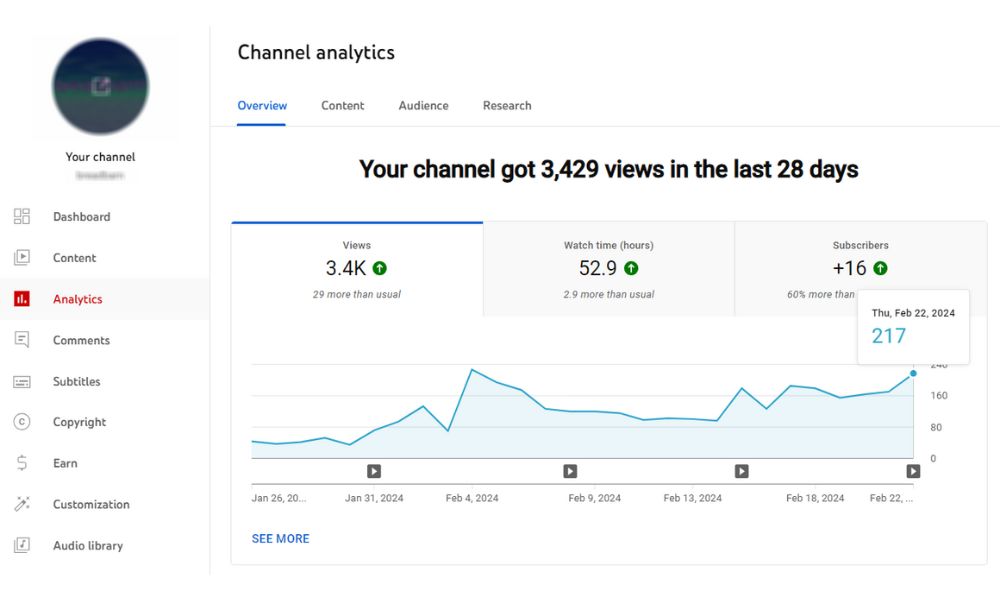
Check your YouTube analytics on the YouTube studio to analyze the view count data, the behavior of new viewers, comments, the video post that has more engagement, and the channel’s growth. With those numbers, you can see what you need to improve for your YouTube’s algorithm to reach quality viewers and new views.
Video View Metrics
Here’s a quick overview of YouTube’s primary view-related metrics:
|
Metric |
Meaning |
|
Views |
Number of valid views (30s+ or almost full) |
|
Watch time |
Total minutes watched (critical for monetization) |
|
Average view duration |
How long people stay before leaving |
|
Impressions |
Times your thumbnail was shown |
|
CTR |
Click-through rate from impressions |
Counting Views from Embedded Videos
Embedded YouTube videos can count as views if:
The viewer clicks to start the video
The volume is on
The user watches 30 seconds or more
However, auto-playing embeds—like those in blog sidebars or popups—typically do not count as real views.
Avoiding Bot Views
To avoid getting flagged or demonetized on YouTube, never use click farms. Additionally, steer clear of automated tools or browser extensions that inflate traffic, and avoid refreshing your own video to manipulate view counts.
YouTube has sophisticated systems in place to detect unusual spikes, suspicious IPs, or abnormal behavior and can remove invalid views. Even channels that are monetized can face demonetization or termination for repeat offenses.
Ready to grow your YouTube channel? Buy real views, subscribers, and likes with BuzzVoice services and start growing your YouTube view counts today.
Conclusion
A view counts when:
A real person intentionally clicks and watches
They watch at least 30 seconds, or a large part of a short video
It’s not autoplay, spam, or bot-generated
A view does not count if:
It’s autoplayed without sound
It’s from bots or traffic exchanges
It’s repeatedly refreshed or manipulated
Focus on making great content, driving real engagement, and you’ll grow your channel sustainably.
FAQ
How long do you have to watch a YouTube video for it to count as a view?
A view is counted when someone watches at least 30 seconds of a video. For videos shorter than 30 seconds (such as YouTube Shorts), YouTube will often count the view if the user watches a significant portion, typically over 90% of the content. This ensures the viewer was meaningfully engaged. Skipping through or clicking away too soon won’t trigger a view count. A YouTube view is considered legitimate based on these criteria, ensuring that the view count accurately reflects genuine engagement.
Do replays count as views?
Yes, replays can count as valid views if the same user watches the video multiple times naturally. YouTube allows repeated views as long as they reflect genuine interest and are not artificially generated. However, views triggered by bots, browser extensions, or rapid, automated reloading are flagged as suspicious and may be filtered out during audits. New views are counted when replays meet certain criteria, such as a minimum watch time and the cycling off of repeated views after a certain threshold.
Do views from embedded videos count?
YouTube only counts embedded video views when the viewer actively engages. The user must click to play the video, keep the sound on or enabled, and watch at least 30 seconds. Auto-playing videos—especially muted or hidden ones—don’t count as valid views due to a lack of interaction.
What happens if I buy fake views?
Fake views (bots) are often removed, and penalties can include demonetization, reduced visibility, or even account suspension. YouTube’s machine learning systems are highly effective at detecting manipulation, ensuring that views come from actual humans to maintain integrity. Violations can damage your long-term credibility.
However, if you are a content creator and you’re looking to increase your content’s visibility, check out BuzzVoice.com. It can help you reach a wider audience across platforms. BuzzVoice provides trusted services to increase YouTube views, subscribers, engagement, and support across Instagram, TikTok, and major networks.

BuzzVoice
BuzzVoice is the best place to go when you need instant engagement services on social media. Offering a wide variety of packages for Instagram, Youtube, Facebook, Twitter, Soundcloud & Tiktok.