Why Do My Likes Disappear on TikTok? 9 Reasons and the Fixes That Work
Read This Before You Worry
If a few likes vanished from one video and everything else looks normal, someone unliked it, deleted their account or got removed as spam, and there is nothing to fix.
If likes are dropping across several videos at once, or your own likes will not stick on videos you tap, start with the app: update it, clear the cache under Free up space, and log back in before you assume a penalty.
If views, comments and reach fell at the same time, open Account check in TikTok Studio and the post analytics for the affected video, because that is where TikTok tells you whether a post was restricted.
The phrase “likes disappearing” covers two different problems, and most guides mix them up. The first is the count on your own videos going down, which is what creators usually mean. The second is videos vanishing from the Liked videos tab on your profile, or a like you tapped not staying put, which is what the busiest Reddit threads on the subject are about. This guide covers both, explains which causes are normal platform behavior and which ones deserve attention, and walks through the fixes in the order that saves the most time.
Build conversation on your TikToks.
Real comments from authentic accounts. Drive engagement signals on your videos.
Two Problems That Share One Name
When your like count drops, the likes were real at some point and then stopped being counted. Either the people who left them changed their minds or lost their accounts, or TikTok decided the likes were not legitimate, or the number you saw was never fully synced in the first place. The video itself is still up and still reachable.
When videos disappear from your Liked videos tab, nothing happened to your account’s standing. The creator deleted or privated the video, their account was removed, the video is no longer available in your region, or the like simply failed to save. Users in the Reddit thread that ranks second for this query describe having to re-like the same video more than once, which points to a sync problem rather than a penalty. The fixes for these two situations overlap, but the diagnosis is different, so the reasons below are split accordingly.
Why the Like Count on Your Videos Goes Down
1. Viewers unlike your video
Double-tapping is the fastest way to like on TikTok, and it is also the easiest way to like something by accident. People scrolling quickly tap once to pause, tap twice without meaning to, and remove the like when they notice. Others go through their Liked videos tab and clean it out. A handful of unlikes on a video with a few thousand likes is background noise, not a signal.
2. The accounts that liked you are gone
When an account is deleted or permanently banned, every like it ever left is removed with it. If someone blocks you, their likes on your videos go too. A video that picked up likes from a wave of new or low-activity accounts will lose more of them this way than a video liked mostly by established accounts, because new accounts are the ones most likely to be abandoned or removed.
3. TikTok removed likes it considers fake
TikTok’s Community Guidelines state that it does not allow services that artificially inflate engagement, and that when it finds accounts or content with inauthentically inflated metrics it removes the associated fake followers or likes. That cleanup runs continuously, not just after a purchase. Like-for-like groups, engagement pods and bot accounts that happened to find your video all fall under it, so you can lose likes this way even if you never paid for anything. A sudden drop of a round-looking number, say 300 or 1,000 likes overnight, is the most common sign that a batch of accounts was removed together.
4. The video was removed or made ineligible for the For You feed
If a post is taken down for a guideline violation, its likes go with it. If instead TikTok marks the post ineligible for the For You feed, the existing likes stay, but new ones stop arriving because almost nobody sees it. From the outside the two can look similar: a video that was climbing suddenly flatlines. TikTok’s help center explains that you can see the decision and appeal it from the post’s analytics, which is covered in the fixes section. Our separate guide to content under review on TikTok covers that review process in detail.
5. Display lag and caching
The number you see in the app is a cached copy that is refreshed from TikTok’s servers when the app decides to refresh it. During a traffic spike or right after an app update, the count on your profile grid, the count on the video page and the count in TikTok Studio analytics can disagree with one another for a while. If the figure jumps back after you pull to refresh or reopen the app, it was never really gone.
6. You hit a rate limit while liking
This one affects the likes you give rather than the ones you receive, but it feeds the same worry. TikTok’s help center says the “tapping too fast” notice appears when you have been liking content too quickly, and that to prevent spamming it may disable the account for 24 hours in those circumstances. Likes tapped during a burst like that may not register at all, which looks exactly like TikTok deleting them afterward.
Boost likes on your TikToks.
Real likes that signal value to the FYP algorithm and lift your video's reach.
Why Videos Vanish From Your Liked Tab
7. The video or the account is no longer available
The Liked videos tab is a list of pointers to other people’s content, so it shrinks whenever that content goes away. Deleted videos, videos switched to Only you or Friends by their creator, banned accounts and content that is restricted in your country all drop out of the tab without any notice to you. Several people in the Reddit threads noticed years of older likes missing at once, which fits a cleanup of removed accounts and unavailable videos more than anything aimed at them personally.
8. The like did not save
When the app is low on storage, running an old version or working on a weak connection, a like can show as registered on screen and then fail to reach TikTok’s servers. The heart turns red, you scroll on, and the next time you open that video the heart is empty again. People who report having to re-like the same video several times are almost always describing this, and the fixes below for the cache and the app version are the ones that address it.
9. The tab is hidden, not empty
A quick one that catches new accounts: liked videos are hidden from everyone else by default. If a friend says they cannot see your likes, that is the Liked videos privacy setting at work, not a deletion. You can set it to Everyone on a public account, Followers on a private one, or Only you under Settings and privacy, then Privacy, then Liked videos.
Normal or Worth Checking
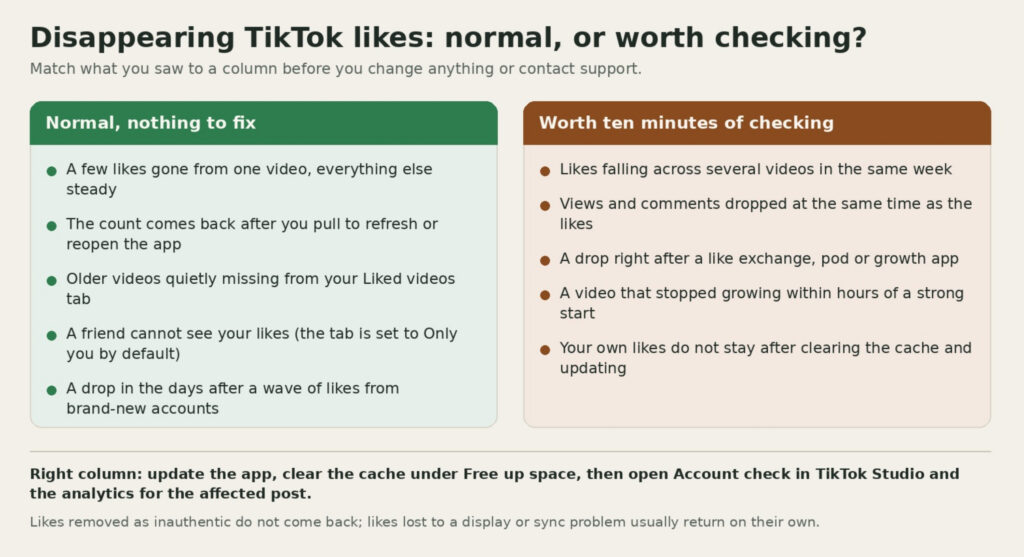
A small drop on one video, likes that reappear after a refresh, older liked videos quietly disappearing and a friend not seeing your likes are all normal. None of them changes how TikTok treats your account, and none of them needs a support ticket.
Repeated drops across several videos in the same week, a drop that lands at the same time as a fall in views and comments, a drop right after you used any service or group that promised likes, or a video that stopped growing within hours of a strong start are worth ten minutes of checking. The same goes for your own likes if they fail to save after you have cleared the cache and updated the app. Those are the cases where the steps below either confirm a restriction or rule one out.
Fixes, in the Order to Try Them
- Pull to refresh, then close and reopen the app. If the count comes back, it was a display issue and you are done.
- Update TikTok from the App Store or Google Play. Many sync problems sit in old versions and go away with the update.
- Clear the cache. In the TikTok app, tap Profile, tap the Menu button, select Settings and privacy, tap Free up space, then tap Clear next to Cache and confirm. This removes temporary files without touching your drafts unless you choose to.
- Log out and log back in, and check whether the same thing happens in the web version of TikTok in a browser. If the web count and the app count agree, the number is accurate.
- Run Account check. Tap Profile, tap the Menu button, select TikTok Studio, then under More tools tap Account check. A checkmark means no issue; a warning sign means a restriction on login, posts, comments, profile edits or messages. The same check sits under Settings and privacy, Support, Safety Center.
- Open the analytics for the affected video. TikTok says you need analytics turned on to see its decision on a post, which you do from TikTok Studio, Analytics, Get started, Turn on. If a post was ruled ineligible for the For You feed, the reason is shown there and you can appeal.
- Stop anything that generates likes artificially, including like-exchange groups and any app that likes on your behalf. If likes were removed as fake, more of the same will be removed the same way.
- Report the problem if it persists. Go to Settings and privacy, tap Help Center, then Chat with us, and describe the video, the time and what you saw. Attach a screenshot of the count before and after if you have one.
What a Like Drop Does to Reach and Earnings
TikTok’s own explanation of its recommender system lists user interactions, including the number of likes and comments on a video, among the signals that are generally weighted most heavily. Losing a few legitimate likes does not change that picture in any meaningful way, because the system is reading many signals across many viewers, not a single number. Losing a block of fake likes can matter more, since TikTok also states that content which tries to manipulate engagement metrics is ineligible for the For You feed.
Earnings are a separate question. The Creator Rewards Program pays on qualified views and RPM rather than a fixed amount per like, so a like count moving by a few percent does not change a payout by itself. Our guide to how TikTok pays creators breaks down what qualified views are and what influences RPM. Brands that sponsor posts do look at likes relative to views, so a video with an unusually high like ratio that later drops is the one case where the change is visible to someone outside TikTok.
Keeping Your Likes Stable
Likes from people who watched the video stay. Likes from accounts that liked it without watching, or that were created to like things, do not. The practical steps are the obvious ones: post content people watch to the end, reply to comments so viewers come back, and keep posting at a steady pace so that a slow video is followed by another chance rather than a gap. Keep the app updated and clear the cache every few weeks, because most “disappearing” reports in community threads are sync problems that never involved a penalty. Check Account check and post analytics occasionally even when nothing seems wrong, so you know what normal looks like for your account before a drop sends you looking.
If you want a steady base of engagement under new videos, BuzzVoice supplies TikTok likes delivered gradually from real accounts, with TikTok followers and views available alongside. Gradual delivery from real accounts is the difference between likes that stay and likes TikTok removes in the next cleanup.
Frequently Asked Questions
Why do my hearts disappear on TikTok?
Hearts and likes are the same thing. They disappear when the viewer removes the like, the viewer’s account is deleted or banned, TikTok removes the like as fake, or the number you saw had not synced yet. A refresh resolves the last case; the others are permanent and harmless.
Why is TikTok not showing all my likes?
Check the Liked videos privacy setting first if the question is about other people seeing them, since the tab is set to Only you by default. If you cannot see your own older likes, the videos were likely deleted, made private or restricted by their creators, or the like never saved; clear the cache and update the app before anything else.
How do I recover likes on TikTok?
Likes removed by TikTok as inauthentic cannot be restored and are not worth appealing. Likes that vanished because of a display or sync issue return on their own after a refresh, an update or a cache clear. If a video was wrongly removed or ruled ineligible for the For You feed, appealing from the post analytics is the only route that brings reach, and new likes, back.
Is there a limit on how many videos I can like?
TikTok does not publish a number, but its help center confirms that liking too quickly triggers the “tapping too fast” notice and can disable the account for 24 hours. Spread your liking out and the limit will not come up.

BuzzVoice
BuzzVoice is the best place to go when you need instant engagement services on social media. Offering a wide variety of packages for Instagram, Youtube, Facebook, Twitter, Soundcloud & Tiktok.