TikTok Views Explained: What Counts as a View on TikTok?
As TikTok continues to dominate the short-form video landscape in 2026, understanding how the platform counts views has become more important than ever for creators and brands alike. Whether you’re trying to crack the algorithm, improve your reach, or simply get your content seen by more users, knowing exactly how TikTok counts views is essential.
In this guide, we’ll break down the mechanics of TikTok views, debunk myths, and share tips on how to get more views on TikTok using data-backed strategies. Let’s dive in.
🎯 Want to skyrocket your TikTok views fast? Skip the guesswork—get real, instant results with BuzzVoice.
👉 Boost My Views Now
What Counts as a View on TikTok in 2026?
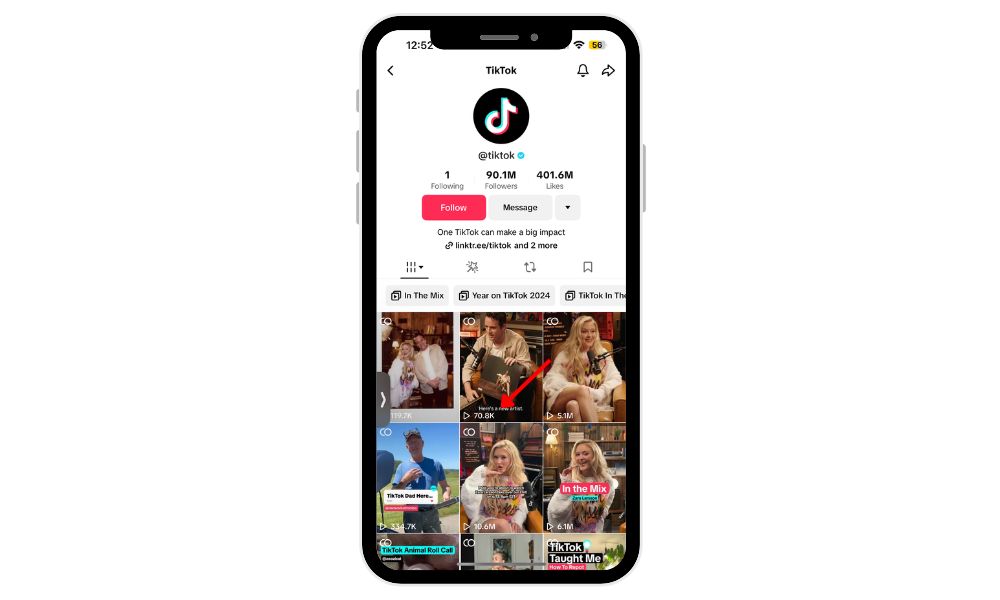
Unlike YouTube or Instagram, TikTok counts a view the moment a video starts playing—even if it’s just for a second. TikTok’s method for counting views is super simple compared to other social media platforms. This leads to higher view counts but also means creators must focus on grabbing attention quickly and driving engagement. While it’s easier to gain views, especially with tools like BuzzVoice or BuySocialMediaMarketing, true success depends on metrics like watch time, completions, and shares, not just view totals.
A View Is Counted As Soon As a Video Plays
TikTok considers a view to be counted as soon as your video begins playing, even if it’s just for a fraction of a second. There’s no need for the viewer to engage, like, or comment for it to register. TikTok only counts views from real users and filters out fake views and spam accounts to ensure authentic engagement. Views from the creator’s own videos, such as your own views, are not included in the view count.
The Viewer Doesn’t Need to Finish the Video
Unlike platforms like YouTube, TikTok does not require viewers to watch the entire video for the view to be counted. Even if they scroll away halfway through, that initial second still adds to your total view count. Other social media platforms, like YouTube and Instagram, have different criteria for what counts as a view, often requiring longer watch times or specific engagement.
Autoplay Views and Loops Both Count
TikTok’s autoplay feature on the For You Page (FYP) starts playing videos automatically as users scroll, and every one of those impressions counts as a view. TikTok measures views by counting each time a video is played, and each impression, even from the same IP address, can count as a view. Even when a video loops and replays on the same device, it continues to add to your total view count. TikTok’s counting method is designed to ensure that only legitimate views are included, and repeated plays from real users are valid.
In summary, TikTok counts views differently from other social media platforms, focusing on impressions and actual plays rather than just clicks or scrolls.
Do Replays or Loops Count as Views?
Many creators wonder whether repeat plays from the same user matter. The answer is yes—and here’s how it works:
Yes – If Someone Replays the Video, It Counts as Another View
TikTok does count each replay as a new view. So if a viewer watches your video more than once, it increases your total view count every time. TikTok counts views from the same user or device, and the total number of views reflects all valid plays, including repeated ones.
Each Loop on the Same Device Adds to the Total View Count
TikTok videos are designed to loop seamlessly, encouraging repeated viewing. These loops—whether they’re deliberate or passive—all count toward your total view metric, even if they happen on the same device or by the same user. TikTok measures views by counting each loop, even if it comes from the same IP address, and this is part of how the platform tracks the total number of views.
Passive Views (e.g., Scrolling Through the For You Page) Also Count
While TikTok is fairly generous with what it considers a view, not every interaction qualifies. Just because a video is displayed or clicked on doesn’t mean it will automatically add to your view count. TikTok applies certain filters to ensure the accuracy of its metrics, especially to avoid artificially inflated numbers. TikTok’s counting system is designed to filter out invalid or artificial views, ensuring that only legitimate plays are included in the total.
What Doesn’t Count as a View?
While TikTok is generous in what it counts as a view, not every interaction makes it onto the scoreboard. TikTok actively filters out fake views and views from spam accounts to maintain reliable analytics. Some actions may appear to engage with the video, but they don’t meet TikTok’s criteria for a view. Whether it’s watching your content or seeing a preview in a notification, certain behaviors are filtered out to keep analytics reliable. Here’s what doesn’t cut.
Watching Your Own Video
If you play your video—whether in editing, preview, or after posting—it does not add to the view count. TikTok filters out self-views to maintain analytics accuracy.
Video Previews in Messages or Notifications
If someone sees your video in a preview format—such as a shared link in DMs or a notification—this does not count as a view unless they click and it begins to play. Simply seeing your video as an impression, like a brief display or preview, does not count as a full view.
Muted Views May Still Count—But Not Confirmed by TikTok Officially
There’s an what counts as a view on tiktokongoing debate about whether muted or background views (e.g., minimized or playing in split-screen) count. While many users report they do, TikTok has not confirmed this publicly in 2026. It’s best to assume that sound enhances view quality, especially if you’re aiming for shares and algorithmic promotion.
Additionally, profile views are tracked separately from video views and do not contribute to the video view count.
Where to See Your TikTok Views
Knowing where to track your views is essential for understanding what’s resonating with your audience and where there’s room for improvement. By monitoring performance metrics in the right places, you can make smarter decisions about your content strategy and optimize future posts for better results.
On the Video Itself
Each video you post displays the public view count directly on your profile grid. This number is visible to you and others and updates in real-time as views accumulate.
Through TikTok Analytics (for Pro/Business Accounts)
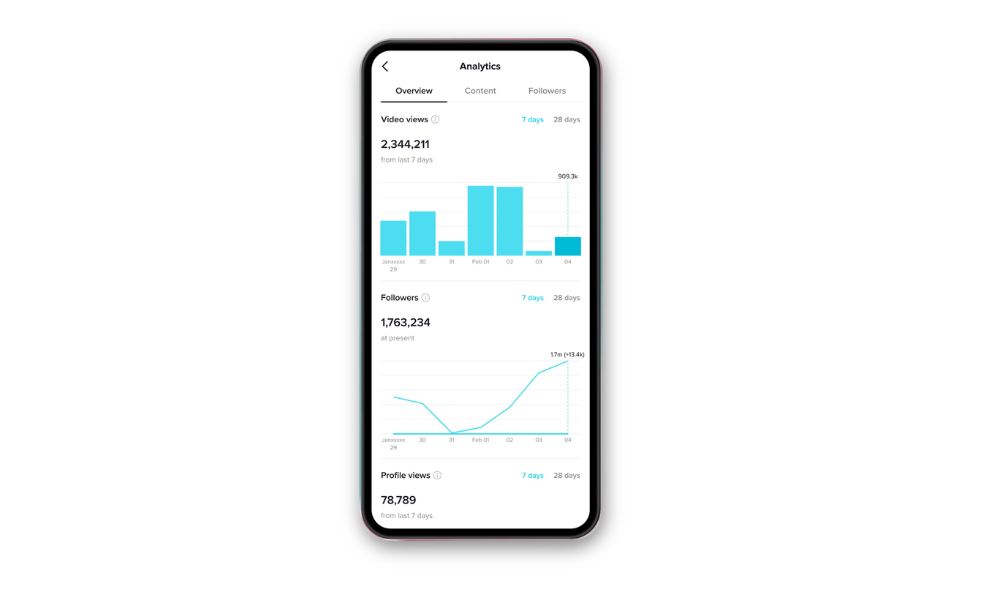
For a deeper breakdown, creators should switch to a TikTok Pro or Business account (free to do). This unlocks the Analytics dashboard, where you can explore:
- Video views by date range
- Follower growth and demographics
- Traffic sources (For You Page, followers, search, etc.)
The analytics section provides detailed insights similar to what creators find in YouTube Studio or Instagram Insights, including metrics like YouTube video count and Instagram video count.
Breakdown: Views vs. Likes vs. Shares vs. Completions
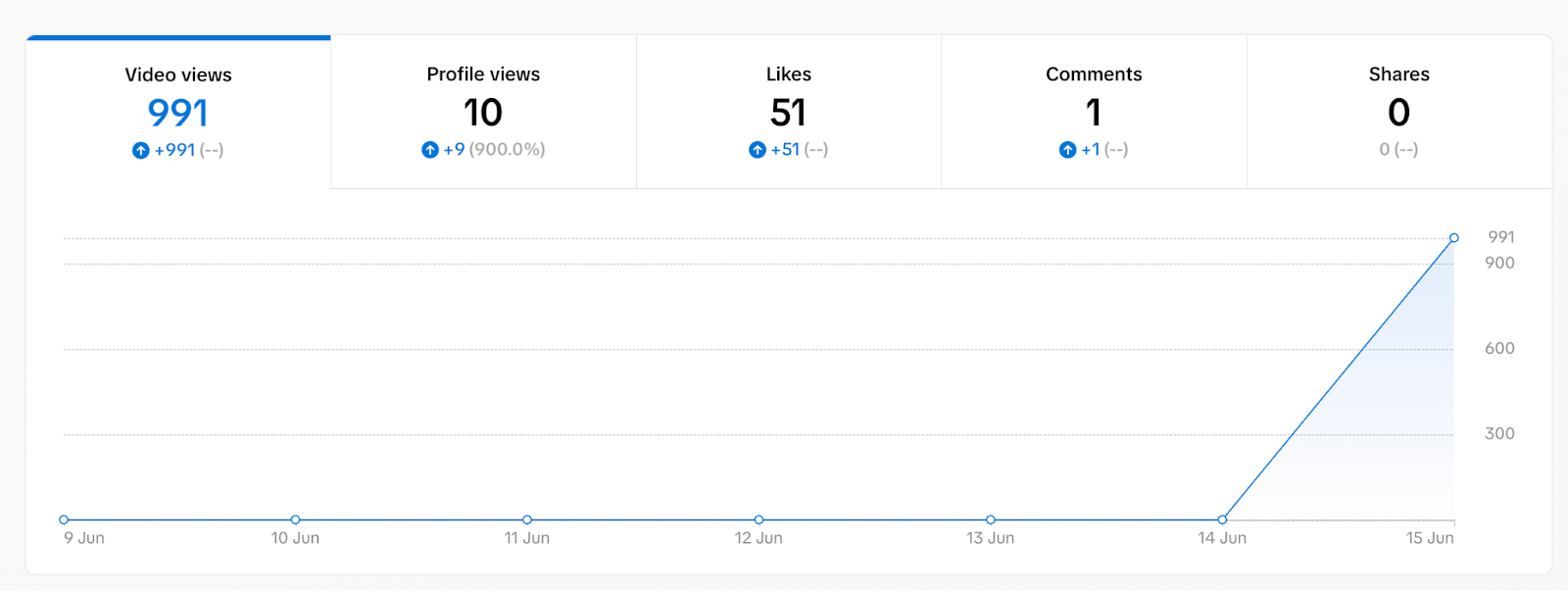
Your analytics also separate views from other key metrics, like:
- Likes – social proof and engagement
- Shares – indicate virality
- Completions – how many people watched to the end
- Average watch time – a major ranking signal for TikTok’s algorithm
Compared to other platforms and other social media platforms, TikTok’s analytics offer unique insights into how views, likes, and completions are measured, with different rules for what counts as a view than on YouTube or Instagram.
Understanding this breakdown helps you interpret your true performance beyond raw view count.
Business Account Benefits for TikTok Views
Switching to a business account on TikTok unlocks a range of powerful tools designed to help businesses and creators maximize their video views and overall video marketing impact.
One of the standout features is advanced analytics, which gives you a detailed look at your audience’s demographics, engagement patterns, and how each video is performing. With this data, you can fine-tune your content strategy, ensuring your videos are reaching the right users and helping users discover your brand more effectively.
A business account also allows you to run targeted paid advertisements, putting your videos in front of a much broader audience and rapidly increasing your view count. This is especially valuable for businesses looking to boost brand awareness or promote specific products.
Speaking of products, TikTok’s shopping feature is another major advantage—business accounts can tag products directly in their videos, making it easy for viewers to shop while they watch. This not only drives engagement but can also lead to direct sales from your TikTok content.
How to Increase Your TikTok View Count
There are several ways and tips to increase your TikTok view count. By following these strategies, you can maximize your reach and engagement on the platform.
Now that you understand what counts as a view on TikTok, it’s time to focus on what really matters—how to boost those numbers. Let’s dive into the most effective, up-to-date strategies for getting more views on TikTok in 2026 and making sure your content reaches the widest audience possible.
Use Trending Sounds and Hashtags
TikTok’s algorithm in 2026 continues to prioritize content that uses trending sounds and popular hashtags. Participating in a TikTok trend is an easy way to boost visibility and reach new audiences.
Staying up to date with what’s gaining traction can significantly boost your visibility, especially on the For You Page. You can spot current trends by browsing the Discover tab, exploring the Creative Center, or simply watching what top creators in your niche are posting.
Create High-Retention Content (Watch Time Matters)
TikTok ranks videos based on average watch duration and completion rate. Creating engaging content that resonates with your target audience is key to keeping viewers interested and encouraging them to interact.
For example, a video that starts with a surprising fact and ends with a call-to-action can keep viewers watching until the end. Content that people watch to the end—or rewatch—gets boosted to more feeds. To increase your chances of appearing in users’ feeds, create content regularly and post more videos.
- Start with a strong hook (first 1–2 seconds)
- Use captions and storytelling to hold attention
- End with a loop or cliffhanger to encourage replays
Post at Optimal Times Based on Your Audience
Posting when your followers are most active can increase your initial view velocity, which is critical for going viral.
Check your Audience insights in TikTok Analytics to find your best posting times by:
- Day of the week
- Hour of activity (local time)
- Geographic location
Engage With Your Followers and Reply to Comments
The more engagement your content receives, the more TikTok pushes it. Commenting and interacting with your audience can help foster relationships and boost organic reach. Replying to comments—especially with video responses—can boost interaction, increase watch time, and generate new content ideas.
Don’t forget to use Stories and share your videos in your story or stories to increase reach, even though views from stories may not count toward the main video view count.
Final Thoughts
Knowing exactly what counts as a view on TikTok can give you a real advantage in 2026, helping you better understand how the platform’s algorithm works and how to tailor your content for maximum reach and engagement. To sum it up:
A view is counted the moment your video starts playing—no need for someone to watch the whole thing.
The same user can contribute multiple views by replaying or looping your video.
Views from your account don’t count, but nearly every other watch does.
By leveraging analytics, following trends, and engaging with your audience, you can boost your content’s visibility and increase your chances of going viral.
TikTok’s algorithm rewards creators who understand its rules and tailor their content accordingly. By focusing on retention, timing, and engagement, you can optimize every post to reach more people and grow your following faster. You can also boost your TikTok growth with Buzzvoice’s services in just one click
FAQs About TikTok Views
Does Watching Your Own TikTok Add Views?
No, it doesn’t. TikTok is designed to exclude views that come from the creator’s own account to keep the analytics accurate and fair. So, no matter how many times you watch or replay your own video, those views won’t be counted toward your total.
Do Views From the Same Person Count Multiple Times?
Yes, they do. Every time the same user watches your video again—whether by replaying it or letting it loop—it adds to your total view count. This is why creating content that’s easy to watch repeatedly can really boost your chances of going viral.
Are Muted or Background Views Included?
Possibly. TikTok hasn’t officially confirmed if views watched with the sound off or while the app is running in the background count, but many creators notice that muted autoplay views still contribute to their total. While it’s not 100% clear, it seems TikTok gives some credit to these passive views.
Do Deleted Views Disappear From Your Count?
No, once a view is recorded, it stays in your total—even if the user who watched deletes their account later on. However, if you delete your own video, the entire view count resets to zero, since the content is no longer available.

BuzzVoice
BuzzVoice is the best place to go when you need instant engagement services on social media. Offering a wide variety of packages for Instagram, Youtube, Facebook, Twitter, Soundcloud & Tiktok.
Learn more →