Can You See Who Views Your X (Twitter)?
In a nutshell, no, Twitter does not allow you to see who exactly is viewing your profile. The platform protects that information, even though a plethora of apps and browser extensions may make claims to the contrary. In 2026, Twitter/X still doesn’t let users know who has been looking at their content. While many users want to check Twitter profile views, Twitter does not provide a feature for this.
Unlike Twitter, LinkedIn provides more transparency by allowing users to see the identities of people who have viewed their profile. This is a key difference between various social media platforms, as some, like LinkedIn, offer detailed visitor analytics, while Twitter maintains a more private approach.
Reaching more actual users and analyzing real engagement trends over time can be achieved by using reputable growth platforms such as BuzzVoice’s Twitter services, which include Twitter Followers, Retweets and Likes.
What You Can See with Analytics Tools
Although Twitter does not allow you to see who views your profile, its built-in data tracking tool, Twitter Analytics, provides useful insights. Without disclosing specific viewers, it gives you a clear picture of how well your content is performing and aids in understanding audience behavior and reach.
Twitter Analytics dashboard looks like:
Profile Visits: This metric shows the total profile visits your private account receives over a specified period of time; it’s a useful indicator of brand interest or curiosity, but does not reveal who the individual visitors are.
Tweet Impressions: Total number of times your tweets have been viewed on the platform.
Engagements & Engagement Rate: Monitor the proportion of total viewers who engaged with your posts, as well as the number of people who interacted with them (likes, replies, retweets, and link clicks).
Follower Growth: Track patterns in the number of your followers and identify the tweets or marketing initiatives that draw in new followers.
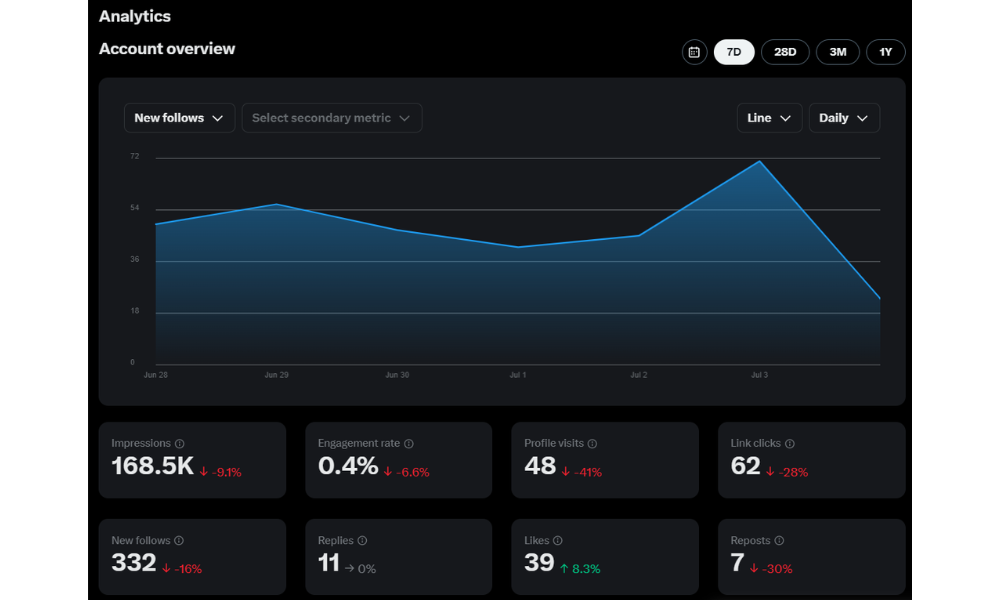
Twitter Analytics provides you with the ability to view general engagement metrics, such as impressions, profile visits, and audience demographics, but not the identities of individual visitors.
There is a metric called ‘profile visits’, a Twitter profile views metric which shows the total number of times your profile has been viewed, but it does not reveal individual viewers. Twitter’s API does not allow access to data about individual viewers, and such apps or third-party tools claiming to provide this feature are unreliable and often scams.
Services like BuzzVoice’s Twitter tools can help if you want to boost your profile visits and engagement rates more quickly. Increasing your Twitter profile visits can help you understand which content drives more people to visit your profile.
To improve visibility, you can utilize Twitter Followers, Retweets, and Likes services to enhance credibility. These purchases all support better analytics performance and help your profile grow naturally over time.
Related: How To Make Money on Twitter (5 Ways)
Myths About Third-Party Apps
The idea that you can use third-party apps to see who viewed your profile is one of the most common misconceptions ever. Unfortunately, that isn’t the case, and it can be dangerous to believe it.
Numerous applications promise to track Twitter profile views in detail or reveal who visits your account. This type of access is actually not permitted by Twitter’s API, so no third-party app can authentically reveal to you who views your account.
Common red flags include:
Apps asking you to log in with your Twitter credentials outside the official platform.
Businesses that make claims to “unlock” viewer lists for hidden profiles.
Extensions requesting excessive permissions to your account.
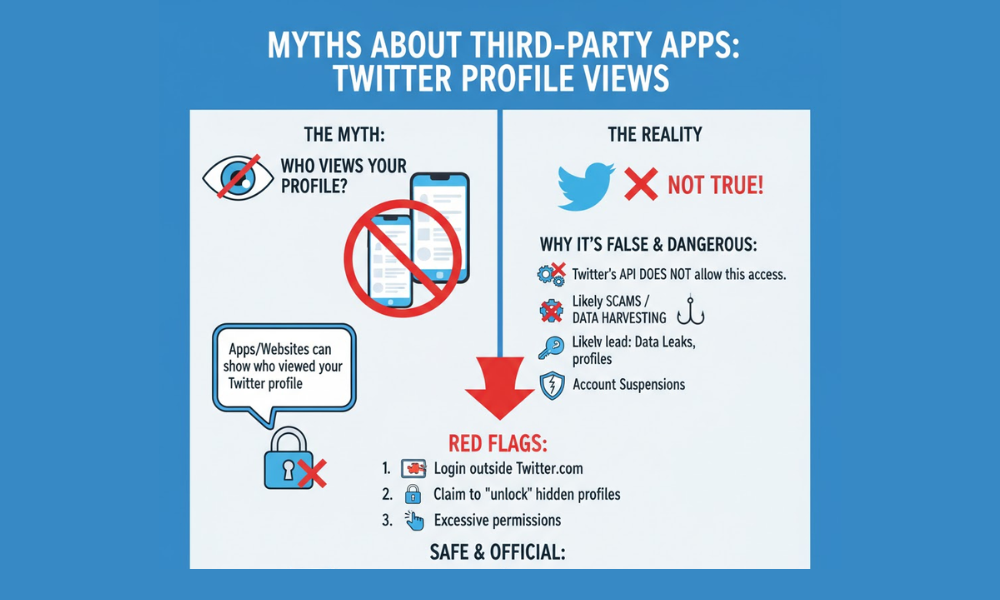
Your account security may be compromised if you fall for these scams, which could result in data leaks or account suspensions. Performance can only be safely monitored using Twitter Analytics or trustworthy engagement platforms such as BuzzVoice’s Twitter services.
Rather than squandering time on phony “profile viewer” applications, concentrate on increasing genuine engagement and visibility. You can get more Twitter Followers, Retweets, and Likes from reliable sources with BuzzVoice, which will help you gain real momentum while protecting your account and adhering to Twitter’s guidelines.
Related: How to Turn Off ‘Content Warning’ on Twitter (X)
Tips to Measure Engagement Without Profile Viewers
Although you are unable to see who is viewing your Twitter profile, there are numerous methods to gauge the effectiveness of your content. You can get a realistic idea of what draws in and encourages interaction from your audience by concentrating on visible engagement metrics.
Here are a few reliable ways to track your impact:
Track Likes and Retweets: These are clear signs of how much your audience appreciates or finds enjoyment in your material. Generally speaking, tweets with more likes and retweets indicate that your message is effective.
Track Comments and Replies: Talking with others is a great way to learn about your community. Commenting on tweets is a visible form of engagement and can signal to others that you have viewed and engaged with their content.
Use Twitter Analytics: Dive into your profile visits, impressions, and engagement rates to see which tweets perform best. Trends can be found by topic, media type, or post timing.
Watch for Mentions and Shares: When your content is tagged or quoted, it indicates that it is being seen by people outside of your immediate audience.
Only people with access to your account can view your private search history or sensitive data.
Use reliable tools like BuzzVoice’s Twitter growth services if you want to improve engagement metrics more effectively. While still achieving real audience growth, you can purchase Likes to increase engagement, Retweets to broaden your audience, and Followers to establish credibility.
These engagement signals not only strengthen your profile performance but also give you more accurate insights into what’s working, even without knowing exactly who viewed your profile.
Related: 7 Tips: How to Get Followers on Twitter (X)
Number of Profile and Audience Growth
Twitter Analytics offers a straightforward way to monitor the total number of profile visits your account receives over time.
This “Profile Visits” metric is a key indicator of how much interest your profile page is generating and can help you fine-tune your content strategy to attract even more visitors and new followers.
To check your profile visits using Twitter Analytics, simply:
- Log in to your Twitter account.
- Click on the “More” tab on your profile page.
- Select “Analytics” from the dropdown menu.
- Head to the “Profile Visits” section to see the total number of times your profile has been viewed.
Conclusion
In the end, you are unable to determine precisely who is viewing your Twitter profile, and that is intentional. While you can’t see who is visiting your profile, you can still track overall engagement and visits.
You can improve your content strategy by examining your profile visits, impressions, and engagement metrics in Twitter Analytics.
Steer clear of third-party apps or scams that claim to show who has viewed or is visiting your profile. Instead, concentrate on increasing your interaction and visibility through legal methods.
BuzzVoice offers quantifiable growth to help your profile perform better in 2026, whether you’re looking for Followers, Likes, or Retweets.
FAQs
Does Twitter show who viewed my profile?
No, Twitter doesn’t show who views your profile. Although Twitter Analytics provides aggregate data, the platform does not reveal viewer specifics or the identities of individual viewers. Any app or website that makes such a claim is deceptive and may jeopardize the security of your account.
Can I use an app to track profile visitors?
No, you can’t. Third-party apps are not permitted to access information about who visits your X account through Twitter’s API. Typically, Twitter’s API is scams that aim to obtain login credentials or personal information.
What’s the difference between impressions and profile visits?
Impressions measure the number of times your tweets were viewed on Twitter, whether through retweets, search results, or someone’s timeline. However, profile visits measure the number of people who visit your profile after viewing a tweet.

BuzzVoice
BuzzVoice is the best place to go when you need instant engagement services on social media. Offering a wide variety of packages for Instagram, Youtube, Facebook, Twitter, Soundcloud & Tiktok.
Learn more →