Does Instagram Notify When You Screenshot a DM?
Many users wonder, “does instagram notify when you screenshot a dm?” because privacy on social media has become more important than ever. Instagram is one of the most widely used platforms for private conversations, business communication, content sharing, and networking.
People send direct messages (DMs), share instagram posts, exchange voice notes, send disappearing messages, and even discuss private content in group chats. But the fear of screenshot notifications makes many users hesitate before taking a screenshot.
Unlike Snapchat, which is famous for sending alerts when someone takes a screenshot, Instagram follows a more relaxed approach. But that does not mean there are no exceptions. Understanding when Instagram sends alerts and when it does not can help users avoid awkward situations and protect their privacy.
- Regular DMs do not send screenshot notifications.
- Vanish mode always notifies screenshots.
- View-once photos and videos trigger alerts.
- Screen recording follows the same rules.
- The bookmark icon saves content privately.
Concerned about privacy on Instagram? BuzzVoice helps you grow quietly with authentic followers, likes, and views—boosting credibility and reach without alerts, risks, or unwanted attention, while staying in control online.
When Does Instagram Send Screenshot Notifications?
Instagram generally allows users to screenshot DMs without alerting the other person. However, there are two key exceptions where Instagram actively notifies users that their content has been captured. Understanding these scenarios is crucial to respect privacy and avoid unintended alerts.
Related: How to Do Boomerang on Instagram That Grab Attention?
1. Vanish Mode (Messages That Disappear)
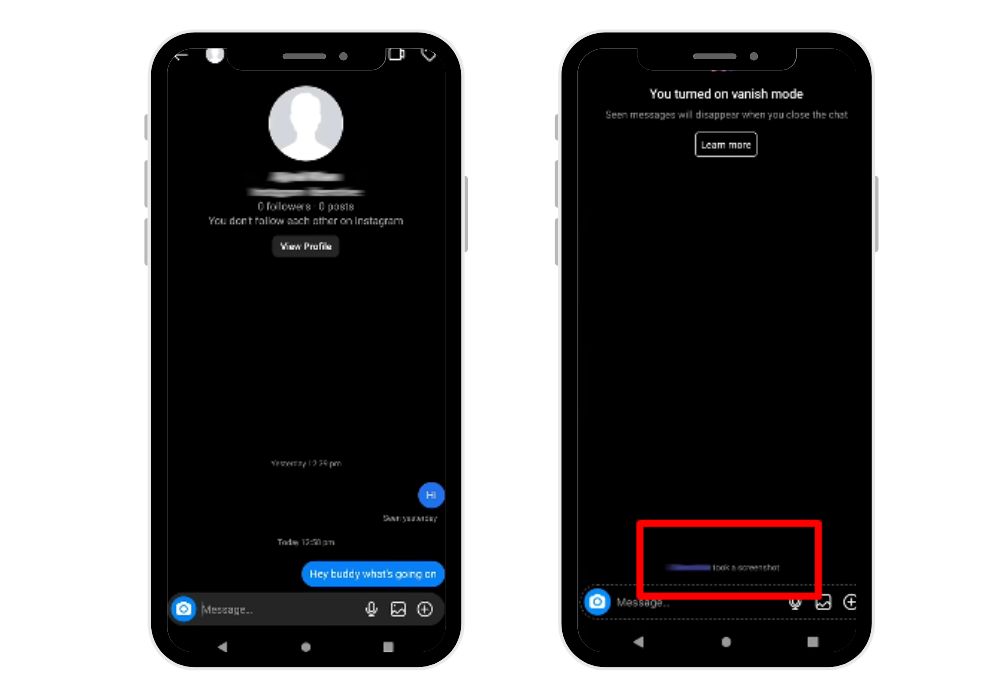
Vanish Mode is a feature designed for private, temporary conversations. Messages sent in vanish mode disappear automatically once they are seen and the chat is closed.
If you take a screenshot in vanish mode, Instagram will send a notification directly in the chat stating:
“[Your Username] took a screenshot.”
This alert applies to all types of vanish mode content, including:
- Text messages
- Photos
- Videos
- Any chat content that disappears
If you want to keep vanish mode chats private without sending alerts, avoid taking screenshots or use the copy/save message options where allowed.
2. Disappearing Photos or Videos (View-Once Media)
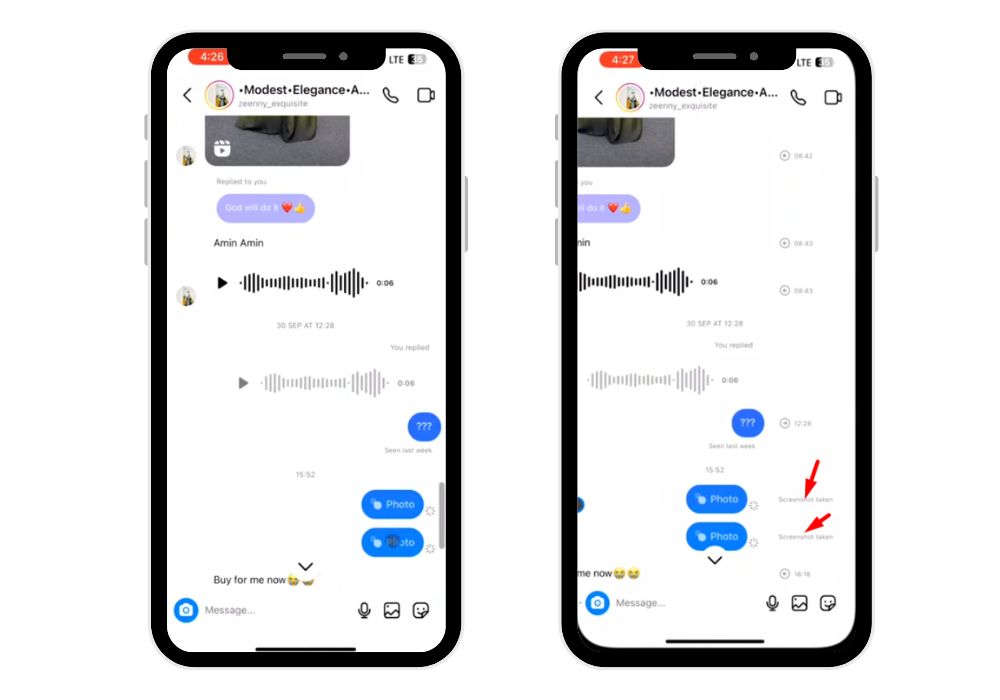
Instagram also protects view-once photos or videos sent through the in-app camera. These messages are ephemeral and intended to be temporary.
If you screenshot or screen record these disappearing messages, Instagram will:
- Notify the sender immediately
- Display a small starburst icon next to the message in the chat
This applies to:
- Photos disappearing
- Disappearing videos
- View-once messages
- Other ephemeral content
These notifications exist because Instagram treats such content as private and temporary, ensuring users are aware if their content is captured.
What About Screen Recording?
Many users wonder: “Does Instagram notify when you screen record a DM?” The rules are simple and follow the same logic as screenshots:
- Regular DMs: Screen recording does not trigger notifications. You can record text messages, shared posts, feed posts, or voice notes without the other person knowing.
- Vanish Mode: Screen recording sends a notification to the other user. All ephemeral content—texts, photos, and videos—will alert the sender.
- Disappearing Photos/Videos (View-Once Media): Recording view-once content triggers alerts. A small starburst icon appears in the chat next to the message.
- Key Takeaway: Screen recording on Instagram works exactly like taking a screenshot. Notifications are only sent for vanish mode or ephemeral content, while regular DMs remain private.
💡 Pro Tip: BuzzVoice makes it simple to grow likes quickly, helping you rank better on hashtags, explore pages, and feeds.
Does Instagram Notify When You Screenshot a Story?
Some ask on reddit “Do I get notified if someone takes pics of my story?”
The short answer is: ✅ No — at least most of the time. Unlike DMs in vanish mode or view-once media, Instagram does not send screenshot notifications for standard stories.
When Screenshots of Stories Are Safe
You can take a screenshot without alerting the user in the following cases:
- Someone’s Instagram story: Whether it’s a personal account or a public account.
- Close friends’ stories: Even exclusive stories shared with your close friends remain private, and screenshots are not notified.
- Public account stories: Any stories you see in the explore tab or from content creators are safe to screenshot.
- Private account stories: If you follow them, taking a screenshot will not trigger notifications.
Does Instagram Notify for Screenshotting Posts?
Many users wonder whether taking a screenshot of a post whether it’s an image, video, or shared content will alert the content creator. The answer is no. Instagram does not send notifications when you screenshot any type of post.
Types of Posts You Can Screenshot Safely
You can freely take a screenshot of:
- Regular posts: Photos or graphics shared by friends, public accounts, or private accounts you follow.
- Video posts: Including short videos and reels shared in your feed.
- Shared posts in DMs: Content that others send you privately via direct messages.
- Feed posts: Any post appearing in your main Instagram feed.
- Explore tab content: Posts discovered through recommendations, trending content, or the explore page.
- Favorite or bookmarked posts: Even if you’ve organized them in your private collections using the bookmark icon, screenshotting does not alert anyone.
Why Screenshotting Posts Is Safe
Instagram treats posts differently from ephemeral or disappearing content. Regular posts are permanent and visible to followers or public users, so the platform does not generate screenshot notifications for these.
Does Instagram Notify for Video Calls?
A common question among users is: “Does Instagram notify someone if I take a screenshot during a video call?”
The short answer is no. Instagram does not send notifications when you screenshot, or screen record an active video call.
Key Points to Consider
- Privacy of the Other User: Even though Instagram doesn’t notify, it’s important to respect the other user’s privacy.
- Ethical Use: Always ask for consent before recording or taking screenshots of private video calls.
- Legal Considerations: In some countries, recording or capturing someone without permission can be illegal. This is true even if Instagram itself does not send alerts.
- Content Type: This rule applies to:
- One-on-one video calls
- Group video calls
Pro Tips for Safe Video Calls
- Use built-in screen recording features only when necessary and with permission.
- Avoid sharing screenshots from video calls without consent to maintain trust and privacy.
- Combine with Instagram’s vanish mode DMs or disappearing content if you want added security for sensitive conversations.
What About Third-Party Apps? (Risk Warning)
Some users look for ways to save Instagram content beyond the platform’s built-in options. They might try third-party apps too:
- Download DMs
- Record chat conversations
- Save disappearing messages
- View private content
Related: How to Get Featured on Instagram
Why This Can Be Risky
Using these apps may seem convenient, but it comes with serious risks:
Violation of Instagram Policies:
Instagram’s terms of service strictly forbid using external apps to access or download content. Using these apps can lead to temporary or permanent account suspension.
Account Security Risks:
Third-party apps often require you to log in with your Instagram credentials. This can compromise your account and make it vulnerable to hacking or theft.
Privacy Threats:
Some apps can access your private conversations, disappearing content, or sensitive media. This may expose your private information to unknown parties.
Malware and Data Theft:
Many unofficial apps may carry malware that can steal your personal data, credit card details, or device information.
Safer Alternatives
Instead of using risky apps, always rely on Instagram’s official features, such as:
- Bookmark icon to save posts privately
- Screenshot regular DMs or posts (except vanish mode or view-once media)
- Screen recording responsibly only for non-ephemeral content
Key Takeaway: Third-party apps might promise extra features, but the risks far outweigh the benefits. Using Instagram’s built-in tools ensures your account safety, user privacy, and compliance with Instagram’s policies.
Best Alternative to Screenshot: Use the Bookmark Icon
Taking screenshots may seem convenient, but it can sometimes clutter your device or create privacy concerns, especially in private chats. Fortunately, Instagram offers a built-in feature that lets you save content without alerting anyone: the bookmark icon.
Why Use the Bookmark Icon?
The bookmark icon allows you to save posts, reels, and shared content privately in your account. Unlike screenshots:
- The other user does not know you saved their post
- Your device storage remains uncluttered
- You can organize content efficiently
Pro Tips for Bookmark Collections
- You can create multiple collections to organize saved content by topic or category.
- Use collections to plan content for personal projects or business accounts.
- Regularly review saved content to keep collections relevant and clutter-free.
Key Takeaway: Using the bookmark icon is a safe, private, and efficient alternative to taking screenshots. It helps you store and organize content without violating Instagram’s privacy rules or notifying other users.
Instagram Privacy and Screenshot Rules (Why It Works This Way)
Instagram handles screenshot notifications differently from platforms like Snapchat. While Snapchat alerts users almost every time someone takes a screenshot, Instagram has taken a more balanced approach to make the app user-friendly while still protecting privacy.
1. Flexible Screenshot Rules for Regular Content
For normal DMs, posts, shared content, feed posts, and stories, Instagram does not send notifications. This flexibility allows users to save important messages, organize posts, or reference content later without worrying about notifying the sender. By doing this, Instagram encourages sharing, engagement, and content exploration without creating unnecessary friction.
2. Notifications for Sensitive Content
Instagram only sends alerts in situations where the content is temporary or private:
Messages sent in vanish mode or ephemeral DMs trigger notifications when screenshotted. View-once photos or videos are meant to be temporary, so screenshotting them alerts the sender. Certain content shared with close friends or restricted access may also have notifications to maintain user trust.
3. Why This Balance Works
Instagram wants users to freely capture permanent content for convenience, personal use, and inspiration. At the same time, it respects privacy for messages and media that are designed to disappear. This approach ensures Instagram is both user-friendly and confidential, giving users control over what can be captured and what cannot.
Instagram’s screenshot rules are carefully designed to protect privacy where it matters most while letting users freely save and interact with regular content. It strikes a balance between sharing, usability, and trust.
💡 Pro Tip: BuzzVoice makes gaining Instagram followers easy. Boost your credibility and grow your influence with high-quality follower growth.
Stay Safe While Screenshotting on Instagram
While most Instagram screenshots are private, there are times when alerts can be sent or privacy could be compromised. Following these tips will help you stay safe, respect others, and avoid sending notifications accidentally.
1. Do Not Screenshot in Vanish Mode
Vanish mode is designed for temporary chats that disappear after being seen. Screenshots in vanish mode trigger notifications, so avoid capturing these messages if you want to stay private.
2. Avoid Capturing View-Once Media
Disappearing photos or videos sent via the in-app camera are ephemeral by design. Screenshotting or screen recording this content will alert the sender, so it’s best to view only or use Instagram’s built-in options like replies or save features where available.
3. Use the Bookmark Icon Instead of Screenshots
Instagram’s bookmark feature lets you save posts, shared content, or favorite posts privately without notifying anyone. This is a safer, organized alternative to taking screenshots, especially for DMs, reels, or feed posts.
4. Be Careful with Screen Recording
Screen recording works exactly like screenshots: it triggers notifications only for vanish mode or disappearing content. Always check the type of content before recording and avoid sensitive media that may alert the sender.
5. Respect Other Users’ Privacy
Even if a screenshot or recording is technically private, it’s important to use discretion. Don’t share private conversations or content without permission. Respecting privacy builds trust and maintains ethical use of Instagram.
Final Thoughts
Understanding Instagram’s screenshot rules is essential for protecting privacy while enjoying the platform’s features. For most regular DMs, posts, stories, and shared content, you can safely take screenshots or screen recordings without alerting the other user. However, ephemeral content like vanish mode messages and view-once photos or videos will automatically trigger notifications, so caution is needed. Using Instagram’s bookmark icon is a smart alternative to screenshots, allowing you to save posts privately and organize content efficiently. Always respect other users’ privacy and avoid third-party apps that may compromise security. By following these tips, you can interact confidently, save content responsibly, and enjoy Instagram safely, balancing usability with user privacy.
FAQs
Can Instagram see who took a screenshot of a chat?
Instagram does not track screenshots of regular DMs. Only ephemeral content like vanish mode messages or view-once photos/videos triggers notifications. Regular chats, shared posts, and voice notes can be screenshotted safely without the other user or Instagram tracking it.
How do you screenshot on Instagram DM without them knowing?
To screenshot safely, avoid vanish mode and disappearing content. Screenshots of regular DMs, shared posts, feed content, or voice notes do not notify the sender. For posts, use the bookmark icon to save content privately, maintaining privacy without sending alerts.
Does Instagram notify you when you screenshot a DM photo?
It depends on the type of DM photo: regular photos from the camera roll do not send notifications, while view-once or ephemeral photos taken with the in-app camera do. Vanish mode photos also trigger alerts. Only temporary or disappearing content generates screenshot notifications.
How to screenshot an Instagram DM photo without notifications?
Only regular photos or images uploaded from the camera roll can be screenshotted safely. Avoid vanish mode and view-once content, as Instagram will notify the sender. Using the bookmark icon for posts is a safer alternative to save content privately without alerts.
Can someone see if I screenshot my Instagram DM?
For standard DMs, shared posts, and permanent photos/videos, the other user cannot see if you take a screenshot. Alerts are only sent for ephemeral content, including vanish mode messages or disappearing photos/videos. Regular content is private, so the sender won’t be notified.