
How to Change Your Age or Birthday on Instagram
In today’s age-restricted digital world, your age on platforms like Instagram does more than just define your birthday; it determines what content you can see, which features you can use, and even how your profile is managed. So in 2026, if you’ve entered the wrong birthdate or simply need to update it, you might be wondering: How to change age on Instagram?
While the process is possible, it’s closely monitored through Meta’s Accounts Center Instagram app, and depending on your age change, you may be asked to verify your identity. Whether you’re correcting a mistake or updating your real date of birth, knowing the right steps is key to managing your Instagram effectively.
Grow your presence while keeping your account in good standing, with tools like BuzzVoice can give you the visibility boost you need. Grow your Instagram account by buying real followers, views and likes, BuzzVoice helps creators and brands amplify their reach without cutting corners.
How to Change Age on Instagram
To make changes to your birthday, you must log into your Instagram account. Too many changes or suspicious edits may trigger an identity verification request.
Having an accurate birthday and correct birthdate on your Instagram profile is important for accessing age-based features, privacy settings, and ensuring compliance with platform guidelines.
The process of updating your birthday can be conveniently completed on the Instagram app as well as on a smartphone.
Note: Not everyone may be able to change their birthday due to account restrictions or regional limitations. Facebook integration with Instagram may affect age verification and privacy settings.
Step by Step Guide: How to Change Your Birthday on Instagram
Step 1: Open Instagram and Go to Your Profile
On iPhone tap profile icon in the bottom-right corner to access your Instagram profile. Then tap your profile picture or username to enter the edit profile section. For Android users, use the Android tap profile method to quickly reach your profile settings.
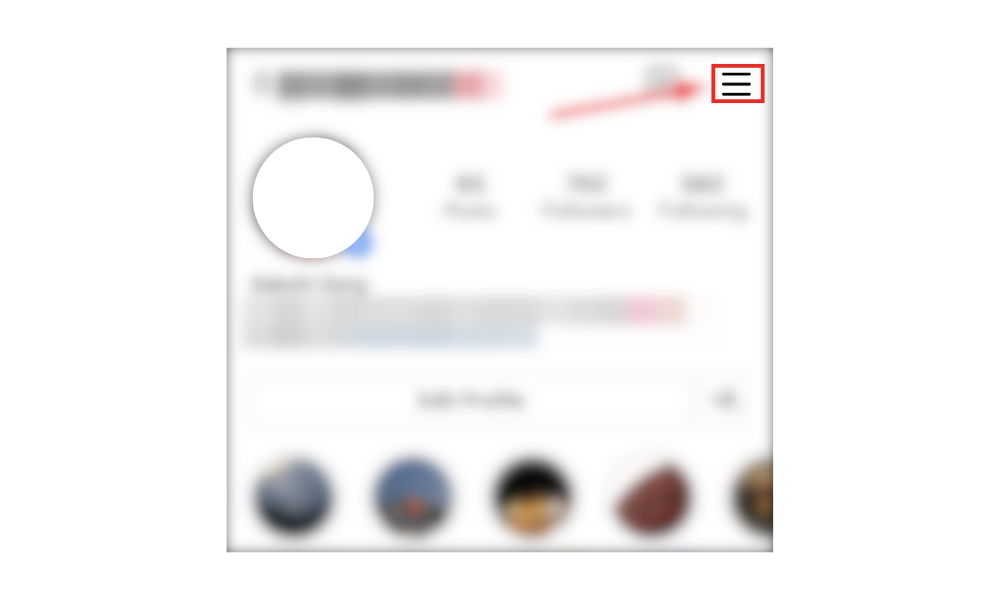
On a mobile browser, use the mobile browser tap to select your profile picture, then tap menu (the three lines) to open the navigation and access settings.
Step 2: Access the Meta Accounts Center
Scroll down and tap Accounts Center. Make sure you are in the same accounts center if you manage other accounts, as birthdays must match across all linked accounts for certain experiences.
Step 3: Access Settings
Within the Accounts Center, tap settings. This section is where you manage your account preferences and privacy details.
Step 4: Go to and click Personal Details
Tap personal details, or use the edit profile option as an alternative navigation path.
Step 5: Tap date of birth
Edit your birthday directly and save. You may be prompted to verify your identity if you’re updating from under 18 to over 18.
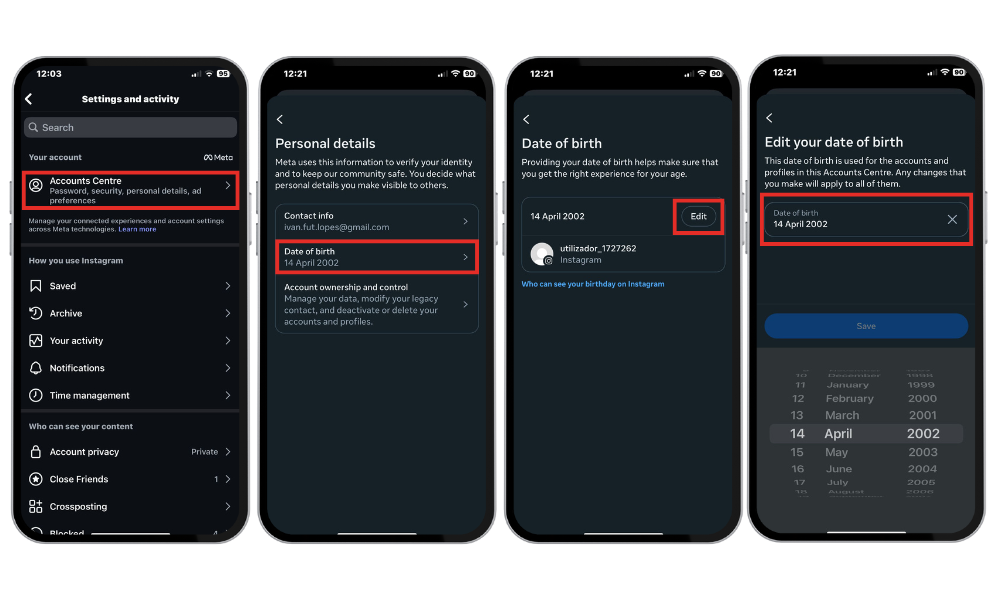
To do this on a computer, use the computer click to navigate through the menu, access the accounts center, and update your birthday. The process is similar whether you use the Ig app, a mobile browser, or a computer.
Keeping your Instagram profile and profile picture up to date helps maintain accurate account information and enhances your online presence.
If you have other accounts in the same accounts center, click accounts center and make sure you don’t have a different birthday date across all accounts. If you made a mistake with your birthdate, you may need to fill out a form to request a change and explain the situation.
Protect your data—social media platforms like Instagram create and enhance safety and privacy settings to keep your information secure. For a new account, you will need to sign up or create an account.
What Happens When You Change Your Birthday?
Age-based features may change (e.g., restricted content for users under 18). Your birthday must match across all linked accounts in the Accounts Center.
If the change shifts your age category (e.g., from minor to adult), Instagram might ask you to upload a selfie video or government ID. Having an accurate birthday is important for accessing age-based features and protecting your account data.
Instagram limits how often you can edit your birthdate to avoid misuse.
Why Can’t I Change My Age on Instagram?
Your account may be flagged for suspicious activity.
You’re using a business or creator account, which limits age-editing options.
You previously changed your birthdate too many times.
Instagram might require ID verification before allowing further edits.
If you have recently changed your birthday, you may need to wait before making another change.
How to Appeal or Verify Your Age on Instagram
If Instagram has incorrectly flagged your age or restricted your account:
Visit the Meta Help Center via your app settings.
If prompted, fill out the form with your data, including your accurate birthday and the reason for your request.
Submit a government-issued ID/ complete selfie video verification.
Follow the screen instructions to confirm your age.
Related: To not have your account banned, these are the hashtags you should never use.
Conclusion
Changing your age on Instagram it’s more than just a simple profile tweak. With Meta’s integrated Accounts Center handling personal details, any edits to your date of birth are closely monitored and may require identity verification, especially if you’re trying to cross critical age thresholds like 13 or 18.
And once your profile is up to date, don’t stop there. If your goal is to increase reach and connect with the right audience, BuzzVoice can help with real followers to drive higher engagement through likes and views.
FAQ
Can I lie about my age on Instagram?
No. Misrepresenting your age may lead to account restrictions or removal. Instagram uses AI and user reports to detect suspicious activity, so it’s safer to enter your real birthdate.
What happens if Instagram says I’m too young?
Accounts detected as under 13 are subject to deletion. You can appeal by providing ID or completing selfie verification. If verified successfully, Instagram may reinstate your account.

BuzzVoice
BuzzVoice is the best place to go when you need instant engagement services on social media. Offering a wide variety of packages for Instagram, Youtube, Facebook, Twitter, Soundcloud & Tiktok.



