
Add a Link to Your Instagram Post: Here’s How
Instagram remains one of the most powerful platforms for personal branding, marketing, and business growth. But if you’ve ever tried to add a link to an Instagram post, you’ve probably noticed the limitations. So, how can you drive traffic from Instagram in 2026?
This guide will walk you through the current methods that work, including link in bio, Stories with link stickers, and third-party tools like Linktree. Let’s dive in.
🚀 Boost Your Instagram Presence Before You Share
Make your profile impossible to ignore. Whether you’re growing a brand, promoting your content, or just want to stand out, start by increasing your visibility and credibility:
- 👉 Buy Real Instagram Followers – Grow your audience fast with authentic followers.
- ❤️ Get Instant Likes – Keep every post looking popular and engaging.
- 🎥 Increase Views on Reels & Videos – Amplify your reach and attract new followers.
Start now and turn every profile visit into a connection.
How to Add a Link to Instagram Post in 2026?
Short answer: No, you still can’t add a clickable URL directly to the caption of an Instagram post in 2026.
Instagram has long restricted clickable links in photo and video captions to keep the platform clean and spam-free. This limitation remains in place today. Any link you add to a caption or comment will appear as plain text, not tappable.
That said, creators and brands have developed clever workarounds that make sharing links more effective.
Introduction: The State of Instagram Links in 2026
In 2026, Instagram continues to be a powerhouse for sharing content, building communities, and driving traffic to external websites. While the platform still restricts clickable links in standard Instagram posts, it has evolved to offer new ways for users to share links and connect their audience with valuable resources.
Whether you’re a business, influencer, or everyday user, understanding how to leverage clickable links on Instagram is key to maximizing your reach and engagement.
This guide will walk you through the latest features, best practices, and creative workarounds for adding links to your Instagram posts, helping you make the most of every post and story you share.
Best Ways to Share Links on Instagram
1. Add a Link in Your Bio
The most popular and straightforward method is to use the link in bio. This strategy keeps your feed clean while driving followers to a single destination.
Since Instagram only allows one link in your bio, you can add multiple links by using a link landing page service, such as Linktree or Campsite, which creates a central hub for all your important links on your profile page.
How to update your profile link:
Go to your Instagram profile.
Tap “Edit Profile.”
- Click “Links.”
Paste the URL you want to share in the “Add external link” field.
Save your changes.
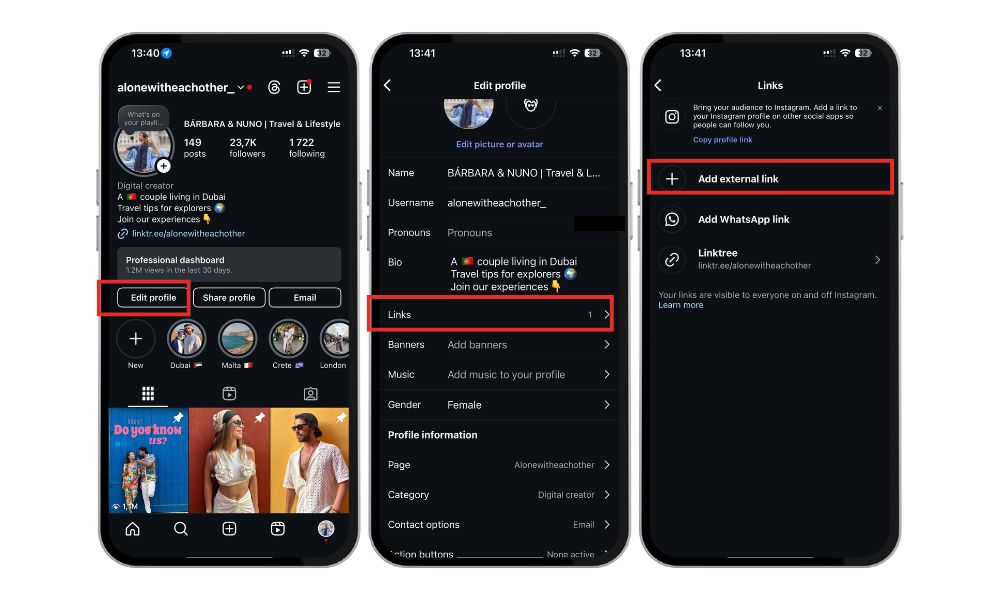
Then, in your post captions, you can say something like:
“Check out the full article – link in bio!”
This strategy keeps your feed clean while driving followers to a single destination.
2. Use Instagram Stories (With Link Sticker)
As of 2026, the Link Sticker is available to all users—not just verified accounts or those with large followings. The Link Sticker allows you to add clickable links to your Instagram Story, making it easy to share a website URL with your audience.
How to add the Link Sticker:
Create a Story.
Tap the Sticker icon at the top.
Select “Link.”
Paste your desired URL and customize the sticker text.
Share your Story.
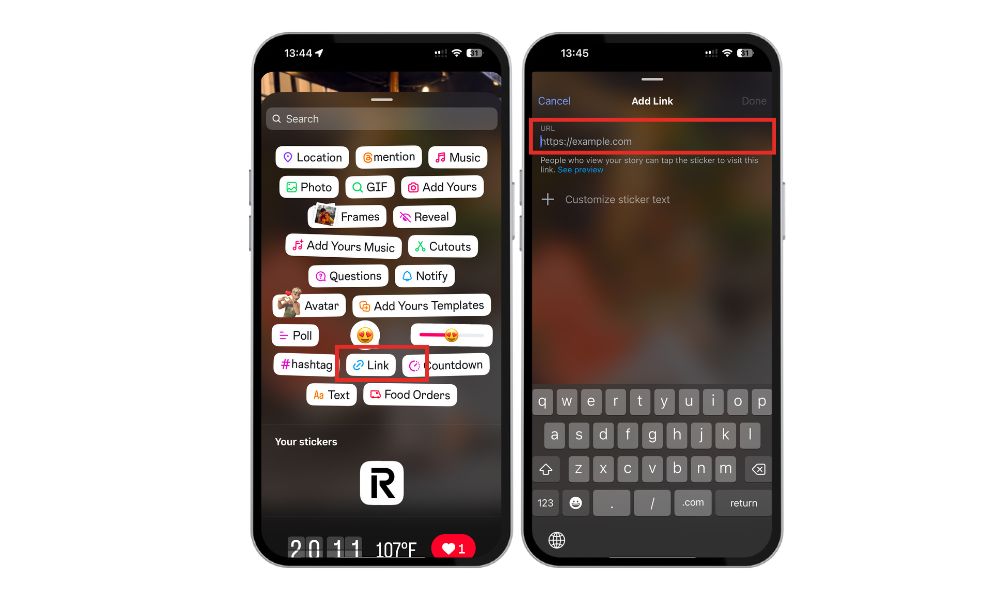
Best practices for boosting clicks:
Use a strong call to action (e.g., “Tap here for more!”).
Place the sticker where it’s easy to see.
Add GIFs or arrows to draw attention to the sticker.
3. Use Third-Party Link Tools (Linktree, Beacons, etc.)
When you want to share multiple links, third-party tools like Linktree, Beacons, or Later’s Link in Bio come in handy. These services let you create a link landing that consolidates all your important URLs in one place.
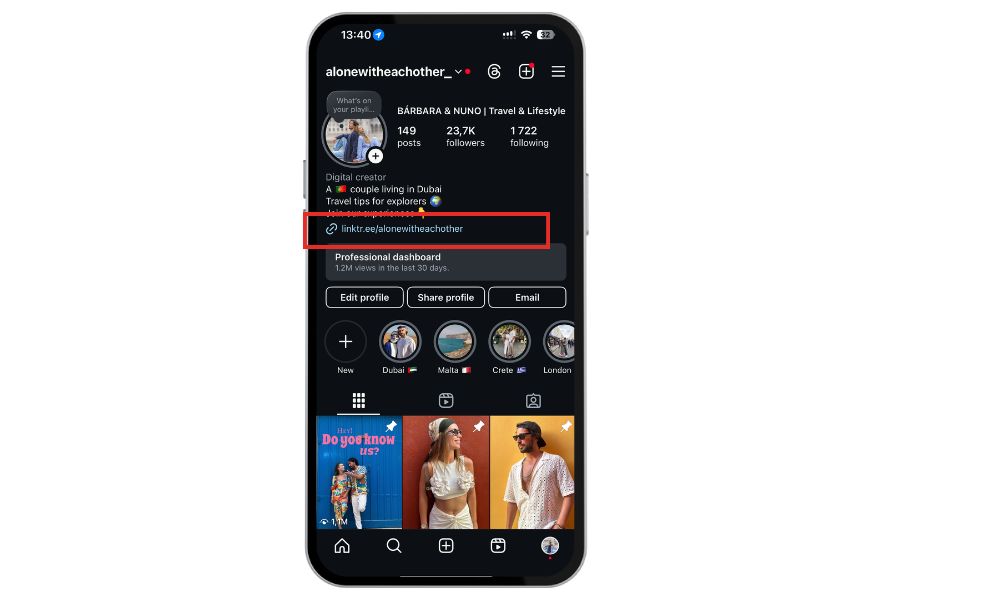
Pros and Cons:
|
Pros |
Cons |
|---|---|
|
Centralize multiple links |
Requires external platform |
|
Custom branding options |
Some features are paid |
|
Track clicks and analytics |
May load slower than native links |
How to organize multiple links:
Keep the top links most relevant (latest blog post, shop now, subscribe).
Use icons or buttons for visual clarity.
Update your link-in-bio tool frequently to reflect your latest content.
Related Article: How to Turn On Dark Mode on Instagram?
4. Promote Posts With Swipe-Up Style Links (Paid)
If you’re a business or influencer with a budget, you can learn how to run Instagram ads effectively to create promoted posts with clickable links directly in the ad. Whether you run a single sponsored post or multiple campaigns, these ads help you reach a wider audience while including a call-to-action that drives users to your website or product page.
Instagram offers features like shopping links, product links, and checkout options through Instagram Checkout, which are available to business accounts and business profiles.
To access these features, you need to have an Instagram business account or Instagram business profile, and shopping links can be synced with your e-commerce platform for seamless purchasing.
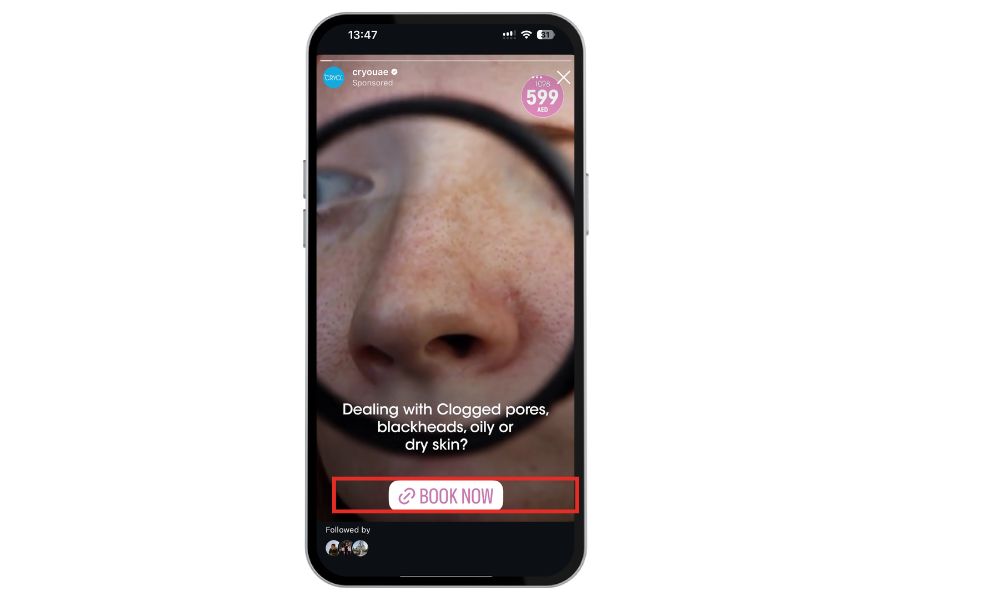
Why use paid promotions?
Reach larger, targeted audiences.
Add links directly to your post’s call-to-action.
Appear in feeds and Stories with tappable links.
Paid posts are perfect for product launches, service promos, or lead generation campaigns.
Want to grow faster without relying only on the algorithm? BuzzVoice’s Instagram promotion tools help your content get seen by the right audience—instantly.
Creating a Landing Page for Instagram Traffic
A well-designed landing page is a game-changer when it comes to converting Instagram traffic into real results. Since Instagram only allows one clickable link in your bio, directing users to a dedicated landing page ensures they find exactly what you want them to see—whether it’s your latest product, a sign-up form, or a special promotion.
By tailoring your landing page specifically for Instagram users, you can streamline their journey from your Instagram profile to your website, making it easier for them to take action and for you to track their behavior.
Why Instagram Doesn’t Allow Clickable Links in Captions
Instagram has consistently avoided allowing clickable URLs in captions or comments to:
- Prevent spam
- Encourage engagement within the app
- Maintain clean, visual-first content
This means Instagram restricts the use of external links in post captions, encouraging users to stay within the Instagram app and interact with content there rather than navigating away.
Instead of opening the floodgates to spammy links, Instagram promotes alternatives like Stories, bio links, and paid ads. While it may seem frustrating, these limits help keep the platform more user-friendly.
Tips for Getting Users to Click Your Link
Even if your link isn’t in the caption, you can still drive clicks effectively.
- Use strong CTAs: “Click the link in my bio for the full guide!”
- Create eye-catching visuals: Include arrows, stickers, or overlays pointing to where the link lives.
- Highlight links in Story Highlights: Save Stories with important links so they remain visible on your profile.
You can also share clickable links directly with followers through direct messages or Instagram DMs. This allows you to guide users to your desired link, helping to generate more traffic and increase website traffic.
By tracking user clicks on these links, you can measure engagement and optimize your strategy for better results. Consistency and clarity are key—train your audience to expect links in your bio or Stories.
Final Thoughts
While Instagram still doesn’t allow you to directly add a clickable link to an Instagram post, there are now more powerful and creative ways to share URLs than ever before. Whether you’re trying to drive traffic to a blog, product page, or sign-up form, the platform offers several effective alternatives:
- Place your most important link in your Instagram bio.
- Use Instagram Stories with link stickers to drive immediate action.
- Organize multiple URLs using third-party tools like Linktree or Beacons.
- Invest in Instagram ads for clickable links right inside your posts or Stories.
These methods, especially when combined, allow you to bypass the caption limitation and still provide a seamless user experience. With these strategies, you can share clickable links, showcase your Instagram link, and even embed your Instagram feed on your website.
To use many of these features, you need to open the Instagram app, and each new feature enables more creative ways to connect with your audience.
Instagram continues to prioritize mobile-first, visual content, and a spam-free environment. That’s why mastering these link strategies is essential in 2026 if you want to maximize your visibility and engagement.
So don’t just drop a plain URL in a caption—strategically place your links where your audience is most likely to see and click them. The right approach can turn a passive scroll into real traffic and results.
In case you want to grow other social media platforms, check BuzzVoice services to buy likes, views, and increase your engagement.
FAQs About Adding Links on Instagram
Can I add a clickable link to my Instagram photo or video caption?
No, Instagram still doesn’t allow clickable URLs in post captions or comments as of 2026. Even if you paste a full web address (like www.example.com), it will only appear as plain text. Users would need to copy and paste it manually, which most won’t do—making it an ineffective strategy. To share links effectively, use your bio, Stories, or tools like Linktree.
Why can’t I just paste a link in the comments or captions?
This is part of Instagram’s design to minimize spam and create a cleaner user experience. Allowing clickable links in captions or comments could lead to excessive self-promotion and phishing attempts. Instead, Instagram promotes using structured tools like the link in bio, clickable Story Stickers, or ads with link buttons.
What’s the best link-in-bio tool in 2026?
Several excellent link-in-bio tools are depending on your needs:
Linktree – Still the most popular, with free and premium plans.
Beacons – Great for creators, with monetization tools built-in.
Later’s Link in Bio – Ideal for Instagram scheduling and linking individual posts.
Koji – Offers interactive link pages with mini apps and shops.
Campsite – Sleek design and good analytics.
Most of these tools allow you to create a mini landing page with multiple clickable links, perfect for sharing a website on Instagram or promoting various content pieces.
Can I use more than one link on Instagram?
Yes, but not directly on a post. You can:
Use a multi-link bio tool like Linktree to host several URLs.
Add one link in your Instagram bio (native option).
Share links through Stories with stickers.
Run paid Instagram ads that include clickable links.
This combination gives you flexibility while respecting Instagram’s link limitations.
Can I track link clicks from Instagram?
Yes. If you’re using a link-in-bio service, most offer built-in analytics to see how many clicks each link gets. You can also use UTM parameters and Google Analytics to track traffic from Instagram to your website more precisely. This is essential for understanding how effective your calls to action and visual strategy are.

BuzzVoice
BuzzVoice is the best place to go when you need instant engagement services on social media. Offering a wide variety of packages for Instagram, Youtube, Facebook, Twitter, Soundcloud & Tiktok.



