How to See Your Followers on SoundCloud?
SoundCloud is one of the leading platforms for independent musicians, podcasters, and audio creators who want to share their work with the world. Whether you’re an emerging artist or someone who enjoys building playlists, understanding your followers is a crucial part of your journey. Followers reflect your reach, credibility, and influence within the SoundCloud community.
If you’ve ever wondered how to see your followers on SoundCloud, you’re not alone. Many creators use this feature daily to track their growth, connect with their fans, and plan future releases. This guide will walk you step by step through viewing your followers on both the desktop and mobile app, explain why it matters, and provide tips to maintain and grow your following.
Let’s dive deep into the details.
Looking to boost your SoundCloud account? Buy SoundCloud followers, likes and reposts to ensure your songs reach more fans and get shared widely.
Why Checking Your Followers is Important
Tracking your followers isn’t just about seeing numbers. Here’s why it matters:
- Understanding Your Audience: When you check who follows you, you get insights into what kind of listeners are interested in your music. Are they fellow artists, fans, or casual listeners?
- Building Engagement: Respond to followers by liking their tracks, leaving comments, or following back. This builds stronger relationships.
- Measuring Growth: Seeing follower trends can help you understand whether your promotional efforts are working. If you gain many followers after releasing a track, you know you’re on the right path.
- Strategic Planning: Follower data helps you plan tours, collaborations, and releases.
- Motivation: Every new follower is a sign that someone values your work. Checking followers often motivates creators to keep going.
How to See Your Followers on SoundCloud (Desktop/Browser)
If you’re on your computer, here’s a step-by-step breakdown of how to see your followers on SoundCloud:
- Open the SoundCloud website in your preferred browser.
- Click the small arrow icon next to your profile picture (top-right corner).
- Select Profile from the dropdown menu.
- On your profile page, click on the Followers section.
This opens a list of all users who follow you. Each follower’s username, profile picture, and activity may appear, giving you an overview of who supports your music.
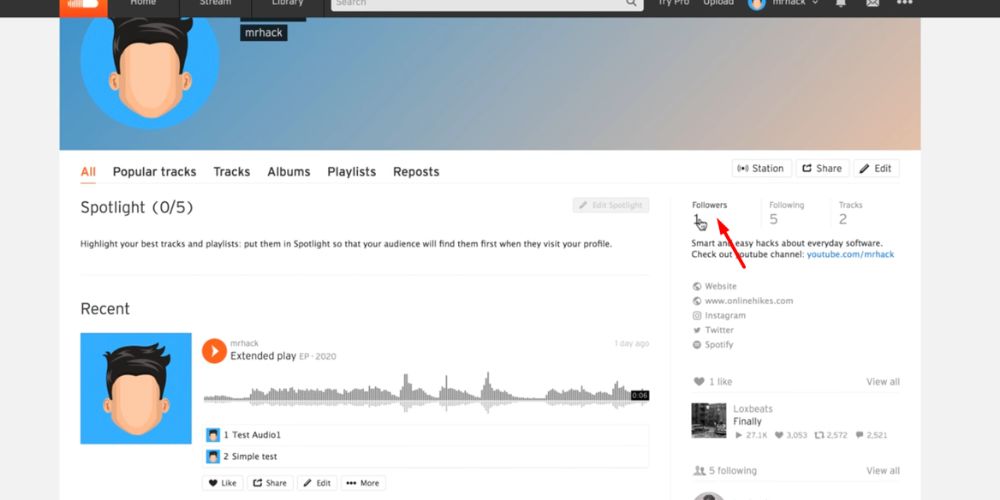
🔎 Note: If you have more than 1,000 followers, SoundCloud may round the number displayed (e.g., 1.2k). To see the exact total, hover over the figure with your mouse.
⚠️ Sometimes, you may encounter messages like “verification successful waiting,” “verify you are human by completing the action,” or “help.soundcloud.com needs to review the security of your connection before proceeding.” These are temporary verification prompts. They exist for performance security and to protect your account from bots. Once verification is complete, you can proceed to view your followers normally.
Related: Where to Buy SoundCloud Followers?
How to See Your Followers on the SoundCloud Mobile App
If you prefer using the SoundCloud mobile app, follow these steps:
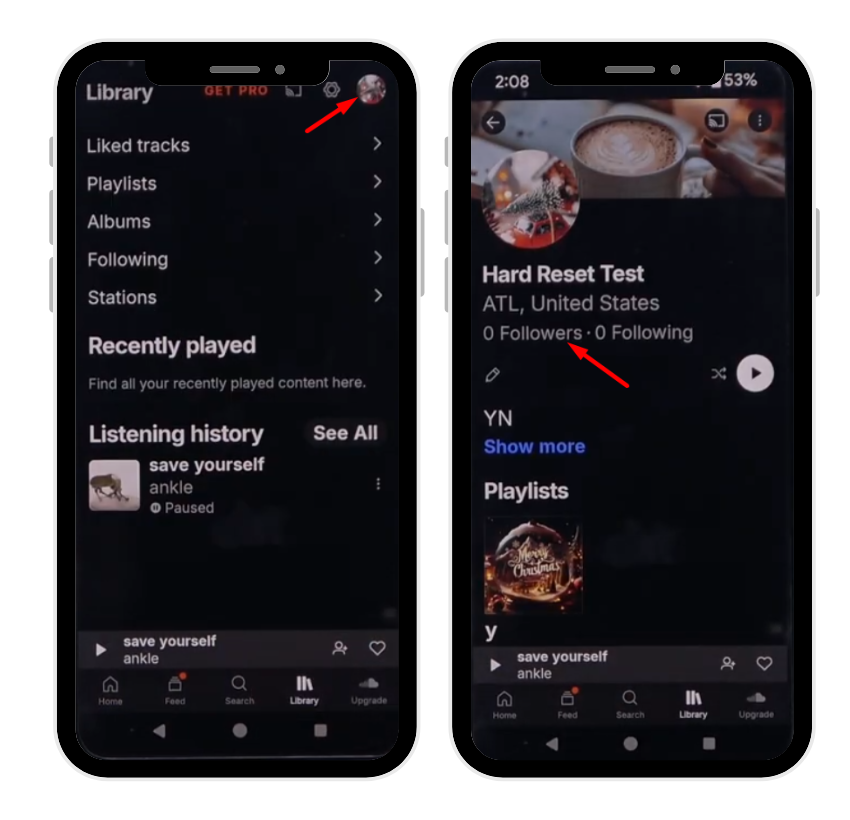
- Open the SoundCloud app.
- Tap the Library tab at the bottom right corner.
- Tap your profile icon.
- Select View public profile.
- Tap the Followers section to see your list.
This method works on both iOS and Android. You’ll see the complete list of users who follow your account.
Just like on the browser, you might sometimes be asked to verify your identity if the system suspects unusual activity. A message like “help.soundcloud.com needs to review the security of your connection before proceeding” may pop up. In that case, simply complete the verification step, wait for help.soundcloud.com to respond, and once verification successful appears, you can access your followers list.
Tips to Maintain Your SoundCloud Followers
It’s one thing to gain followers—it’s another to keep them. If you want a loyal fanbase, consistency and engagement are key. Here are some proven tips:
- Upload High-Quality Tracks Regularly: Consistency keeps your followers engaged. Don’t leave them waiting too long between uploads.
- Optimize Your Profile: Use a professional profile picture, engaging bio, and proper links to your other social platforms.
- Interact With Your Community: Follow back, comment on tracks, and message your followers when possible. This builds trust and loyalty.
- Share Across Platforms: Promote your SoundCloud on Instagram, Twitter (X), TikTok, and YouTube to bring in new listeners.
- Join Repost Chains & Playlists: Getting featured in playlists or repost chains boosts exposure and helps you retain attention.
💡 Pro Tip: SoundCloud reposts give your music viral reach by spreading it across other profiles.
How to Get More SoundCloud Followers
If you’re serious about growing, here are strategies to boost your follower count:
- Collaborate With Other Artists: Teaming up with other SoundCloud creators allows you to tap into their fan base. A single collaboration can double your exposure and attract followers who already enjoy similar music styles.
- Submit Tracks to Playlists: Playlists are one of the most powerful ways to gain traction. By getting your music featured in popular or niche playlists, your tracks can reach thousands of new listeners who may turn into loyal followers.
- Use SEO and Tags Effectively: SoundCloud works like a search engine. Optimize your track titles, descriptions, and tags with keywords that match your genre, mood, and style. This improves discoverability and helps listeners find your music more easily.
- Invest in Promotion Services: Sometimes organic growth needs a boost. Professional platforms like Buzzvoice provide safe and reliable follower growth services, helping you enhance your profile credibility and attract even more organic followers in the process.
- Engage Daily: Being active is key. Respond to comments, repost other creators’ music, and interact with your audience. The more consistently you engage, the more visible you become, encouraging followers to stick around.
Buy Followers from BuzzVoice
Buzzvoice is a trusted platform for boosting social media presence, including SoundCloud. If your follower count is dropping or you want to expand faster, here’s how you can buy followers:
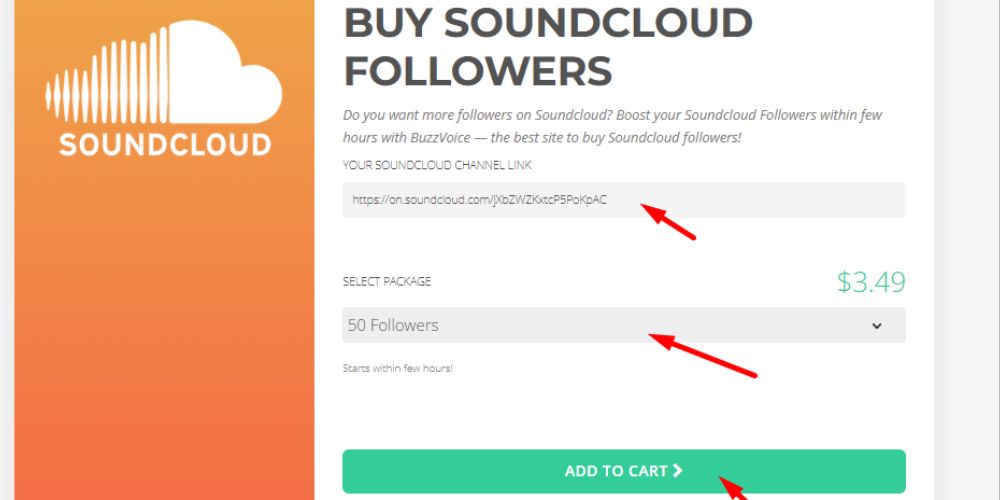
- Visit the BuzzVoice Website: Navigate to the SoundCloud services section.
- Select the Package You Need: Choose how many followers you want. Packages are flexible.
- Enter Your SoundCloud Profile Link: This ensures followers are directed to the right account.
- Watch Your Followers Grow: Within hours, you’ll see an increase in your follower count.
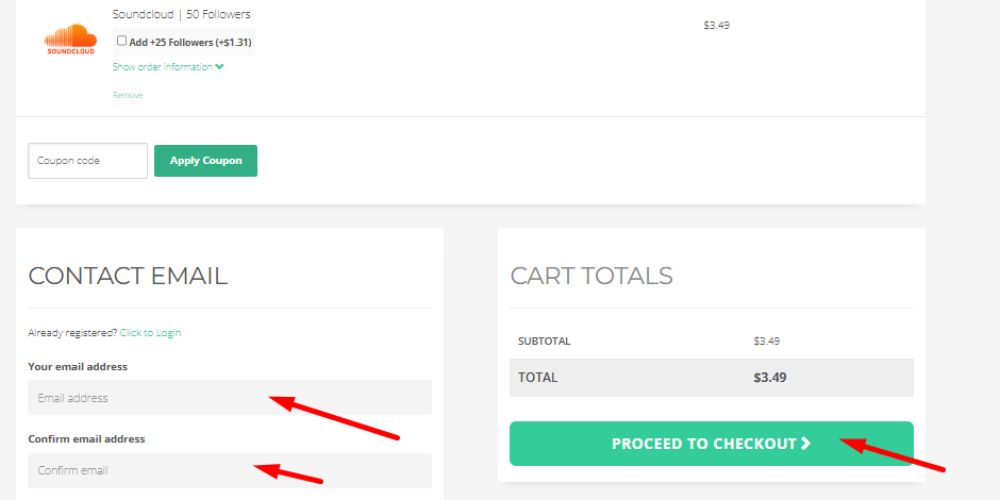
- Complete Secure Checkout: Buzzvoice uses safe payment methods for customer protection.
This method is especially useful if you’re stuck at a plateau or want to build credibility quickly.
Related: How To See Your SoundCloud Wrapped: Explore Your Top Songs
Troubleshooting: Why Can’t I See My Followers?
Sometimes, users face issues when trying to view followers. Common problems include:
- Verification Screens: You may see messages like “verify you are human,” “completing the action,” or “waiting for help.soundcloud.com to respond.” This happens when SoundCloud reviews the security of your connection. Simply complete the verification to proceed.
- Browser Cache Issues: Clear your cache and cookies if the followers list isn’t loading.
- App Glitches: Update your app if it crashes when you try to view followers.
- Connection Problems: Ensure you have a stable internet connection to load the list smoothly.
Final Thoughts
Learning how to see your followers on SoundCloud is simple, whether you’re on desktop or mobile. It’s more than just checking numbers—it’s about building connections and tracking your growth.
If you encounter messages like “verification successful waiting,” “help.soundcloud.com needs to review the security of your connection before proceeding,” or “verify you are human by completing the action,” don’t worry. These are standard security checks to review and protect your connection before proceeding. Once you complete them, you can access your follower list without issues.
Maintaining followers requires consistent uploads, community engagement, and profile optimization. If you want to speed up growth, Buzzvoice offers reliable follower packages to boost your credibility instantly.
💡 Pro Tip: Buying SoundCloud likes creates a strong social proof and show listeners that your track is worth their time.
FAQs
How do I see followers on SoundCloud?
Go to your profile (via desktop or app), then click or tap on Followers to view your list. If prompted with verification messages, complete them before proceeding.
How do I see my listeners on SoundCloud?
Listeners are different from followers. To see them, check your track’s Insights/Stats section. It shows plays, likes, reposts, and audience location.
Can you see your viewers on SoundCloud?
SoundCloud doesn’t show “viewers” in the traditional sense. Instead, you can see plays and who liked or commented, but not every single listener identity unless they engage.

BuzzVoice
BuzzVoice is the best place to go when you need instant engagement services on social media. Offering a wide variety of packages for Instagram, Youtube, Facebook, Twitter, Soundcloud & Tiktok.