How to Accept Follow Requests on Twitter (X): Complete Guide
Follow requests on Twitter (X) are an essential feature for anyone using a private account and wanting to maintain control over who can see and interact with their content. How many pending requests do you have? Many users still get confused when they start receiving pending follow requests and aren’t sure where or how to accept or decline them.
Typically, users receive a follower request notification when someone requests to follow their private account, but they may not always notice or understand these notifications. This confusion is especially common among users who enable protected tweets for the first time or recently change their privacy settings. Suddenly, followers no longer join automatically and instead require manual approval.
- You only receive follow requests on Twitter (X) if your account is set to private.
- In 2026, follow requests can be managed directly from your notifications or your follower requests screen.
- You can approve or ignore requests individually at any time.
- Accepting a request immediately allows that person to see your protected posts.
- You can remove a follower later if you change your mind.
If you’re serious about growing your visibility, boosting engagement, and mastering social media strategy, BuzzVoice can help you get there faster with X followers, likes and retweets!
How to Accept Follow Requests on Twitter (Mobile App)
Step-by-step (mobile app)
- Open the Twitter (X) app
- Go to the Notifications tab
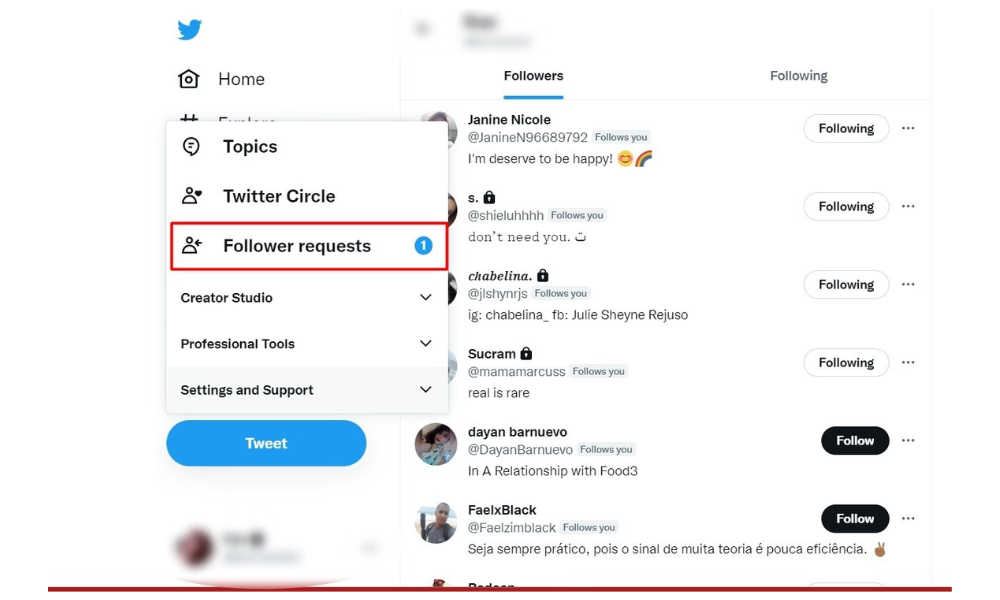
- Tap the profile icon in the top left corner and tap ‘Follower requests’ from the menu.
- Users will see a list of all the accounts that have requested to follow them when they access this section.
- To manage follow requests, tap accept or tap decline for each request
Where to find pending follower requests? They usually appear as a direct notification but you can also manage those requests by navigating through the menu list and using the profile icon or more icon as needed from within the Notifications menu.
Accept vs. decline
- Accept: the person will be able to see all of your protected tweets
- Decline: the request disappears without notifying the user
Related: 7 Tips: How to Get Followers on Twitter (X) in 2026
How to Approve Followers on Twitter (Desktop)
Steps on the web version
- Go to twitter.com (X)
- Click Notifications
- Open the Follow requests section
- Accept or decline requests manually
While there is no dedicated ‘sent requests’ list on Twitter, you can check the status of a follow request you have sent by visiting the profile of the private account you requested to follow. If your request is still pending, it will show as ‘Requested’ on their profile.
Differences compared to the app. The navigation is similar, but on desktop, the following requests are more integrated into the side panel.
Related: What Do ‘Impressions’ Mean on Twitter?
What Are Follow Requests on Twitter?
Twitter follow requests appear when someone tries to follow an account that is set to private.
What triggers a follow request
- An account with Protect Your Tweets is enabled
- A recent switch from a public account to a private one
- A user with no prior connection to the profile
Public account vs private account
- Public account: anyone can follow and view tweets. Accounts with public posts will never receive follow requests that need approval.
- Private account: all followers require manual approval
Who can send follow requests? Any Twitter user can send a follow request to a private account, except users who are blocked.
Grow your engagement and site statistics with BuzzVoice services as followers. This way, you’re attracting real, genuinely interested followers significantly reducing the need to filter suspicious requests.
Why You’re Seeing Follow Requests
Seeing pending follow requests is normal when you choose a more privacy-focused approach.
You enabled “Protect your Tweets”
This is the main reason. When this option is active, all new followers require manual approval.
Privacy-first approach
Many users prefer private accounts to:
- Avoid bots and spam
- Control who sees personal tweets
- Protect sensitive content
A common choice among creators
Creators who manage multiple accounts or test new formats sometimes prefer to start with private accounts before making them public.
Combine a Twitter strategy with personalized content and ads based on past insights with BuzzVoice services, such as Twitter followers, automatic engagement, and retweets.
How to Turn Follow Requests Off (Make Account Public)
Making your account public
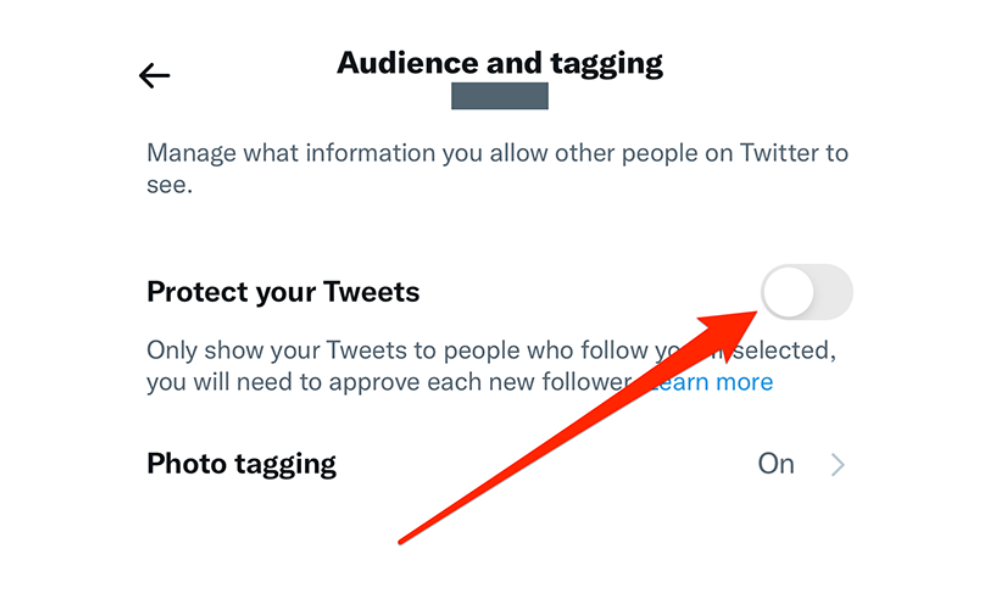
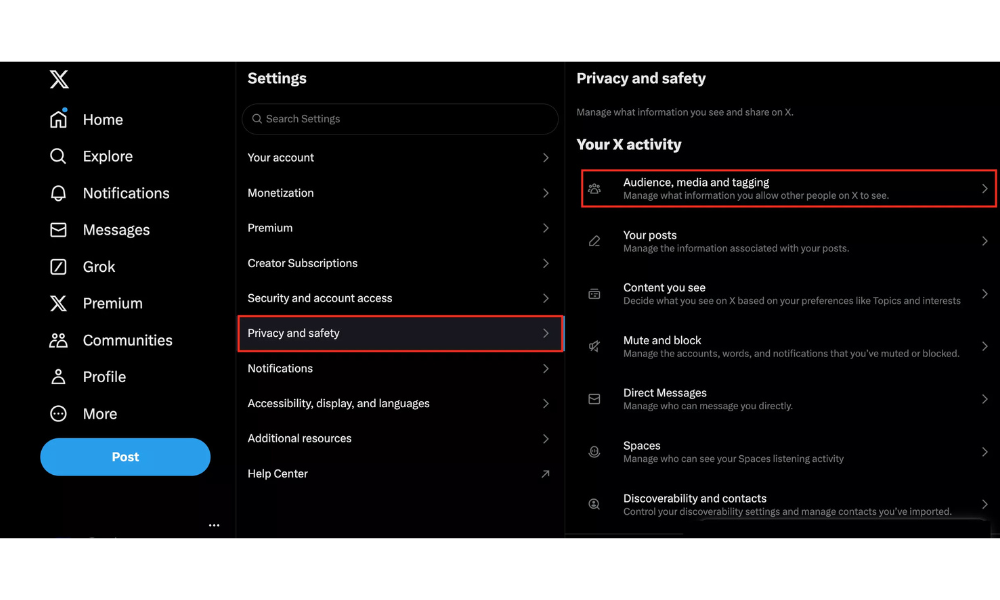
- Go to Settings and Privacy
- Privacy and safety → Audience and tagging
- Turn off Protect your Tweets
Pros and cons
Pros
- Faster growth
- Greater reach
Cons
- Less control
- More exposure to bots
Who should keep accounts private
- Personal accounts
- Profiles with sensitive content
- Privacy-focused users
Related: How to Make Your X (Twitter) Account Public (4 Steps)
What Happens After You Accept a Follow Request?
After accepting a request:
Visibility of past tweets
The new follower will be able to see all of your previous protected tweets, not just future ones.
Notifications
The user does not receive a specific notification, but your content will start appearing in their feed.
Interaction permissions
They can reply, like, retweet (when allowed), and send direct messages depending on your settings.
By using BuzzVoicetools to gain authentic followers, real likes, and strategic retweets, you improve audience quality and reinforce positive signals to the algorithm, making growth more natural and secure.
Related: Can People See What You Like on X (Twitter)? Explained
How to Decline or Remove Follow Requests
Declining a request
Simply tap or click Decline. The user is not notified.
Removing a follower later
Even after accepting a request, you can remove followers at any time from their profile.
Blocking vs. removing
- Remove: the user is unfollowed, but can send a new request later
- Block: prevents any future interaction
Related: How to Go Viral on X (Twitter): 7 Tips That Work In 2026
Tips for Managing Follow Requests Safely
How to identify fake accounts
- Profiles without a photo
- Random usernames
- Zero interactions
Avoiding bots and spam fraud, and abuse
Carefully reviewing follow-up requests helps reduce future risks
Privacy best practices
- Review requests regularly
- Adjust direct message settings
- Use quality filters
Currently, there are no reliable third-party tools for tracking or managing follow requests on Twitter due to privacy policies, so users should rely on Twitter’s built-in features.
BuzzVoice works as a smart step for anyone looking to grow on Twitter without compromising trust, engagement, or profile credibility. Measure audience engagement and site statistics to understand the best BuzzVoice services you need to use to grow all the accounts you have.
Related: How to Improve X (Twitter) Engagement in 2026: 7 Tips That Work
Conclusion
Follow requests on Twitter (X) are a powerful privacy feature that puts full control in your hands. Knowing how to accept, decline, or disable them allows you to adapt your account to your personal or professional goals.
With well-configured settings and growth strategies focused on real users, it’s possible to effectively balance privacy and visibility. Check out BuzzVoice to understand how our services can help enhance the quality of your content and grow your Twitter account with followers, likes, and retweets.
FAQ Section
Why can’t I see follow requests on Twitter (X)?
If you don’t see any follow requests, your account is likely set to public. Follow requests only appear when Protect your Tweets is enabled and your account is private. You can check this in Settings and privacy → Privacy and safety → Audience and tagging.
Can someone see my tweets before I accept their follow request?
No. When your tweets are protected, non-followers cannot see any of your tweets, replies, or media until you approve their follow request.
Can I undo accepting a follow request?
Yes. If you accept a request and later change your mind, you can remove that follower or block them at any time from their profile, without notifying them.
Do follow requests expire?
No. Follow requests do not expire automatically. They remain as pending requests until you choose to accept or decline them.

BuzzVoice
BuzzVoice is the best place to go when you need instant engagement services on social media. Offering a wide variety of packages for Instagram, Youtube, Facebook, Twitter, Soundcloud & Tiktok.