How to Make an Album on SoundCloud: A Step-by-Step Guide
Nowadays, the music scene is highly digital, and platforms such as SoundCloud provide an excellent platform for independent artists to distribute their music worldwide and connect with fans. Making an album on SoundCloud is a great way to promote your music and get noticed by the constantly expanding music scene.
You can easily create albums by organizing your music, uploading tracks, and customizing album details such as genre, tags, and permissions, regardless of whether you are a band, an independent artist, or a music producer.
In case you want to grow your SoundCloud account, you can count on BuzzVoice services to improve your engagement and audience reach.
Step-by-Step Guide to Creating an Album on SoundCloud
1. Preparing Your Tracks for Upload
The first step in creating an album on SoundCloud is to be sure that your tracks are ready for upload.
- File Format: Although SoundCloud supports several file types, MP3 is the most often uploaded format. 320 kbps is the suggested bitrate for high-quality audio.
- Master Your Tracks: Make sure your tracks are expertly mixed and mastered before uploading.
- Track Naming & Metadata: Give each track the appropriate name, mentioning any featured musicians or collaborators.
- Make Sure It Is Consistent: If your album has a theme or a mood, ensure every song fits that idea. Listeners will be far more interested in a well-organized album than in a collection of unrelated songs.
Once your tracks are complete, you can start working on your album. You can group your songs into albums or playlists on SoundCloud.
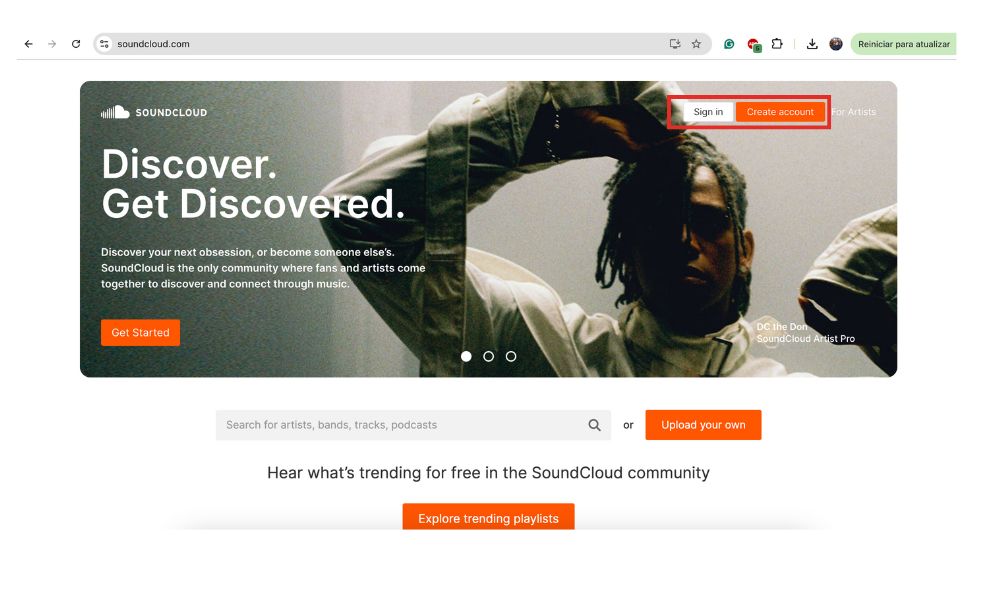
2. Log into Your SoundCloud Account
- Go to SoundCloud and log in to your account.
- If you don’t have an account, click on Create Account and follow the registration process.
3. Upload Your Tracks
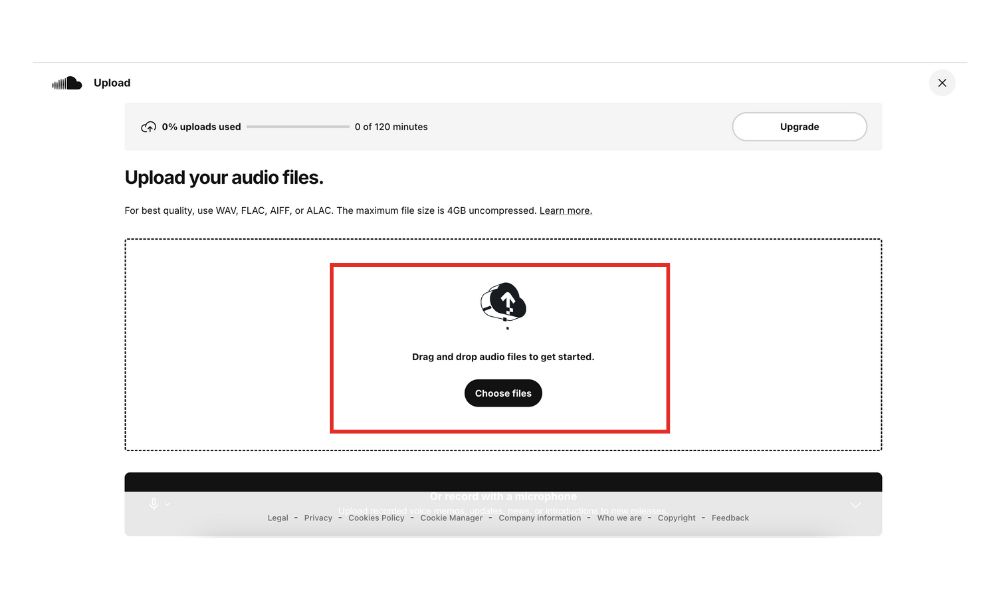
- Select Upload: Click on the Upload button (usually located in the top-right corner).
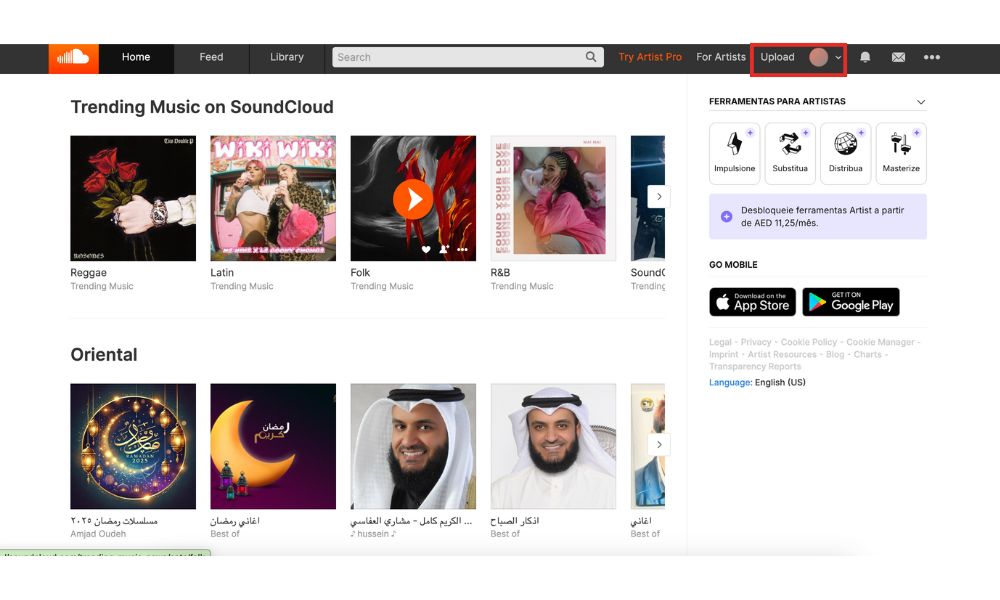
Upload option to create an album
- Select Files: After selecting “Upload,” you will be asked to drag and drop, or select, your music files into the uploader. This is where you can add your new tracks to the platform.
- Track Details: For each track, you’ll need to provide details, such as Title + Description + Artwork
- Privacy Settings: Select if you want the track to be private or public.
4. Create a Playlist for the Album
- Once all the tracks are uploaded, go to Playlists.
- Click Create New Playlist.
- Add a title that represents your album.
- Organize your tracks into playlists to enhance your music collection.
- Choose a genre and include a description.
5. Add Tracks to Your Playlist
- Open each uploaded track.
- Click the More Options (three dots icon) and select Add to Playlist.
- Choose the playlist you just created to save tracks for offline listening.
- Arrange the track order by dragging and dropping them in the preferred sequence.
6. Edit Album Details
- Click on the Edit Playlist option.
- Select the Playlist Type and choose Album.
- Upload album artwork (recommended size: 800×800 pixels or larger).
- Set the release date to strategically time the album’s visibility and optimize search results.
- Adjust privacy settings if necessary.
7. Publish Your Album
- Review all details to ensure accuracy.
- Click Save Changes.
- Click Make Public to share it with your audience.
Organizing Your Tracks and Albums
You can start organizing your album after uploading your tracks.
- Arrange Track Order: You can drag and drop your tracks in SoundCloud to put them in the right order.
- Album Artwork: SoundCloud suggests that you use images with a minimum pixel size of 1000 x 1000. The artwork should provide a visually appealing representation of your music and be in line with the theme of your album.
- Extra Details: Provide a synopsis of the album, the genre, and any acknowledgments for producers, artists, or other partners.
- Specify Record Label: This feature mimics traditional record label processes and helps in the distribution and production of your music on platforms like SoundCloud.
Album Details and Artwork
An important component of your SoundCloud album is the album artwork. It not only enhances the visual appeal of your music but also serves as a brand ambassador.
- Image Dimensions: Verify the quality of your album cover. The recommended size is 1000 x 1000 pixels.
- Consistency of Cover Art: The theme of your music should be reflected in the cover art of your album. Choose fonts, colors, and images that best reflect your genre and style.
- Album Description: Write an engaging album description that will be displayed to listeners on the album’s webpage.
Why Create an Album on SoundCloud?
Currently, SoundCloud has millions of users who upload, stream, and find music every day. An album offers a thorough musical experience that keeps listeners interested. It is an opportunity to showcase your uniqueness on multiple tracks, providing listeners with a more comprehensive taste of your sound.
Albums have a higher chance of showing up in search results, being shared, and even being included on playlists, all of which increase your visibility. Compared to single tracks, albums provide a closer bond with your listeners. Albums can generate revenue if you qualify for SoundCloud’s monetization program. You can make royalties from streams and ad revenue by monetizing your music on SoundCloud.
Optimizing Your SoundCloud Album for SEO
Since SoundCloud is one of the biggest music streaming services globally, competition is fierce. To make your album stand out, SEO optimization is crucial for SoundCloud users. These are some crucial tactics:
Effectively Employing Keywords and Descriptions
- Track Titles: People see your track titles first, and they have a big impact on search engine rankings.
- Album Description: Write a thorough album description that incorporates keywords associated with your genre, tone, and musical influences.
Using Tags and Genres
- Tags: Make sure to include pertinent tags that complement your themes, mood, and genre.
- Genres: Select the genre that best suits the album as a whole and each track.
Album Artwork SEO
- Alt Text for Images: It is important to give your artwork descriptive file names, even though SoundCloud does not offer alt text for images. This will increase the possibility that search engines will index your artwork.
Promoting Your SoundCloud Album
After uploading and optimizing your album, you’ll want to promote it to gain listeners and followers. Sharing your new music on platforms like SoundCloud is crucial for discovering and connecting with fans. Make the most of social media to market your album:
- Instagram: Post snippets of your songs, album artwork, and behind-the-scenes photos.
- Facebook & Twitter: Share frequent information about your album, such as release dates, partnerships, and significant events.
- TikTok: To generate interesting content about your album, think about leveraging TikTok’s viral trends. Popular challenges combined with brief snippets of your music can draw in new listeners.
BuzzVoice is a platform that assists musicians in boosting their music’s level of engagement. Your SoundCloud album will receive moreplays,reposts, anddownloads if you use BuzzVoice. For artists looking to increase their reach even faster, you can also buy SoundCloud downloads to enhance visibility. The more engagement your tracks receive, the higher they rank on SoundCloud‘s algorithm, increasing your visibility and potentially drawing in more listeners.
Related Article: How To Get More Followers on SoundCloud
Conclusion
Making an album on SoundCloud is a fantastic way to showcase your work, discover new artists, engage with your audience, and advance your musical career.
You can make sure that as many people listen to your album as possible by following the instructions in this guide and putting into practice efficient SEO and promotional techniques. To increase engagement and visibility on the platform, do not forget to use tools like BuzzVoice.
FAQs
How long does it take for my album to appear on SoundCloud?
Depending on server load and processing time, it may take a few minutes to several hours for your album to show up on SoundCloud after your tracks have been uploaded and your album is complete.
Can I release an album as private until I’m ready?
Yes! Until you are ready for the official release, you can upload your tracks and make them private. You can change the privacy settings to “Public” when you are ready for your audience to see.
Is it free to post an album to SoundCloud?
Yes, up to three hours of audio can be uploaded by free accounts on SoundCloud. However, if you want to grow your reach quickly, you can buy SoundCloud plays to help boost visibility even with a free plan.
How do I change the order of tracks on my album?
By visiting your profile and navigating to the album page, you can rearrange the tracks in your album. After that, select the “Edit” button. Just drag and drop the tracks into the appropriate order from there.
Is it possible to add more tracks to my album after it has been posted?
Yes! Once your album has been uploaded, you can always add more songs to it. Just add the new songs to the album after uploading them.
Can I add collaborators to my album?
Although you can give collaborators credit in the track details and description on SoundCloud, you are unable to “add” collaborators to an album directly from an administrative standpoint. To make sure featured artists and collaborators receive the credit they deserve, you can list them in the track titles or descriptions.
Can I monetize my album on SoundCloud with fan-powered royalties?
If you have a SoundCloud Pro or Pro Unlimited account and are qualified for SoundCloud’s monetization program, you can make money off of your album. You must enable monetization on each track or your album as a whole in order to accomplish this. After that, SoundCloud will compensate you according to how many plays and interactions your song gets.
Can I schedule the release date of my album?
SoundCloud does not currently have a built-in feature for scheduling album releases. When you are ready for the album to go live, you will need to manually set it to “Public”. You can, however, schedule your release ahead of time and advertise it on the day you wish to go public using email campaigns and social media.
How do I get my album featured on SoundCloud’s editorial playlists?
You must have a well-publicized, high-caliber album release if you want it to appear on SoundCloud’s editorial playlists. Make sure your album has the correct tags and metadata, use SoundCloud’s “Submit” feature if it is available, and contact the editorial team via your profile. Increasing engagement and plays early on will improve your chances of getting noticed.
Can I track the performance of my album on SoundCloud?
Yes, you can view detailed analytics for your songs and albums if you have a SoundCloud Pro or Pro Unlimited account. This will provide you with information about your listeners’ locations as well as plays, downloads, comments, likes, and shares. You can better understand your audience and make future releases better with the help of this data.
Can I take my album down from SoundCloud after it has been uploaded?
Yes, you can remove an album whenever you want. Go to the album page, click “Edit,” and then choose “Delete” or “Remove” to accomplish this. Remember that once an album has been deleted, it cannot be recovered; deletion is final.
What should I do if I see my album being pirated on other websites?
SoundCloud provides a takedown service to eliminate unauthorized copies of your music if you believe it is being pirated or illegally distributed on other websites. To have the content taken down, you can use SoundCloud’s DMCA procedure to file a copyright infringement complaint.

BuzzVoice
BuzzVoice is the best place to go when you need instant engagement services on social media. Offering a wide variety of packages for Instagram, Youtube, Facebook, Twitter, Soundcloud & Tiktok.