How to Unblock SoundCloud at School or Work Without a VPN
SoundCloud, which has over 300 million tracks from 30 million creators worldwide, is an essential component of the music streaming scene. Both listeners and creators find it indispensable due to its special function as a platform for independent artists, remixes, podcasts, and up-and-coming talent. Many users encounter annoying obstacles when attempting to access SoundCloud‘s vast library, though. So, how can you Unblock SoundCloud?
BuzzVoice’s SoundCloud services provide a practical means of increasing the followers, plays, and reposts of your SoundCloud profile for creators who want to make the most of their presence once access is restored.
Whether you are using a restricted network, traveling overseas, or experiencing unforeseen access problems, this thorough guide will help you unblock Soundcloud. We will examine the causes of these blocks and offer practical fixes suited to your particular circumstance.
Why Is Your SoundCloud Blocked?
Before exploring the fixes, it is critical to comprehend the reasons why SoundCloud may be blocked in your area:
Geo-Restrictions: Because of copyright concerns or legal restrictions, SoundCloud is blocked in some nations.
School & Workplace Blocks: To reduce distractions and save bandwidth, many workplaces and educational institutions block streaming services like SoundCloud. Network administrators at schools and universities block access to ensure a focused educational environment and address concerns over content appropriateness.
ISP Restrictions: Because of bandwidth management regulations, certain internet service providers (ISPs) may impose access limitations.
Network Firewalls: To stop excessive data usage, SoundCloud may be blocked on public Wi-Fi networks.
Best Methods to Unblock SoundCloud
Let’s explore some effective methods that allow you to bypass those frustrating restrictions and access SoundCloud again.
1. Use a VPN
VPNs are now the best option for getting online access to content that is restricted. They conceal your true location and make it look as though you are browsing from a different area by establishing an encrypted tunnel between your device and the internet.
Using a free VPN can pose significant risks, including instability, poor security, and potential privacy violations. It is strongly advised to avoid free VPNs for tasks like unblocking SoundCloud due to performance issues, slow speeds, and harmful practices such as data harvesting. Instead, opt for premium VPN services that provide better security and reliable performance.
How to Use a VPN to Unblock SoundCloud:
Select a trustworthy VPN service (such as NordVPN, ExpressVPN, or Surfshark).
Install the VPN on your device after downloading it.
Launch the VPN app and establish a connection with a server located in a nation where SoundCloud is available.
Start streaming without any restrictions by launching SoundCloud.
|
Pros |
Cons |
|
Secure and private browsing |
Some premium VPNs require a subscription |
|
Works on multiple devices (PC, mobile, tablets) |
Free VPNs may have limited speeds and data caps |
|
Bypasses ISP throttling |
2. Use a Web Proxy
To conceal your true location without the complete encryption of VPNs, proxy servers serve as go-betweens to manage and reroute internet traffic between your device and SoundCloud’s servers. Proxy servers are perfect for circumstances that call for rapid access without complete security.
Types of Proxies for SoundCloud Access:
Web Proxies: Services that run in a browser and do not require installation
HTTP Proxies: Work with certain apps and browsers
SOCKS5 Proxies: Work with virtually all internet applications, including the SoundCloud app
- Mobile Proxies: These offer reliable and secure access to services like SoundCloud on mobile devices. These proxies provide customized solutions optimized for performance on cellular networks, ensuring seamless and uninterrupted access while using mobile apps.
How to Use Web Proxies for SoundCloud:
Go to a trustworthy web proxy service like ProxySite, KProxy, or HideMyAss.
The URL field should contain “soundcloud.com.”
Choose a server location (ideally US or UK servers) where SoundCloud is available.
Click “Browse” or “Visit Site” to use the proxy to access SoundCloud.
Log in to your account and enjoy streaming
Limitations to Take into Account: Web proxies frequently show advertisements, have speed restrictions, and might not be able to access all SoundCloud features. Instead of being used frequently, they work best for brief, sporadic access.
|
Pros |
Cons |
|
Free and easy to use |
Slower speeds compared to VPNs |
No software installation is required |
Less security and encryption |
3. Use a Smart DNS Service
Faster streaming speeds are achieved by smart DNS services, which are specifically designed to get around geo-restrictions without encrypting your whole connection. Without altering your IP address, a smart DNS service reroutes your DNS queries through an unrestricted region, enabling access to blocked websites.
How to Set Up Smart DNS for SoundCloud:
Sign up for a Smart DNS service, such as Smart DNS Proxy or Unlocator.
Set up your device’s Smart DNS (provider-specific instructions differ).
Restart your device to gain unrestricted access to SoundCloud.
Best For: Smart DNS services are excellent at giving users fast access to streaming services without the overhead of VPN encryption. For users who are more focused on geo-restrictions than privacy or network monitoring, they are perfect.
|
Pros |
Cons |
|
Faster speeds compared to VPNs |
Does not encrypt data |
|
Works on multiple devices |
Requires a paid subscription |
4. Use Browser Extensions to Unblock SoundCloud
Accessing restricted content is made easier with the help of built-in VPN or proxy functionality found in several VPN extensions.
Top Browser Extensions for Unblocking SoundCloud:
Hola VPN: A free browser add-on that operates with just one click
ZenMate VPN: Provides dedicated streaming servers along with both free and premium options.
Windscribe: Offers extra privacy features along with 10GB of free data per month.
SetupVPN: Easy-to-use interface with servers located in more than 100 nations
Urban VPN: Automatic server selection and no data caps
Implementation Steps:
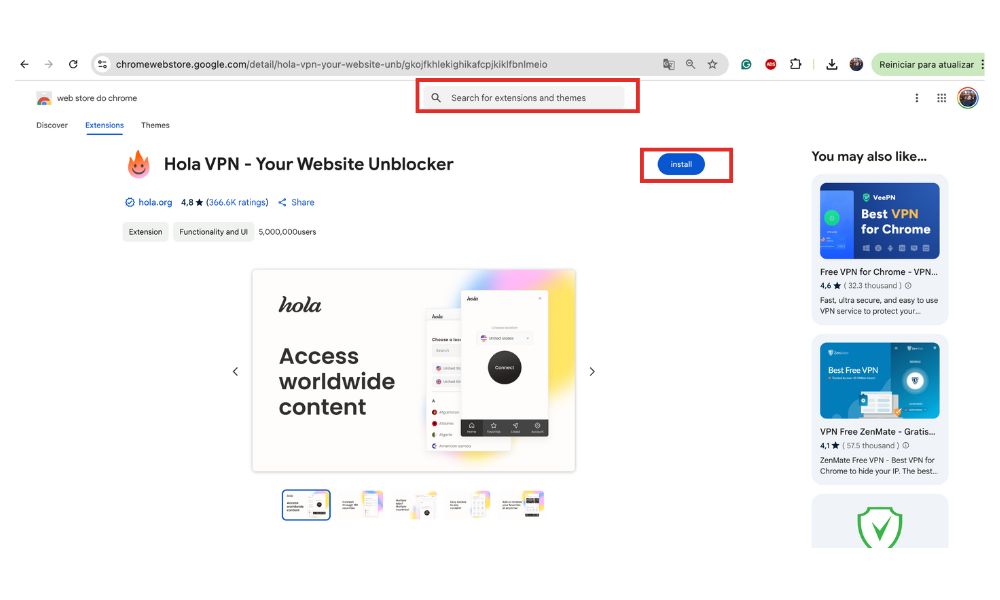
- Go to the store for extensions for your browser (Chrome Web Store, Firefox Add-ons, etc.).
- Look for the VPN extension that you like best.
- Either click “Install” or “Add to Browser.”
- Finish any setup or registration procedures.
- Choose a server location and activate the extension.
- Go to SoundCloud and start broadcasting.
Additional Troubleshooting Tips
1. Clear Browser Cache & Cookies
Resetting your network settings can be aided by clearing the cache and cookies in your browser if SoundCloud is still blocked.
How to Delete Cookies and Caches:
On Chrome: Select Settings > Security & Privacy > Clear Browsing Data
On Firefox: Options > Privacy & Security > Cookies and Site Data > Clear Data
2. Try a Different Browser or Device
Local restrictions can occasionally be circumvented by using a different device or by switching browsers (for example, from Chrome to Firefox).
3. Check Your Internet Connection
Make sure your mobile data or Wi-Fi is stable on your mobile devices if SoundCloud is not loading. If required, restart your router.
4. Disable Firewall & Antivirus Restrictions
SoundCloud may be blocked by certain firewalls or antivirus settings. Determining whether they are the cause can be aided by temporarily disabling them.
Conclusion
Finding a solution that strikes a balance between security, performance, and accessibility for your particular scenario is crucial, regardless of whether you go with the speed of a Smart DNS, the all-encompassing protection of a VPN, or any of the other approaches mentioned.
To supplement your unblocking efforts with more engagement and visibility, creators who want to make the most of their SoundCloud presence after access is restored might want to think about using BuzzVoice’s SoundCloud promotion services to improve the performance of their profile. This way, you can get more reposts, followers, and plays —even consider purchasing SoundCloud likes to give your tracks a strong initial push and increase social proof.
You can get around limitations and have unrestricted access to the music, podcasts, and audio content that are most important to you by using these tools and strategies.
FAQs
Can SoundCloud detect when I’m using a VPN or proxy?
SoundCloud does not actively block the majority of VPN services, in contrast to certain streaming services. However, since some IP ranges might be blocked in their system, try connecting to a different server if you have trouble logging in while using a VPN.
Will unblocking methods affect my streaming quality?
Generally speaking, premium VPNs offer fast enough speeds for audio streaming with little interference, even when accessing popular streaming services. Select local servers and services that are optimized for streaming content for optimal performance. In general, streaming speeds are least affected by smart DNS services.
Is my SoundCloud account at risk if I use unblocking tools?
SoundCloud hardly ever bans accounts for using proxies or VPNs alone. However, abruptly moving between different regions could result in security alerts. Once you have found a virtual location that works, stick with it for account security.
Which countries have the most complete access to SoundCloud?
The most extensive access to SoundCloud’s library is usually available in the US, Canada, UK, Australia, and the majority of EU nations. The best results are typically obtained by connecting to servers located in these locations.
Can I use these unblocking methods on all my devices?
Yes, the majority of solutions are cross-platform compatible. Think about setting up a VPN or Smart DNS at the router level to unblock all connected devices in the house at once.
Are free VPNs good enough for SoundCloud?
Free VPNs frequently have restrictions, such as speed limits, data caps, fewer server choices, and possible privacy issues. While they might be useful for infrequent listening, they are usually not advised for frequent streaming or account security.
How can I tell if SoundCloud is blocked or just experiencing technical issues?
Check SoundCloud’s status on downdetector.com or their official Twitter account. Try using a different network or device to access the platform. You are probably dealing with network-specific limitations rather than a service outage if it functions on one but not the other.
Will clearing my cookies and cache help with SoundCloud access?
This can fix some simple access problems, particularly if the restriction is based on session or browsing history. However, more reliable solutions like VPNs are required for systematic restrictions like network filtering or geo-blocking.

BuzzVoice
BuzzVoice is the best place to go when you need instant engagement services on social media. Offering a wide variety of packages for Instagram, Youtube, Facebook, Twitter, Soundcloud & Tiktok.