How to Hide Your Followers List on TikTok: 4 Steps
In 2026, TikTok isn’t just about trends — it’s a space where creators build influence, connect with fans, and manage their digital presence, so privacy matters more than ever. TikTok now lets you hide your followers list with just a few quick changes. It’s easy, fast, and gives you more control over your account.
In this updated guide, we’ll walk you through how to hide your followers on TikTok step-by-step, what happens when you do it, and tips to keep your profile even more private.
Want faster growth on TikTok? BuzzVoice helps you promote your content instantly—no need to rely solely on the algorithm.
Can you hide your followers on TikTok in 2026?
Short answer- Yes.TikTok now offers a Following List privacy toggle, and users can find this feature by heading to specific settings options in the app. This enables users to choose from different options to control who can see their followers.
How to Hide Followers on TikTok (Step-by-Step)
If you prefer to keep your TikTok activity private, hiding your followers list is a simple yet effective way to control who sees your connections. TikTok gives you the option to limit the views of accounts you follow. Here’s how to adjust this setting in just a few easy steps:
Step-by-Step Guide:
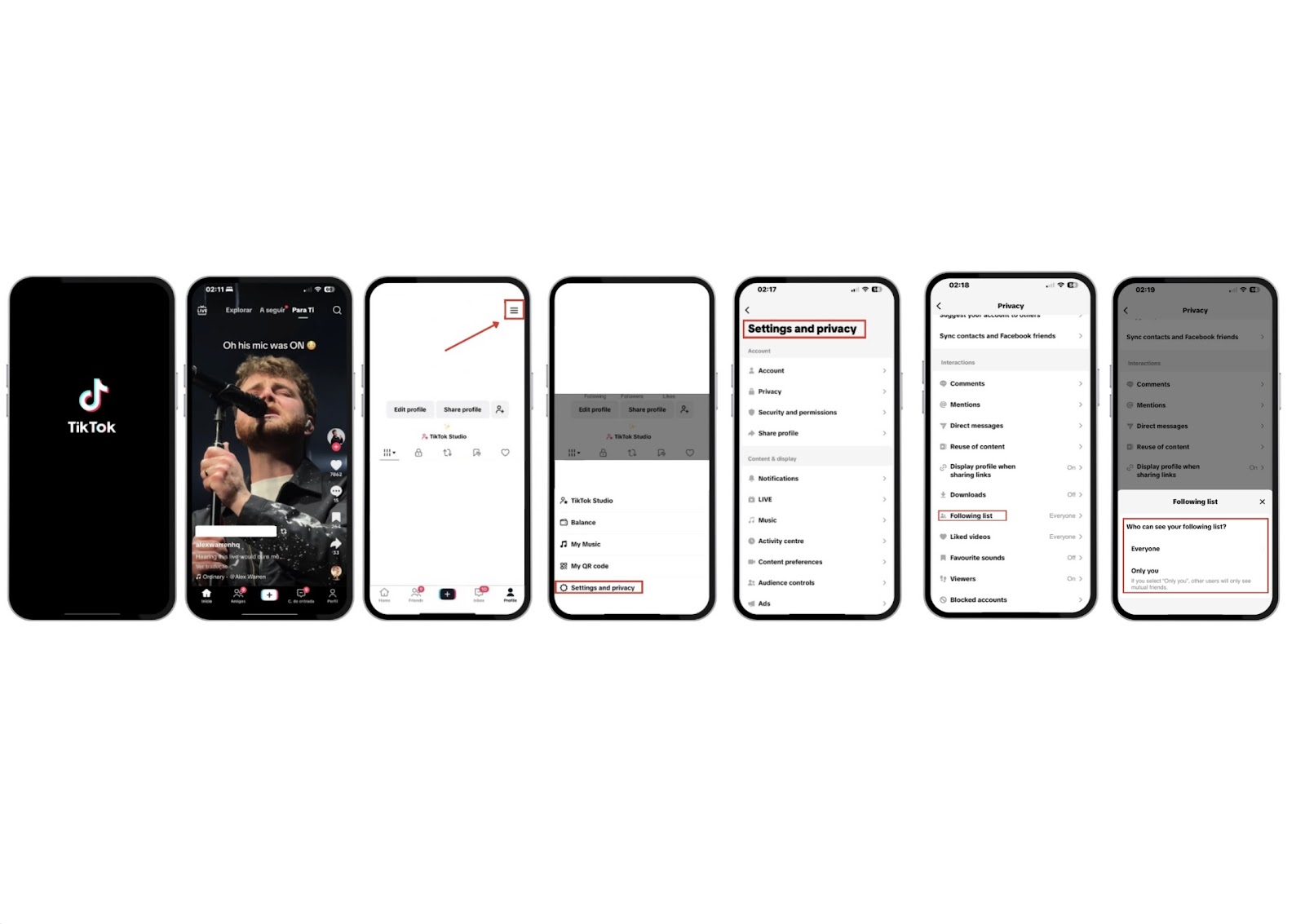
Step 1: Open TikTok app and go to your Profile
- Click the ☰ (menu icon) in the upper right corner of your profile screen.
Step 2: Tap “Settings & Privacy”
- From the menu, select Settings & Privacy to access your account controls.
Step 3: Navigate to Privacy → Following List
- Scroll to the Privacy section, then tap on Following List under the “Interactions” category.
Step 4: Choose who can see your profile
- Only Me: No one else can view the people you follow.
- Friends: Only mutual followers (users who follow you and whom you follow back) can see your list.
After Step 4, you may need to accept changes to your privacy settings to finalize the process.
For your company account, combine tailored ads with the services of BuzzVoice to grow your community, improve the views and likes of your posts.
For your company account, combine tailored ads with the services of BuzzVoice to grow your community, improve the views and likes of your posts.
Why do people choose to hide their followers?
In today’s hyper-connected world, managing who can see your social network is more important than ever.
- Privacy: Keeps your social circle discreet from strangers and prevents others from learning about your social connections
- Professionalism: Prevent competitors or clients from seeing your network
- Peace of mind: Avoid scrutiny or unwanted judgment
We hope these measures will help you feel more secure and confident in managing your profile.
What Happens When You Hide Your Followers List?
Here’s what happens when you choose to hide your follower list—and how it affects your account and interactions:
|
Feature |
Result |
|
Others can’t see who follows you | Your follower list is hidden from unauthorized viewers |
|
Reach remains unaffected |
Hiding followers doesn’t limit your content visibility or engagement |
|
Your view unaffected |
You still see others and your follower count as usual |
Hiding your followers helps protect your data from being accessed by others, enhancing your privacy on the platform. However, making a mistake in your settings could lead to unintended exposure of your follower list. Also, if you make excessive changes to your privacy settings in a short period, you may be temporarily blocked from making further adjustments by TikTok’s system.
Take your TikTok growth to the next level and reach a bigger audience faster with TikTok Views, TikTok Comments, and Real TikTok Followers with Genuine Engagement.
Tips to make your TikTok more private
Make your account private: Only approved users can view your profile
Limit comments & DMs: Adjust settings under Settings → Privacy for Comments, Direct Messages, etc.
Turn off suggested accounts: Prevent TikTok from recommending your profile publicly.
Account Customization for Enhanced Privacy
Customizing your TikTok account is a crucial step in enhancing your privacy and protecting your followers list. Start by switching your profile to private, which ensures that only users you approve can follow you and view your content. If you’re wondering can people see who viewed your Tiktok profile, adjusting your privacy settings helps limit who can interact with your account and see your activity. You can also block or report users who engage in spam or unwanted behavior, further safeguarding your profile from unwanted access.
Regularly review and update these settings to adapt to your changing needs. Using tools like blocking, reporting, and adjusting your followers list visibility helps prevent unwanted users from accessing your profile and content.
By staying proactive and customizing your account, you can maintain a safe, private, and positive presence on the TikTok platform, ensuring your experience remains enjoyable and under your control.
Final Thoughts
TikTok’s 2026 privacy settings give you complete control over who sees your TikTok followers. Whether for privacy, professionalism, or peace of mind, following these steps helps ensure a method of safety and authenticity. Regularly reviewing your privacy settings ensures your profile stays secure and comfortable for you.
If you continue to face some problems on growing your TikTok, check BuzzVoice services for followers, likes and comments.
FAQ
Can people still see how many followers I have?
Yes. Even if you choose to hide who follows you, the total number of followers on your profile remains publicly visible. This means anyone visiting your profile can still see how many followers you have, but they won’t be able to view the specific accounts unless you allow it. TikTok’s privacy setting only restricts access to the list of follower names, not the overall follower count.
Can I hide who I’m following, too?
Yes. TikTok allows you to hide not just your followers, but also the people you follow. The Following List setting controls visibility for both lists. By setting it to Only Me, you can make sure no one else can see who you’re following or who follows you. This is especially useful if you want to keep your social activity private or limit public connections for personal or professional reasons.
Does hiding my followers limit engagement?
No—hiding your followers does not impact how TikTok distributes or promotes your content. Your videos can still appear on the For You Page, and all standard engagement features such as likes, comments, shares, and duets will function normally. Engagement levels are primarily driven by your content’s relevance, quality, and how users interact with it, not by the visibility of your follower list.
Can I undo the setting anytime?
Absolutely. The visibility of your Following List is fully adjustable at any time. If you change your mind, just go to Settings → Privacy → Following List, and select your preferred option (such as Everyone or Friends). TikTok allows you to toggle this setting as needed, giving you full control over your profile’s views at all times.

BuzzVoice
BuzzVoice is the best place to go when you need instant engagement services on social media. Offering a wide variety of packages for Instagram, Youtube, Facebook, Twitter, Soundcloud & Tiktok.