Can People See Who Viewed Their TikTok?
In the ever-evolving social media landscape, privacy remains a paramount concern for users. As of 2026, TikTok has introduced features that allow users to see who has viewed their profiles and stories, enhancing transparency and interaction on the platform. Here’s what you need to know about profile views on TikTok in 2026!
Level up your profile instantly when you buy TikTok likes and get more TikTok followers from BuzzVoice — your shortcut to viral success!
Can People See Who Viewed Their TikTok Profile?
TikTok offers a “Profile View History” feature that lets users see which accounts visited their profiles in the past 30 days. The profile owner and the visitor must have the “Profile View History” setting enabled to access this feature. It is available to users aged 16 and above with fewer than 5,000 followers.
| Feature | Availability & Details |
|---|---|
| See who viewed TikTok videos | ❌ No, TikTok does not allow users to see who viewed their videos. |
| See who viewed TikTok profile | ✅ Yes, but only if “Profile View History” is enabled. |
| Profile View History duration | Last 30 days. |
| Who can use Profile View History? | Users aged 16+ with fewer than 5,000 followers. |
| Mutual visibility requirement | Both the profile owner and visitor must have “Profile View History” enabled to see each other. |
| How to enable/disable Profile View History? | Go to Profile → Settings → Privacy → Profile Views. |
| Can you control who sees your content? | ✅ Yes, users can set accounts to private and control video visibility with “Who can watch this video” settings. |
| Other TikTok privacy features | Users can manage comments, direct messages, and story visibility in the “Settings and Privacy” section. |
Understanding TikTok’s Privacy Features
TikTok’s privacy features are designed to give users control over their accounts and content. One key feature is seeing who has viewed your profile and videos. However, this feature is only available to users 16 years or older with fewer than 5,000 followers. Additionally, users can control who can watch their videos by setting their accounts to private or using the “Who can watch this video” feature.
TikTok users can also manage their privacy settings to control who can comment on their videos, send them direct messages, and view their stories. By navigating to the “Settings and Privacy” section, users can customize their experience to ensure their content is only seen by their desired audience.
What Information Does TikTok Share About Profile Views?
TikTok shares information about profile views with users who have enabled the Profile View History feature. This feature lets users see who has viewed their profile within 30 days. However, users can only see the profiles of other users who have also enabled the Profile View History feature and have visited their profiles within the last 30 days.
This mutual visibility ensures that both parties know each other’s profile visits, promoting transparency. If the Profile View History feature is enabled, you can access this information by navigating to your profile page and tapping the profile icon. This will show you a list of other TikTok users who have viewed your profile, helping you better understand your audience.
How to Enable or Disable Post View History
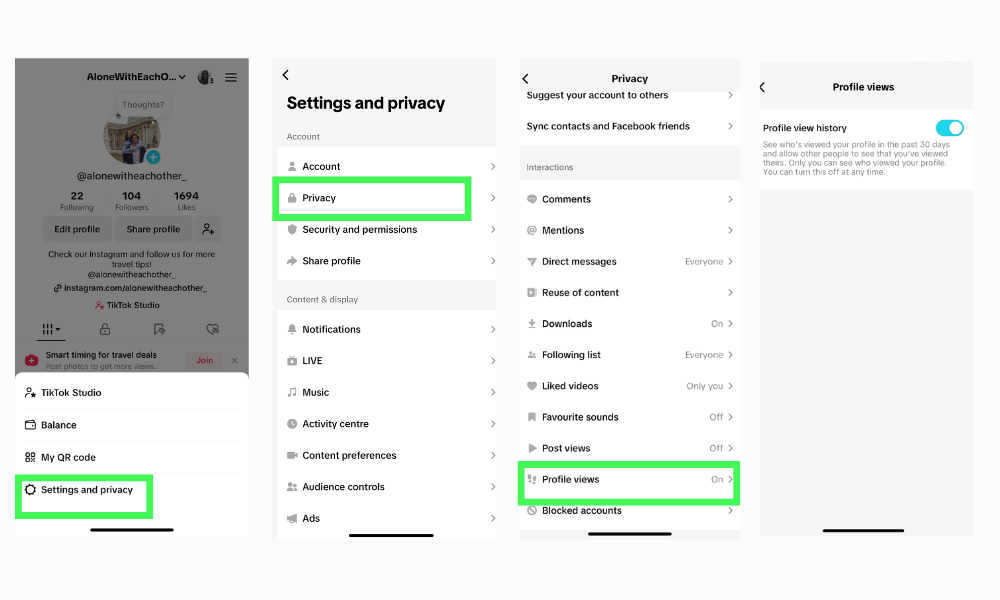
- Accessing Settings:
- Open the TikTok app and tap your profile icon at the bottom right.
- Tap the three-line menu (hamburger icon) at the top right to access “Settings and Privacy.”
- Navigating to Privacy Settings:
- Select “Privacy” from the menu.
- Scroll down to find “Profile Views.”
- Toggling Profile View History:
- Tap on “Profile Views.”
- Toggle the “Profile View History” setting on or off according to your preference.
It’s important to note that enabling this feature allows others with the settings turned on to see when you’ve viewed their profile. If you prefer to browse anonymously, disabling this feature is advisable.
Can People See Who Viewed Their TikTok Videos?
Currently, TikTok does not provide a feature that allows users to see who has viewed their videos. Users can access metrics such as the total number of views, likes, comments, and shares, but the identities of specific viewers remain confidential. This approach aligns with TikTok’s commitment to user privacy, ensuring that content consumption habits are not disclosed.
- View Count: You can see how often your video has been viewed.
- Engagement Metrics: Likes, comments, and shares are visible and can indicate how well your content performs.
- Creator Tools: TikTok offers advanced analytics for creators, providing insights into audience demographics and engagement patterns.
While you can’t see individual viewers, you can see the total number of people who have viewed your TikTok video. This information helps creators understand their reach without compromising viewer privacy.
How to See Who Viewed Your TikTok Videos
You must enable the Post View History feature to see who viewed your TikTok videos. This feature lets you know who viewed your videos within the last 7 days. To enable Post View History, go to your settings and toggle the switch to the right. Once you’ve enabled Post View History, you can head to your videos and check your views. Tap on the video in your profile that you want to track, and then tap the number of views in the bottom-left corner to see who has viewed that specific video.
This feature provides valuable insights into your audience, allowing you to see which TikTok users engage with your content. By understanding who views your videos, you can tailor your content to better meet your viewers’ interests and increase your engagement rates.
Can People See Who Viewed Their TikTok Stories?
Yes, TikTok allows users to see who has viewed their stories. When you post a story, you can access a list of viewers by tapping on the story and then tapping profile to select the viewer count icon. This feature provides insight into who engages with your ephemeral content, fostering a more interactive experience.
- View Count: You can see how many people viewed your story.
- Interactions: If someone comments or reacts to your story, you’ll know who they are.
- Privacy Settings: You can control who can view and interact with your stories.
This approach maintains user privacy while still providing creators with engagement insights.
Privacy Considerations:
While these features enhance user interaction, it’s essential to understand their implications:
- Mutual Visibility: Enabling “Profile View History” means that while you can see who views your profile, others can also know when you view theirs. Similarly, enabling post views allows you to track who has viewed your videos, but it also means others can see when you view their posts.
- Age and Follower Restrictions: The “Profile View History” feature is limited to users aged 16 and above with fewer than 5,000 followers, aiming to protect younger users and those with a large audience.
- Anonymous Browsing: If you prefer anonymity while exploring content, consider keeping particular view history features disabled.
Controlling Who Sees Your TikTok Account
TikTok allows users to control who can see their account and content. Users can make their accounts private to prevent non-followers from viewing their videos. Private accounts allow users to approve or reject follow-up requests and control who can message them. Additionally, users can block specific users to prevent them from viewing their content.
To make your account private, navigate to “Settings and Privacy,” select “Privacy,” and toggle the “Private Account” option. Only approved followers can see your videos and interact with your content. To block a specific user, go to their profile, tap the three dots (or the “More” option), and select “Block.” This will prevent the user from finding your profile, viewing your content, or interacting with you.
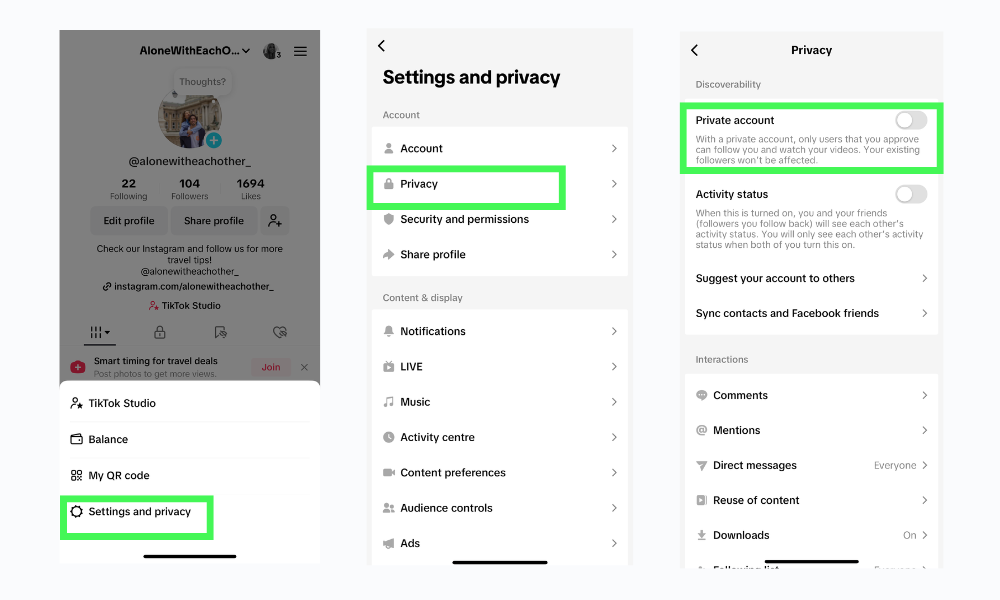
By utilizing these privacy settings, you can enjoy a more secure and personalized TikTok experience, ensuring that your content is only seen by those you trust.
Video Analytics for Creators
While you can’t see who specifically viewed your TikTok videos or profile, the app does provide some built-in analytics to help you track your content’s overall performance. Here’s how to access TikTok’s analytics:
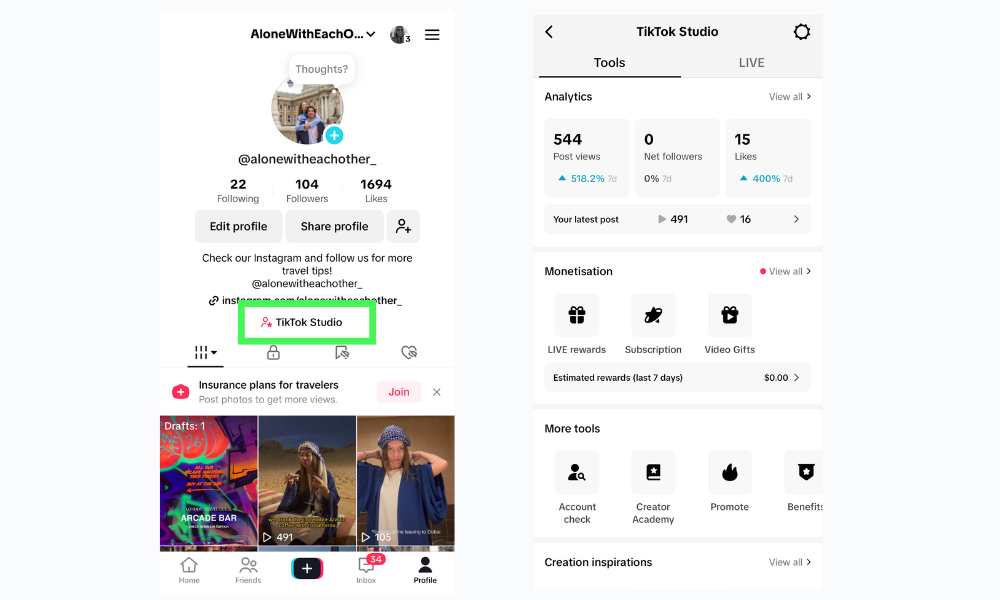
- Open the TikTok app and go to your profile
- Tap the three-line menu icon in the top right
- Select “TikTok Studio”
- Tap “Analytics”
TikTok’s analytics dashboard shows metrics like:
- Audience Demographics: Age range, gender, and location of your viewers.
- Traffic Sources: Where your views come from (For You page, hashtags, etc.).
- Engagement Rates: How viewers interact with your content (total video views, profile views, new followers gained)
You can view analytics for your overall account or examine individual video performance. To adjust video visibility settings, navigate to the posting page during the video posting process and select who can view your videos. Pay attention to metrics like views, shares, and comments, and watch time to see what content resonates best with your audience. These insights help creators tailor their content without knowing individual viewer identities.
If you’re looking to boost engagement and optimize your content for more likes, this guide on making viral TikTok videos provides valuable strategies for success.
Third-Party TikTok Analytics Tools
While TikTok does not provide data on individual video viewers, several third-party analytics platforms have emerged to help creators gain deeper insights into their audience and content performance. These tools can give view counts, viewer demographics, geographic data, and other valuable metrics.
One of the most popular third-party analytics tools for TikTok is Analytic.io. This platform integrates directly with your TikTok account and provides detailed audience insights, including estimated viewer locations, age ranges, and gender breakdowns. However, it cannot show data on specific individuals who viewed your content.
Another option is Pentor.io, which offers real-time TikTok analytics tracking. In addition to overall video view counts, it provides data on viewer attention span, peak viewing times, and content engagement rates. This can help optimize your posting strategy, but individual viewer details are unavailable.
For advanced analytics needs, services like Influencer Marketing Hub and Grin can be helpful for TikTok influencers and marketing campaigns. These platforms track campaign performance and viewer demographics and even allow the whitelisting of specific viewer profiles for analysis. However, they are typically more expensive solutions for professional influencer marketing.
It’s important to note that while these third-party tools can provide valuable aggregate data, TikTok’s terms of service prohibit developers from collecting or sharing personally identifiable viewer information.
Related: How to hide chat on TikTok live
Managing Your TikTok Privacy Settings:
To ensure your TikTok experience aligns with your privacy preferences, regularly review and adjust your settings:
- Profile Visibility: To control who can follow you and view your content, set your account to private. Navigate to “Settings and Privacy” > “Privacy” > toggle the “Private Account” option.
- Story Audience: Before posting a story, select the audience (e.g., friends, followers) to control who can view it.
- Comment and Message Controls: Under the “Privacy” section, you can modify the settings to control who can comment on your videos and send direct messages.
- Manage Notifications: Control what type of notifications you receive.
- Regular Privacy Check-ups: Periodically review and update your privacy settings.
- Be Mindful of Sharing: Think twice before sharing personal information in videos or comments.
Utilizing these features allows you to enjoy TikTok while maintaining your desired level of privacy.
Conclusion
While TikTok previously allowed users to see who viewed their videos, this feature is no longer available for standard posts. However, if you have TikTok Profile View History enabled, you can see who visited your profile in the last 30 days. Additionally, TikTok Stories provide insights into who has viewed them, making tracking engagement on temporary content easier.
As TikTok continues to evolve, privacy settings and visibility options may change. If tracking your audience is crucial, leveraging TikTok’s analytics tools and engagement metrics can help you understand your reach without directly seeing who viewed your videos.
If you’re looking to boost your reach BuzzVoice can help with followers, likes, and views, paired with strong Live moderation, your TikTok presence is primed for success.
Frequently Asked Questions:
Can someone check whether I viewed their TikTok profile and whether I have “Profile View History” turned off?
No, if you have the “Profile View History” feature disabled, your visits to other profiles will remain completely private. TikTok only tracks and displays profile visits when both parties enable this feature. If it’s turned off on your account, you can freely browse other users’ profiles without them being notified.
Will I be notified if someone views my TikTok profile?
You will only receive a notification if you and the visitor have “Profile View History” enabled. This means that profile visits are only visible on a mutual basis. If the visitor has the feature disabled, their visit won’t be recorded, and you won’t receive any notification. The Profile View History section lists users who have viewed your profile in the past 30 days but does not provide real-time notifications.
Can I see who viewed my TikTok video if they liked or commented on it?
TikTok does not provide a direct way to see a complete list of users who have watched your videos. However, their interaction will be visible if someone engages with your content by liking, commenting, or sharing the video. This means that while you can’t see passive viewers, you can identify those who have actively interacted with your post.
Is there a way to view TikTok stories anonymously?
Currently, TikTok does not offer an official feature that allows users to view stories without appearing in the viewer list. Whenever you watch someone’s TikTok story, your username will be visible to the creator in the list of viewers. If you’re looking for a workaround, some users try viewing stories using alternate accounts, but this is not a built-in platform feature.
How can I prevent specific users from viewing my TikTok content?
If you want to stop a specific user from viewing your TikTok profile, videos, or stories, you can block them. To do this, go to the user’s profile, tap the three dots (or the “More” option), and select “Block.” Once blocked, users can no longer find your profile, see your content, or interact with you. Additionally, if you want more control over your audience, you can adjust your privacy settings by making your account private, which limits your content to approved followers only.

BuzzVoice
BuzzVoice is the best place to go when you need instant engagement services on social media. Offering a wide variety of packages for Instagram, Youtube, Facebook, Twitter, Soundcloud & Tiktok.