How to Change X (Twitter) Username (Step-by-Step)
Ready to change your Twitter handle at any time? The platform provides a process that takes only a few minutes.
Whether you’re rebranding your personal profile, aligning your account with a business, or just want something more memorable, the process is straightforward. A username change is often part of a broader rebranding effort and is important for maintaining brand consistency across all platforms.
This guide walks you through everything you need to know: how to change your username on desktop and mobile, important tips before switching, and what happens afterward. A Twitter handle is not permanent; you can update it whenever you need, as long as the new handle meets Twitter’s guidelines.
If you’re serious about growing your reach and monetizing effectively, BuzzVoice can help you boost your Twitter followers, stay ahead of trends and grow your Twitter likes and retweets.
Can You Change Your Twitter Username?
Yes, unlike some social platforms, Twitter/X lets you update your username anytime.
You can change it directly in your account settings.
It works on both desktop devices and mobile devices (iOS and Android).
Your followers and content stay intact, but there are some things to keep in mind, which we’ll cover below.
To change your username, you must be logged in to your account, so make sure you are logging in properly and remain logged in during the process.
No two accounts can have the same Twitter handle or the same username. Your Twitter handle is not permanent and can be changed at any time.
Related: How to make money on Twitter
How to Change Your Twitter Username on Desktop
Changing your handle on a computer is straightforward. Just follow these steps:
Log in to your X/Twitter account.
Click on the three dots (bottom-left corner on the left side of the screen).
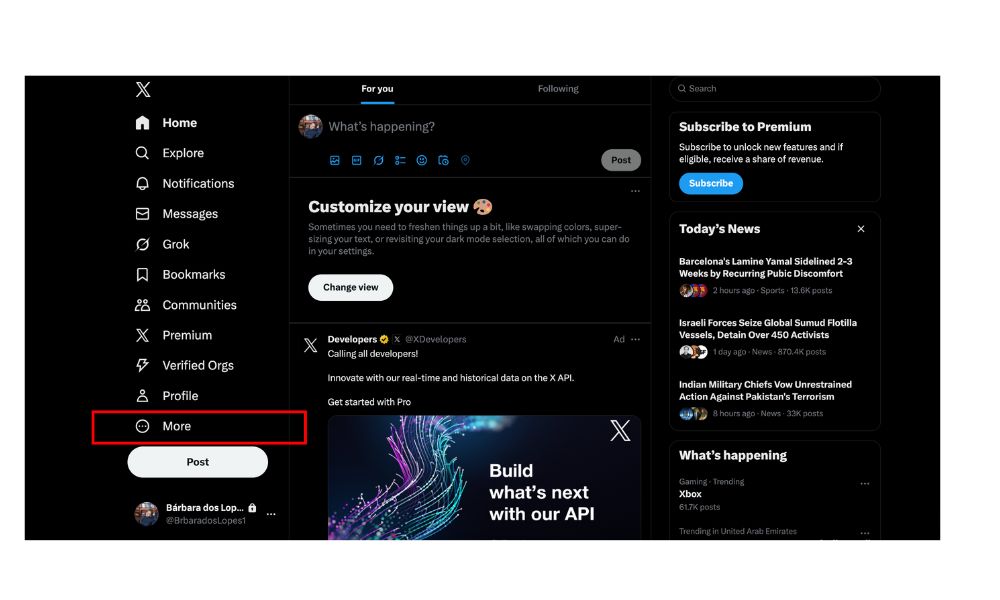
Select Settings and privacy.
Go to Your account → Account information. (You may be asked to enter your password.)
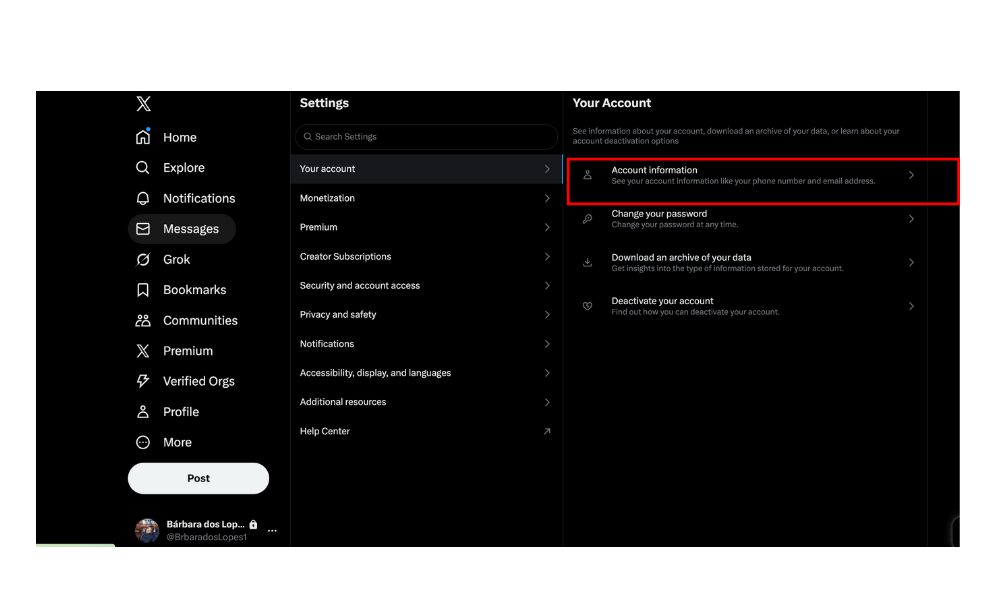
Click Username to access the username field, where you can view your current username (current Twitter handle) or enter a new one.
Type in your new username in the username field (Twitter will show if it’s available). If the new username is available, a green checkmark will appear next to the username field.
Click the Save button to confirm your new username.
Pro tip: Twitter usernames must follow character limits: your handle must be between 4–15 characters long. Usernames can include only letters, numbers, and underscores; special characters are not allowed. Avoid using special characters to keep your handle professional and easy to remember.
Related: How Much Does Twitter (X) Pay? A Guide to Earnings
How to Change Your Twitter Username on Mobile (iOS/Android)
If you’re using the app on a mobile device, the steps are nearly identical:
Open the Twitter app on your phone.
Tap your profile icon in the top left corner.
Select Settings and privacy.
Tap Your account → Account information → Username.
Enter your desired username.
Tap Done (iOS) or Save (Android) to set your new username.
Now your handle is instantly updated across the app. Your Twitter profile and profile page are instantly updated once you set your new username.
Related: X (Twitter) Post Image Size Guide
Twitter Username and SEO
Your Twitter username plays a significant role in your online visibility and search engine optimization (SEO). Choosing a Twitter username that includes relevant keywords related to your niche or industry can help your Twitter account appear higher in search results, both on Twitter and in external search engines. A descriptive and concise username makes it easier for users to find your account and understand what you or your brand represent.
Consistency is also important; using the same Twitter handle across all your social media platforms can improve your overall SEO and make your brand easier to locate online. By thoughtfully selecting a Twitter username that incorporates relevant keywords, you can enhance your brand’s online presence, attract more followers, and drive greater engagement on Twitter and beyond.
And with tools like BuzzVoice, you can supercharge your reach, grow your influence faster, and tap into monetization opportunities that most users miss.
Tips Before Changing Your Twitter Username
While changing your username is quick, here are some best practices to keep your brand and engagement safe:
Notify your followers: Consider posting a tweet to explain your new username so people can still recognize you.
Check availability first: Always verify the availability of your desired handle and desired Twitter handle before making changes. If your preferred handle is already taken, consider reaching out to the current user directly to request permission or negotiate for the handle. If that’s not possible, you may need to adjust it with underscores or numbers.
Review Twitter’s rules: Before changing your username, review Twitter’s rules regarding usernames, including character limits, allowed characters, and restrictions, to ensure your new handle is compliant.
Address impostors: If you find someone using a similar handle to impersonate your brand, address impostors by reporting them to Twitter to protect your business identity.
Avoid frequent changes: Constantly switching usernames can confuse your audience and hurt brand recognition.
Update links elsewhere: If your Twitter handle is in your email signature, website, or other socials, update it right away. Also, consider whether to keep the same display name for consistency across your profiles. Maintaining brand consistency and improving brand recall is especially important if your business is targeting new target markets or has undergone changes in corporate structure.
Note: As businesses evolve, rebranding may require updating your handle to reflect new directions, missions, or audiences.
Related: Best Time to Post on X (Twitter) in 2026
What Happens After You Change Your Username?
Here’s what you can expect after making the switch:
Followers stay the same: You won’t lose your audience, and you can change your handle within the same account without losing followers or content.
Tweets and DMs remain intact: All your past activity, including tweets and direct messages, stays connected to your new username.
Old mentions won’t redirect: If someone tagged your old username in a tweet, those mentions won’t point to your new account. People mention your new handle in tweets and direct messages after the change.
Old handle becomes available: Once you switch, your old username is freed up and could be taken by someone else.
After changing your username, consider updating your profile photo to help your followers recognize your account and verify your authenticity.
Now your handle is instantly updated across the app. Your new handle appears on your profile and is how people mention you in tweets and direct messages. Your x username is now your unique identifier for mentions and account management.
To help your engagement with the new handle, visit BuzzVoice services as Twitter followers, retweets, and likes.
Promoting Your New Handle
Once you’ve changed your Twitter username, it’s important to let your existing followers and wider audience know about your new handle. After updating your username, consider updating your Twitter display name to match your new branding and enhance your online presence.
Start by tweeting about your new username so your followers are aware of the change and can continue to mention or tag you correctly. Update your account information on other social media platforms, your website, and your email signature to reflect your new Twitter handle.
When updating your profile, take the opportunity to customize your Twitter display for a more engaging and brand-consistent profile. This helps maintain consistency and ensures that anyone looking for you can find your profile without confusion. Using relevant keywords in your tweets and profile can also improve your discoverability and help attract new followers.
By actively promoting your new handle, you’ll maintain engagement, strengthen your online presence, and make your transition to a new username seamless for your audience. Check BuzzVoice services for more likes and retweets to grow your account!
Conclusion
Changing your Twitter username in 2026 is quick and straightforward, whether you’re on desktop or mobile. It’s a great way to refresh your brand identity, simplify your handle, or create something more professional.
Just remember: your content and followers will stay with you, but old mentions won’t update, and your old username may be claimed by someone else. To minimize confusion, always notify your audience and update your links.
A smartly chosen username helps keep your Twitter/X profile professional, recognizable, and engaging. Choosing an intuitive handle strengthens your Twitter identity and makes your presence more memorable and user-friendly.
Frequently Asked Questions (FAQs)
Can I change my Twitter username without losing followers?
Yes. When you change your username, you are still using the same account, so your followers, tweets, and messages remain intact.
Is there a limit to how many times I can change it?
No official limit exists. However, frequent changes can confuse followers and weaken your online identity.
What’s the difference between a display name and a username?
Username (@handle): Your unique account identifier (e.g., @buzzvoice).
Display name: The bold name on your profile, which can include spaces, emojis, or longer text.

BuzzVoice
BuzzVoice is the best place to go when you need instant engagement services on social media. Offering a wide variety of packages for Instagram, Youtube, Facebook, Twitter, Soundcloud & Tiktok.