How To Download Songs On SoundCloud?
SoundCloud is a top choice for finding new music. But, how do you download SoundCloud tracks for offline listening? This guide will show you all the ways to save tracks for later. Whether you’re on the move, traveling, or listening without Wi-Fi, learning to download from SoundCloud is key.
We’ll look at safe and legal methods to keep your favorite songs ready anytime. From official tools to third-party options, we’ve got you covered.
In case you are thinking of growing your SoundCloud account, you must invest in engagement services, such as followers, downloads, and reposts.
What is SoundCloud and Why It’s Popular
SoundCloud is a digital platform where creators and fans meet through audio. It started in 2008 and lets users upload, share, and find music, podcasts, and spoken word. The SoundCloud login system makes it easy to save favorites and follow artists. Here’s why it’s special:
SoundCloud’s Unique Features
Timestamp Comments: Listeners can tag exact moments in tracks to give feedback.
Direct Artist Interaction: Fans can message creators directly through profiles.
Endless Discovery: The “Explore” tab uses algorithms to find new genres and artists.
Types of Content Available on SoundCloud
Content-Type |
Examples |
|---|---|
|
Music |
Unsigned artists, remixes, and niche genres |
|
Podcasts |
Interviews, storytelling, and educational talks |
|
Audio Art |
Experimental sounds, ambient tracks, and soundscapes |
Official Ways to Download Songs on SoundCloud
SoundCloud makes it easy to download a SoundCloud track legally. You can save tracks offline and support creators and the platform’s rules.
First, try the SoundCloud Go+ subscription. It costs $9.99/month and lets you download unlimited tracks. Here’s how it works:
Open the SoundCloud website or app and find the track you want.
Click the three-dot menu next to the track title.
Select “Download” to save it to your device.
Additionally, you can use browser extensions or online web apps to download SoundCloud tracks by adding a download button to the platform or converting tracks to MP3 format by pasting the URL.
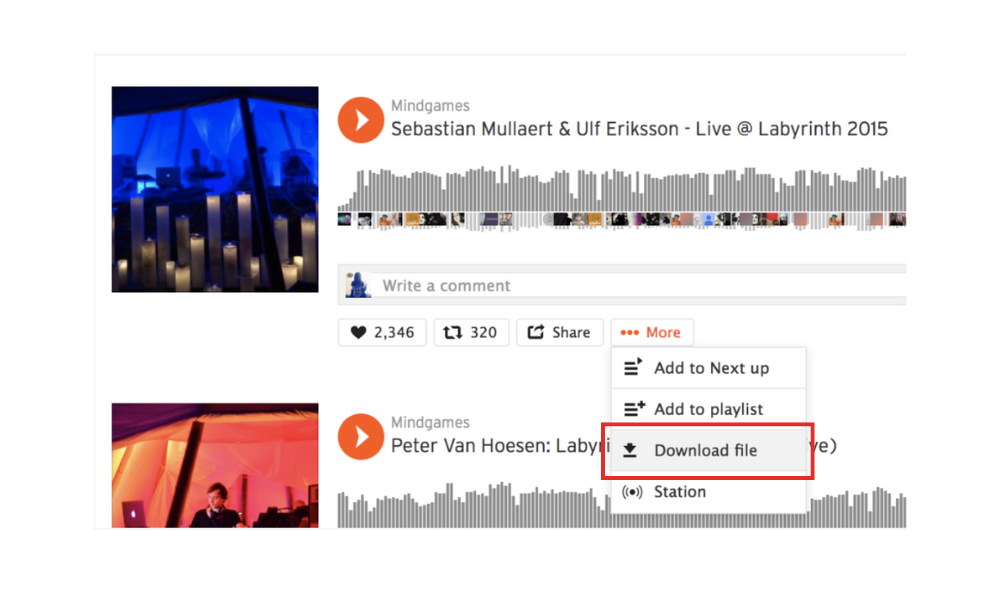
Some artists have download buttons on their tracks. Look for the downward arrow icon. Tapping it lets you save the file without a subscription.
To find downloadable tracks easily:
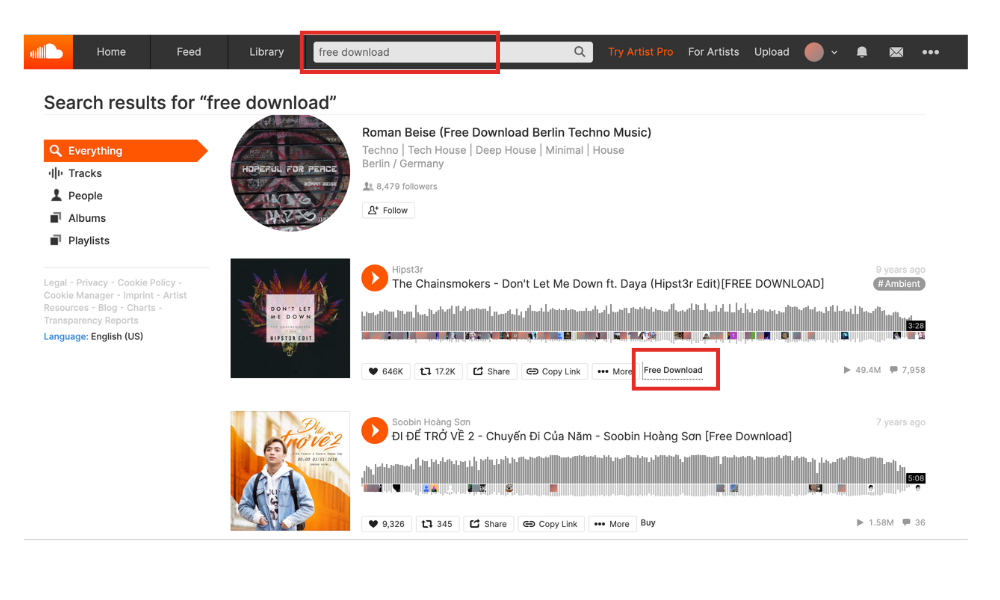
Search using terms like “free download” or “offline ready.”
Check descriptions or comments for links to download options.
Focus on independent artists who often offer this perk to fans.
These steps make it simple how to download SoundCloud songs legally. Always check permissions before saving tracks to follow SoundCloud’s rules.
How to Download from SoundCloud Using the Mobile App
Learning to download tracks on the mobile app is easy. It lets you listen offline. Here’s a guide for Android and iOS users.
Steps for Android Devices
Open the app and tap a SoundCloud song or playlist you want to download, including entire SoundCloud playlists.
Tap the ••• menu icon next to the play button.
Select Download and check storage space. Tracks appear in the Downloads section.
Steps for iOS Devices
Ensure you’re on a free track or a premium subscriber’s content.
Open the track and tap the ••• menu.
Select Download. Files are saved to the app’s library under Downloads
Best SoundCloud Downloader Tools in 2023
Looking for SoundCloud downloader options? You might pick browser add-ons, apps, or web tools. Each has its benefits but also has downsides like privacy and legal issues.
Browser Extensions for SoundCloud Downloads
Extensions like Soundiiz and ClipGrab make downloading easy. They add buttons to SoundCloud. But, they might not work on all browsers and could share your data. These extensions often integrate with SoundCloud CDN networks, ensuring high-speed and secure downloads directly from the source.
Pros: Easy access, lightweight.
Cons: Limited to supported browsers, privacy risks.
Standalone Apps for Downloading SoundCloud Music
Apps like 4K Download Manager and Free Download Manager offer cool features like batch downloads. They need to be installed but work offline. Always check their security ratings. After using these apps, you can access and store the downloaded file in your designated download folder, making it easy to retrieve your music files.
Online SoundCloud Converter Services
Websites like OnlineAudioConverter let you convert tracks easily. They’re handy but might store your files on their servers, which could be a security risk. Decide based on what you need—convenience, privacy, or flexibility. Always use tools ethically and follow copyright laws.
How to Download Music from SoundCloud Without a Premium Account
Free users can still download tracks from SoundCloud. This is possible if artists have made them available for download. Here’s how:
Search for tracks with the Download Available icon (a downward arrow) next to the play button.
Click Download to save the file to your device. This works only for content creators who allow it.
Always check the track description—artists may specify terms for use. Never use third-party tools to bypass these settings, as this violates SoundCloud’s terms of service:
“Downloading content without explicit permission from creators or SoundCloud is prohibited.” — SoundCloud Community Guidelines
|
Free Account Permissions |
Premium Account Benefits |
|---|---|
Download selected tracks with the artist’s permission |
Unlimited downloads + offline listening |
|
No access to Go+ exclusive features |
Ad-free streaming + HD audio |
For tracks without the download option, consider these ethical alternatives:
Use SoundCloud’s “Add to Library” feature for offline streaming (temporarily caches audio)
Support artists by purchasing official releases through linked platforms
Is Downloading Songs from SoundCloud Legal?
SoundCloud’s terms of service are clear: unauthorized SoundCloud download methods are against their rules. Artists decide if you can download their songs. Always check the track description first.
Legal downloads need artist consent and follow how to download from soundcloud rules.
Tools or sites not approved by creators can lead to legal trouble.
Supporting artists means respecting their rights. Many depend on streaming royalties.
|
Allowed |
Unauthorized |
|---|---|
The official “Download” button is visible |
Using unofficial software |
The artist grants permission in the description |
Bypassing platform restrictions |
|
Personal use only |
Sharing downloaded files |
Tips for Managing Your Downloaded SoundCloud Library
After downloading songs on SoundCloud, it’s important to keep your collection organized. You can use smart strategies to do this. Whether you’ve saved tracks for offline listening or have a growing library, these tips will help you stay organized without any technical issues.
Regularly check your download history within your browser to easily manage and locate your downloaded songs.
Organizing Your Music Files
Begin by setting up a logical folder structure. Use categories like Genres, Artists, or Mood Playlists. Name your files clearly with the artist and song title to avoid confusion. Tools like MusicBee or MediaMonkey can add searchable metadata to your files.
Example folder: “SoundCloud Downloads/Jazz/John Coltrane – My Favorite Things.mp3”
Use consistent naming formats: “Artist – Song Name – Year”
Backing Up Your Downloaded Tracks
It’s crucial to back up your collection regularly. Here’s a quick checklist:
Upload files to cloud storage (e.g., Google Drive or iCloud)
Store copies on external drives for physical redundancy
Enable auto-backup tools like Backblaze for real-time protection
Transferring to Different Devices
Sync your tracks across devices using these methods:
|
Device |
Transfer Method |
|---|---|
|
Smartphones |
Cloud sync via Google Drive or USB cables |
|
Tablets |
Wireless apps like Send Anywhere |
|
Computers |
Network drives or file-sharing platforms |
|
MP3 Players |
SD cards or dedicated music apps |
Always check that your file formats (e.g., MP3/WAV) are compatible with your device.
Common Problems When Downloading SoundCloud Songs and How to Fix Them
Having trouble with how to download from SoundCloud? Here are some quick fixes:
Download fails or stops midway: Close other apps to free up bandwidth. It might be an internet access problem so try again with a stable Wi-Fi or mobile data connection.
Corrupted files: Delete the incomplete file and redownload. Make sure the track’s link is still good. Use a reliable SoundCloud downloader tool like Soundiiz or TuneFab.
Tracks suddenly unavailable: Some tracks get removed due to copyright. Look for the artist’s official profile or try similar tracks.
Region restrictions: Check if the track is available in your country. Use a VPN only if it’s legal in your area.
Mobile app issues? Clear the app cache via device settings. Update the app to the latest version from the app store. For SoundCloud downloader tools that stop working, check for updates or switch to alternatives like 4K Download or Cloudrip. Always verify third-party tool compatibility with SoundCloud’s latest policies.
If these steps don’t help, contact SoundCloud support via their website. Mention any error codes or specific issues for faster assistance.
Conclusion
Downloading songs on SoundCloud lets you enjoy music without the internet. You can use the app’s download button or premium plans. These options help creators get the credit they deserve.
Logging into your SoundCloud account lets you find new music legally. This way, you support artists and get to enjoy the latest songs. SoundCloud and other platforms work hard to meet your needs. They do this while making sure artists are fairly paid. By using legal ways to listen offline, you help keep the music scene alive.
FAQ
How can I download songs on SoundCloud?
You can download songs on SoundCloud by using the official download option. This is available when artists enable it. You can also get a SoundCloud Go+ subscription for offline listening in the app. Some tracks have a download button, thanks to the artists.
What is SoundCloud?
SoundCloud is a music streaming platform. It lets artists upload, share, and promote their music. It has a wide range of content, including tracks, podcasts, and DJ mixes.
Is downloading songs from SoundCloud legal?
Downloading songs from SoundCloud is legal if the artist has enabled the download option. Always follow SoundCloud’s copyright and terms of service.
How do I download SoundCloud songs without using a premium account?
You can download tracks for free if artists have made them available. Look for tracks with a download button. Supporting artists in other ways, like streaming their music, is also important.
What are some popular tools to download songs from SoundCloud?
Popular tools include browser extensions and standalone apps for music downloading. Online converter services are also popular. Choose reputable options to stay safe and legal.
How can I troubleshoot issues when downloading from SoundCloud?
First, check your internet connection if you have download issues. If it fails, try clearing your browser’s cache or restarting the app. Make sure the track is still available for download and check for app updates.
Can I convert SoundCloud tracks to MP3 format?
Yes, you can convert tracks to MP3 format using desktop apps or online services. Just make sure the content is yours or has been made available for use by the artist.
What are the differences between SoundCloud and other streaming platforms?
SoundCloud focuses on independent musicians and has a comment system for community interaction. Other platforms like Spotify and Apple Music offer curated playlists and mainstream content.

BuzzVoice
BuzzVoice is the best place to go when you need instant engagement services on social media. Offering a wide variety of packages for Instagram, Youtube, Facebook, Twitter, Soundcloud & Tiktok.