
How to Reactivate Your Instagram Account in 4-Steps
In 2026, it is normal to want to return to social media after taking a break from it. Many users decide to temporarily disable their Instagram accounts for a variety of reasons, such as mental health, digital detoxification, or just to avoid distractions. However, what occurs when you are prepared to go back and get back in touch? Do you have to create a new account? Or can you reactivate your Instagram account?
Fortunately, if you know what to do, Instagram makes restoring your profile fairly easy. We will show you how to quickly reactivate your Instagram account in this guide.
Once you return to Instagram, if you need a little boost to increase your Instagram engagement, think about using BuzzVoice’s services for Instagram followers, likes, views, and comments to help you grow even more.
How to Reactivate Instagram Account: Can You Reactivate a Deactivated One?
You may be wondering now if you can ever get back into the app after choosing to deactivate your account temporarily and come back. The answer depends on whether your account was deactivated or deleted.
Deactivated vs Deleted
Deactivated (Temporary): This means you disabled your account manually. While not deleted, your profile, images, comments, and likes are hidden. However, prolonged deactivation can lead to account deletion, so avoid leaving your account deactivated for too long. Additionally, users can only deactivate their accounts once a week.
Deleted (Permanent): It’s not possible to recover an account that you or Instagram has deleted. You will need to create a new profile and username from scratch. (To avoid cookie history, try not to use the same username and password as the previous account.)
Reactivation Timeframe and Eligibility
Usually, you can reactivate your account on Instagram at least 24 hours after deactivating. This delay helps prevent spammy behavior or frequent toggling.
To reactivate your Instagram account, make sure:
Your login credentials are correct.
You haven’t violated community guidelines severely, which can lead to permanent disabling
You’re using the latest version of the app
Once reactivated, you can continue using your account normally.
When Reactivation Might Not Work
Even if the account was only disabled, there are still some circumstances in which you are unable to access Instagram:
You try to log in too many times, and all the attempts failed
Your account was suspended or reported.
Instagram marked the account as inactive because you waited too long.
In such cases, you’ll need to go through extra recovery steps. In most cases, it is still possible to recover a deactivated Instagram account, so do not worry.
Steps to Reactivate Your Instagram Account
Ready to get back on Instagram? Reactivating an Instagram account typically takes less than a minute. Just follow these simple steps to regain access to your account.
Buzz Voice can help you with Instagram followers, likes, views, and comments if you are serious about keeping a vibrant, involved audience after you return.
Open the Instagram App
Sign in to your account
Follow Any On-Screen Prompts
Your account should be restored right away
What to Do If You Can’t Reactivate Your Account
Tried logging in but still locked out? If you are unable to log in using the standard method, there are several ways to troubleshoot and recover a deactivated Instagram account. Here’s what to try next:
If these methods fail, it is important to contact Instagram support for assistance.
1. Reset Your Password
Tap “Forgot password?” on the login screen if you have forgotten your password
Choose the method to receive the reset link
Follow the instructions and create a new password
Try logging in again
2. Check for Account Suspension or Ban
Instagram may have temporarily deactivated or permanently disabled your account for violating its Community Guidelines or Terms of Use. Signs include:
A message saying your account has been disabled
Unable to find your profile or change the password
Try using the Instagram website or logging in from a different device to confirm. Usually, you will get a specific notice if you are banned.
Additionally, check your personal details in the Accounts Center to confirm your account status.
3. Appeal a Disabled Instagram Account
If your account was mistakenly disabled or flagged, you can file an appeal:
Go to the Instagram Help Center
Go to “My Instagram account was deactivated.”
Complete the appeal form and submit any required identification.
Instagram manually evaluates appeals, and reaction times may differ. When making a request, be precise, courteous, and explicit. Due to the high volume of support requests, users may need to be patient for a response from Instagram after submitting an appeal.
4. Contact Instagram Support
Still unable to move? Getting in touch with Instagram directly might be your best option:
Open the app (if possible), go to Settings → Help → Report a Problem
If you can’t access the app, visit the Instagram Help Center via browser
Choose the appropriate topic (e.g., “Login Issues” or “Disabled Account”)
Support may take several days to respond, but this route is essential if other methods fail.
Make sure your login information matches exactly when attempting to activate an Instagram account on a new phone or device, and delete any cookies or cache from earlier attempts.
Reactivating on iPhone vs Android
There is not much of a difference between reactivating Instagram on an Android device and an iPhone. Though there are a few minor considerations, the procedure is essentially the same on all platforms.
However, for certain recovery processes, such as filling out an appeal form for account deactivation, it is necessary to use a desktop or laptop from a home Wi-Fi IP to ensure a proper response from Instagram.
Interface Consistency
Instagram’s iOS and Android apps are made to look and work similarly. Logging into a disabled Instagram account is the same process on both Samsung and iPhone devices.
Additionally, users may need to submit a video for identity verification when contacting Instagram support.
App Store Updates
One key difference: update availability. Updates for the Instagram app occasionally appear on one platform a little earlier than the other. Check for updates before attempting to restore your account.
Reactivating an Instagram account may be hampered by using an out-of-date version of the app. Verify the app version to ensure it is up-to-date before attempting reactivation.
Device Sync Issues
If you use multiple devices, be cautious. Temporary caching problems or sync mistakes may result from back-and-forth switching. To prevent issues:
Open Instagram on the device you last used to log in.
Clear cache/data if you’ve switched phones recently
Ensure your device’s clock and region settings are accurate
Keep in mind potential sync issues when using multiple devices.
Tips to Avoid Deactivation Issues in the Future
Avoid Violating Instagram’s Terms
Repeatedly posting content that goes against Instagram’s guidelines can lead to temporary or even permanent bans. One way to avoid losing your profile again is to stick to the rules.
Keep Login Credentials Secure
Many people are unable to access Instagram because they were hacked or simply forgot their login. Use a strong password and refrain from disclosing your information to third parties or other apps.
Securing your login credentials is crucial to avoid the hassle of having to create a new account if you lose access.
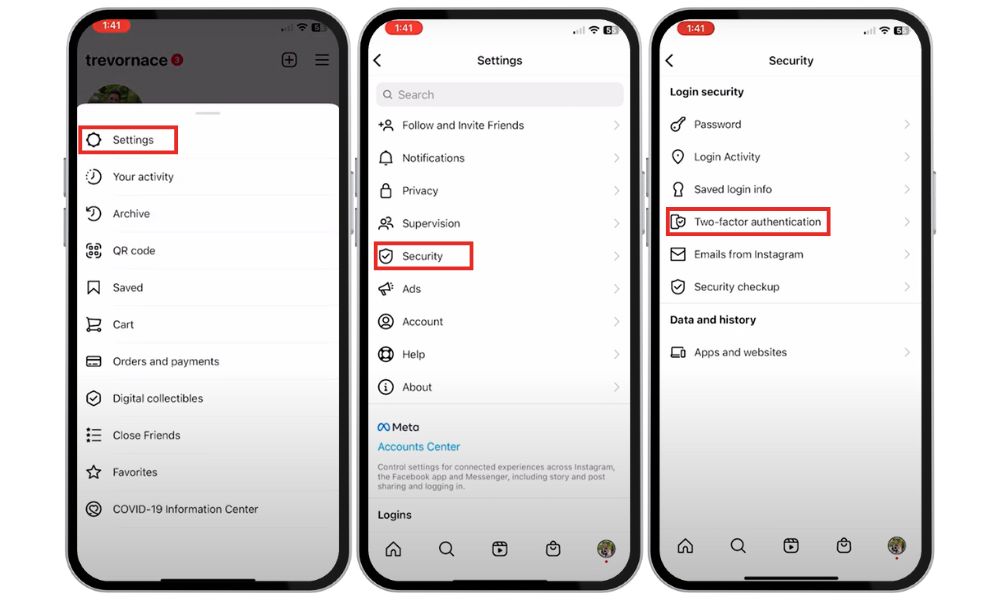
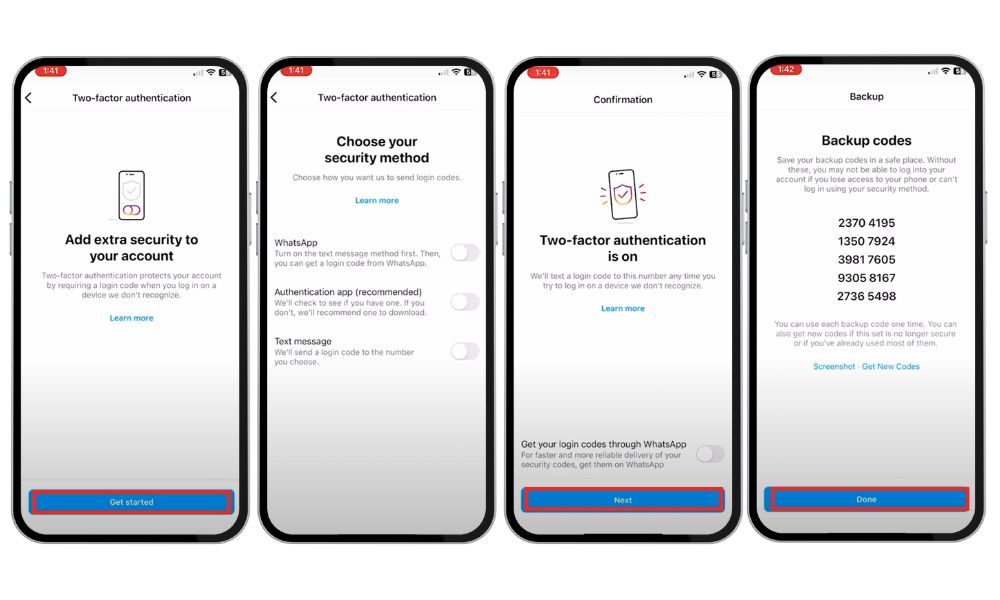
Turn On 2FA (Two-Factor Authentication)
Two-factor authentication provides an additional security measure that can be easily found and enabled. This stops unwanted access and aids in regaining access to an Instagram account that has been deactivated in case of problems.
Don’t Disable Repeatedly
Instagram discourages frequent deactivation and reactivation because it may cause delays in login or raise red flags. Consider turning off notifications if you need a break.
Before deactivating your account, make a note or reminder so you will remember your login credentials when it is time to return.
Avoiding frequent deactivation helps maintain a normal reactivation process.
Conclusion
Do not panic if Instagram has deactivated or disabled your account; you are not alone, and there is typically a straightforward fix. Most users can quickly reactivate Instagram by simply logging in again with the correct credentials, regardless of how many days or weeks have passed.
Due to the platform’s user-friendly design in 2026, you can frequently restore your Instagram profile in a matter of minutes. Just don’t forget to:
Keep your app updated
Avoid repeated deactivation/reactivation cycles
Follow Instagram’s terms to keep your account in good standing
Once you are back in, you do not have to start over when sharing reels, stories, and photos. After your account is reactivated, Buzz Voice’s Instagram followers, likes, views, and comments services can help increase your visibility and engagement if you want to further improve your Instagram presence.
FAQ
Can I reactivate my Instagram account after it has been deactivated?
Reactivation is typically possible 24 hours later. You might get an error if you log in too soon, so wait a day before attempting again.
After deleting my Instagram account, is it possible to reactivate it?
No, accounts that are deleted are irrevocable. You will need to make a new Instagram profile if you deleted your old one.
I forgot my password. Can I still recover my account?
Yes! To reset your password by phone, email, or username, click the “Forgot password?” link on the login screen.
After reactivating, will I lose my content or followers?
No, all of your images, videos, likes, and followers will return when you reactivate an account that has been temporarily disabled.
Can I reactivate Instagram without the app?
Yes, you can try using the website to log in, but the app might be a better option for some recovery features (like 2FA).

BuzzVoice
BuzzVoice is the best place to go when you need instant engagement services on social media. Offering a wide variety of packages for Instagram, Youtube, Facebook, Twitter, Soundcloud & Tiktok.



