
How to See Recently Viewed Reels on Instagram: Practical Guide
With Instagram Reels being one of the platform’s most addictive features, and ig reels becoming increasingly popular across social media platforms, it’s frustrating when you want to rewatch something, but can’t seem to find it again. So, how can you see Reels that were recently viewed on Instagram in 2026? The answer is both simple and slightly disappointing: there is currently no direct way or surefire way to view your recently watched Reels, but there are some workarounds.
Grow your Instagram account by buying real followers, views and likes, BuzzVoice helps creators and brands amplify their reach without cutting corners.
Can You See Recently Viewed Reels on Instagram?
As of 2026, Instagram still doesn’t offer a dedicated Reels feed watch history. While users can try to access their activity data through the Instagram website, there’s no centralized list of recently watched Reels or a view Instagram watch history feature, even on the website.
However, the activity tab and activity section within the app or website can help users review their engagement history, such as liked, saved, or viewed Reels.
Workarounds to Revisit Reels You Watched
While Instagram doesn’t have a Reels history feature yet, you can still find recently watched Reels by using workarounds:
1. Check Your Liked Reels
If you double-tapped the Reel or tapped the heart icon, you can easily find it in your Liked posts.
How to find it:
Log in to your Instagram app
Go to your Instagram account
Tap the hamburger menu (≡) in the top right corner
Navigate to Your activity > Likes
Scroll through to find Reels you’ve liked
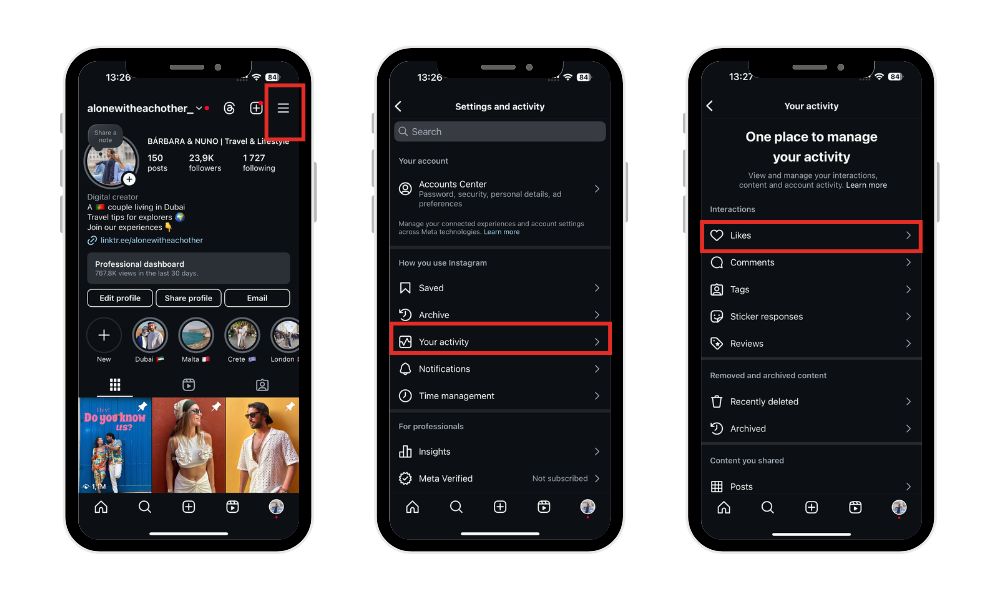
Note: In the Your activity section, you can view and manage all the posts you’ve liked or interacted with, including comments and other engagement activities.
2. Check Your Instagram Reels Watch History
If you searched for the creator or topic before watching the Reel, the profile may still appear in your search history Instagram. You can also try searching by keyword, hashtag, or account name to locate previously viewed Reels.
How to find it:
Tap the search icon (magnifying glass)
Tap the search bar to see recent activity
Look for profiles or hashtags you recently viewed
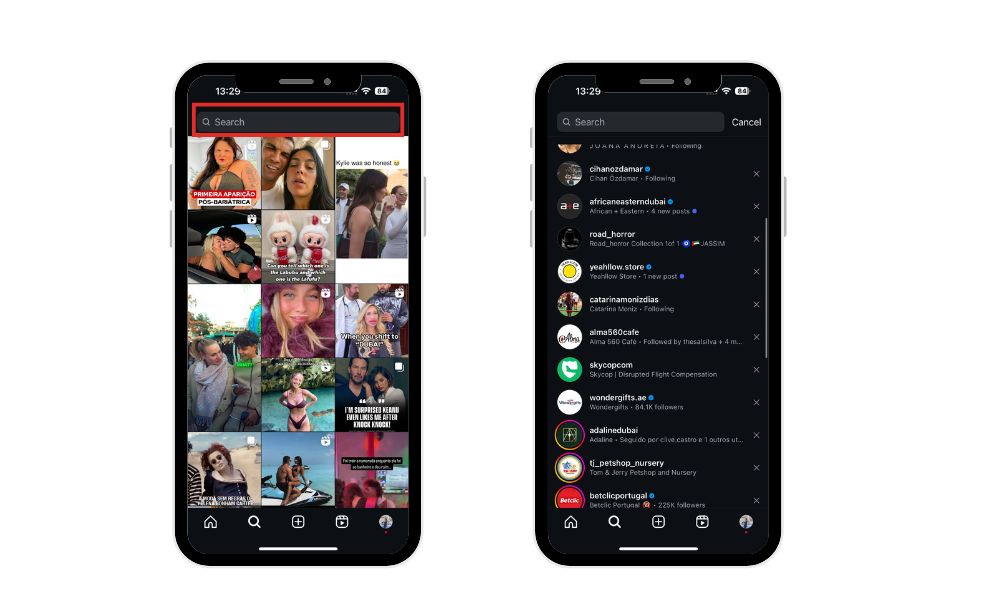
From there, you may be able to locate the Reels tab on the profile and recover the video.
3. Look at Saved Posts
If you tapped the Save icon (🔖), also known as the bookmark icon, while watching, the Reel is stored in a folder.
The save feature on Instagram allows you to bookmark Reels for future reference, making it easy to organize and retrieve your favorite content later.
How to find saved Reels:
Go to your profile page
Tap the menu (≡) > Saved
Browse your collections or saved content
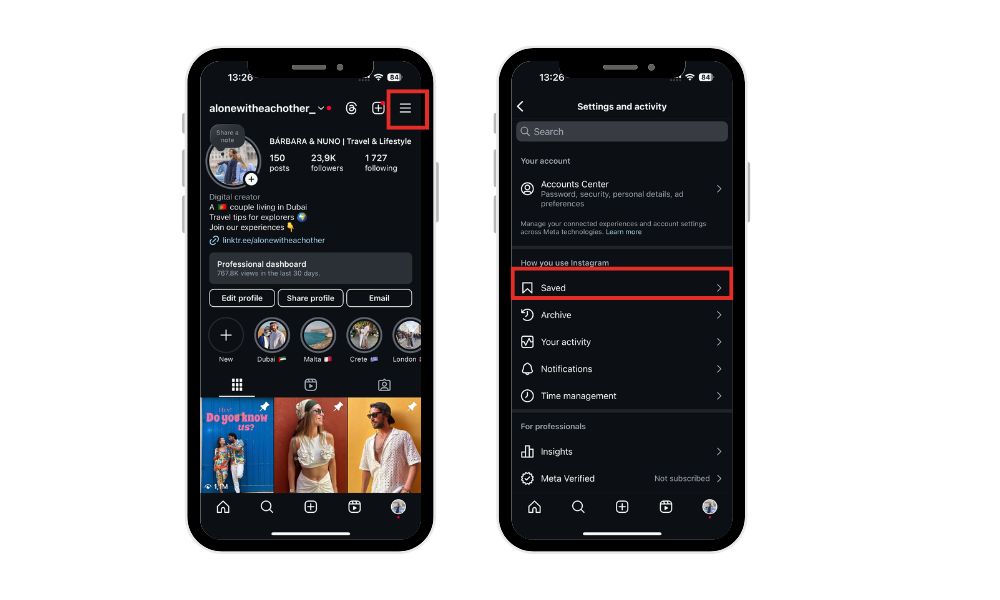
This is perfect if you regularly use Instagram as a visual inspiration board or want to recover lost Reels you planned to revisit.
4. Browse the Profile’s Reels Tab
If you remember who posted the Reel (even vaguely), you can go directly to their profile.
Tap the Reels icon/tab on their page
Scroll through to find the video you watched
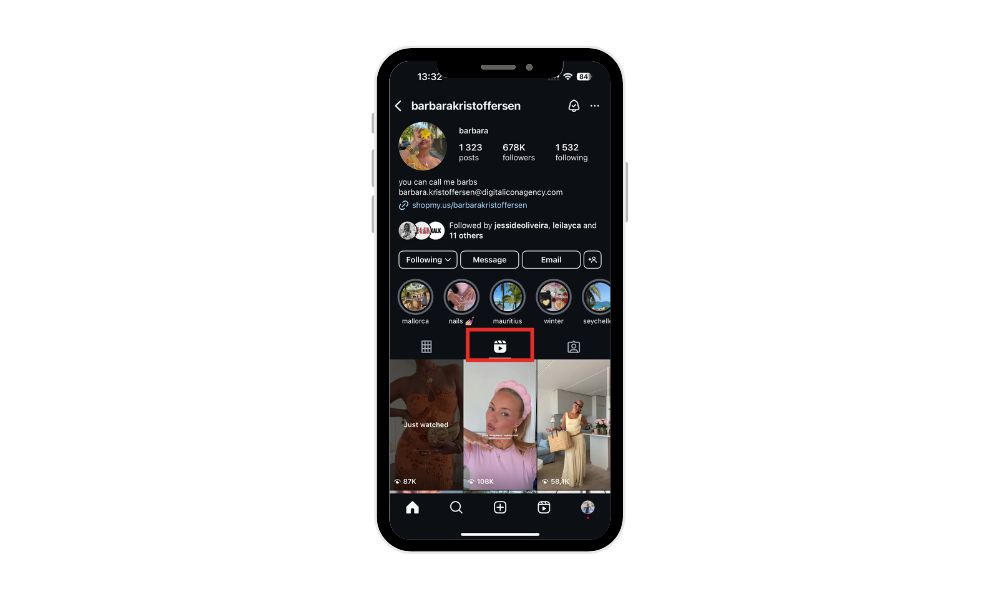
While it’s not guaranteed, this method works well if you frequently follow specific creators or brands.
BuzzVoice can help with real followers to drive higher engagement through likes and views.
Accessing Instagram Account Data to Find Reel History
While this method takes a bit more time and patience, it allows you to see a record of all the videos you’ve watched directly from Instagram’s records.
Sign in to your Instagram account on a desktop browser for the smoothest experience.
Click the (≡) in the bottom left corner of the page.
Select “Your activity” from the menu.
Click on “Download your information.”
Follow the prompts: confirm your email address, choose your preferred data format (HTML file or JSON), and enter your password.
To see your watched Reels, request your Instagram data download. After receiving the email (which can take minutes or up to 14 days), download and extract the ZIP file.
Open the “videos_watched.html” file in the “ads_and_topics” folder to view a list of videos you’ve watched, including Reels, with account names and timestamps — but no direct video links. For your own uploaded Reels, check the “reels.html” file.
Tips to Never Lose a Reel Again
Here are a few tips to keep track of the content you love:
Use the Save button
Get in the habit of saving Reels you find valuable, funny, or inspiring. They’ll be safely stored in a folder.Create a collection of favorite reels using the Save feature
Instagram allows you to organize your favorite reels by creating collections within the Saved section.Like Reels, you may want to revisit
Even a quick double-tap adds it to your Liked posts list.Screenshot or share the link with yourself
You can tap the paper plane icon and send the Reel to your DMs or save a screenshot for future reference.Save a specific reel that you love in your camera roll
Final Thoughts
Can you see recently viewed Reels on Instagram in 2026? Unfortunately, the platform still doesn’t offer a proper watch history feature or a way to see who viewed your Instagram videos, but all is not lost.
By liking, saving, or sharing Reels, you can create your workaround to track videos you enjoy. And if you do lose a Reel, checking your search history or browsing the creator’s profile can sometimes help you recover it.
Until Instagram rolls out a native solution, these tips are your best bet to stay organized and avoid losing the content that matters most.
FAQs About Recently Viewed Reels
Can I see my full Reel watch history on Instagram?
No, Instagram doesn’t have a full Reels watch history in 2026. Unless you liked, saved, or shared a Reel, there’s no official way to revisit it, unlike platforms like YouTube or TikTok that offer complete viewing histories. What if I forgot to like or save the Reel?
If you didn’t engage with the Reel in any way, it becomes much harder to track it down. However, you still have a few options:
Check your search history to see if you can remember the creator’s profile or topic you searched.
Review the Explore tab, which sometimes resurfaces content based on what you’ve recently interacted with.
Scroll through the Reels tab of accounts you follow — if the creator is someone you regularly watch, they might repost or pin similar content.
Are there third-party apps or browser extensions that show Instagram Reels history?
While some apps and Chrome extensions claim to help track your Instagram activity, you should proceed with caution. Most of these are not officially approved by Instagram and may violate the platform’s Terms of Service or compromise your privacy.
Additionally, many fail to deliver on their promise. It’s always safer to stick to in-app features like Likes, Saves, and DMs for tracking Reels you’ve watched.
Can I rewatch Reels shared in DMs or Group Chats?
Yes. If you or someone else shared a Reel in Instagram Direct Messages, you can access it again by going to that conversation thread. This includes:
One-on-one DMs with friends
Group chats
Self-DMs (if you send content to yourself as a personal archive)
Simply scroll through your messages or search the chat by keywords to find shared Reels. As long as the original post hasn’t been deleted, it will still be viewable.
Do deleted Reels disappear from my Likes or Saves?
Yes. If a Reel you previously liked or saved is deleted by the creator or removed by Instagram for violating guidelines, it will disappear from your activity list. There’s no way to retrieve it in this case, as the content no longer exists on the platform.
That’s why it’s important to screenshot or save links to Reels you want to keep for future reference.

BuzzVoice
BuzzVoice is the best place to go when you need instant engagement services on social media. Offering a wide variety of packages for Instagram, Youtube, Facebook, Twitter, Soundcloud & Tiktok.



