
How to View Your Old Instagram Stories In 5 Steps
You are not alone in wondering how to see old Instagram Stories. Whether you want to relive memories, save a favorite moment, or repost a popular update, Instagram makes it simple to find past content in 2026, if you know where to look. This article shows you how to view your old Instagram Stories, how to recover expired Stories, and gives you tips to avoid losing important memories in the future.
Are you looking to increase your Instagram visibility? Check our Instagram engagement services, you can easily buy Instagram Views, Followers, Likes, Automatic Engagement and Comments to expand your reach.
Introduction to Instagram Stories
Instagram Stories are one of the most popular features on the app, allowing users to share photos and videos that appear at the top of the screen and disappear after 24 hours. To view Instagram Stories, simply navigate to the profile picture of your friends on your home screen and tap on the story icon, which displays the latest updates from the accounts you follow. Each story expires after 24 hours, making them perfect for sharing moments that don’t need to stay on your feed forever.
Can You See Old Stories on Instagram in 2026?
Yes, if you’ve enabled Stories Archive.
Instagram Stories are supposed to disappear after 24 hours, but since 2018, the app has automatically saved them (if you enable the Stories Archive feature).
If you’ve ever wondered whether you can view expired Stories on IG, the answer is yes, as long as your Archive is active. You can enable this feature in your settings to ensure that you never lose access to your Story content again.
Where Instagram saves old Stories automatically
Instagram saves your Stories in the Story Archive, which is a private section of your profile that only you can access. From here, you can:
View expired Stories
Repost content
Highlight them on your profile
Download or save video/ photo
Instagram keeps these archived Stories indefinitely (as long as your account is active), so you can recover old Stories at any time.
Want more engagement when you reshare your best Stories? Try BuzzVoice’s Instagram Views to give your reposted content the attention it deserves.
How to See Your Old Instagram Stories
Step-by-step guide
Open the Instagram app and go to your profile.
Tap the menu icon (☰) in the top-right corner.
Select Archive.
Make sure the Stories Archive is active (not Posts or Lives).
Scroll through your saved Stories by date.
That’s it!
How to access the Archive section
If you’re wondering where to find old Instagram Stories, look no further than the Archive. It should be noted that this section is only available in the mobile app and not on the desktop. These steps apply to both Android and iPhone devices.
To quickly access your Stories Archive:
- Go to your profile
- Tap the ☰ menu
- Choose Archive
- Toggle to Stories Archive at the top
This section contains every Story you’ve ever posted (since the day you enabled archiving). If you’re looking to recover old Instagram Stories, this is where you should start.
Maximize the potential of your Story by using BuzzVoice’s Instagram Views and Reactions to increase engagement after reposting.
Viewing Stories in Highlights (if saved)
Another easy way to view old Stories is through Highlights. These are curated collections of Stories that you have pinned to your profile.
If you saved a Story to a Highlight before it expired, you can:
Visit your profile
Tap on any Highlight bubble
View the full Story (along with others in that set)
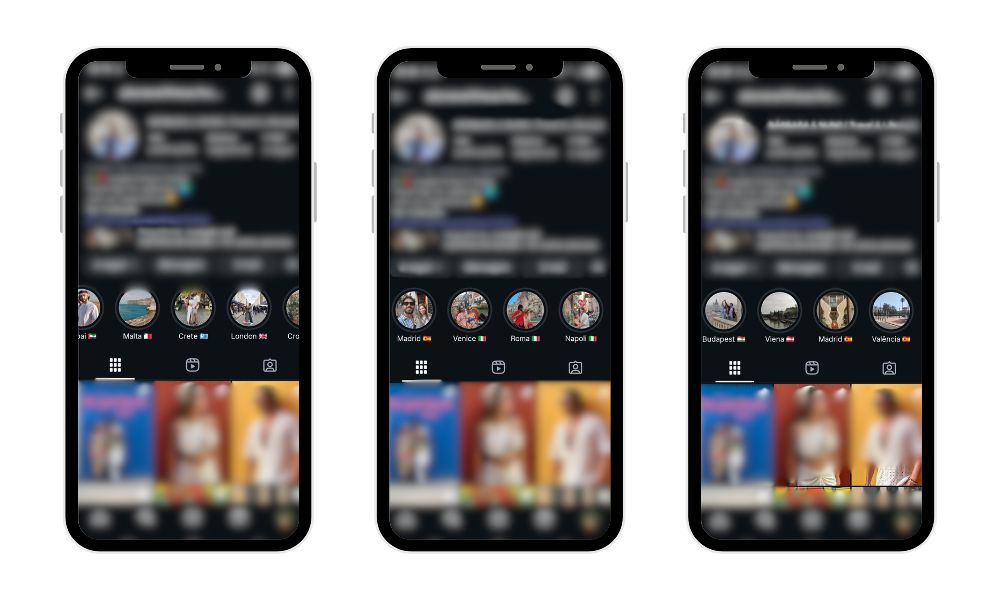
Highlights are a visible way to save valuable content, such as a product demo, behind-the-scenes moment, or personal memory.
Related: How to See What You Liked on Instagram?
How to Enable Story Archive (If It’s Off)
Not seeing your previous Stories? It’s possible that the Story Archive feature was never turned on in your account.
To check if Ig is saving your Stories:
Open Instagram app.
Go to your profile > tap the ☰ menu in the upper right corner.
Select Settings and privacy.
Tap Archiving and downloading > then Story archive.
If the toggle for “Save story to archive” is off, your Stories haven’t been saved.
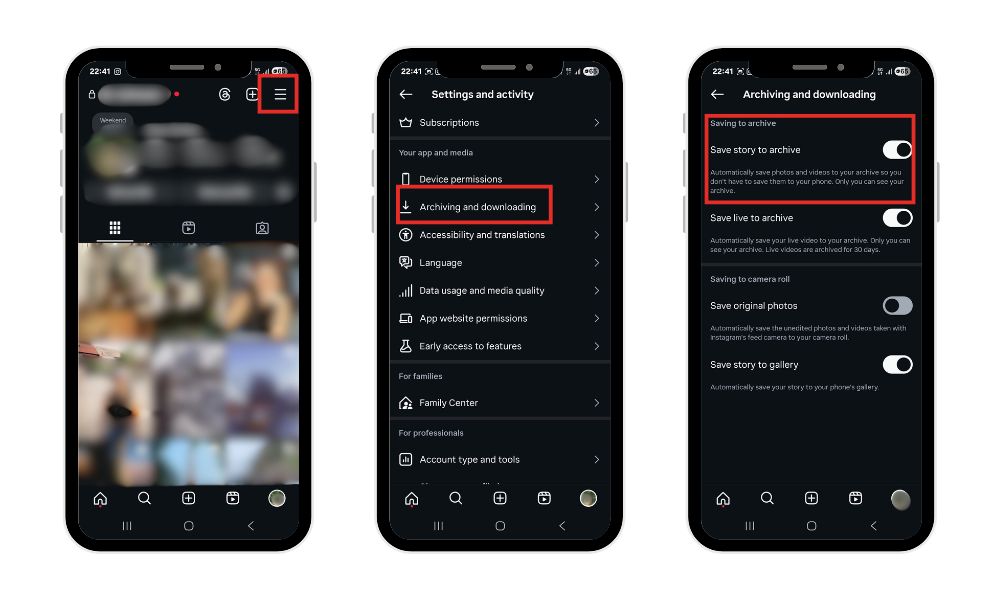
If the switch is already turned on, you’re good to go. You can now view expired Stories any time in the Archive section.
How to turn on story saving for the future
If archiving is currently disabled, here’s how to enable it:
Follow the steps above to open your Archive settings.
Switch on “Save story to archive”.
Optional: Turn on “Save to gallery” if you also want Stories backed up to your phone.
Once enabled, every Story you post will be privately saved in your Archive, ready for later viewing, reposting, or creating Instagram Highlights.
Planning to use Stories for your brand? Boost your content with BuzzVoice’s Instagram Views and Likes to reach a wider audience.
Can You See Other People’s Old Stories?
Unlike your own Instagram Story Archive, Instagram does not allow you to view archived content from other accounts.
Only if they saved them in Highlights
You can only view other people’s old Stories if they have manually added them to their Highlights. These are the circles that appear beneath a person’s bio on their profile.
To view:
- Go to their profile
- Tap on any Highlight
- Scroll through the content
For example, an account owner might save a travel story or an event recap to their Highlights so followers can view it after 24 hours. If a user does not save their content to Highlights, it is permanently deleted after 24 hours unless they repost it later.
Want your Stories to live on and continue gaining traction? Use BuzzVoice’s Instagram Engagement Tools, like Views, Followers, Likes, Automatic Engagement, and Comments, to make the most of your content.
Private accounts vs. public profiles
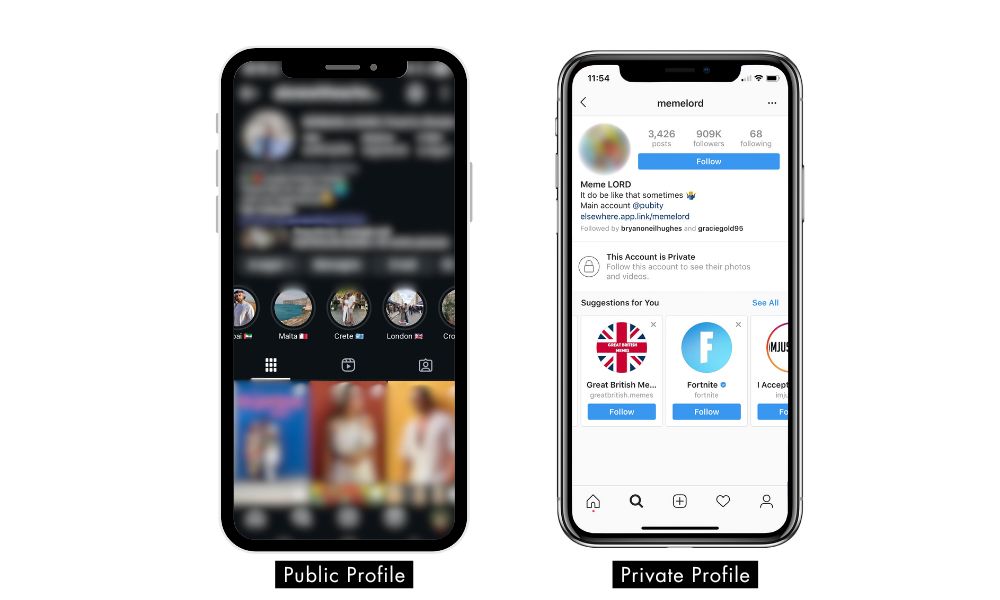
The ability to view old Instagram Stories in Highlights is also dependent on account privacy:
Public profiles: Anyone can see their Highlights, unless certain Stories are hidden from you.
Private accounts: You will only be able to see Highlights if your follow request has been approved.
While Highlights are an excellent way to save and share previous Instagram Stories, they are only publicly viewable if the account allows it.
Final Thoughts
If you’ve ever been concerned that your Instagram Stories would vanish after 24 hours, don’t worry. Because of the Instagram Story Archive, your previous content can be safely stored and accessed at any time, as long as archiving is enabled.
Whether you want to see past Stories, revisit a memory, or repurpose content for a new campaign, the Archive and Highlights tools have everything you need.
Want to get more value from your Story content? Use BuzzVoice’s Instagram engagement services like Views, Followers, Likes, Automatic Engagement, and Comments to maximize your reach every time you repost an archived Story.
We recommend:
To prevent the loss of valuable content, enable the Story Archive on a regular basis.
Highlights are organized by themes to facilitate access and audience engagement.
Visit your previous Instagram Stories regularly to find content worth sharing again.
Understanding where to find old Instagram Stories and how to use Highlights effectively can help you turn short-lived posts into long-term value, for memories, branding, or both.
FAQs
Can I download my old Stories?
Yes! You can download any story from your Instagram Story Archive. Simply open the archived Story, click the three-dot menu in the corner, and then select Download. This saves it directly to your device, which is ideal for repurposing or saving personal memories offline.
How long do Stories stay in the archive?
Instagram keeps Stories in your archive indefinitely as long as you enable the feature and keep your account active. There is no expiration date, so you can see past Instagram Stories from years ago whenever you want.
Why don’t I see the Archive option?
If you can’t find the Archive option in your menu:
Make sure you’re using the most recent version of the Instagram app.
Tap your profile page > menu (☰) > select Archive.
If the Archive still isn’t showing, it may be disabled. Head to Settings > Privacy > Story > and enable “Save story to archive.”
Once enabled, Instagram will automatically start saving your future Stories.
Can I repost an archived Story?
Absolutely. To repost an archived Story:
Go to your Story Archive.
Tap the Story you want to repost.
To add it to your current Story, click the Share icon. You can also send it via DM or create a new Highlight.
It’s an excellent way to repurpose high-performing content or commemorate anniversaries.
Are old Stories visible to others?
No, all your stories (archived) are private and only visible to you. If you add a Story to a Highlight, it becomes publicly visible (unless your account is private or you’ve hidden the Story from certain users).
Highlights are the only way for others to view older Stories on your profile.

BuzzVoice
BuzzVoice is the best place to go when you need instant engagement services on social media. Offering a wide variety of packages for Instagram, Youtube, Facebook, Twitter, Soundcloud & Tiktok.



