How to Turn Off Profile Views on TikTok?
In today’s digital age, privacy is becoming more important than ever, especially on social media platforms like TikTok. While the app is designed to be interactive and engaging, not every feature is welcomed by all users.
One such feature is Profile View History, which allows users to see who has visited their TikTok profile within the last 30 days. Although this can be useful for creators and influencers to track interest, many people prefer to explore content or check profiles without being noticed.
Whether you’re doing market research, quietly admiring someone’s content, or simply value your digital privacy, knowing how to disable this feature is essential. In this article, we’ll walk you through how to turn off profile views on TikTok, step-by-step, so you can enjoy the app with more control over your personal data and activity.
If you want to increase your visibility and reach more potential fans, visit BuzzVoice.com, a trusted platform for boosting your views, followers, and engagement across TikTok, YouTube, Instagram, and more.
What Is the TikTok Profile View History Feature?
The Profile View History feature on TikTok lets users see who has visited their profile within the last 30 days. However, this is a mutual feature; both you and the other user must have it enabled to see each other’s profile views. If either party has it turned off, neither can see the other’s profile visits.
Introduction to TikTok Profile Viewing
TikTok profile viewing is a feature that allows users to see who has visited their profile on the TikTok app. This feature is available to users who are 16 years or older and have fewer than 5,000 followers.
To access TikTok profile viewing, users must select settings and navigate to the “Settings and privacy” option, where they can toggle the “Profile view history” setting on or off. This feature provides users with a digital footprint of who has been viewing their profile, allowing them to understand their audience and manage their online presence effectively.
Understanding Profile Views
Profile views on TikTok refer to the number of users who have visited a particular profile. The profile views feature allows users to see who has viewed their profile over the past 30 days, providing valuable insights into their audience and helping them understand who is engaging with their TikTok content.
To view profile views, users can tap the footprint icon or eye icon on their profile page, which will take them to the profile views page. From there, they can see a list of users who have visited their profile, allowing them to track their viewers and manage their online presence more effectively.
Reasons to Turn Off Profile Views
Enhanced Privacy: Keep your browsing activity discreet.
Avoid Awkwardness: Prevent situations where someone knows you’ve viewed their profile.
Control Over Visibility: Decide when and how others can see your interactions.
How to Turn Off Profile Views on TikTok (Step-by-Step)
Disabling profile views is straightforward and can be done through two methods:
Method 1: Through Settings
Access TikTok app and tap on your Profile icon in the bottom right corner.
Tap the three-line menu (☰) in the top right corner to access settings.
Select Settings and Privacy.
Tap on Privacy.
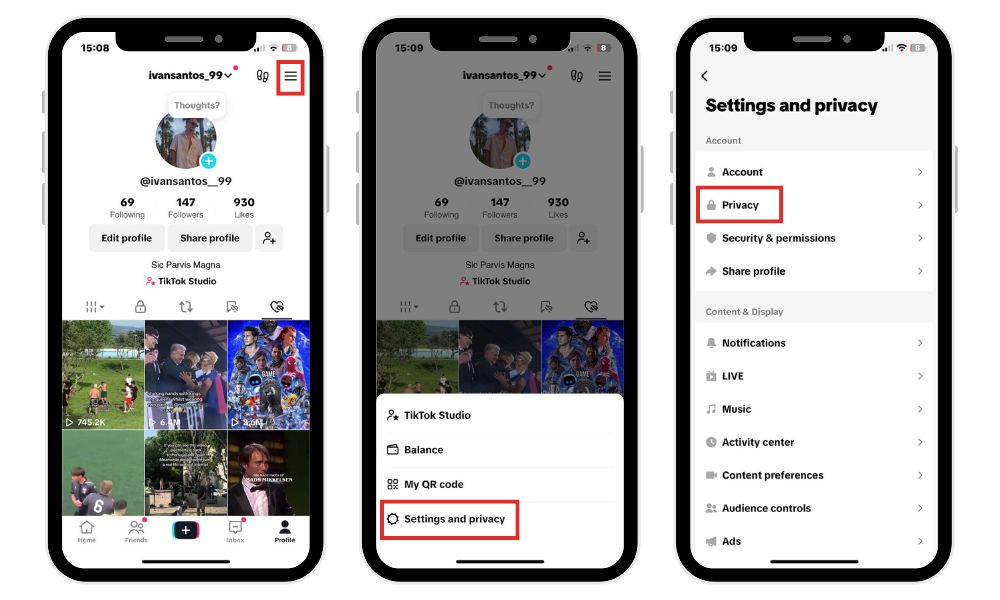
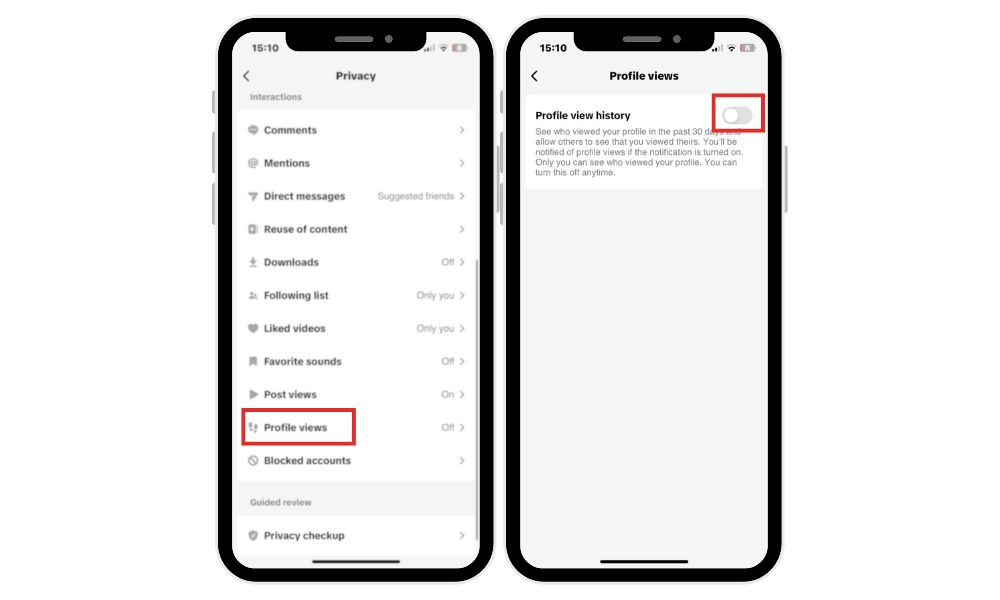
Scroll down and select Profile Views.
Toggle off the Profile view history option.
Method 2: Through Profile Views Page
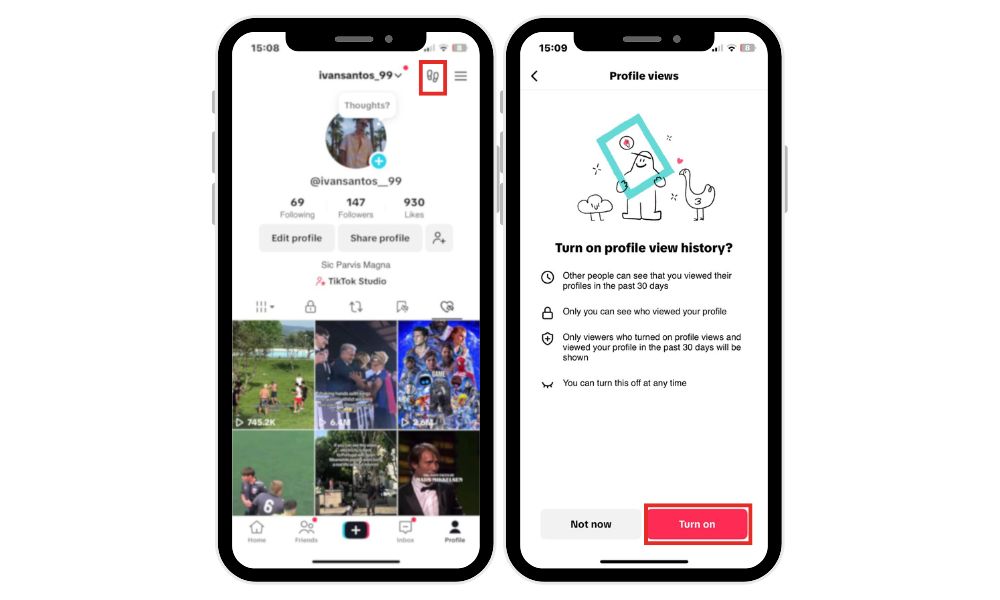
Open the TikTok app and go to your Profile.
Tap the eye icon in the top right corner.
Tap the Settings icon on the Profile Views page.
Toggle off the Profile view history option.
Once disabled, your profile visits won’t be visible to others, and you won’t see who visits your profile.
What Happens When You Turn Off Profile Views?
- Your profile visits become invisible to others.
- You won’t see who has viewed your profile.
- It’s a mutual feature, both parties must have it enabled to see each other’s views.
- Turning off profile views allows you to view someone else’s profile without being noticed.
- This setting also affects watching behaviors, as it prevents others from knowing you have viewed their content.
Can You Turn It Back On Later?
Yes, you can re-enable the Profile View History feature at any time by following the same steps to turn profile view history back on. Changes take effect immediately.
Effectively managing your profile view settings is crucial, especially for accounts with larger followings, to control visibility and maintain privacy.
Final Tips for TikTok Privacy in 2026
Regularly Review Privacy Settings: Ensure your settings align with your desired level of privacy.
Limit Visibility: Adjust who can see your videos, comments, and interactions.
Enable Two-Factor Authentication: Add an extra layer of security to your account.
Keep the App Updated: Ensure you have the latest features and security patches.
If you are looking for an illustrative video on how to carry out the steps we have indicated, check this:
FAQ
What happens when I turn off profile views on TikTok?
When you disable profile views, other users won’t be able to see that you visited their profile. At the same time, you’ll also lose access to seeing who viewed yours. The feature works only when both users have it enabled. Turning it off increases privacy but limits some social insights. It’s a trade-off between visibility and discretion on the platform.
Can people still see my videos if I turn off profile views?
Yes, disabling profile views doesn’t affect who can watch your content. It only hides mutual profile visit history from the last 30 days. Your videos, likes, and comments remain visible based on your other privacy settings. To hide those, you’ll need to adjust your overall profile visibility. Profile view settings only control who sees your visit activity, not your content.
Can I turn profile views back on after disabling them?
You can toggle the feature back on anytime through your profile settings. Changes take effect immediately once re-enabled. You’ll start seeing new profile visitors again, but not retroactively. Remember, it still only works if the other person also has it turned on. Re-enabling it gives you access to a 30-day viewer history moving forward.
Why would someone want to turn off profile views?
Some users prefer to browse TikTok more privately without being noticed. Turning off profile views prevents any awkward moments or “who viewed me” notifications. It’s useful if you research competitors or explore anonymously. It’s a simple privacy feature that helps you control your activity footprint. Many creators also disable it to maintain a low profile.
Is the TikTok profile view history feature available to everyone?
The feature is generally available to most TikTok users, but it may not appear for accounts under a certain age. It also requires the app to be up-to-date with the latest version. If you don’t see it, try updating TikTok or checking if it’s been disabled by default. TikTok may also roll it out gradually in certain regions. Not all devices or countries may have full access immediately.

BuzzVoice
BuzzVoice is the best place to go when you need instant engagement services on social media. Offering a wide variety of packages for Instagram, Youtube, Facebook, Twitter, Soundcloud & Tiktok.
Learn more →