
Can Others See Who You Follow on Instagram? Here’s the Truth
In 2026, Instagram is a very powerful platform, but by default, other users can see who you follow on Instagram. However, the platform offers several privacy tools that allow you to manage who can access this information.
Boost your audience on Instagram and reach more followers. With BuzzVoice, you can instantly promote your content!
Can People See Who You Follow on Instagram?
Instagram is a visually driven social network, but it also displays important data about your account, like who you follow and who follows you. By default, unless you’ve changed your settings, Instagram allows anyone to see this information. Unless you set your social media account to private, by default, people can see who you follow on your profile, and there is no way to hide this list entirely on a public account.
Following vs Followers Visibility
When someone visits your Instagram profile, they’ll see two sections near the top: your Instagram Followers and Following counts. By tapping on these, they can view full lists. This applies to all accounts unless privacy settings have been altered.
- The follower list shows everyone who follows you.
- The Following list shows everyone you follow. Some users may want to make their following list private, but Instagram’s default settings do not allow you to make the list private unless you change your privacy settings.
This visibility is one of the ways users explore who others interact with and often plays a role in social validation and online presence.
Public vs Private Account Differences
Your account type plays a major role in who can access your followers and following lists.
- Public Instagram Account: With a public account, anyone on or off Instagram can view your profile, including your Instagram followers, following, posts, and stories. A public account means your followers and following lists are visible to everyone.
- Private Instagram Account: Only users you’ve accepted as followers can see your profile content, including who you follow and who follows you. Setting your account as a private Instagram account helps keep your profile private, restricting non-followers from viewing your followers and following lists.
The default setting for new Instagram accounts is public, but you can switch to private mode to make your profile private. Adjusting your privacy preferences allows you to control who can see your followers and following lists.
Making your social media account private is the most effective way to protect your privacy on Instagram.
Business Accounts and Visibility
Business accounts on Instagram are tailored for brands, organizations, and entrepreneurs looking to reach a wider audience and promote their offerings. These accounts unlock features like Instagram Insights, which provide valuable analytics to help track engagement and growth. However, by default, business accounts are public, meaning anyone on Instagram can view their posts, stories, and following list.
If privacy becomes a concern, business accounts have the option to switch to a private account, though this may limit their organic reach and engagement. Additionally, business accounts can restrict accounts or block specific users to control who interacts with their content and who can see their following list, giving them more flexibility in managing their online presence.
Who Can See Your Following List?
If your account is private, only the people you approve as followers can see your following list. However, current followers will always have access to your following and followers lists unless you remove or block them.
For Public Accounts
If your account is public, your following list is visible to every user, regardless of whether they follow you or not. Your followers remain visible to anyone who visits your profile. Anyone can visit your profile, tap on “Following,” and scroll through the accounts you’ve chosen to follow. While you can hide some information on your profile, the list of who you follow or who follows you remains visible on public accounts.
This can be fine for influencers or brands that rely on transparency to build trust, but it may feel intrusive for users who prefer to keep their social behavior more private.
For Private Accounts
Private accounts offer a more secure experience. Only people you’ve approved as followers can see your content, including who you follow. If someone sends you a follow request and you don’t approve it, they won’t have access to your following or followers list.
This is the most straightforward way to prevent strangers from seeing your connections and is the first major step in tightening your Instagram visibility controls.
What Your Followers Can See
If someone is your follower, they will be able to see:
- Your full list of followers and following.
- Your content (photos, videos, Reels, and stories).
- Who interacts with your content (likes and comments).
Instagram does not allow you to hide followers directly; the total number of followers and your followers list remain visible to others. However, you can manage who sees your content by choosing to remove followers or block followers, which will prevent them from viewing your posts and stories.
Activity Status and Online Presence
Instagram users have the ability to manage their activity status and online presence directly from their account settings. The activity status feature shows when you were last active on the app, letting your followers and people you follow know if you’re currently online or recently active. If you prefer to keep this information private, you can easily adjust your settings to hide your online status from everyone, only your followers, or just specific users.
Switching to a private account, restricting accounts, or blocking specific users are additional ways to limit who can see your activity and maintain a more private experience on Instagram.
How to Limit Who Sees Your Activity
If you want more control over who sees your following list and general activity, we’ll discuss multiple ways to limit who can view your activity on Instagram.
Instagram offers multiple settings beyond simply switching your account to private. While there is no direct way to completely hide your following list, there are several effective methods to manage your visibility. Here’s some options:
Make a Private Profile
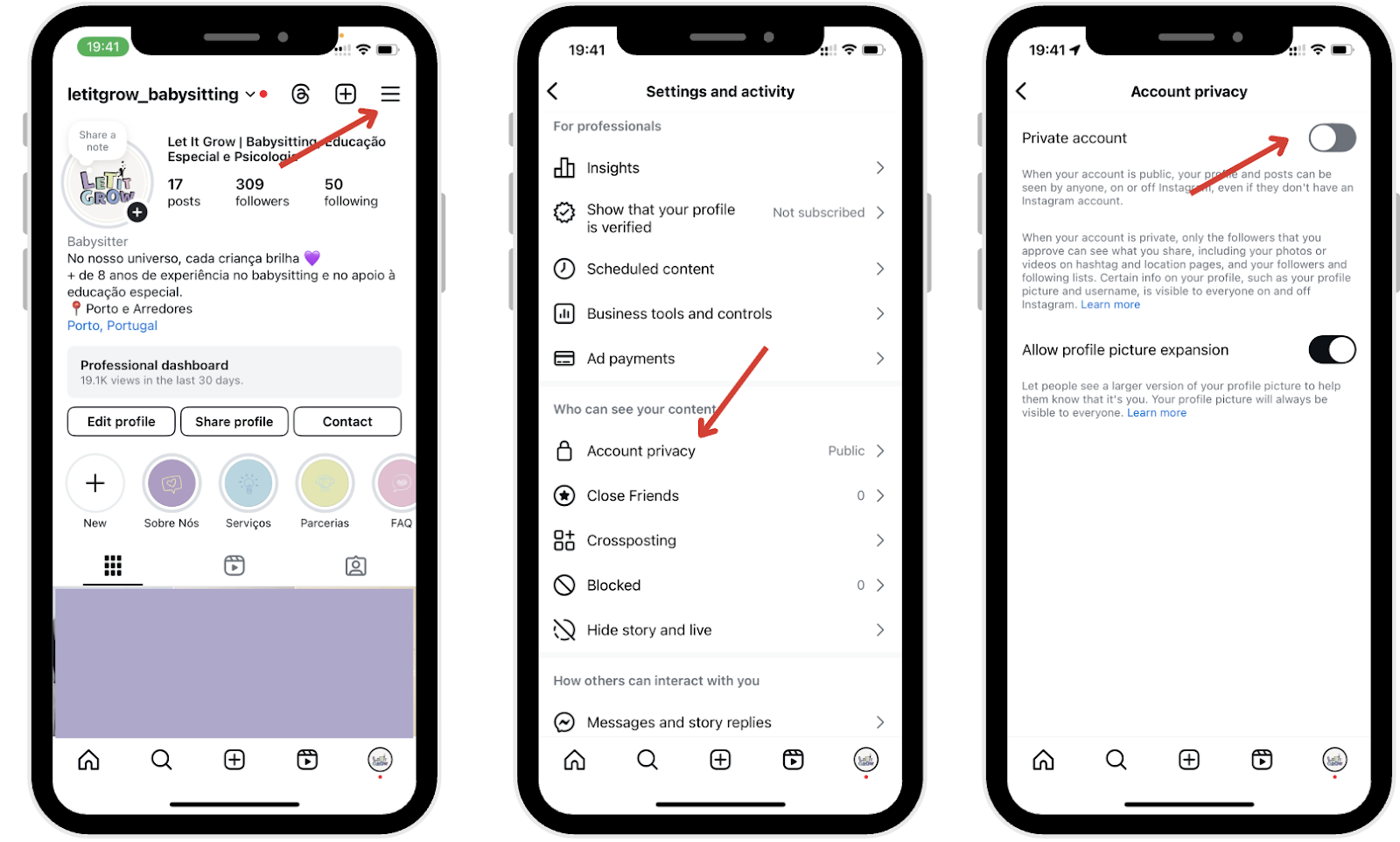
This is the most effective step you can take. A private account ensures that only approved followers can see your posts, interactions, and your following list. Here’s how to do it:
- Open Instagram and tap the profile icon in the bottom right corner to access your profile page.
- Tap the three horizontal lines (menu) in the top-right corner.
- Tap Settings and privacy, then tap Privacy.
- Tap Account privacy.
- Toggle Private account on.
From now on, only your followers will be able to view your full profile.
Restrict Specific Users
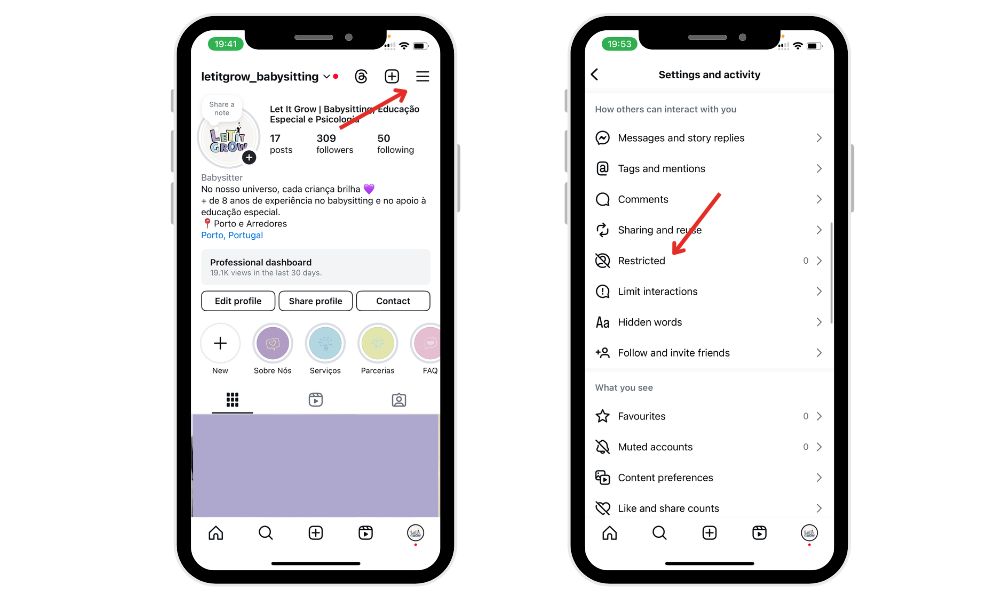
If there’s someone you’re unsure about—maybe you don’t want to block them completely—you can restrict them instead. Restricted accounts can still see your profile (if it’s public or they follow you), but their interactions with you are limited:
- Their comments on your posts are only visible to them unless you approve them.
- Their DMs go to your message requests, not your main inbox.
- They won’t see when you’re online or if you’ve read their messages.
To restrict a user:
- Go to their profile.
- Tap the three dots (menu).
- Select Restrict.
You can follow the same steps to restrict additional users.
Remove or Block Users
If a follower is making you uncomfortable or you simply don’t want them to see your following list, you can either remove followers or completely block them. You may want to remove or block a particular user to protect your privacy.
- Removing followers: Removing followers means they won’t be notified, and they’ll lose access to your private content.
- Completely block: If you completely block a user, they can’t search for your profile, see your content, or interact with you in any way.
Both options are useful for tightening control over your Instagram experience, particularly when it comes to Instagram privacy settings.
Can You Hide Who You Follow on Instagram?
Instagram’s Current Limitations
On Instagram, there’s no setting that allows you to hide your “Following” list. This means your best bet is to either limit access to your entire profile or manually control who can follow you and see your activity. However, even with privacy settings enabled, not the list of who you follow this remains visible to your approved followers.
Even with a private account, your approved followers will always be able to view your list of followed accounts. While you can hide your content from non-followers, your followers remain visible to those you approve, including both your followers and following lists.
Workarounds Using Privacy Settings
Here are a few things you can do to make your activity more private. Start by reviewing your privacy preferences to ensure your information is only visible to those you trust:
- Switch to a private account – This hides your following list from non-followers.
- Manually approve followers – Be selective about who you let in.
- Remove or block unwanted followers – Prevent them from seeing your lists.
- Avoid engaging with certain accounts – If you don’t want mutual followers to see you commenting or liking posts.
- Check your Instagram settings – Explore additional privacy options to control who can find or contact you.
You can also adjust your phone’s settings to limit contact-based discovery on Instagram, further enhancing your privacy.
These actions won’t fully hide your following list from all users, but they reduce visibility significantly—especially from strangers or unwanted connections.
All users, but they reduce visibility significantly, especially from strangers or unwanted connections.
Final Thoughts
Instagram offers many tools to control your profile visibility, but it still lacks a feature to hide your following list entirely. Still, with the right combination of privacy settings—like going private, restricting or blocking users—you can significantly limit who sees your activity.
Managing your privacy on social media apps like Instagram can contribute to your digital well-being by helping you control who interacts with your content and reducing unwanted attention. Understanding people’s insight, such as how others engage with your profile, can help you make better decisions about your privacy settings and overall digital presence.
In case you want to grow other social media platforms, check BuzzVoice services to buy likes, views, and increase your engagement.
FAQs About Instagram Following Visibility
Can someone see if I follow them?
Yes. If someone visits your profile and your account is public (or they follow you), they can view your following list and check if their account is there. Other Instagram users can see your following list if your account is public or if they are approved followers. This is visible unless your profile is private, and they aren’t approved.
Does Instagram notify others about your followers?
Instagram doesn’t send alerts when you follow someone. However, your new followers may show up in mutual friends’ feeds or suggestions, especially if they frequently interact with the same account.
Can third-party apps reveal hidden followers?
No legitimate third-party app can bypass Instagram’s privacy settings. Most of these apps violate Instagram’s terms, pose privacy risks, and may even expose your account to hacking or phishing attempts.
Can I completely hide my following list from everyone?
Unfortunately, no, because you cannot hide you following list from your followers. The only workaround is to make your account private and curate your followers carefully to reduce visibility.
Will someone know if I remove or block them?
Instagram does not send a notification when you remove or block a user. However, they may realize it if they visit your profile and notice they can’t see your content or follow you again.

BuzzVoice
BuzzVoice is the best place to go when you need instant engagement services on social media. Offering a wide variety of packages for Instagram, Youtube, Facebook, Twitter, Soundcloud & Tiktok.



