Can’t Find the Instagram Bio? This Is Where You Should Look
In the fast-paced world of social media, your Instagram bio is often the first impression people get of who you are or what your brand stands for. But if you’re new to the platform or navigating a recent update, you might be asking a surprisingly common question: Where is the Instagram bio?
Your Instagram bio is more than just a line of text. It’s a brief description where you can include your name or nickname, a short description, a clickable link, and even action buttons like email or directions. It’s your digital elevator pitch, and for creators, brands, and businesses alike, it plays a major role in visibility and engagement.
📸 Ready to Boost Your Instagram Visibility?
Grow your presence with real Instagram followers, likes, and views from BuzzVoice—a trusted platform for authentic engagement.
✅ Fast, organic-looking growth
✅ Safe & secure
✅ Perfect for reels, posts & stories
Optimize your bio. Amplify your reach. Grow with BuzzVoice.
👉 Get started now
Where Is the Bio in Instagram?
On Someone Else’s Profile
When you visit another user’s Instagram account, their bio appears directly beneath their profile picture and username. You’ll see:
Their display name
A short description or tagline
A website or “link in bio”
Action buttons (if it’s a business profile)
This is usually the first thing you’ll read, placed above the user’s posts and story highlights.
On Your Profile
To see your own Instagram bio, go to your profile by tapping your profile picture in the bottom-right corner of the app. You’ll see your bio text located directly under your display name and above your grid of posts. Adding a bio to your Instagram is the perfect place to provide essential information about you or your brand and makes your profile more engaging.
If you’re using the Instagram Lite app, the process is similar, though some advanced features may be limited. It’s a great option for users who want a faster, lighter experience while still managing their profile and bio.
If you’re managing a professional account, you may also see buttons like Email, Call, or Directions next to or below your bio. A business account serves as a central hub for promoting products, running campaigns, and engaging with your audience.
Compared to business accounts, personal accounts have fewer features for analytics and external linking.
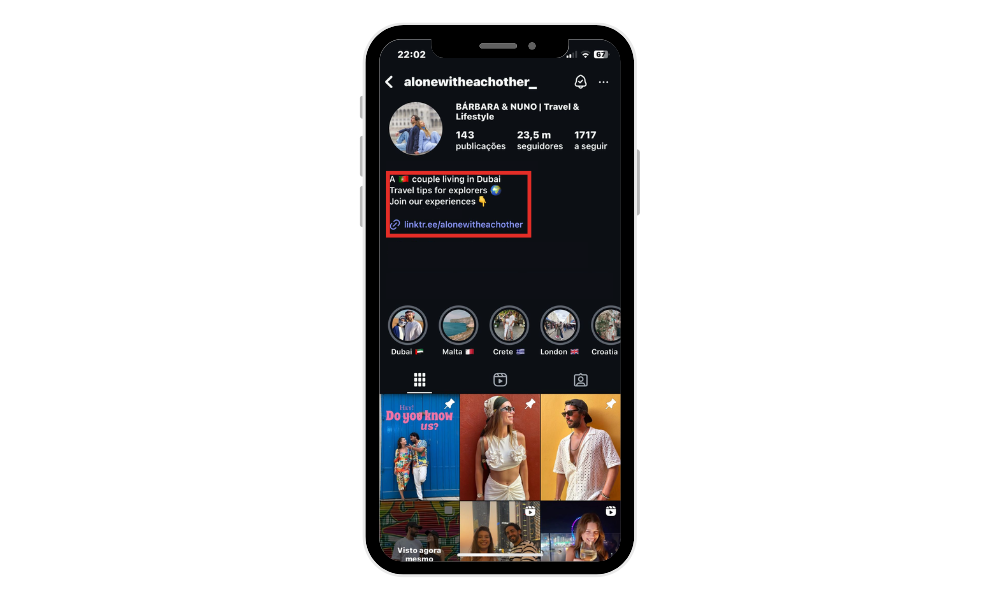
If you’re managing a professional account, you may also see buttons like Email, Call, or Directions next to or below your bio.
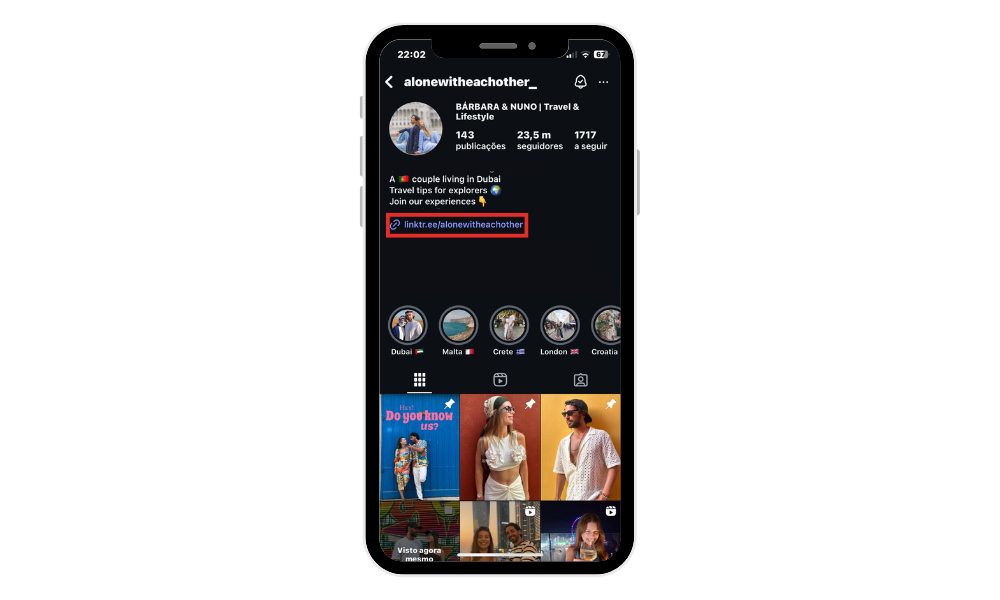
Instagram Bio on Mobile vs Desktop
On mobile browser, the bio is very prominent, just under the username. On the desktop, it appears in a similar position, beneath your profile photo and name. When viewing Instagram on a computer, you can easily see bios and any links included.
However, editing your bio or adding links requires using the Instagram app on a mobile device. On smaller screens, text might wrap differently, and clickable links may appear truncated depending on formatting.
What Is Included in an Instagram Bio?
An Instagram bio can be customized to showcase personal or brand identity. Here’s what it typically includes:
- Name or Nickname – in bold and helps with searchability.
- Short Description – 150-character space to describe who you are, what you do, or what you promote. Make sure to write a compelling bio that clearly represents you or your brand and attracts followers.
- Link in Bio (URL) – add links directly to your bio, including your own link or multiple external links. You can add up to five links to direct followers to various destinations, such as a blog post, websites, social media profiles, or online resources.
- Contact Buttons (Email, Directions, etc.) – Available on business or creator accounts, these buttons help users get in touch or find your location quickly.
How to Edit Your Instagram Bio
Step-by-Step (iOS & Android)
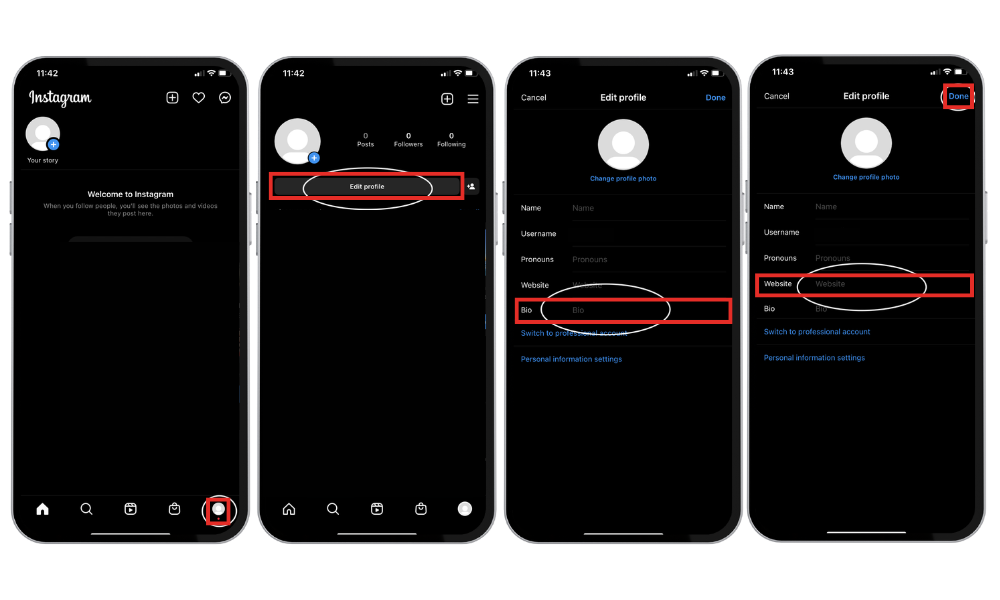
Open Instagram and go to your profile.
Tap Edit Profile under your username.
Tap the Bio field to change your description.
To add a link, tap the Website and insert your URL.
Press Done or the checkmark icon to save your changes.
You can update your bio as often as needed, so feel free to test different formats or CTAs (calls to action).
Tips for Writing a Good Bio
- Be clear and concise – 150 characters go fast.
- Use emojis or line breaks to improve readability.
- Include a call to action (e.g., “Watch my latest video ”).
- Use relevant keywords to your niche for discoverability, and optimize your bio with relevant tags and hashtags to improve visibility.
- Link to your latest product, content, or landing page.
A well-optimized bio link helps users find your content or profile easily without extensive searching.
Related: Hide the tagget photos in your Instagram to improve your account.
Measuring the Effectiveness of Your Instagram Bio
With Instagram Insights, you can easily track key metrics such as the number of clicks on your bio link, profile visits, and website clicks. These analytics give you a clear picture of how users are interacting with your bio and which links are generating the most interest.
Instagram Insights also provides valuable information about your audience, including their age, location, and interests. By analyzing this data, you can tailor your bio and content strategy to better connect with your target audience.
Regularly measuring the effectiveness of your Instagram bio allows you to see what’s working and what needs adjustment. By tracking which links drive the most traffic, you can focus your efforts on the most successful strategies and ensure your Instagram profile continues to support your social media goals.
Tools and Resources for Instagram Bios
Creating a standout Instagram bio is easier when you take advantage of the many tools and resources available. Instagram’s own features, like Instagram Stories and Instagram Posts, are great for promoting your bio link and driving traffic to your website, facebook pages or other social media.
The “Link in Bio” feature now allows you to add multiple links, making it simple to direct followers to your blog, business website, or other social media accounts from a single profile page.
For tracking and analytics, third-party tools such as Hootsuite and Sprout Social can help you monitor the performance of your Instagram bio and refine your strategy for better results.
If you want to make your Instagram profile visually appealing, design platforms like Canva and Adobe Creative Cloud offer easy-to-use templates for creating custom graphics and videos that enhance your bio. To maximize the impact of your bio link, consider using services like Linktree or AllMyLinks.
These tools let you create a custom link in bio page, allowing you to add multiple links and drive traffic to various destinations. Instagram’s IGTV feature is another way to share longer videos and direct viewers to your website or other accounts.
By leveraging these tools and resources, you can create an Instagram bio that not only looks great but also drives meaningful traffic to your website, blog, or other social media accounts—helping you achieve your social media objectives and grow your online presence.
If you’re looking to boost your engagement and reach a wider audience, BuzzVoice offers effective and secure services to increase your Instagram followers, comments and views.
Conclusion
Your Instagram bio may be small, but it’s one of the most important parts of your profile. Instagram users utilize the bio to share important links and information, making it a key spot for engagement. Brands often use the link in bio to promote their products, campaigns, or services and drive traffic to their main web pages. You can also use your bio to showcase your latest feed content, such as Instagram posts or stories, keeping your audience updated.
Promote your podcast or personal blog by linking to them in your bio, or direct followers to your YouTube channel for more content. Followers can easily navigate from an Instagram post to your bio to find external links you want to highlight.
FAQ
Why can’t I see someone’s bio on Instagram?
If a user has set their account to private and you don’t follow them, you might not see their full bio or contact buttons. Sometimes, Instagram glitches can also cause display issues—try refreshing the app.
How long can my Instagram bio be?
Instagram bios are limited to 150 characters. This includes spaces and emojis, so every word counts.
Can I add clickable links in my bio?
Yes! You can add one clickable URL in the Website field. For more links, use services like Linktree or similar link-in-bio tools.
Why does my bio look different on another device?
Text may wrap differently depending on screen size. Also, emojis or line breaks can render slightly differently across iOS, Android, or desktop.

BuzzVoice
BuzzVoice is the best place to go when you need instant engagement services on social media. Offering a wide variety of packages for Instagram, Youtube, Facebook, Twitter, Soundcloud & Tiktok.