
What Does “In the Chat” Mean on Instagram?
Instagram has become more than just a platform for sharing photos and videos—it’s now a dynamic social networking hub where people build connections, deliver content, and interact through features such as Stories, Reels, and especially Direct Messages (DMs). One of the phrases that users frequently encounter is “in the chat.” But what does in the chat mean on Instagram?
To understand it fully, we need to explore Instagram’s direct messaging features, how users interact within the app, and the context in which this phrase is used. This guide covers everything, from the meaning of “in the chat” to tips, business applications, and FAQs.
Outshine competitors with BuzzVoice. Grow Instagram views, build followers, and add likes to make your profile more active and appealing.
What Does “In the Chat” Typically Mean?
When you see the phrase “in the chat” on Instagram, it usually signals someone is active in their Direct Messages, either reading, typing, or engaging with shared content in real time.
1. Active Engagement
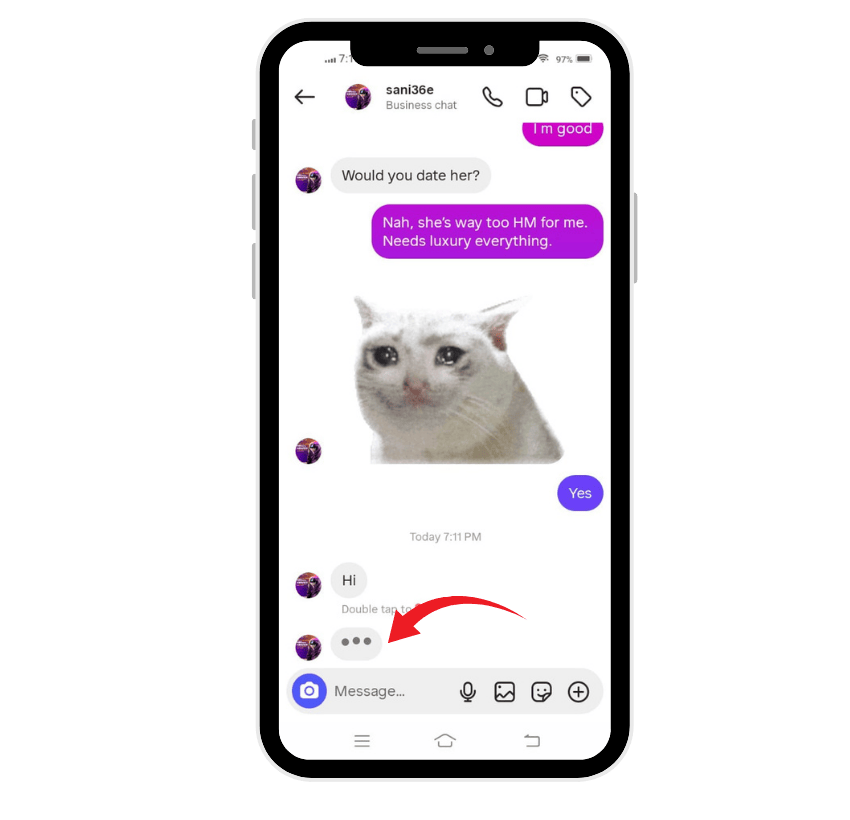
When Instagram shows that a person is “in the chat,” it usually means that they currently have the Direct Messages section of the Instagram app open. They might be typing a response, scrolling through a conversation, or checking story replies. Essentially, the person is active and engaged with their inbox.
2. Presence Indicator
Much like Facebook Messenger or WhatsApp, Instagram sometimes displays whether someone is active on the platform. Being “in the chat” is similar to an active status, giving friends or followers an idea that the person is available and visible in that conversation.
3. Context Matters
Interestingly, the exact meaning can depend on the situation. Sometimes, “in the chat” might appear even if the person has not yet read the new message. For example:
- They could be navigating photos or videos in the chat window.
- They might be viewing content shared earlier but not actively responding.
- The status might remain visible for a short time after they leave the conversation.
In short, while the phrase generally means active presence in a conversation, it isn’t always a guarantee of immediate response.
Related: What Does Fye Mean on Instagram?
Instagram’s Direct Messaging (DM) Features
Instagram’s Direct Messages are essential to its communication network. This private messaging system continues to evolve, enabling deeper interactions between users, businesses, and communities. Let’s break down the key features:
- Text, Photos, and Videos: Users can send text, photos, or videos directly in a chat. You can take new content using the in-app camera or choose (select) existing files from your library.
- Sharing Content: From your feed, Stories, or Reels, you can share posts straight into a DM. This allows friends and followers to view and discuss the same content in private.
- Message Effects and Reactions: Instagram makes chats more engaging with custom emoji reactions, animated effects, stickers, polls, and GIFs. These interactive tools add fun and personality to every conversation.
- Customizable Chats: Instagram lets users personalize their conversations with themes, gradient colors, and emoji shortcuts.
- Disappearing Messages: The platform also provides the option to send vanishing photos and videos for private moments.
- Message Requests: When a person outside your followers sends a message, it lands in Message Requests. You can choose to accept or decline.
- Group Chats: Instagram enables group conversations with friends or followers. Users can even invite others using group QR codes.
- Scheduled Messages
- Another useful feature is the ability to schedule text messages—helpful for reminders, birthdays, or professional tasks.
- Pinned Messages: Important information, memes, or a video can be pinned to the top of the chat for quick access.
- Message Translations: Instagram allows you to translate messages into different languages, enhancing international networking.
- Music and Location Sharing: You can share songs, previews, and live locations, enabling real-time collaboration and meetups.
- Automated Chats: Business accounts can create automated responses, providing instant help to followers. Instagram clearly informs users when a response comes from automation.
Together, these features make the chat experience on Instagram versatile and essential for communication.
💡 Pro Tip: With BuzzVoice, more engagement equals more growth. Strengthen your profile visibility and build long-term success effortlessly.
Best Practices for Online Interactions
Using Instagram effectively means practicing positive communication. Here are five best practices:
- Respond Promptly: Reply to messages in a timely manner to keep the conversation flowing.
- Provide Value in Business Chats: For brands, Direct Messages are an opportunity to deliver exclusive offers, tips, or important updates.
- Be Respectful: Avoid spam, offensive messages, or unwanted content.
- Use Safety Tools: Instagram offers blocking, reporting, and “restrict” features to ensure safe interactions.
- Build Genuine Connections: Engage authentically to enhance friendships, community, and customer relationships.
By following these steps, users enhance the effectiveness of Instagram as a platform for communication.
Using Instagram for Business
Businesses on Instagram rely heavily on Direct Messages. Being “in the chat” shows responsiveness, which builds trust. Brands often use DMs to:
- Answer customer questions.
- Provide personalized recommendations.
- Share updates, offers, or new posts.
- Continue conversations started in Stories or the feed.
This creates stronger connections between accounts and followers, increasing networking opportunities.
How to Send Instagram Messages?
If you’re new to Instagram’s chat system, here’s a step-by-step guide:
Step 1: Tap the Paper Plane Icon
Open the Instagram app. In the top right corner, tap the paper-plane-shaped icon (or Messenger symbol) to access your inbox.
Step 2: Create a Message
Select “New Message.” Choose the person or group from your followers or search for an account.
Step 3: Send Your Message
Type your text, add photos or videos, and tap “Send.”
Step 4: Return to Your Screen
Once done, tap the back arrow to return to your feed or profile screen.
Related: What Does ND Mean on Instagram?
How to React to Instagram Messages?
Reactions make chats more expressive:
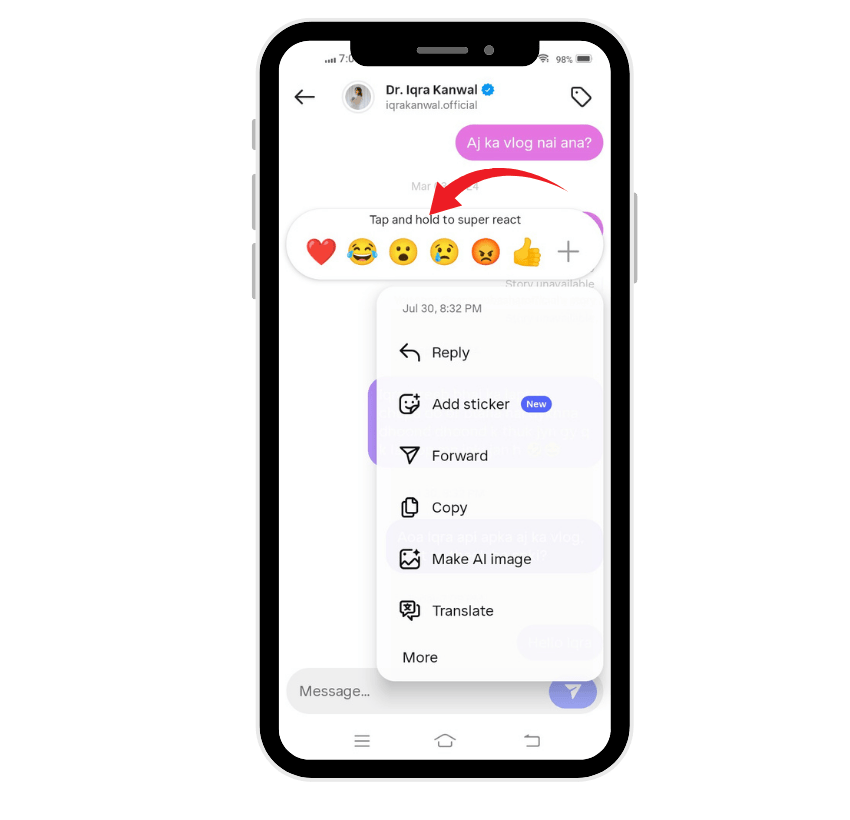
- Tap and hold a message to choose an emoji reaction.
- Double-tap to “like” a message.
- Customize emoji shortcuts in chat settings for quicker use.
How to Delete Instagram Messages?
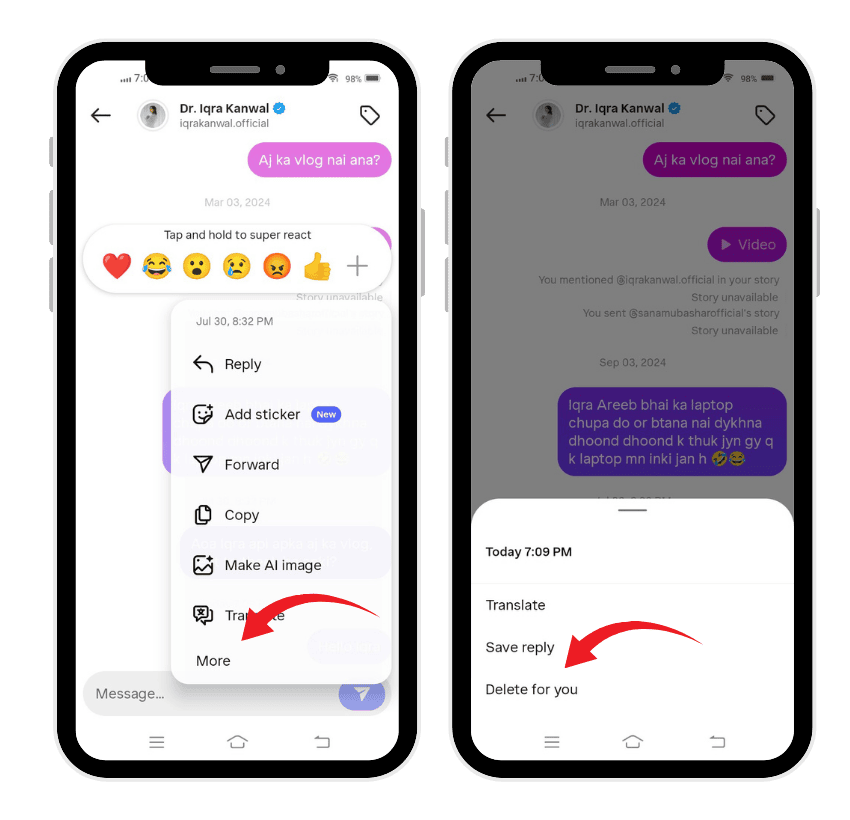
There are two main ways to delete messages on Instagram:
To Unsend One or Two Messages
- Tap and hold the message.
- Select Unsend.
- The message disappears from both sides of the chat.
To Delete an Entire Conversation
- From the inbox screen, swipe left on a conversation.
- Tap Delete to remove it from your account.
Final Thoughts
So, what does in the chat mean on Instagram? At its core, it means the person is present in a conversation—reading, writing, or browsing their Direct Messages. While context influences its exact meaning, it generally signals active engagement within the app.
Understanding this feature alongside Instagram’s wide range of chat tools helps users interact more effectively, whether with friends, followers, or businesses. By practicing respectful communication and leveraging Instagram’s advanced features, you can enhance your networking, build stronger connections, and create a more positive experience on the platform.
💡 Pro Tip: BuzzVoice provides real Instagram comments that make your content look active, engaging, and worth following.
FAQs
What does it mean when Instagram says in the chat?
It means the person is currently active in their Direct Messages, possibly reading, scrolling, or typing in a conversation.
How do I know if someone is in the chat on Instagram?
You may see a status indicator, typing bubbles, or quick responses that confirm they are present in the chat.
What does “keep in chat” mean on Instagram?
“Keep in chat” is an option that allows certain photos, videos, or messages to remain visible in the conversation instead of disappearing after one view.
Does Instagram still show when someone is in the chat?
Yes, Instagram often shows activity indicators, but these settings can be turned off. If a person disables activity status, you may not see when they are “in the chat.”

BuzzVoice
BuzzVoice is the best place to go when you need instant engagement services on social media. Offering a wide variety of packages for Instagram, Youtube, Facebook, Twitter, Soundcloud & Tiktok.



