With over a billion users on Instagram, it is important to be able to find the people you want to see, know, and follow, right? Instagram is all about connecting people, making it easier to discover and contact individuals even if you are not directly connected.
At the same time, it is important to be able to source information, separate fake news from the hard-hitting stories and create a feed which suits your lifestyle and likes.
So, you would probably agree that knowing how to identify who owns an Instagram account is a useful skill. It’s actually very simple, and we are going to show you three easy ways to find someone’s Instagram, helping you connect with the people you are looking for.
And if you’re looking to boost your engagement and reach a wider audience, BuzzVoice offers effective and secure services to increase your Instagram followers, comments, and views.
#1 – Use the search
Head over to the ‘Explore’ section and tap search (the magnifying glass icon) to begin.
Start by tapping the search bar, then type in the username or the first and last name of the Instagram user you’d like to connect with.
In the search results, look for their profile picture and details to help ensure you are selecting the right account.
Click on their profile picture to open their page, where you can follow, message, or just scroll to see what they are up to.
#2 – Mutual friends
If you cannot find someone through the ‘Explore’ and search section, you can take advantage of mutual friends and mutual relationships. Additionally, you can sync your Facebook account to find and connect with your Facebook friends on Instagram, making it easier to discover more connections.
If you are trying to find a particular user or some brand, and only know that your friend, relative, colleague, or affiliate is in contact with them, go over their posts, look at the people who like and comment on their posts, etc.
However, the quickest way is to hop onto the list of ‘Followers’ and ‘Following’. You should be able to spot the person’s account or profile you were looking for with ease.
#3 – Discover people
Discover people is a simple way to connect with people who you have mutual friends with or shared some interactions over the past time. Discover people is an entirely separate feature and can be found with ease:
Navigate to your profile and look for the icon on the top-right side.
Select Discover People.
Look for Connect Contacts, then click Connect, and then Allow Access.
You can use the upload contacts feature to sync your phone contacts with Instagram. You may need to go to settings to enable contact syncing.
The process involves uploading your contacts to Instagram. Once your contacts are uploaded, Instagram will suggest relevant Instagram accounts for you to follow.
Click Follow on the Instagram accounts that you would like to connect with or click on their profile pics to look at their content. You might find a user you know among the suggested profiles.
#4 – Google?
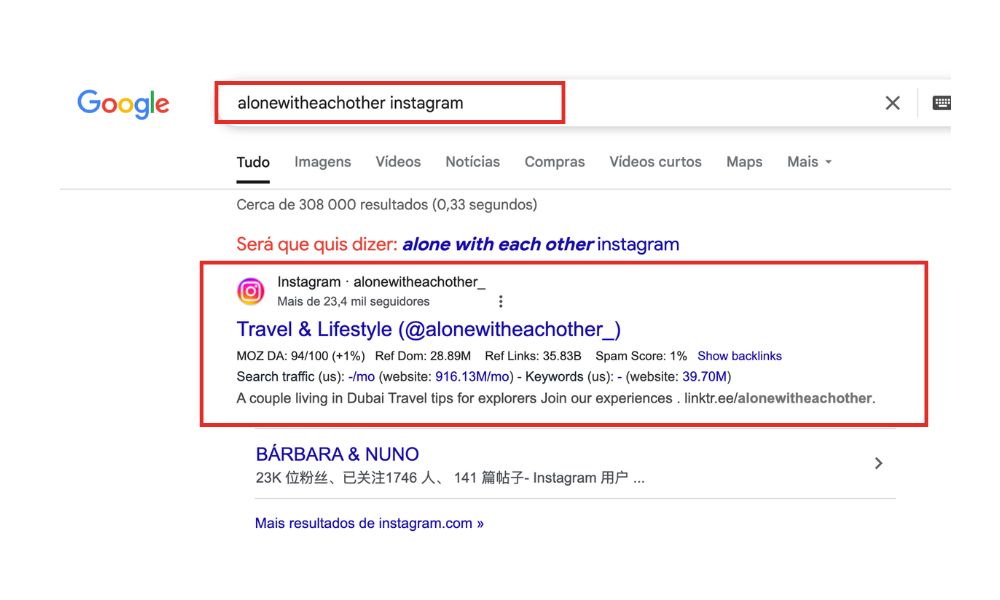
If none of the three previous methods help you find the profile you were looking for, take advantage of the almighty Google search engine.
In addition to searching by name or username, you can use Google’s reverse image search to find someone’s Instagram profile. Upload an image or photo of the person, and Google will search for matching images across the web, including Instagram.
High-quality images or photos increase the chances of finding the right profile, while poor-quality images can reduce the effectiveness of this method. If you have multiple photos, try each one to improve your results.
You can also search for people by using keywords, hashtags, or tags related to their interests, locations, or events. Searching for a specific hashtag or clicking on a tag associated with a post can help you discover posts and accounts connected to the person you’re looking for.
Analyzing someone’s posting activity, such as the frequency and content of their posts, can also provide clues to help locate their Instagram profile.
When using external tools or third-party services for facial recognition or profile searches, be aware of the search process involved, including uploading images and waiting for results. Always consider ethical considerations, such as respecting privacy and using these tools responsibly when trying to reconnect with someone online.
Finding Someone Using a Phone Number
If you want to find someone on Instagram but only have their phone number, the process is simple thanks to the app’s contact integration. Most Instagram users sign up with their phone numbers, making it easier to connect with friends and contacts.
To get started, open the Instagram app and tap the search bar. Next, tap the search button and look for the “Contacts” option in the drop-down menu. Select “Connect Contacts” to allow Instagram access to your phone’s contact list.
Once you grant access, Instagram will automatically suggest accounts linked to the phone numbers in your contacts. You can then follow and invite friends directly from these suggestions. This process is a great way to find someone on Instagram without knowing their username, and it helps you connect with users you already know through your phone contacts.
What to Do If You Can’t Find Someone
If you’re having trouble finding someone on Instagram, don’t worry—there are several alternative methods you can try. First, double-check the spelling of the person’s username or real name to make sure you’re searching correctly. If that doesn’t work, try looking through mutual friends or acquaintances who might be connected to the person’s account.
You can also use search engines like Google to look for their Instagram account by entering their name along with “Instagram” in the search. Additionally, searching for the person on other social media platforms like Facebook can sometimes lead you to their Instagram profile.
If you still can’t find someone, consider using third-party tools designed to help find people on Instagram, but always respect privacy and use these tools responsibly. Remember, not all accounts are public, and some users may choose to keep their profiles private or use different names online.
Conclusion: How to Find Someone on Instagram
Finding someone on Instagram doesn’t have to be complicated — whether you know their full name, username, phone number, or just have mutual connections, there are multiple ways to track down the right profile.
By using these four methods, you’ll increase your chances of connecting with friends, influencers, or accounts you’ve been meaning to follow. Just remember: if their account is private or they’ve limited visibility, you might not be able to view their full profile until they approve your follow request.
Can I find someone on Instagram without knowing their username?
Yes! If you don’t know their exact username, you can try searching their full name, phone number (if it’s linked to their account), or check mutual followers through a friend’s profile. Instagram also suggests accounts based on your interactions.
How do I find someone on Instagram using their phone number?
If you have their number saved in your phone and you’ve allowed Instagram access to your contacts, you can go to Menu > Discover People > Contacts. If their account is linked to that number, it will appear in the suggestions.
Can I search for someone by email on Instagram?
No, Instagram doesn’t offer a direct search by email. However, if their email is linked to their profile and visible (like on business or creator accounts), you may be able to identify them by related clues like their name, bio, or linked website.
Why can’t I find someone I used to follow?
There could be a few reasons: they may have changed their username, deleted their account, blocked you, or set their profile to private. Try checking mutual connections or searching by name instead of username.
Can I find someone’s Instagram through other social media accounts?
Yes, many users cross-link their Instagram on platforms like Facebook, TikTok, LinkedIn, or Twitter. Check their bios or profile info — you might find a direct link or username.
Will someone know if I search for them on Instagram?
No, Instagram doesn’t notify users when you search for or view their profile (unless you engage, like a post, or follow them). Profile views remain private.
BuzzVoice
BuzzVoice is the best place to go when you need instant engagement services on social media. Offering a wide variety of packages for Instagram, Youtube, Facebook, Twitter, Soundcloud & Tiktok.