
What Does It Mean When Someone Mentions You on Instagram Live?
When someone mentions you on Instagram Live, it signals that your Instagram account was referenced by another user during a live broadcast. This could be through a comment containing your username, a verbal shoutout, or an invitation to join the video. Mentions are an important feature of the Instagram app, helping people interact, engage, and connect in real time on one of the most active social media platforms in the world.
Understanding how mentions work, how to manage them, and what to do when someone mentions you on Instagram Live can help you use the platform more effectively, protect your privacy, and strengthen your visibility among your target audience.
Attract attention naturally with BuzzVoice. Increase Instagram comments, grow your followers, and boost likes to maximize your engagement signals effectively.
Understanding Instagram Mentions
To understand what it means when someone mentions you on Instagram Live, it helps to first know what Instagram mentions are in general. A mention happens when a person types the @ symbol followed by your username — for example, “@yourname.” This links directly to your profile, making it easy for others to click, view, and follow your account.
A mention can occur in multiple parts of the Instagram app:
- Posts – A mention in a caption connects your account to a photo or video.
- Comments – A mention in a comment draws attention to your handle under a post.
- Instagram Stories – When you’re mentioned in a story, you’ll be notified in your messages and can choose to add that story to your own.
- Instagram Live – A live mention acts as a real-time acknowledgment, shout-out, or invitation to join the video conversation.
When a user mentions you, you’ll immediately receive notifications within the app. The notification will allow you to tap, read, and respond directly. This system creates quick, organic interactions that help brands, creators, and individuals build stronger online connections.
Related: Pookie Meaning: How It’s Used on Social Media
How to See When Someone Mentions You on Instagram
Learn how to see when someone mentions you on Instagram through notifications, messages, stories, comments, and activity feed updates.
- Open the Instagram app.
- Tap the heart icon (♥) at the bottom or top of the screen.
- You’ll see a list of recent activities — if someone mentioned you, it will say “@username mentioned you in a comment/post/story/live”.
- Tap the notification to view or reply directly.
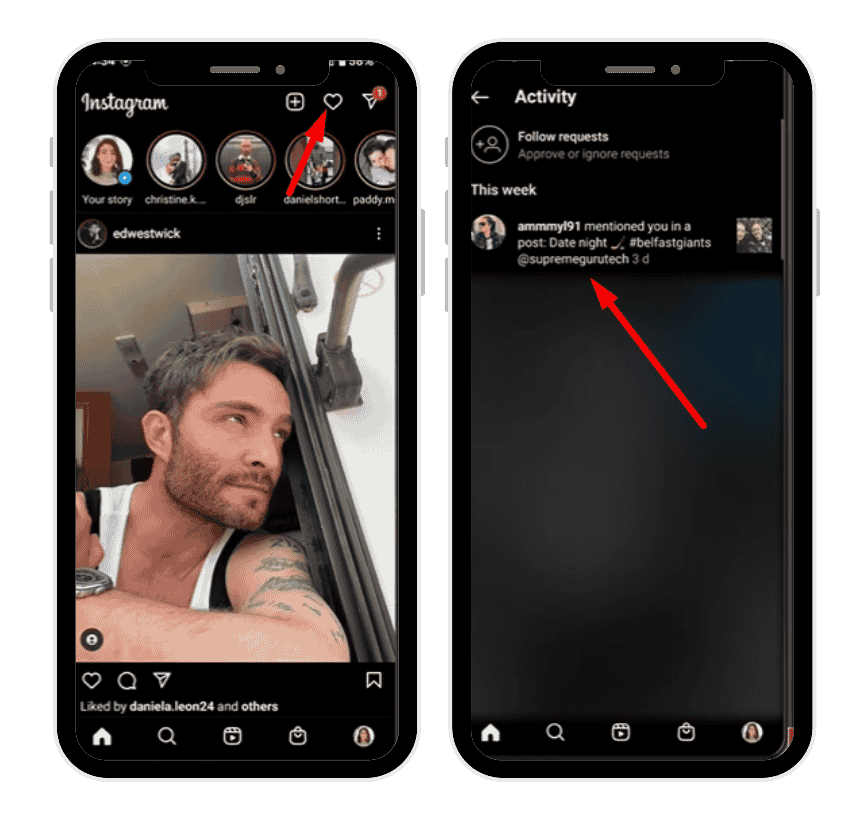
Mentions in Instagram Live Videos
During a live broadcast, mentions serve a unique purpose. When someone types “@username” in the live chat, your handle becomes visible to everyone watching. The Instagram app sends a notification letting you know you’ve been referenced.
Here’s how to mention someone during a live stream:
- Open the Instagram app and start a live broadcast by tapping the “+” button and choosing Live.
- In the comment bar, type the @ symbol followed by the username of the person you want to mention.
- Select their account from the drop-down list that appears.
- Post the comment. Your mention now appears public in the chat, and they’ll receive a notification.
If the host verbally says your handle on video, Instagram may still show “Someone mentioned you in their live” in your notifications. You can tap this to watch or join the broadcast.
💡 Pro Tip: Buy Instagram comments with BuzzVoice to create meaningful engagement, spark conversations, and improve your content credibility instantly.
What Happens When Someone Mentions You on Instagram Live
When someone mentions you on Instagram Live, several things occur:
- You’ll receive notifications in your Direct Messages.
- If the account mentioning you is one you follow, the alert will appear in your main inbox.
- If you don’t follow them, it may show up as a message request.
- You can accept, ignore, or reply depending on your preferences.
- If the live video is saved as a replay, you can still view it later.
If your account is set to private, only your approved followers can see your posts and stories. However, being mentioned publicly in a live session might still attract new viewers who may send follow requests. This makes mentions a subtle but effective way to increase visibility and audience reach.
Why People Mention You on Instagram Live
There are various reasons why someone might mention you in a live broadcast. Understanding these motives helps you engage appropriately:
- Collaboration: Creators and brands often mention partners or collaborators to recognize shared work.
- Invitations: Sometimes, hosts mention you to invite you to join the live video.
- Appreciation: Mentions can simply acknowledge your support, friendship, or contribution.
- Promotion: Businesses might mention your account to highlight a product or service.
- Community Engagement: Mentions make live interactions dynamic, encouraging users to discuss and connect in real time.
When you’re mentioned, it’s a form of digital acknowledgment — a way of saying your presence or opinion matters.
Benefits of Being Mentioned on Instagram Live
Being mentioned on Instagram Live has direct and indirect advantages for your social media growth:
- Increased Visibility: Your username becomes visible to a broader target audience watching the broadcast. This visibility can lead new users to click your profile, explore your content, and follow your account.
- Credibility and Social Proof: When a well-known brand or influencer mentions you, it signals trust and recognition. Such public endorsements enhance your reputation and attract organic engagement.
- Valuable Insights: Tracking how and when people mention you provides valuable insights into audience sentiment. It helps you monitoring who’s talking about you, what kind of content gets attention, and how people perceive your brand.
- Real-Time Engagement: Live mentions encourage immediate interaction. You can reply, engage, and discuss in real time, creating authentic conversations that strengthen connections.
- Increased Traffic: Each mention is an open invitation for others to visit your profile, explore your feed, and interact with your posts and stories. It’s a simple yet effective way to drive organic traffic.
Related: What Does PFP Mean on Instagram?
Tagging vs. Mentioning on Instagram
Many users confuse tagging with mentioning, but the two have different functions.
| Aspect | Tagging | Mentioning |
|---|---|---|
| Where Used | Posts, Photos, Reels | Captions, Comments, Stories, Live Videos |
| Purpose | Attaches someone directly to the content | Refers to or acknowledges someone |
| Visibility | Appears in the “Tagged” tab on their profile | Appears in the text or chat only |
| Notification | Tagged person gets a notification | Mentioned person also gets a notification |
| Control | You can choose to hide tagged posts | You can manage who can mention you |
In short, tagging adds you to the actual post or photo, while mentioning simply refers to you in text. For ongoing collaborations, tagging ensures lasting association; for conversational moments, mentions work best.
How to Manage and Control Mentions
Instagram allows every user to control who can mention them. If you prefer to limit or stop mentions, follow these steps:
- Open your Instagram app and go to your profile.
- Tap the three-line menu icon in the top right corner.
- Choose Settings → Privacy → Mentions.
- Under Who can mention you, select:
- Everyone
- People you follow
- No one
If you select No one, nobody will be able to type your username with the @ symbol in any story, comment, or video. If someone is bothering you or using mentions maliciously, you can also block their account entirely. Once blocked, they cannot tag, mention, or interact with your content in any way.
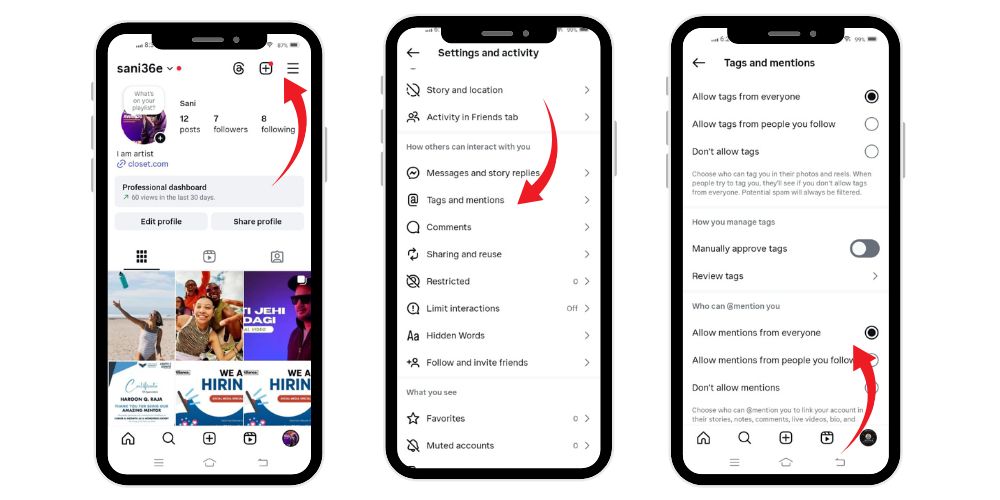
How to See When Someone Mentions You
You can track mentions in several ways:
- Check the Activity Feed (heart icon) for new alerts.
- Open your Direct Messages — mention notifications often appear there.
- Review your Stories — Instagram sends you a preview when you’re mentioned.
- Use the search bar to look for your username in comments or stories.
- Use analytics or third-party monitoring tools (with caution) to gather data about mentions over time.
Always ensure that any third-party tool you use complies with Instagram’s policies and doesn’t compromise your account security.
Managing Notifications for Mentions
If you receive too many alerts, you can customize how notifications work:
- Open Settings → Notifications → Posts, Stories, and Comments.
- Find the Mentions section.
- Choose whether you want notifications from Everyone, People You Follow, or No One.
Understanding what Quiet Mode means on Instagram helps you focus only on interactions that are important and relevant to your online goals, while reducing clutter in your feed.
Protecting Your Privacy on Instagram Live
Mentions can sometimes bring unwanted attention. To protect your privacy:
- Restrict mentions to trusted followers.
- Adjust your account to private so only approved followers can interact.
- Block or report anyone who abuses the mention feature.
- Regularly review your settings to ensure your preferences remain in place.
- Use moderation tools to filter comments during live videos.
Maintaining control over who can mention or tag you ensures that your profile remains professional and safe from spam or harassment.
How to Mention Someone in Your Own Instagram Live
To create stronger engagement during your own Instagram Live, you can mention others too:
- Go live from your profile.
- While streaming, type “@” followed by their username in the comment section.
- Select the correct account and send.
- They’ll instantly be notified.
Alternatively, you can invite them to join your live directly:
- Tap the icon with two faces.
- Choose the person’s handle.
- Send an invitation.
Once accepted, they’ll appear on split screen with you. This method is great for interviews, discussions, or product demonstrations.
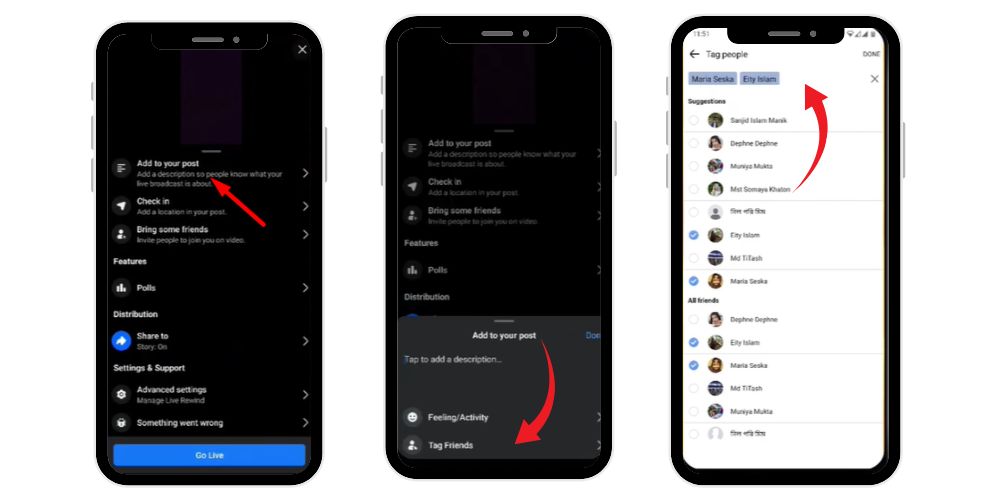
Why Mentions Matter on Social Media
Mentions are a cornerstone of community engagement on social media. They make content more interactive, keep conversations public, and help you continue building relationships with your followers. Whether you’re an influencer, a small brand, or just someone active online, mentions help you:
- Gain attention from your target audience
- Strengthen trust with your followers
- Expand your visibility
- Gather valuable insights for strategy planning
- Keep your profile active and relevant
Every mention is a signal that someone values your presence enough to reference you publicly — a small but meaningful acknowledgment in the digital world.
💡 Pro Tip: More views improve ranking. With BuzzVoice, your Instagram videos get attention, trust, and stronger algorithm support.
Controlling Mentions Without Losing Engagement
It’s important to balance privacy with visibility. If you block too many interactions, your content might lose organic reach. Instead of disabling mentions completely, choose the option that limits them to approved followers. This keeps your online space safe while allowing your name to appear in relevant contexts.
You can also use moderation tools to manage unwanted comments or tags. Regularly note who interacts with your posts and stories. The more you monitoring these details, the better you can control how your account appears across the platform.
Final Thoughts
Being mentioned during Instagram Live is more than a casual reference — it’s a sign of connection, relevance, and influence. It makes your username visible to new viewers, increases engagement, and helps you reach your target audience effectively.
When someone mentions you, take a moment to read, reply, or discuss if appropriate. Each interaction strengthens your relationships on social media and contributes to your overall growth.
At the same time, maintain control over your privacy by managing your settings, restricting unwanted mentions, and allowing only approved followers to tag or reference your account. Remember, every mention can be a valuable opportunity — or a learning note — depending on how you choose to respond.
Ultimately, what it means when someone mentions you on Instagram Live is simple: your name has captured attention, your content has made an impression, and your online presence continues to grow across the Instagram community.
FAQs
What does it mean when a live video says “mentioned you”?
It means your username was referenced during a live broadcast — either typed in chat, spoken aloud, or used as an invitation. You’ll receive notifications allowing you to view or join the video.
What happens when someone mentions you on Instagram?
It means they used the @ symbol plus your username in a post, story, or comment. This makes your handle visible and links directly to your profile.
What’s the difference between tagging and mentioning?
Tagging connects you directly to photos or posts, while mentioning simply refers to you in text. Both trigger notifications, but tagging adds the content under your “Tagged” section.
How do I see who mentioned me on Instagram Live?
Check your notifications or Direct Messages. Instagram always sends an alert when someone mentions you during a live session.
How can I mention someone in my live broadcast?
While live, type “@” plus their username in the comment box, or use the “Invite” option to bring them into your video. They’ll instantly be notified and can accept to join.

BuzzVoice
BuzzVoice is the best place to go when you need instant engagement services on social media. Offering a wide variety of packages for Instagram, Youtube, Facebook, Twitter, Soundcloud & Tiktok.



