How To See Comments On Twitter (X) in 2026
Short Answer:
- If you need to read the comment section of a simple or hidden tweet, just go to the timestamp below.
- If the tweet has been retweeted, press or click on the three dots directly beneath it and select View post engagements. It will open the comment section and likes that were retweeted as well.
Twitter[X] is a platform built upon quite simple guidelines. If the audience engagement is higher, the algorithm will rank your content better. This indicates that more people will look at your posts, more followers, and a higher influence. It is very important to add comments to your posts and hidden tweets if you want the audience to be more engaged on Twitter. A retweet icon is a powerful way to start a conversation and compel other users to reply.
Related: Buy Followers on X starting from $5.97, delivered in one day!
Why Read Comments on Twitter?
The content posted on Twitter is crucial in portraying the views of different entities. The shared discourse is enriched by the different perspectives that come from users who are from various cultures, different educational backgrounds, and lifestyles. The comments could be helpful because they may provide many views that let us learn how those perspectives complement each other.
When you leave a reply on hidden tweets, it is a way to get deeper content and some extra context or insight than the original had in the tweet. As a strategy to improve the understanding of a particular subject, accompanying links, resource materials, and stories may be provided to users. Exploring the comments and drawing on the collective intellect in the Twitter community are effective strategies to narrow the gap between your story comprehension and greater detail.
Steps To See Comments on Twitter, aka X
A Twitter private profile viewer or your feed will include their tweets:
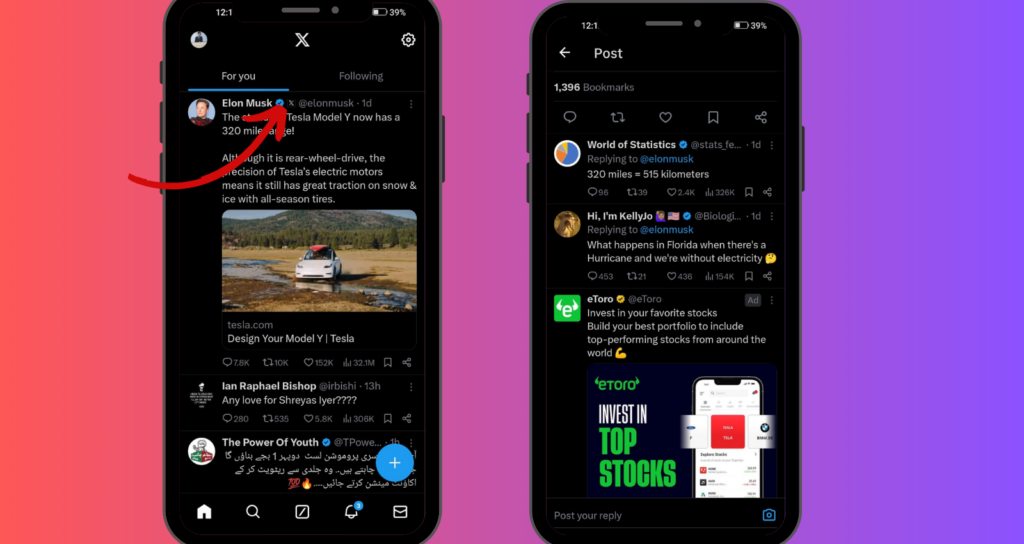
- Log in to X to view tweet comments. Or create a new X account instantly.
- Check the tweet’s timestamp and click or touch it. Timestamps are on the right of tweeters’ usernames. The chat bubble is for comments only, so don’t click on it.
- Click the timestamp to see when a tweet was posted. A tweet with a “9m” time stamp was sent nine minutes ago. Previous tweets’ dates are shown.
- Touch the timestamp to view the tweet’s comments. Click or touch “Show more replies” at the bottom for more responses.
- Click or tap the tweet’s three dots at the top right. Select View Hidden Responses to view Twitter’s hidden tweets.
- Quote tweets are optional. You can view who retweeted a tweet with retweet icons and their comments on the X mobile app or website. After clicking the timestamp, click the tweet’s top right corner and the three horizontal dots. Select View Post engagements. This page contains all quote tweets.
- Quote tweets aren’t visible without authorization. If the Quotes option is inaccessible, these hidden tweets do not include approved quote tweets.
Hiding a Tweet Reply
You can’t delete Twitter comments, but you can hide damaging, spammy, or unpleasant ones. Hide an unfavorable Twitter reply with these steps:
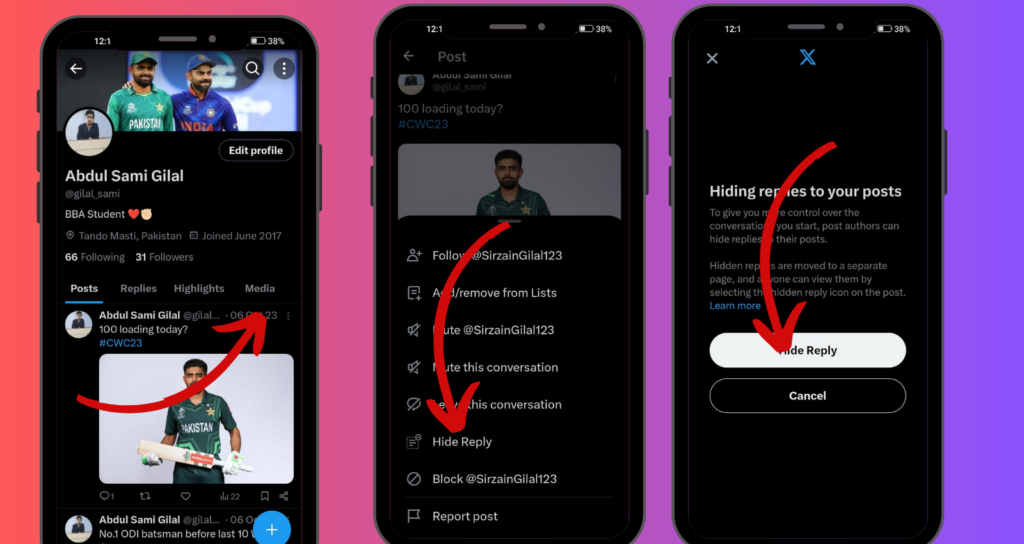
- Go to the post you want to hide reply on.
- Choose from the dropdown.
- The tweet has a downward-pointing arrow in the upper right corner. Clicking it opens an arrow-style menu.
- Click “Hide Reply.”
- Select “Hide Reply” from the menu. Control tweet answers’ visibility by selecting them.
- Then choose “Replies to Hide.” You may select which replies to keep private from a list. Mark the box next to an answer to hide it.
- Verify the action after selecting replies. Only the poster and followers may see the chosen answer in the main thread.
Deleting Tweet Replies Via Twitter Support
Only hidden tweets, comments, and quotes tweets you wrote can be deleted. There is no easy way for users to remove a reply to a tweet on Twitter, even when contacting Twitter support and leave a reply. You can send a report to Twitter if you come across a reply that is against their standards or guidelines. To report a tweet, follow these steps:
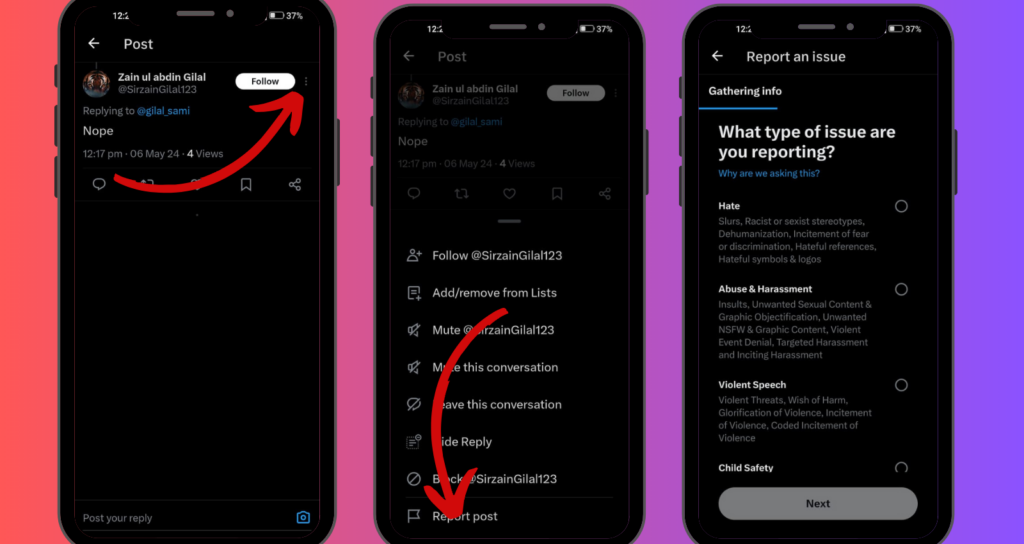
- Go to the tweet reply you want to report.
- To open the dropdown menu, click the downward arrow in the upper right corner of the message.
- Click on the “Report Tweet” option in the dropdown menu.
- Just do what it says on the screen. To explain why you want to report the tweet, Twitter will walk you through a few steps. Submit the report afterward.
Muting the offending people is a quick and easy way to deal with many unwelcome responses. You might be able to mute a user if you want to enjoy Twitter more serenely. This will conceal their tweets and alerts, making your timeline more private.
Nevertheless, remember that muting won’t make their past comments to your tweets disappear. Deleting such comments one by one is the only way to tidy up your discussions. Although it isn’t automate, it restores your control over your Twitter private profile viewer.
Can You Limit Replies?
The steps to make your public Twitter account more private are not hard to follow. Before submitting your tweet, note the globe symbol underneath the tweet composition box. In that menu, you’ll see three separate choices: “Everyone” (the standard option), “People you follow” (to narrow your audience), and “Only people you mention” (a VIP version).
Pick the option that best suits your needs, send out your tweet, and your public account will be more private than before.
Final thoughts
Now that you know how to read Twitter comments, you can interact with Twitter like an expert. A person can easily leave a reply under a tweet. It is more crucial, but still not very difficult, to see all of the retweet icons that include comments.
If the tweet has any interactive elements, clicking on them will take you to the corresponding item. In this section, you will find “@” responses, links, and buttons to connect with Twitter. Clicking on the text or right-clicking the timeline will bring up the responses and retweet icons.

BuzzVoice
BuzzVoice is the best place to go when you need instant engagement services on social media. Offering a wide variety of packages for Instagram, Youtube, Facebook, Twitter, Soundcloud & Tiktok.
Learn more →