How To Make a Facebook Reel That Gets Seen With These Tips
Facebook Reels are a great way to interact with your audience. This tutorial will take you step-by-step through the entire process, from creating your first video to posting it to your followers. Ready to learn how to make a Reel on Facebook?
You can also make your reels to be visible to more people by using BuzzVoice Facebook packages, a tried-and-true social media growth tool. You can buy Facebook followers, gain Facebook video views, and purchase Facebook post likes to grow your account and boost your overall reach.
How to Make a Reel on Facebook: A Step-by-Step Guide
1. Open the Reels Feature
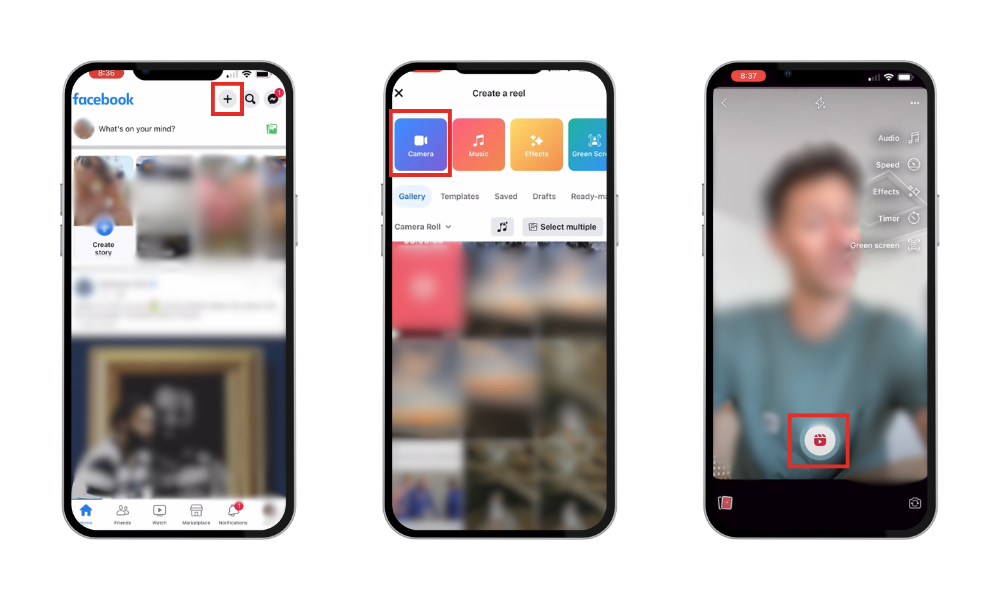
- Open the Facebook app on your mobile device.
- To access the Reels section, either scroll down your feed or tap the “Reels” button in the top navigation bar.
Alternatively, to get started, select “Create” from the Reels tab on your profile.
2. Record Your Reel
- To access the recording screen, tap the camera icon.
- To switch to hands-free mode, tap the record button once or press and hold it.
- To better control the flow of your video, use the timer and speed settings.
Users can incorporate multiple video clips and photos into their reels, enhancing the versatility and creativity of their content. Plus, reels bring you more followers and can also help you monetize your content.
3. Edit Your Reel
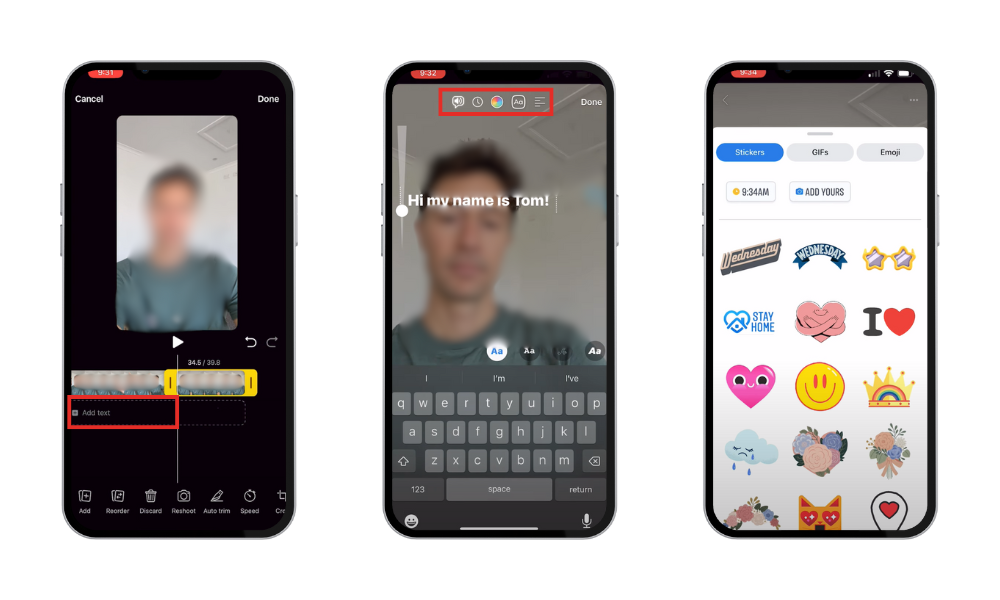
- Add music from Facebook’s licensed audio library.
- Add text overlays, visual effects, and filters to make your reel unique.
- Cut, divide, or rearrange your clips to improve your video.
4. Publish and Share
- To increase discoverability, write an interesting caption and use pertinent hashtags.
- Select the appropriate audience settings – set your video to ‘Public’ to reach a larger audience.
Ensure you upload the reel to Facebook in the correct format to avoid any complications with the video settings.
Best Practices for Creating Engaging Facebook Reels
Tell a Story: Despite the brief length of Reels, make an effort to share a narrative or point of interest with your viewers.
Use Time Wisely: Social media users have short attention spans, so try to create content that is both impactful and brief.
Visual Appeal: Take note of the images; content that is well-lit and brighter will typically perform better.
Hashtags and Captions: To improve your chances of being found by more people, use pertinent hashtags and an engaging caption. Facebook Reels are short-form videos and should be engaging and concise.
Avoid These Beginner Mistakes
Inadequate Lighting: Videos with poor lighting may be difficult to watch, so try to record in well-lit areas.
Videos That Are Too Long: Reels should be brief and to the point. Stay within the ideal range of 15–30 seconds.
Unclear Audio: Viewers may become disinterested in poor audio quality. Make sure the audio in your video is clear, and if you are using background music, make sure it complements the dialogue.
Technical Problems: Errors can occasionally occur during recording or editing. Restart the app, look for updates, and make sure the storage on your phone is not full.
Related Article: 10 Best Reel Editing App Free for iOS: From Free to Pro Plans
To create the perfect reels easily, check out this video:
Conclusion
Making a Facebook Reel is an enjoyable and fulfilling way to interact with your audience and show off your artistic abilities. You can create your first reel quickly by following our step-by-step guide. To reach a wider public, you can implement the best practices we have described.
You can increase your Facebook reach and begin to see tangible results, such as more shares, views, and insightful responses from actual users, by using our engagement services. We make it easier to be seen, whether your goal is to increase visibility, build a following, or promote a brand.
FAQs
What is the difference between Facebook Reels and Instagram Reels?
The features and target audiences of Facebook Reels and Instagram Reels differ slightly. Facebook Reels is more community-focused and integrated into the larger Facebook experience, while Instagram Reels is geared toward a younger audience and emphasizes trends and creative video editing.
How long can a Facebook Reel be?
Facebook Reels can last up to 90 seconds, but for maximum engagement, it is usually best to keep them between 15 and 30 seconds.
How do I get more views on my Facebook Reel?
- Use relevant hashtags
- Post consistently
- Create engaging captions
- Engage with comments
For even more targeted engagement, you can explore our Facebook packages to boost your reach.
How do I delete a Facebook Reel?
Go to your profile or Reels tab.
Select the Reel you want to delete.
Tap the three dots (•••) in the top-right corner of the post.
Choose Delete from the options.
Once deleted, your Reel will be permanently removed from Facebook.
Can I add a link in my Facebook Reel?
Facebook does not permit users to directly include clickable links in Reels. You can, however, point viewers to your profile or website for additional information or include a link in your caption or comments.
How can I tell how well my Reel is performing?
Go to your Reels tab and tap the video to see how your Facebook Reel is doing. Facebook gives you information about views, likes, shares, and comments. By using these metrics, you can identify the content that most appeals to your audience and modify your approach accordingly.

BuzzVoice
BuzzVoice is the best place to go when you need instant engagement services on social media. Offering a wide variety of packages for Instagram, Youtube, Facebook, Twitter, Soundcloud & Tiktok.
Learn more →