
How to See What You Liked on Instagram? Step-by-Step Guide
Instagram makes it simple to go back and find the posts you’ve liked over time—whether it’s a particular post that inspired you, a video that made you laugh, or a Reel you wanted to revisit later. This feature is especially helpful when you want to reconnect with content that caught your eye but got buried in your feed.
Instead of scrolling endlessly or trying to remember who posted it, you can easily access a collection of everything you’ve shown appreciation for with just a few taps. With the Instagram app’s recent updates, the path to find this information has changed.
In this guide, we’ll explain how to access your likes, organize your interactions, and resolve potential issues in case of an iphone app or android app.
Boost your likes and reach more followers without waiting for the algorithm. With BuzzVoice, you can instantly promote your content!
Where to Find Liked Posts on Instagram
To view the posts you’ve liked:
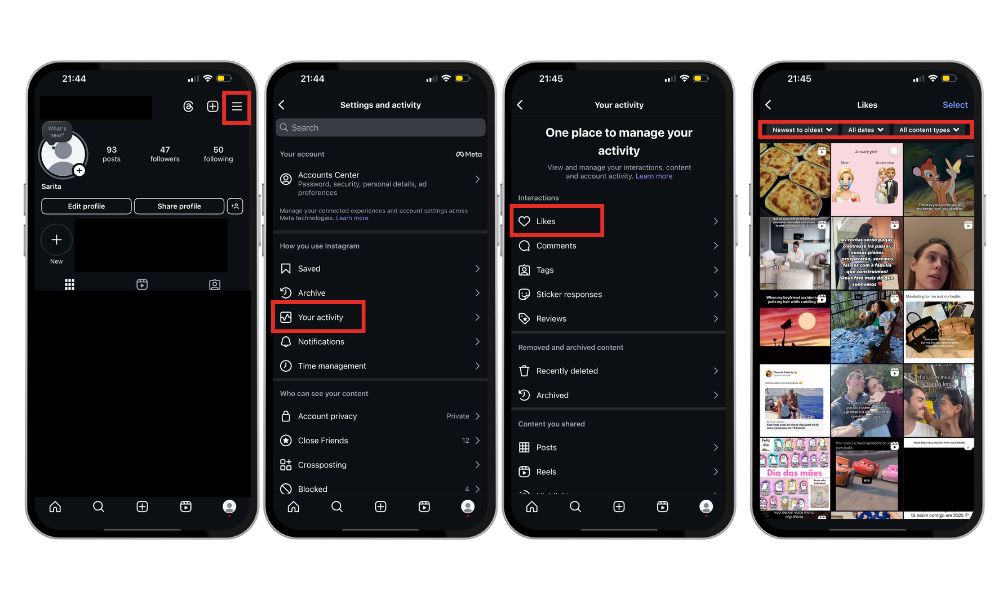
Start by opening the Instagram app on your device, then tap on your profile icon in the bottom right corner to access your personal page.
Next, tap the menu icon — the three horizontal lines — located in the top right corner of your profile page screen.
Select “Your Activity.
Tap on “Interactions,” then tap “Likes.”
You’ll see a list of the posts you’ve liked, including photos, videos, and Reels. You can filter them by date, author, or content type to make browsing easier.
What You Can and Can’t Do with Liked Posts
What you can do:
Instagram gives you several useful options when reviewing your liked content:
You can browse through all the photos, videos, and Reels you’ve previously liked. This makes it easy to rediscover posts that caught your attention.
You have the ability to filter your likes by date, the Instagram account that posted them, or the type of content. This helps you find specific posts more quickly.
If you’ve changed your mind about something, you can unlike multiple posts at once, making it easier to clean up your interaction history.
Related Article: Why Can’t I See the Comments on Instagram?
What you can’t do:
Even with these useful features, there are still a few limitations to keep in mind:
You can’t search through your likes using specific hashtags, which means you’ll need to rely on visual memory or filters like date or author.
Instagram generally only allows you to see likes from the past year or so, so anything older may no longer be visible in this section.
Alternative Ways to Save Content
Liking a post isn’t the only way to keep track of content you enjoy on Instagram. If you want a more organized or private way to revisit posts later, Instagram offers a couple of helpful options:
Save Posts: Whenever you come across something you want to keep—whether it’s a quote, a recipe, or an outfit idea, you can tap the bookmark icon located just below the post. This saves it to your personal collection so you can easily find it again later.
Create Collections: To take it a step further, Instagram lets you organize your saved posts into themed collections. For example, you might create one for travel inspiration, another for workout tips, or one just for your favorite Reels. It’s a great way to keep everything sorted and easy to access.
One important thing to note: unlike likes, saved posts are completely private. Only you can see what you’ve saved and how you’ve organized your collections, making this a more discreet way to keep content for future reference.
Troubleshooting: Can’t See Liked Posts?
If you’re having trouble viewing the posts you’ve liked on Instagram, don’t worry—there are a few simple steps you can try to fix the issue:
Check for updates: Ensure that your Instagram app is running the latest version.
Log out and log back in: Signing out of your account and then logging back in can help refresh the app and resolve minor glitches.
Clear the app cache: On some devices, clearing the app’s cache can solve loading problems or missing features. This won’t erase any of your data, but it could help improve the app’s performance.
Try the web version: If nothing else works, go to instagram.com in your browser and log into your account there. You might be able to access your liked posts from the computer interface.
These quick fixes often solve the issue and get things running smoothly again.
Final Thoughts
Keeping track of your interactions on Instagram is not only a great way to stay organized, but it also helps you manage your online presence more effectively. By using the tools Instagram offers, you can easily review your likes, organize saved posts, and make sure you’re staying connected with the content that matters most to you.
Additionally, if you want to take your social media management to the next level, services like Buzzvoice.com can provide valuable insights into your social engagement. It helps you optimize your Instagram experience and grow your presence more strategically. Whether it’s analyzing your audience or discovering trends, Buzzvoice can offer the support you need to navigate and enhance your social media journey.
In conclusion, Instagram offers useful tools to help you manage and revisit the content you engage with, from liking posts to saving and organizing them. By staying organized and using these features, you can enhance your overall Instagram experience. Additionally, leveraging services like Buzzvoice.com can provide extra support for managing and optimizing your social media presence.
FAQ
Can I see all the posts I’ve liked since I created my account?
No, Instagram typically only allows you to view likes from the past 12 months. This is a limitation set by the platform, so you may not be able to access likes from older posts. However, if you’re interested in gaining deeper insights into your engagement on Instagram, services like Buzzvoice.com can provide detailed analytics and social media insights that go beyond what Instagram offers.
Buzzvoice can help track your interactions and provide strategies to enhance your online presence, allowing you to stay on top of trends and engagement over time.
Can people see the posts I’ve liked?
Whether other users can see the posts you’ve liked depends on the privacy settings of the posts and your Instagram profile. If your profile is public, others may be able to see the posts you’ve liked, but if your account is set to private, only your approved followers can view this information.
Additionally, services like Buzzvoice can help you manage your Instagram online presence and analyze who’s interacting with your content, giving you greater control over your engagement strategies and privacy.
Can I unlike multiple posts at once?
Yes, Instagram allows you to unlike several posts at once. In the Likes section, tap on “Select,” choose the posts you want to unlike, and then tap “Unlike.” This feature is useful for cleaning up your interaction history quickly.
To enhance your social media management even further, Buzzvoice offers tools that allow you to track and analyze your interactions, giving you insights into how your likes and engagement are impacting your overall reach. With Buzzvoice, you can also refine your approach to social media to ensure it aligns with your goals.

BuzzVoice
BuzzVoice is the best place to go when you need instant engagement services on social media. Offering a wide variety of packages for Instagram, Youtube, Facebook, Twitter, Soundcloud & Tiktok.



