
Why Did Instagram Log You Out? 5 Common Reasons
If you’re wondering, “Why did Instagram log me out?”, you’re definitely not alone — this is a common issue faced by many users. The most frequent reasons include password changes, suspicious or unusual activity detected by Instagram, app errors or bugs, recent system updates, logging in from multiple devices, or even violating the platform’s community guidelines.
However, various reasons can cause unexpected logouts, including issues with Instagram’s servers, technical glitches, or account management problems. These measures are often put in place to protect your account and personal data.
Fortunately, in most cases, the issue can be resolved quickly with a few simple steps, allowing you to regain access to your profile and get back to posting, scrolling, and engaging as usual. We hope the solutions provided in this article will help you resolve your login issues and get back to enjoying Instagram without further interruptions.
Want to boost your reach on Instagram? Buy real followers, views, and comments safely with BuzzVoice. Use our services to keep your profile active and relevant, even during technical issues on the platform.
1. Logged In on Multiple Devices
If you use Instagram on your phone, tablet, computer, and maybe even on another device, this could trigger the app’s security system and result in a forced logout. Instagram’s algorithm is designed to detect unusual or simultaneous logins from different devices and locations, which it may interpret as suspicious activity or a potential security threat.
This is a protective measure to prevent unauthorized access and keep your account safe. While it can be frustrating, it’s Instagram’s way of ensuring that only you — or someone you trust — has access to your profile. To avoid this, try limiting active sessions or regularly checking your login activity through the app’s security settings.
Also, keep in mind that changing your login details or security settings on one device can affect your sessions on other devices, so always update your information across all devices you use.
|
Device |
Simultaneous Access Allowed? |
|
Mobile Phone |
Yes |
|
Tablet |
Yes |
|
PC |
Yes |
|
2+ Devices at the Same Time |
May Trigger Logout |
Tip: To avoid unexpected logouts, stick to using just one or two devices at a time and enable two-factor authentication for added security. If you manage more than one account on the same device, be aware that this can sometimes trigger bugs or additional security checks, so use caution when switching between accounts.
2. Instagram Update or Bug
In 2026, many users reported experiencing automatic logouts after updating the Instagram app. This issue is often linked to temporary bugs or glitches introduced in the new version of the app’s code.
A common error is the infamous “Instagram glitch logout,” where users are repeatedly logged out of their accounts despite entering valid login credentials.
To fix this issue:
Make sure you’re using the latest version of the app by checking for updates in your app store.
If the problem persists, delete the app completely and reinstall Instagram— this can clear corrupted data and reset the app’s functionality.
At BuzzVoice, we’re always keeping an eye on the latest Instagram trends, bugs, and system updates so your content stays visible and your engagement stays steady—even when the platform gets a little unstable.
3. Password Changed or Reset
If you — or someone with access to your account — changed the password, Instagram will automatically log out all active sessions as a security measure to protect your data. This is a common step we take to keep your account safe after you change your password.
Typical signs include:
- You receive an email confirming a password change
- You can’t log in using your old password
- A message appears saying “Instagram session expired”
- You are unable to log in even when entering the right credentials
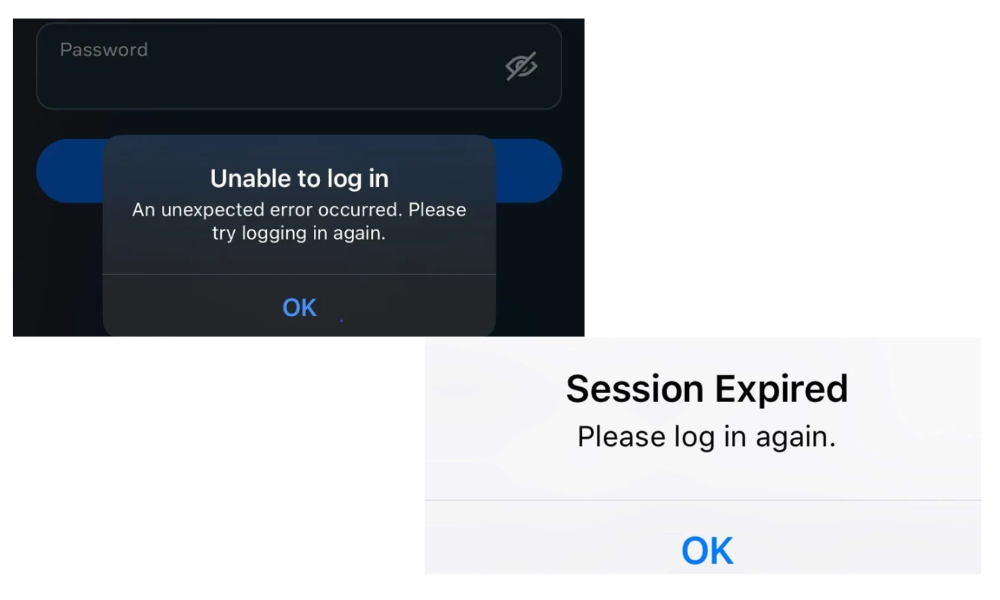
If this happens and you didn’t initiate the change, act quickly: reset your Instagram password immediately, check your login activity in the security settings, and enable two-factor authentication to secure your account. Also, confirm and verify your email address and phone number to ensure your account details are correct and secure.
4. Suspicious Activity Detected
Instagram has automated systems designed to detect suspicious behavior, such as logins from unusual locations, automated access attempts, or the use of bots. When these patterns are flagged, the platform may force a logout to protect your account from potential threats. In such cases, Instagram logs users out for security reasons to prevent accounts from being hacked.
|
Behavior |
Risk of Automatic Logout |
|
Logging in from abroad without a VPN |
🔴 High |
|
Using unauthorized third-party apps |
🔴 High |
|
Frequent IP address changes |
🟠 Medium |
If you’ve been logged out for one of these reasons, it’s likely that Instagram is taking precautionary steps to safeguard your account from hackers or unauthorized access. Reviewing your logs and recent activity can help you detect if your account has been compromised. To prevent this, avoid using unofficial apps, stick to secure networks, and consider enabling two-factor authentication for added protection.
5. Account Disabled or Reported
If your account has been reported by other users or has violated Instagram’s community guidelines, the platform may temporarily suspend it as a precautionary measure.
Signs to watch for include:
A message saying “Your account has been disabled”
Immediate logout without any clear explanation
Inability to log back into your account
If your Instagram is a sales channel, a content creation hub, or you’re an influencer, it’s especially important to maintain a strong and authentic presence. Consider boosting your profile with real comments and consistent engagement through services like BuzzVoice to keep your account relevant and help prevent unjustified reports or suspensions. Taking proactive steps can protect your account’s reputation and ensure uninterrupted growth.
Third-Party Apps and Instagram Integration
Connecting third-party apps to your Instagram account can sometimes lead to unexpected logouts or other technical issues. These party apps often request access to your Instagram account to provide additional features or analytics, but if they’re not properly configured or experience technical problems, they can trigger Instagram’s security measures.
This may result in the Instagram app logging you out as a precaution to protect your account. To keep your account secure, it’s important to regularly review which third party apps have access to your Instagram account.
Head to your Instagram settings, navigate to the security section, and check the list of connected apps. Remove any party apps you no longer use or don’t recognize. By managing these permissions and only allowing trusted apps, you can minimize the risk of logging issues and keep your Instagram experience smooth and secure.
See more tips on our social media blog and check out our follower packages.
What to Do If Instagram Keeps Logging You Out
If you are constantly being logged out of Instagram or if Instagram keep logging you out, there are several steps you can take to fix Instagram:
- To clear the app cache, go to Settings > Apps > Instagram > Storage, then tap on Clear.
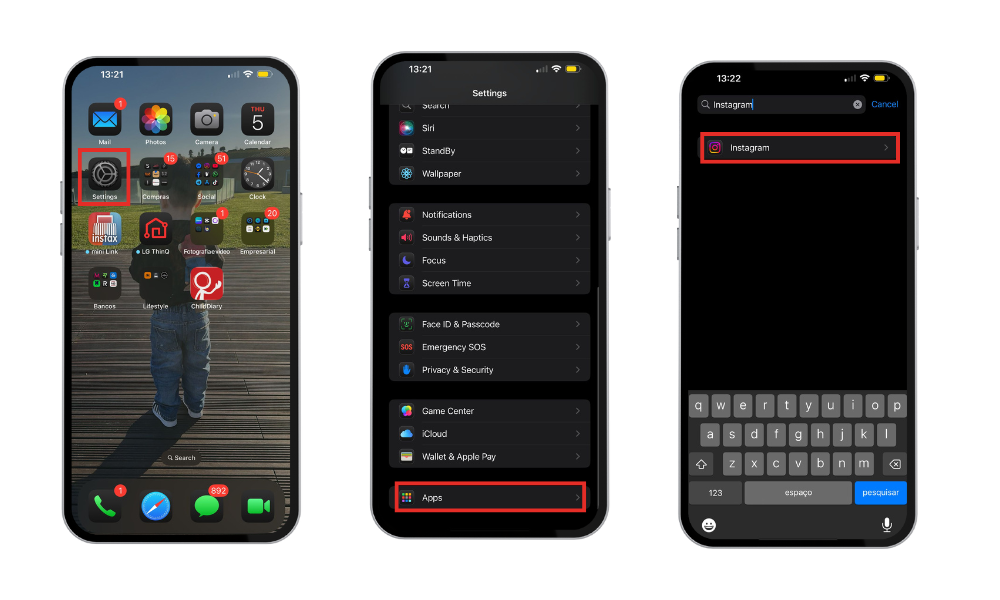
- Try a simple reboot or restart your device to resolve temporary glitches.
- Restart your router or switch to mobile data if your Wi-Fi connection is unstable.
- Try logging in via a browser on a desktop computer to see if the issue persists.
- Check websites like DownDetector to see if Instagram or other platforms are experiencing server issues, and wait if there is a known outage.
- Check if someone else has access to your account (Instagram > Security > Login Activity)
- Reset your password
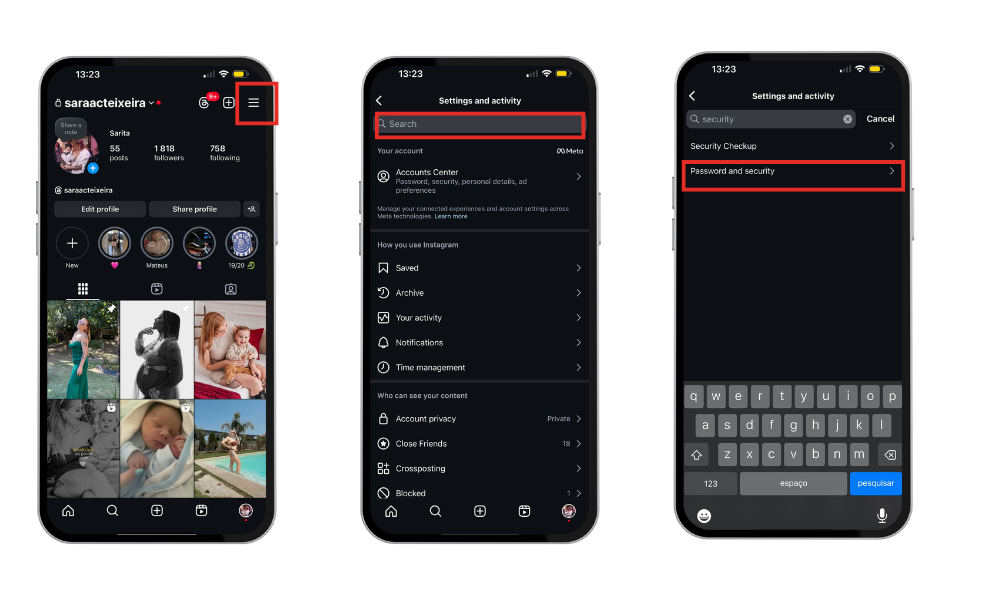
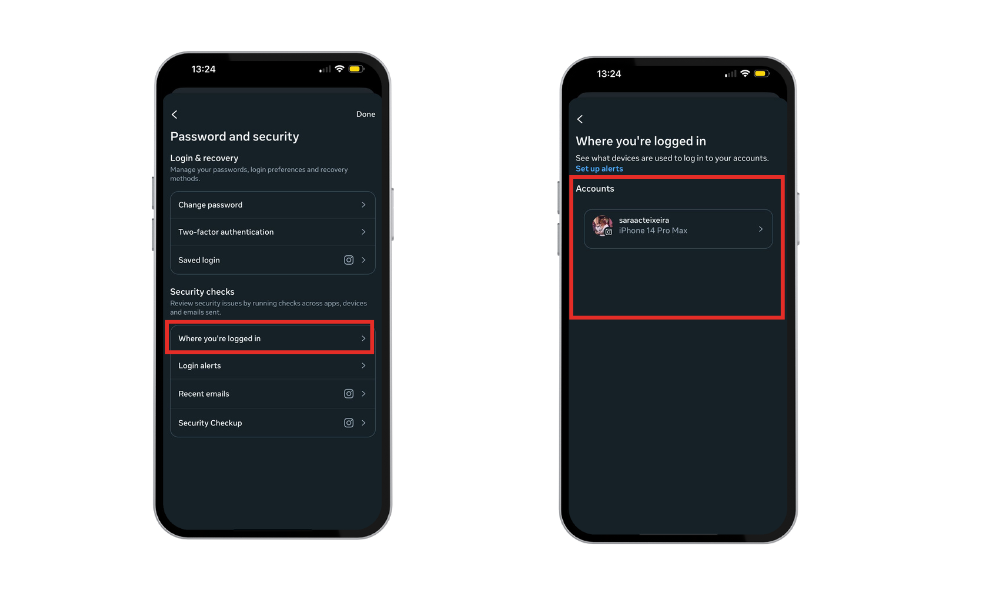
- Connect to a secure Wi-Fi network
- Keep the app updated (check in the App Store or Google Play)
These steps can help if Instagram keep logging you out or you keep logging out unexpectedly.
How to Stay Logged In on Instagram
To avoid further unexpected logout issues, follow these practical tips:
Try to avoid logging in on multiple devices at once
Enable two-factor authentication
Use only the official Instagram app or website
Regularly check your account activity
Pro Tip: If you use Instagram professionally, consistency is key. BuzzVoice helps you maintain your visibility even when facing technical glitches.
Summary Table: Common Reasons for Instagram Logout
|
Reason |
Brief Description |
Recommended Solution |
|
Multiple devices logged in |
Simultaneous login may appear suspicious |
Reduce the number of connected devices |
|
App update or bug | The new version may cause errors |
Update or reinstall the app |
|
Password changed |
Security triggered by credential changes |
Reset password and enable 2FA |
|
Suspicious activity |
Login from unusual location or strange patterns |
Check activity and change password |
|
Account disabled or reported |
Violation of rules or user reports |
Contact Instagram support |
Conclusion
Being logged out of Instagram randomly can be frustrating, but in most cases, it’s a security measure or the result of temporary technical issues.
The best way to prevent these logouts is to:
Use only trusted devices
Keep the app updated
Monitor your account’s security
And if you use Instagram for business or as an influencer, maintaining your engagement with services like BuzzVoice can help keep your visibility steady, even during periods of app instability.
FAQs About Instagram Logging You Out
Why does Instagram randomly log me out at night?
It’s possible that the app updates automatically overnight or that another device is trying to access your account. Check your recent activity.
Can a bug cause automatic logout on Instagram?
Yes, especially after poorly tested updates. This is known as the “Instagram glitch logout” and has affected thousands of users in 2026.
How do I stop Instagram from logging me out repeatedly?
Keep the app updated, avoid multiple simultaneous logins, and enable two-step verification. If you use your account professionally, you can strengthen your profile with BuzzVoice services that boost your reach and reputation.
Will I lose my account if this keeps happening?
Not necessarily. However, if logouts happen frequently and you don’t follow good security practices, you may risk temporary account blocks.

BuzzVoice
BuzzVoice is the best place to go when you need instant engagement services on social media. Offering a wide variety of packages for Instagram, Youtube, Facebook, Twitter, Soundcloud & Tiktok.



