
Does Instagram Suggest Users Who Searched You? Explained!
Curious if Instagram suggests users who search for you? Many users have noticed patterns that suggest it might — but what’s going on behind the scenes? While Instagram has never officially confirmed that profile searches influence suggestions, countless personal experiences seem to point in that direction.
🚀 Want to Get Suggested on Instagram More Often?
Take control of your visibility and let BuzzVoice help you grow faster. Whether you want more followers or better reach, we’ve got you covered:
- 👉 Real Instagram Followers — Grow your audience instantly
- 👉 Comments — Boost interactions in the algorithm
- 👉 Likes — Add credibility and engagement
- 👉 Reels Views — Get seen on Reels and more
Start growing smarter — Explore BuzzVoice »
What Influences Instagram Suggestions in 2026?
While the exact formula remains under wraps, several key factors have been identified that heavily influence who appears in your “People You May Know” list or shows up as a recommended profile. These include your interactions, mutual connections, shared interests, and sometimes even your phone contacts. These are some of the main criteria Instagram considers when suggesting profiles.
Understanding these elements can give you better insight into how Instagram’s algorithm curates your suggested profiles — and how your own profile might be surfacing for others. The suggestion system is dynamic, constantly adapting to new user behaviors and connections.
Top Factors That Influence Instagram Suggestions:
|
Factor |
Impact |
Confirmed by Instagram? |
|
Mutual followers |
High |
Yes |
|
Synced contacts |
High |
Yes |
|
Interactions (likes, DMs, comments) |
Medium-High |
Yes |
|
Frequent profile views |
Medium |
Not officially confirmed |
|
Repeated searches |
Possible |
Not officially confirmed |
Note: Instagram does not directly suggest users based on who searches for you. While searching for someone’s profile may not directly trigger a suggestion, it can still influence the algorithm indirectly — especially when combined with other signals like synced contacts or interactions.
Does Instagram Suggest Users Who Search for You?
This is one of the most debated topics among Instagram users: does Instagram show people from your own search history as a friend suggestions? Instagram suggests profiles based on a variety of factors, including mutual connections, shared interests, and activity patterns, not just search activity.
Why did this theory emerge?
- Many users report seeing profiles they searched for appear as suggested accounts shortly after. These suggestions often appear recently after searches or interactions.
- On forums like Reddit and Quora, there are hundreds of similar reports.
- The app has never shown a public log of “who searched whom” but suggested profiles often align with recent searches.
Although Instagram hasn’t confirmed it the algorithm may be using passive data signals such as:
- How often a profile is viewed
- Time spent on a profile
- Prior searches
- Behavior similar to other users (machine learning)
- Indirect connections, like mutual friends or any type of connection with the accounts you search
Instagram may similarly recommend accounts that share mutual interests or connections, rather than relying solely on direct search activity.
Users often notice that Instagram suggests three suggested accounts in the recommended list, which are influenced by multiple factors such as mutual connections, location data, and engagement patterns.
How to Control Who You See (and Who Sees Your Instagram Account)

If you’re concerned about privacy or don’t want to show up in someone’s suggestions (or vice versa), here are a few effective ways to reduce that exposure. Keep in mind that what you have posted can also affect who sees your account in suggestions.
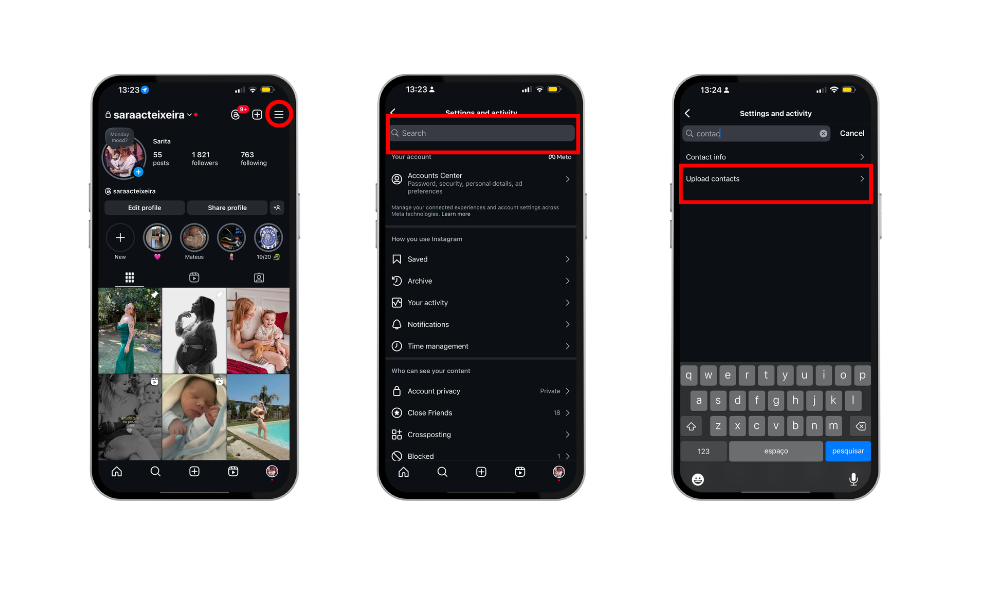
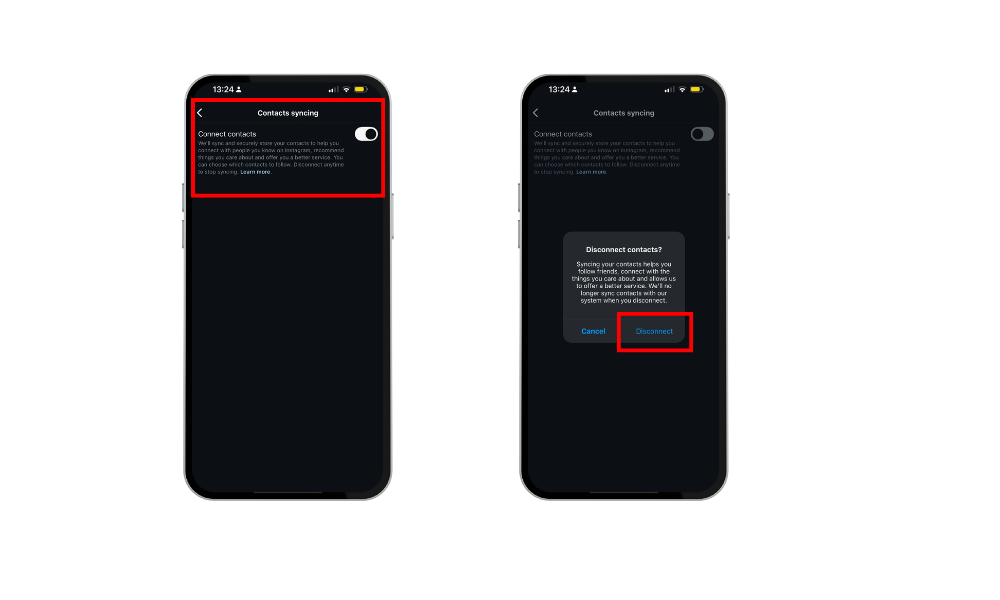
1. Turn Off Contact Syncing
Go to Settings > Account > Contacts Syncing
Disable the option
This prevents Instagram from recommending people based on your phonebook contacts
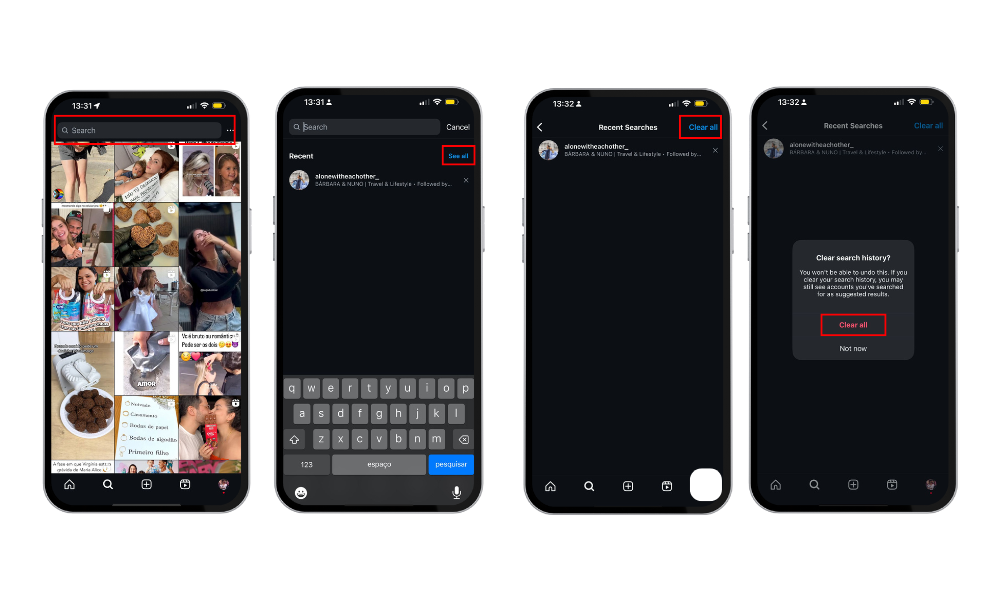
2. Clear Your Searches
Tap the search bar, then tap “See All”
Select “Clear All” to remove search history
Helps prevent the algorithm from associating searched profiles with your account
- If your search history was cleared fairly recently, it may no longer influence suggested profiles
3. Limit Interactions with Certain Profiles
Avoid frequently visiting the profiles of people you don’t want suggested
Don’t send direct messages or react to content — any activity can be interpreted as interest
4. Use Restriction Options
You can mute, restrict, or block profiles to influence future suggestions
This signals the algorithm that you’re not interested in interacting with that person
Table: Actions That Influence Instagram Suggestions
|
Action Taken |
Increases Suggestion Likelihood? |
How to Avoid It |
|
Repeatedly searching the same profile |
Yes (likely) |
Limit repeated searches |
|
Sending messages or reacting to Stories |
Yes |
Reduce interactions |
|
Having someone’s number in contacts |
Yes |
Turn off contact syncing |
|
Having mutual friends |
Yes |
Not controllable |
|
Following similar accounts |
Partially |
Explore a wider variety of content |
Related Article: How to Reset Instagram’s Explore Page
Optimizing Your Profile for Instagram Suggestions
If you want to boost your visibility and grow your followers on Instagram, understanding how the platform suggests users and accounts is essential. Instagram’s algorithm takes into account various factors—like mutual friends, prior searches, comments, and post locations—to suggest accounts that you might find interesting or want to connect with.
Start by making sure your account is complete and up-to-date. A clear profile picture, a compelling bio, and accurate contact information all help Instagram’s algorithm understand your interests and connections. This makes it more likely that your account will be suggested to other users who share similar interests or have mutual connections.
Engagement is another key factor. When you interact with suggested content, comment on posts, or connect with mutual friends, you signal to Instagram that you’re an active member of the community.
Don’t forget that Instagram collects data on your search history, comments, and interactions—so your search activity and the accounts you engage with can influence both the suggestions you see and how often your own account is suggested to others.
To optimize your profile for Instagram suggestions and maximize your growth, try these strategies:
- Share high-quality content that resonates with your audience and encourages interaction.
- Use relevant hashtags on your posts to increase their reach and attract new followers.
- Actively engage with other users by liking, commenting, and responding to comments on your posts.
- Take advantage of Instagram Stories and direct messages to connect with your followers and build a sense of community.
- Monitor your profile views and engagement metrics to see what content and interactions are driving the most visibility.
By following these tips and understanding how Instagram’s algorithm suggests users and accounts, you can optimize your profile for growth and increase your chances of being recommended to other users.
How Does the Instagram Suggestion Algorithm Work?
Behind Instagram’s suggestions is an algorithm that learns from your behavior using AI and machine learning. Its goal is to show profiles most likely to be relevant to you.
Main elements of the algorithm:
- Mutual connections: The more mutual followers, the higher the chance of appearing.
- In-app activity: Likes, comments, shares, and profile views count as signals of interest.
- Photos: Photos you interact with or post, especially those with location tags, can influence who appears in your suggestions.
- Location and contacts: Syncing contacts allows recommendations based on your real-world network.
- Historical behavior: Past searches, visited profiles, and interests influence what you see.
Businesses may also appear in your suggestions based on your activity and interests.
Conclusion
Although Instagram hasn’t officially confirmed that it suggests profiles based on who searches for you, many users believe it does — and their experiences suggest a pattern. People you search for, or who search for you, often appear in the “Suggested for You” section shortly after.
That’s because Instagram’s algorithm considers more than likes or follows. It takes into account subtle behavioral signals, like profile views, search frequency, and mutual interest, even if no direct interaction happens.
If a profile is viewed repeatedly, it may be flagged as relevant and show up in suggestions. This can increase your visibility in ways you didn’t expect — or want. Concerned about privacy? You can limit exposure by adjusting your account settings, disabling contact syncing, or switching to a private profile.
Looking to boost your social media visibility instead? Services like BuzzVoice can help you gain real followers and engagement, increasing your chances of being recommended by the algorithm.
FAQs About Instagram Suggestions
Can Instagram tell if I searched for someone?
Not exactly. Instagram doesn’t show this info directly but may use that data to personalize your suggestions.
If I search for someone multiple times, will that person see me in their suggestions?
Possibly. There’s no guarantee, but frequent searches can signal interest to the algorithm — which might lead to a suggestion.
Are Instagram suggestions the same for every user?
No. Suggestions are 100% personalized based on your actions, contacts, location, and previous interactions.

BuzzVoice
BuzzVoice is the best place to go when you need instant engagement services on social media. Offering a wide variety of packages for Instagram, Youtube, Facebook, Twitter, Soundcloud & Tiktok.



