SoundCloud Banner Size Guide for Creators
Want to stand out on SoundCloud in 2026? Your banner might be the first thing fans notice—so make it count. In this guide, you’ll learn everything you need to know about SoundCloud banner size, including exact dimensions, best image formats, design tips, upload steps, and common mistakes to avoid.
Need more visibility? Check out BuzzVoice’s promotional tools to grow your plays and followers faster on SoundCloud or other social media platform.
What Is the Correct SoundCloud Banner Size in 2026?
In 2026, the ideal SoundCloud banner size is 2480 × 520 pixels. This wide, panoramic format ensures your profile looks sharp and professional across all screen sizes, from desktop to mobile. The banner at the top of your profile is often referred to as a ‘banner image’ or ‘header image’, and it’s a key visual element for your SoundCloud presence.
While the minimum acceptable size is 1240 × 260 pixels, using anything smaller can compromise visual quality and prevent features such as zoom or proper alignment.
SoundCloud supports JPEG and PNG formats only, and your banner must not exceed 2 MB in file size. When uploading your banner image, make sure to use an optimized file to ensure fast loading and the best appearance on all devices.
For the best results, always use a high-resolution image—this avoids pixelation and distortion, keeping your branding crisp and clean no matter how fans access your page. A well-thought-out banner design, with an optimized layout and image quality, ensures your branding is visually impactful and consistent across devices.
Related: SoundCloud vs Spotify
How to Upload or Change Your SoundCloud Banner
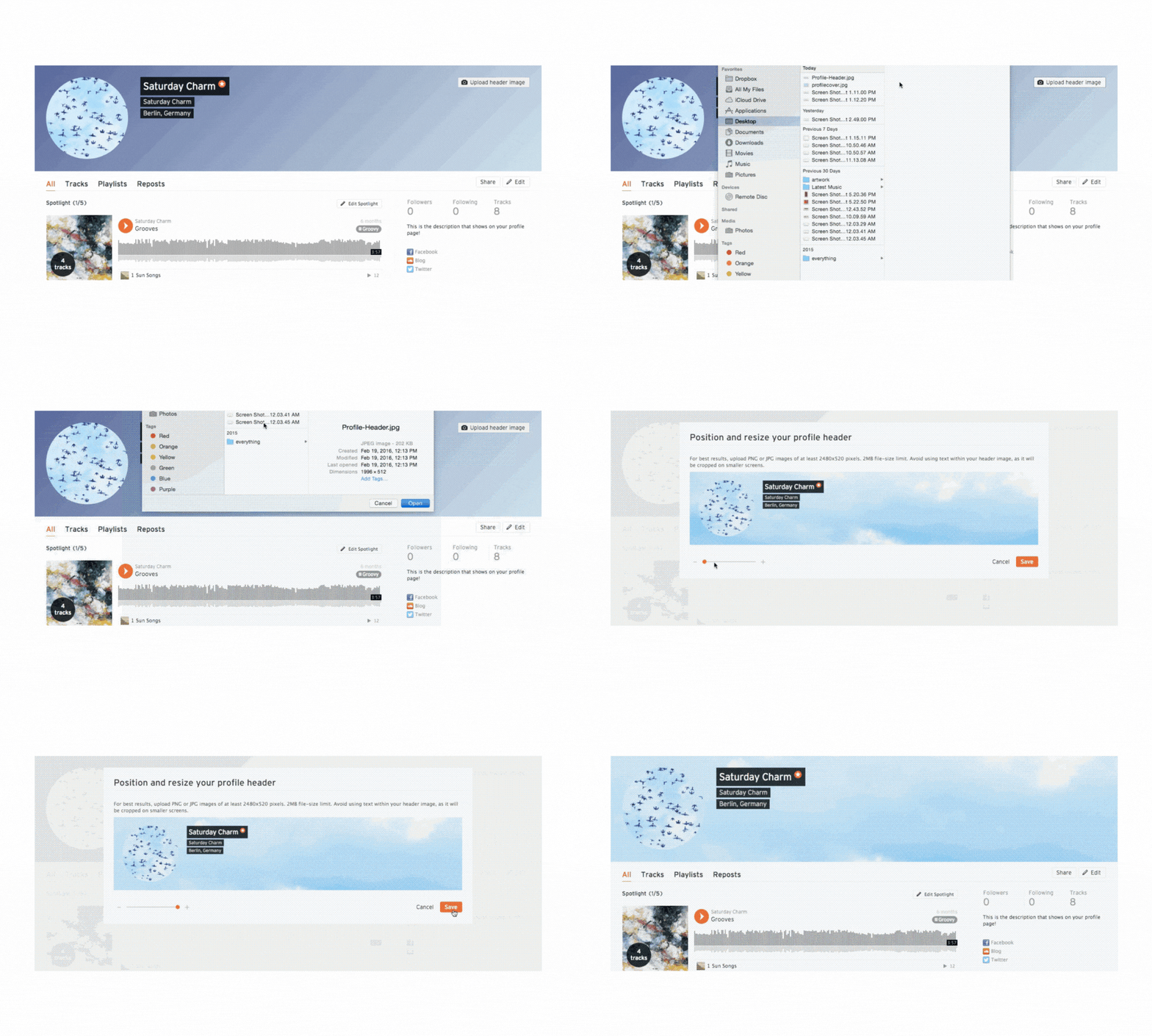
Follow these steps to ensure your SoundCloud banner looks professional and meets all guidelines.
- Go to your SoundCloud profile
- Click the Edit button on the header
- Choose a banner that meets the recommended specs
- You can resize and customize the banner image as needed—drag to adjust positioning or zoom if the image is ≥1240 × 260 px
- Preview and hit Save
- Click the Publish button
Ready to grow your SoundCloud profile? Buzzvoice helps you increase reach, likes, and engagement fast.
Tips for Designing a Great SoundCloud Banner
- Use a high-quality image and album cover art to enhance your SoundCloud profile. High-quality images ensure your profile photos, banners, and album covers look sharp and professional across all devices.
- Match your profile picture, profile photo, and banner design for cohesive branded content. Make sure your photos and graphics have a consistent style and color palette that matches your overall brand identity.
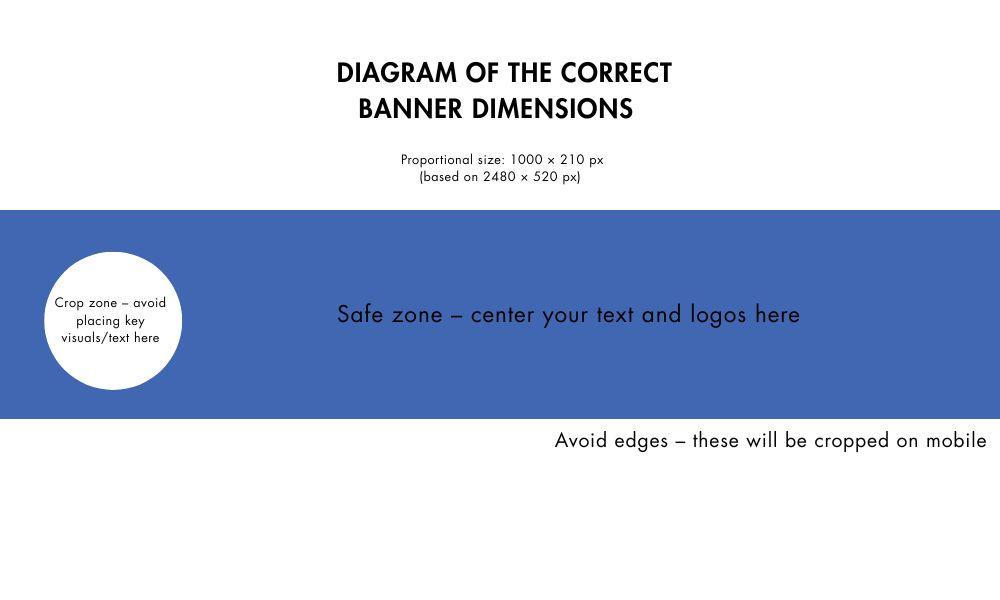
- Take advantage of placing key graphics, logos, or text in the middle of the banner for best visibility. Centering important elements ensures they are not cropped and remain the focal point on any device.
- Artists, musicians, bands, and businesses can establish their identity and create a strong connection with their audience through custom graphics and cover art. Use your profile photos, album art, and banners to showcase your unique style and brand.
- Use stock images or create your graphics, but always choose photos that match your brand.
- Preview your design on every device and adjust the placement (left, middle, right) to ensure nothing important is hidden or cropped. Drag your images slightly left or right if needed to achieve the perfect alignment.
- Print your banner design for promotional use if you want to use your SoundCloud branding in physical marketing materials.
- A slightly adjusted design can make a big difference in how your profile is perceived. Small tweaks to your graphics or layout can enhance professionalism and impact.
- Use the perfect place for your profile photos and cover art to maximize impact.
- Create and upload a SoundCloud album or SoundCloud cover, and remember the importance of album cover art for branding.
- Leave edge clearance to avoid cropping on smaller screens, especially on mobile, where aspect ratios vary.
- Incorporate branding elements like your logo, artist color palette, or recent tour/event visuals to maintain consistency across platforms.
- Make any text bold and readable, keeping it within the central “safe area” to ensure visibility on both desktop and mobile views.
- Align the banner’s theme with your music genre or artist identity—fans should instantly recognize your style from the imagery alone.
- Use minimalist design principles—clean layouts are more effective and avoid overwhelming the viewer with too much detail.
- Prioritize visual clarity and message over excessive effects or filters, so your branding remains clear even on smaller devices.
Common Mistakes to Avoid
- Low-resolution or pixelated images – These make your profile look unprofessional and can damage your brand perception instantly.
- Placing key visuals or text too close to the edges – Important elements may get cropped, especially on mobile devices with narrower displays. Key information placed outside the safe area risks being hidden on some screens.
- Using clashing or oversaturated colors – Poor color choices can hinder readability and distract from your main message.
- Including small or edge-aligned text – Text outside the central safe zone often gets cut off, particularly on mobile views, making your banner hard to read.
- Uploading restricted content – Some profiles, especially commercial or collaborative accounts, may have restricted options for uploading certain types of SoundCloud images or artwork.
Related: How to download songs on SoundCloud
Ideal vs Distorted Banners
| ✅ IDEAL BANNER | ❌ DISTORTED BANNER | |
|---|---|---|
| SIZE | 2480 × 520 px | Under 1240 × 260 px |
| CLARITY | Sharp across devices | Blurry or pixelated |
| DESIGN | Text/logo in safe center | Edges cut off on mobile |
| FILE | ≤ 2 MB JPG/PNG (export your banner in the correct format and size before uploading) | Too large or wrong format |
Conclusion
A well-sized and well-designed SoundCloud banner enhances your brand’s professionalism and credibility. Always stick to 2480 × 520 px, use clean, high-resolution visuals, and ensure your banner aligns with your musical identity.
A cohesive visual presence helps new listeners trust your content and encourages repeat visits to your profile. Refresh your visuals periodically—ideally every few months—to reflect new releases, events, or changes in your branding.
And if you’re serious about growing your SoundCloud audience, explore BuzzVoice’s promotion tools to increase your reach, plays, and followers with proven marketing support.
FAQs
What happens if my image is too small or too large?
If your image is too small, it may appear blurry or pixelated, and SoundCloud will disable zooming functionality. Oversized images may require manual cropping, which can cut off important parts of your design. The safest choice is to use the recommended size of 2480 × 520 pixels to ensure your banner looks clean and professional on all devices.
Can I use animated banners on SoundCloud?
No, SoundCloud does not support animated banners such as GIFs. Only static image formats like JPEG or PNG are accepted for header uploads. To stand out, focus on a high-resolution image that communicates your artist identity without relying on movement or effects.
How often should I update my banner?
It’s a good idea to refresh your banner every 3 to 6 months, especially if you’re releasing new music, changing your visual branding, or going on tour. Updating your visuals shows fans that your profile is active and evolving. A fresh, relevant banner can also help attract and retain new listeners.
Is the banner visible on both mobile and desktop?
Yes, SoundCloud banners are shown on both desktop and mobile devices, but with different cropping behavior. Desktop displays the full image, while mobile tends to crop the sides—so it’s essential to keep key visuals in the center. Designing with this in mind ensures your banner communicates clearly across all platforms.

BuzzVoice
BuzzVoice is the best place to go when you need instant engagement services on social media. Offering a wide variety of packages for Instagram, Youtube, Facebook, Twitter, Soundcloud & Tiktok.