How to See All Followers on Twitter (X): Step-by-Step Guide
Many Twitter (now X) users want to see their full followers list for simple reasons: tracking growth, managing engagement, spotting inactive accounts, or understanding who actually follows them. Regardless of your role on Twitter (creator, brand, or casual user), understanding how to view followers keeps you in charge of your account.
If you’re looking to grow your account, BuzzVoice can help you build a follower list of real, engaged users instead of ghost accounts. With BuzzVoice, you gain access to valuable tools for naturally increasing your Twitter Followers, Likes, and Retweets.
How to See All Followers on Twitter (Mobile App)
Users are a little confused by recent changes to Twitter’s user interface. It may appear as though some followers are missing because the platform now loads followers dynamically. Because of this, a lot of users have started asking questions like “Are Twitter followers not showing anymore?” and “Why can’t I see all my followers on Twitter?”
The good news is that Twitter does not intentionally hide followers. Unless an account is private, suspended, or restricted, your followers are visible, just not always all at once. However, the current interface is based on an outdated idea for business users, making follower management less practical.
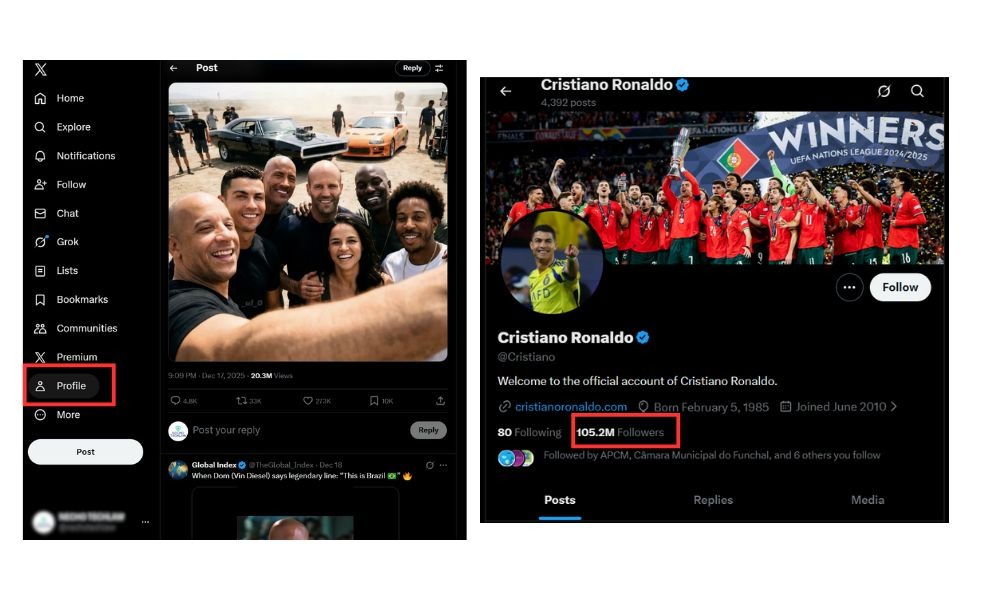
To see all your followers, visit your profile and click the “Followers” count. This will open the list, allowing you to scroll through and view everyone who follows you.
Step-by-step (iOS & Android):
- Open the Twitter (X) app
- Tap your profile icon
- Select Profile
- Tap Followers
The followers list displays details such as usernames, bios, and profile images for each follower.
Twitter loads followers in batches rather than all at once. As you scroll down, more followers automatically appear. This loading system enhances performance, but can initially make your followers list seem incomplete.
Why do some followers appear later?
- Older followers load after newer ones due to Twitter’s algorithmic loading, which imposes a limit on how many followers are displayed at once.
- Inactive or low-engagement accounts may load more slowly
- Temporary app caching issues can delay visibility
If your Twitter followers list doesn’t fully load, closing and reopening the app or switching networks often resolves the issue.
Related: Can People See What You Like on X (Twitter)? Explained
How to See All Followers on Twitter (Desktop/Web)
The website version of Twitter (X) generally provides a smoother experience for viewing large follower lists.
To see all followers on Twitter using your desktop, log in to your Twitter account on the website. Navigate to your Twitter profile page, then click on the “Followers” tab to view the list of accounts following you.
Keep in mind that specialized third-party tools can provide a more comprehensive list of followers than what is available on the website.
Step-by-step (Desktop):
- Go to twitter.com (or x.com)
- Log in to your account
- Click Profile
- Select the Followers tab
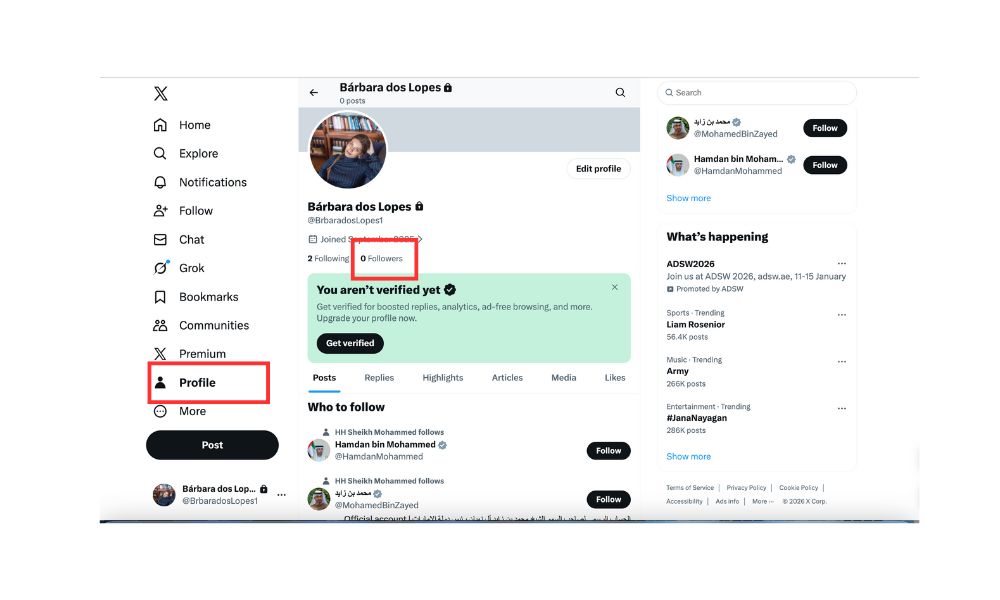
Compared with mobile, desktop loads faster and shows more followers per scroll. You can also use your browser’s search feature to manually find usernames in the list.
Related: How to Boost Your Twitter Presence in 2026: 7 Proven Tips
Mobile vs Desktop: Key Differences
| Feature | Mobile App | Desktop/Web |
|---|---|---|
| Loading speed | Slower | Faster |
| Followers per scroll | Fewer | More |
| Search within list | Not available | Browser search |
| Stability | App-dependent | More consistent |
| Followers and following list present | Limited view | Both followers list and following list are present and accessible |
For accounts managing thousands of followers, the desktop is often the easiest way to check followers on Twitter accurately, as both the followers list and the following list are present and can be viewed or exported for further analysis.
Related: How to Improve X (Twitter) Engagement in 2026: 7 Tips That Work
How to See Someone Else’s Followers
Seeing someone’s followers depends on their account privacy settings.
You can analyze the followers of a specific account using third-party tools, which often provide advanced features to filter, export, and gain insights into someone’s followers.
To find and check another user’s followers on Twitter (X) effectively in 2026, third-party specialized tools are recommended. Circleboom Twitter allows users to see all followers of a specific account.
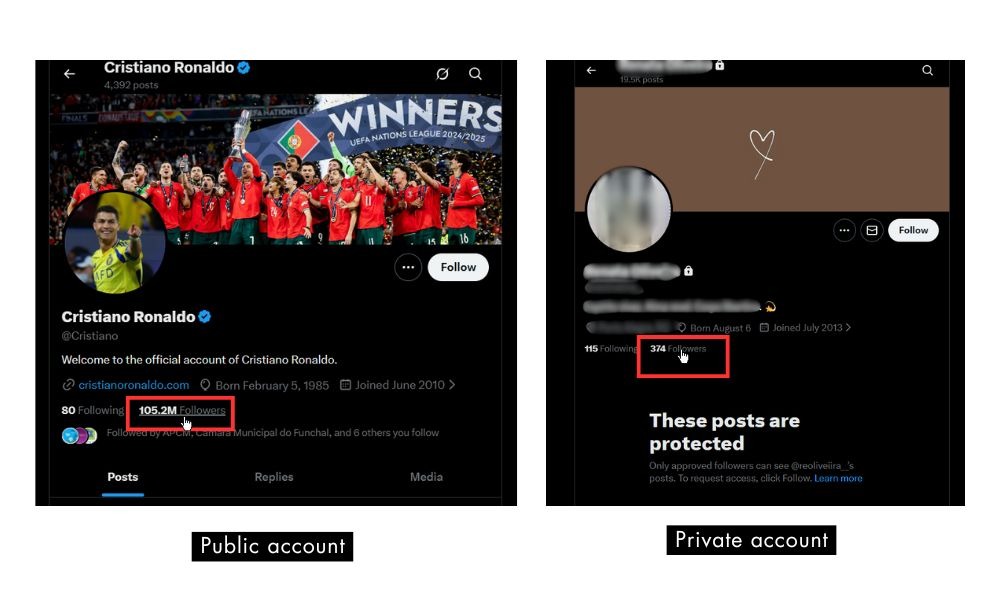
Public accounts
If an account is a public account, you can view their followers list by visiting their profile and tapping Followers. Twitter allows full visibility, subject to loading limits.
Private accounts
If an account is private, only approved users, those who have been granted access, can see their followers. This is one of the most common reasons users believe Twitter is hiding information.
Blocked or restricted users
If you have been unfollowed or blocked by a user, you may not be able to see their profile or followers list. You won’t be able to see someone’s profile or followers list if they have blocked you. Limited interaction data may be displayed by restricted accounts.
Why Can’t I See All Followers on Twitter?
If you’re wondering, “Why can’t I see all followers on Twitter?” it can feel impossible to view everyone at once due to several factors:
- Private accounts: Followers of private profiles are hidden
- Suspended or deleted accounts: Removed users may disappear from lists
- App glitches: Cached data can interrupt loading
- Algorithmic loading limits: Twitter imposes a limit on how many followers can be viewed at a time, so you may not see your entire list if you have a large following
Additionally, Twitter’s native platform does not offer a comprehensive search function for followers, making it difficult to find specific users with just a few words.
Twitter followers not showing is almost always a technical or account-status issue, not intentional hiding.
Related: Can You See Who Views Your X (Twitter)?
Followers vs Following: What’s the Difference?
This confusion is more common than you might think.
- Followers: Accounts that follow you
- Following: Accounts you follow; your following list is accessible directly from your own profile.
Many users accidentally check the wrong tab and assume followers are missing.
How to switch between lists
On your profile:
- Tap the Followers link or tab to see who follows you
- Tap the Following link or tab to see who you follow
Clear understanding here avoids unnecessary confusion when managing your account.

Third-party tools (overview)
Follower exporting is possible with some external tools, but users should exercise caution. These tools may be against Twitter’s terms or privacy policies and frequently call for account permissions.
Marketers and users managing multiple accounts can benefit from specialized third-party tools, as these solutions often provide more comprehensive lists of followers than what is available on X (Twitter). Additionally, many of these tools offer advanced Twitter analytics, allowing users to track follower statistics, audience metrics, and generate detailed reports for marketing strategies.
Tips to Manage a Large Follower List
Managing thousands of followers doesn’t require removing users manually. The process of managing a large follower list can be streamlined with the right strategies and tools.
- Use Twitter Lists to segment your followers. You can organize followers by bio keywords, location, or niche to make your network more manageable and targeted.
- Consider using management tools to automate sorting and filtering.
Practical strategies:
- Sorting manually: Scroll periodically to identify inactive accounts. You can also look for followers who are interested in your content by checking engagement metrics such as likes, retweets, and replies.
- Muting vs blocking: Mute accounts to clean your feed without conflict
- Using Twitter Lists: Organize followers by niche, activity, or relevance
Engagement is more important than follower count. Accounts with active followers perform better in the algorithm, making growth support essential.
BuzzVoice acts as a visibility and growth support tool, not a shortcut. Better engagement on your posts leads to more active followers, which directly impacts how your full list or complete list of followers looks and performs. By helping users buy Likes, gain Retweets, or grow with Followers, BuzzVoice supports organic traction rather than artificial inflation.
Conclusion
Twitter does not intentionally hide followers. If you’re unable to see all of your followers, it’s often due to privacy settings, suspended accounts, app loading limits, or temporary glitches. By following the appropriate steps on both mobile and desktop platforms, most visibility issues can be resolved quickly.
As your account grows, managing followers becomes easier when engagement stays high. With BuzzVoice backing your growth strategy, through targeted Twitter Followers, Likes, and Retweets, you ensure that your follower list reflects active, visible users, not empty numbers.
FAQ
Can I see all my followers on Twitter at once?
Twitter doesn’t allow you to see all your followers in one static list due to a limit on how many followers are loaded at once. They appear in batches as you scroll, so you need to keep scrolling to view older followers, especially if you have a large audience or an active account.
Why are some followers missing from my list?
Missing followers are usually due to their account status or loading issues. Suspended, deactivated, or deleted accounts won’t appear in your list. Additionally, Twitter may temporarily delay loading some followers until you scroll down or refresh the page. When followers are missing, you may also notice missing details such as usernames or profile images in your followers list.
Can I see followers of a private account?
You can only see the followers of a private account if you are an approved follower. Only approved followers—those who have been granted access—can view the follower list of a private account. If you are not approved, Twitter hides the follower list entirely to protect user privacy.
Does Twitter hide inactive followers?
Twitter does not officially hide inactive followers, but inactive or restricted accounts may not appear immediately when you browse a follower’s list. Additionally, if someone has unfollowed you, their account will no longer appear in your followers list. This can create the impression that Twitter followers are missing, even though they still exist or have simply unfollowed you.

![How Long Can Twitter Videos Be? [year] Guide](https://buzzvoice.com/app/uploads/2026/08/How-Long-Can-Twitter-Videos-Be-2026-Guide-4-573x338.jpg)