
How To Deactivate Instagram Account in 4 Steps
In this article, you will find how to temporarily deactivate your Instagram account, how long you can stay deactivated, and what the current limits and reactivation rules are in 2026. Whether you’re planning a short break or stepping away for months, it’s important to understand the differences between deactivation and deletion, how Instagram handles long-term inactivity, and what changes while your profile is hidden.
Want to increase your reach and grow your Instagram following even while you’re taking a break? BuzzVoice lets you instantly promote your Instagram posts and grow your audience faster — without relying solely on the algorithm.
How To Deactivate Instagram Account in 4 Steps
There are a few important rules to understand about account deactivation. Whether you’re stepping away for a few days or several months, knowing how long Instagram lets you deactivate and what happens during that time can help you avoid surprises.
Instagram deactivation is a helpful feature for anyone who needs a break from social media without the commitment of permanently deleting their account. When you temporarily disable your Instagram account, your profile, posts, and comments become hidden from users, giving you full control over your online presence.
This means your Instagram account won’t appear in searches, and you won’t receive notifications or messages while your account is deactivated.
To deactivate your Instagram account:
- Open the Instagram app
- Go to Account Settings
- Tap Account Ownership and Control
- Tap deactivate account or deletion.
You may be prompted to select a reason for deactivation from a dropdown menu before confirming your choice.
Note: Deactivation is temporary and reversible, while deletion is permanent and cannot be undone.
The process is straightforward and designed to give users flexibility—your account is not deleted, just hidden, so you can return whenever you’re ready. Remember, deactivating your Instagram account is different from permanently deleting it: deactivation is temporary and reversible, while deletion is final and removes your entire account from Instagram.
Temporary Deactivation Limits Explained
Instagram gives users the ability to temporarily deactivate their accounts, which hides their profile, photos, comments, and likes until they return. Many users choose to deactivate their accounts for a short period, such as a week or less, to take a quick break from the platform.
- There is no maximum time limit for how long you can stay deactivated.
- Many users take advantage of the flexible deactivation period to manage their Instagram usage according to their needs.
- You can remain deactivated for weeks, months, or even years without losing your account.
- Instagram won’t delete your account due to inactivity if it’s been deactivated manually by you.
Reactivation Window and Conditions
Reactivating your account is simple — just sign in again using your username and password.
- You must wait at least one week after deactivating before you can deactivate it again.
- For security, you may be asked to re-enter your password when reactivating your account.
- Reactivation can take a few hours to fully restore your profile, especially if you’ve been inactive for a long time.
- If your account was deactivated due to a policy violation, reactivation might not be possible.
Can You Stay Deactivated Forever?
What Happens After Long-Term Deactivation
Yes, you can technically remain deactivated indefinitely — there’s no expiration.
- You won’t lose your followers or data while deactivated.
- Direct messages (DMs) will be hidden, and you won’t appear in searches.
- Instagram does not delete deactivated accounts after a set period.
A deactivated account can be reactivated at any time by logging back in. An Instagram account deactivated for a long time remains safe unless Instagram updates its policies.
If you want to boost your Instagram presence, with more views in your videos, more followers, and more likes, visit BuzzVoice services.
Differences Between Temporary Deactivation and Deletion
It’s important to understand how deactivation differs from permanent deletion. Each option has different consequences for your account visibility, recovery, and long-term access.
Feature |
Temporary Deactivation |
Permanent Deletion |
|
Account recovery |
Possible by logging in |
Not possible |
|
Profile visibility |
Hidden |
Removed permanently |
|
Time limit |
Unlimited |
Account deleted in 30 days |
|
Can deactivate multiple times |
Yes, but once per week |
No (final action) |
To delete your Instagram account, you need to request deletion by submitting an account deletion request while logged in. Go to your account settings, follow the prompts, and click Delete account to start the deletion process.
After submitting your deletion request, your account will be deactivated for 30 days. If you change your mind during this period, you can cancel the deletion request by logging back in, and the process will be canceled.
If not canceled within 30 days, your account will be permanently deleted, and all your data will be permanently removed.
Instagram’s 2026 Policy on Extended Deactivation
Instagram’s 2026 policy continues to allow long-term deactivation, as long as:
- The account was voluntarily deactivated
- No violations of terms or community guidelines occurred
- You do not try to deactivate/reactivate too frequently (more than once per week)
How Often Can You Deactivate Instagram?
Once Per Week Limit Explained
Instagram allows only one deactivation per 7 days. The deactivation process involves following specific steps to temporarily disable your account, and the once-per-week limit applies to the entire deactivation process, regardless of the device you use. This means:
- If you deactivate today, you can’t deactivate again until 7 full days later.
- This rule helps prevent misuse and suspicious activity.
What Happens If You Try to Deactivate Too Often?
- Instagram will show an error message.
- You’ll have to wait until a full week passes before trying again.
- Repeated attempts may lead to temporary restrictions or login issues.
What Happens When You Deactivate Instagram?
What Others Can and Can’t See
- Your profile, photos, comments, and likes are hidden from other users. Your profile picture will also be hidden.
- You disappear from followers’ lists, explore pages, and tag searches.
- People cannot send you DMs or view your stories/posts.
Whether Messages, Tags, and Comments Are Hidden
- Messages sent before deactivation remain visible in others’ inboxes.
- Your tags on photos will disappear, and any comments you’ve made may become invisible. During deactivation, your comments disappear from public view.
- When you reactivate, all your content is restored exactly as you left it.
Simply logging out does not hide your profile or content, whereas deactivation removes your presence from public view. Deactivating your account can also help you regain control over your digital life and mental health by taking a break from social media.
Managing Your Data Before and During Deactivation
Before you deactivate your Instagram account, it’s smart to take a few steps to manage and safeguard your data. Start by downloading a copy of your entire account—this includes your photos, posts, comments, and other personal details.
You can do this by going to your account settings, selecting “Download your information,” and following the prompts. This ensures you still have access to your memories and important content.
How to Reactivate Your Instagram Account
Just Log In—Here’s What to Expect
To return from deactivation:
- Visit Instagram.com or open the app.
- Enter your username and password and log in. You can recover your account by logging in with your credentials.
- Instagram will automatically reactivate your account.
You may need to tap continue during the reactivation process to proceed.
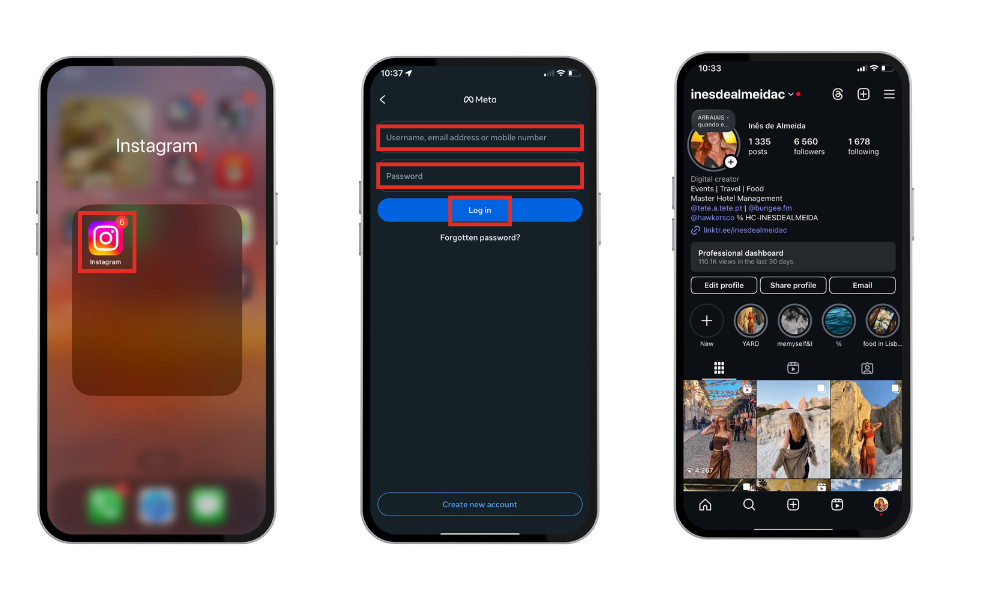
Expect:
- A brief delay in showing all your content.
- Restoration of followers, DMs, and profile info.
- You can post, like, and comment as usual.
Issues That Might Prevent Reactivation
Sometimes reactivation doesn’t go smoothly. You might face issues if:
- You forgot your credentials, especially your account’s password, which is required for reactivation
- Your account was disabled for violating Instagram’s rules
- You attempt to reactivate within the 7-day deactivation window
In these cases, visit Instagram’s Help Center for recovery steps.
Conclusion
Instagram’s flexible deactivation policy is a helpful tool for digital breaks — whether for mental health, social (media) detox, or just focusing on life offline.
- You can stay deactivated for as long as you want
- You’re limited to one deactivation per week
- Everything remains private and safe until you’re ready to return
Be mindful of Instagram’s rules; deactivation can be a stress-free way to disconnect without deleting your account. It’s also a great option if you need time to rethink your content strategy or pause creatively without losing your audience.
For influencers or businesses, this flexibility ensures that your brand presence remains intact even during extended breaks.
Some users wonder how can they boost their social media presence for an extended period, and the answer is BuzzVoice services with likes, views and automatic engagement.
FAQs About Instagram Deactivation or Deletion
Can I deactivate Instagram for 6 months or more?
Yes, you can deactivate Instagram for 6 months or even longer. Instagram does not currently impose a time limit on how long your account can remain temporarily disabled. Your profile, data, and followers will be preserved until you choose to login and reactivate. To do it, go to your settings account and tap deactivation.
Will I lose followers after deactivating?
No, you won’t lose followers when your account is deactivated. While your profile is hidden during deactivation, your followers list stays intact in Instagram’s database. Once you reactivate, all followers and interactions return exactly as they were.
Can I use Instagram again after reactivating?
Absolutely. Your Instagram account is automatically reactivated when you log back in with your username and password. All your posts, followers, DMs, and settings will be restored without any loss of data.
Can I deactivate it multiple times a month?
Yes, but there’s a limit. Instagram only allows one deactivation every seven days, so you can deactivate your account up to four times in a typical month. Trying to do it more often may trigger an error or a temporary restriction.

BuzzVoice
BuzzVoice is the best place to go when you need instant engagement services on social media. Offering a wide variety of packages for Instagram, Youtube, Facebook, Twitter, Soundcloud & Tiktok.



