
How to Find and Watch Lives on Instagram
In a world of constant scrolling, sometimes the most authentic content is the one happening live. Whether it’s a spontaneous Q&A, a product reveal, or a behind-the-scenes moment, Instagram Live gives you front-row access to real-time content from your favorite creators, friends, and brands.
For brands, Instagram Live is a powerful way to showcase their human side, strengthen brand identity, and connect with audiences through behind-the-scenes content and product demonstrations.
If you’re looking to take your Instagram presence even further, BuzzVoice is here to help. With real likes, followers, and views, BuzzVoice gives you what you need to grow authentically.
What Is Instagram Live and Why People Use It
Instagram Live is a feature that allows users to stream video content in real time to their followers. Unlike Stories or Reels, Lives are interactive and unscripted — which is why they’ve become such a powerful tool for:
- Q&As with fans
- Product launches and promotions
- Live performances or interviews
- Casual check-ins and updates
- Broadcasting live events such as concerts, workshops, or celebrations
Creators love it because it brings instant engagement for their content. Followers love it because it feels raw and real. In 2026, Lives remain one of the best ways to connect online, in the moment.
Planning to go live on Instagram? Try Instagram Live views service from BuySocialMediaMarketing to kickstart your Instagram livestream. Once you place an order, people will start joining in minutes!
How to Know If Someone Is Live on Instagram
The easiest way to find Lives is by checking your Stories row at the top of your feed. Here’s what to look for:
- A “LIVE” badge—this is a sign that appears at the top of the screen on a user’s profile icon, usually with a colorful ring, indicating an ongoing Instagram Live video.
- Tap the icon, and you’ll join the broadcast instantly.
- You can comment, react with emojis, or just watch silently.
If someone you follow goes Live and you have notifications on, Instagram will usually send an alert saying: “[Username] is Live now” — a one-tap shortcut to join in real-time.
How to Discover Instagram Lives (4 Methods)
You don’t need to follow someone to discover their random lives. Instagram now offers several ways to help you find Live videos from creators, influencers, or trending topics. You can find random lives by searching hashtags, browsing the Explore tab, or following active content creators. Here’s how:
1. Top of Your Feed (Instagram Stories Row)
At the top section of the Instagram app, known as the stories bar, you can find live videos from accounts you follow. This is still the #1 spot to catch Lives—if anyone is Live, they’ll appear first in the stories bar, marked clearly with the “LIVE” tag.
2. Explore Page
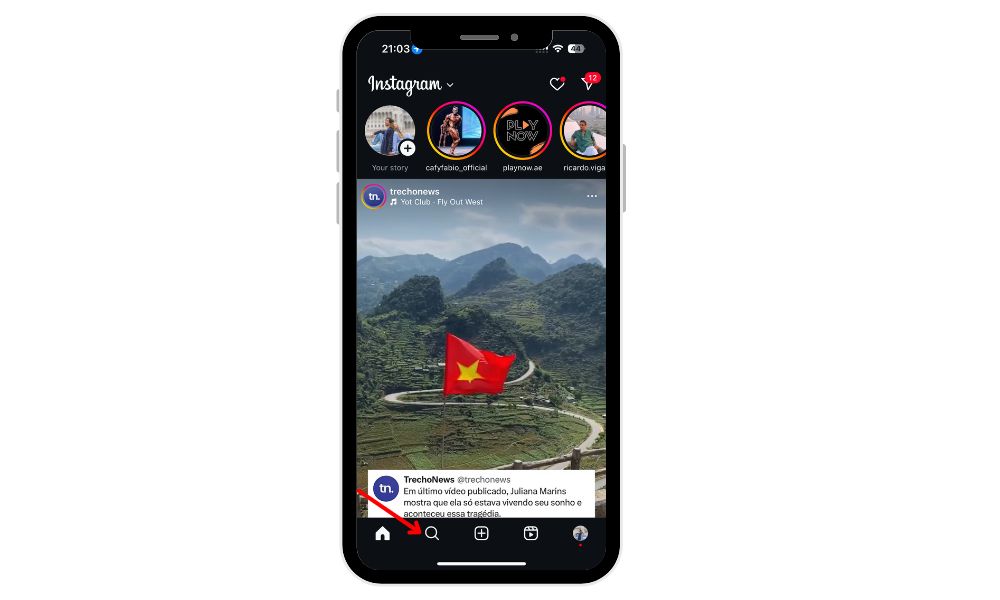
Head to the magnifying glass icon 🔍. The Explore tab sometimes features popular random live streams or trending Live videos, especially if a creator has high engagement. You can also search relevant hashtags or profiles to find live sessions appearing in the search results.
3. Notifications
Turn on Live notifications for your favorite accounts:
- Go to their profile
- Tap the bell icon 🔔
- Enable Live Videos
This ensures you’ll never miss their next broadcast.
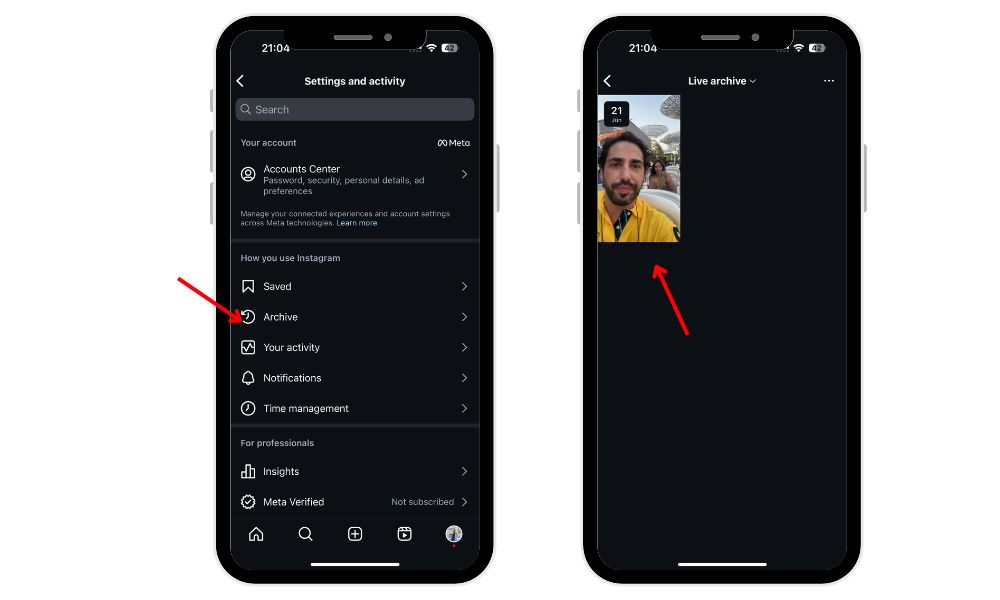
4. Live Archive / Highlights (if available)
While not all Lives are saved, some creators archive their Lives as Reels or Highlights, so followers can rewatch them even after the stream ends. Look for:
- A “Live Replay” in their video tab
- A saved version under their Story Highlights
Browsing Live Content on Instagram
If you’re searching for something specific, use the search bar at the top of the Explore page. Here, you can type in keywords, hashtags, or account names to find live broadcasts that match your interests. Whether you’re looking for a particular live video or just want to browse what’s trending, the search section makes it easy to find live videos and join the conversation.
When you’re browsing, keep an eye on the very top of the Stories section—this is where live videos from accounts you follow will appear. These live broadcasts are marked with a colorful ring around the profile picture and a clear “Live” label, making them easy to spot. To start watching, simply tap the profile photo and you’ll join the live stream instantly. You can also visit an account’s page directly; if they’re currently live, you’ll see the “Live” badge on their profile picture, giving you another way to access live content.
Related Article: Find Instagram Profile By Phone Number
Instagram’s live archive feature is another great tool for fans of live video. If you missed a live broadcast, you can often find replays in the account’s Archive section, allowing you to catch up on videos you couldn’t watch in real time. This feature is perfect for revisiting your favorite moments or sharing live streams with friends after the broadcast has ended.
What makes browsing live content on Instagram truly unique is the interactive experience it offers. While watching a live broadcast, you can comment, react, and interact with both the host and other viewers, making every live stream a dynamic and engaging part of your social media experience.
Whether you’re interested in random lives, trending live streams, or specific creators, Instagram’s browsing features make it easy to discover and enjoy a wide range of live videos.
Can You Watch Past Instagram Live Videos?
Yes, but only if the creator chooses to save them.
When a Live ends, the user can:
Post it as a Replay (formerly IGTV, now often as a Reel)
Add it to Highlights
Or let it disappear forever
If the Live isn’t saved, it can’t be rewatched. So if it’s something you really want to see, try to catch it while it’s still live!
Tips for Getting More From Instagram Lives
Want to level up your Live experience? Try these:
- Go full-screen for better visuals, especially during performances or tutorials
- Turn on notifications for creators you don’t want to miss
- Engage with the chat — ask questions, drop emojis, talk directly with the host and other viewers to create a more authentic experience, and join the community
- Use filters if you’re invited to join the Live on screen
Instagram Lives are more fun when you’re part of the moment.
Final Thoughts
If you’re wondering how to find Lives on Instagram, the good news is — they’re easier to discover than ever in 2026. Whether you’re following friends, brands, or creators, Instagram offers plenty of ways to keep up with real-time broadcasts. If you’re looking to connect more deeply or stay on top of trending conversations, tuning in to Instagram Live is a smart move. Just remember: the moment happens once, so don’t miss it.
And if you want to reach more people, check out BuzzVoice’s Instagram growth tools, perfect for increasing reach, followers, and real engagement.
FAQs
Why can’t I see Instagram Lives on my feed?
There are a few reasons you might not be seeing any Lives:
No one you follow is currently live – Lives only appear at the top of your feed when someone is actively broadcasting.
Your Instagram app may be outdated – Make sure you’ve updated to the latest version, as older versions might not show all features.
You may have missed it – Lives disappear after they end, unless saved by the creator.
Algorithm behavior – Instagram prioritizes accounts you engage with most. If you haven’t interacted with a creator recently, their Live might not be shown prominently.
Tip: Turn on Live notifications for your favorite creators to never miss a broadcast.
Can I search for specific Lives on Instagram?
Currently, Instagram does not offer a direct “Live search” feature, meaning you can’t just type in a topic or creator name and browse Lives like you would with Reels or posts.
However, you can:
- Visit a creator’s profile picture to see if they’re Live or have any Live replays saved.
- Explore the Explore tab to find trending or popular Lives (though this is algorithm-based and not keyword-driven).
- Enable notifications for specific accounts so you’re instantly alerted when they go Live.
While you can’t search directly for live videos, you can discover random Instagram live streams by browsing the Explore tab or searching relevant hashtags. This allows you to find unexpected or unplanned live content from a variety of creators.
Are Lives available on desktop?
Yes, you can watch Instagram Lives on desktop through the web version of Instagram (instagram.com). Just log in and check the top of your feed — if someone is Live, it will appear there just like in the mobile app.
However, there are a few limitations:
- You can’t request to join the Live from desktop (joining a live stream as a guest is only possible on mobile devices).
- Interactive features like filters, emojis, or sending requests to co-host may be unavailable or limited.
- Commenting sometimes lags more on desktop than on mobile.
Still, it’s a great option if you want a larger screen or need to multitask while watching a Live stream.
Make sure your general Instagram notifications are also enabled in your phone’s settings, or you won’t receive alerts even if they’re turned on in the app.

BuzzVoice
BuzzVoice is the best place to go when you need instant engagement services on social media. Offering a wide variety of packages for Instagram, Youtube, Facebook, Twitter, Soundcloud & Tiktok.



