How to Send Gift Messages on Instagram (5 Steps)
Instagram is more than just a social media app; it is a platform where millions of people around the world connect with friends, family, followers, and even new users. One of its fun features is Instagram chat, which lets you send messages, photos, videos, and creative surprises. Among these features, the gift message stands out. A gift message wraps your text or media in a digital gift box, which the recipient must tap to “unwrap” and read. This makes sending messages more interactive and exciting. Whether for birthdays, special occasions, or just for fun, gift messages add a personal touch to your Instagram DMs.
- Gift Messages wrap text, photos, videos, or gifs in a digital gift box for interactive Instagram DMs.
- Send a gift message using the magnifying glass icon and selecting the gift box effect.
- Perfect for birthdays, celebrations, holidays, and surprises.
- Adding photos, videos, emojis, and effects makes messages more personal and memorable.
- Interactive gift messages increase engagement and create meaningful conversations.
Turn your Instagram presence into real impact with Buzzvoice. Increase likes, followers, and views with trusted services that help your content reach, engage, and stand out effortlessly.
What is a Gift Message on Instagram?
A gift message on Instagram is a text or media message wrapped in a digital gift box. When you send it, the recipient sees a present in their Instagram chat instead of the regular text. To read it, they must tap the box to “unwrap” your message.
This fun feature makes sending messages more interactive and exciting. You can send gift messages in your Instagram DMs to friends, family, followers, or even new followers to make them feel special.
Key Benefits of Gift Messages:
- Adds a fun and creative touch to your messages.
- Perfect for special occasions, like birthdays or anniversaries.
- It can surprise your friends, family, or followers.
- Works with text, photos, videos, and gifs.
Step-by-Step Guide: How to Send Gift Messages on Instagram
Here is a simple step-by-step method to send a gift message from your device or computer using Instagram:
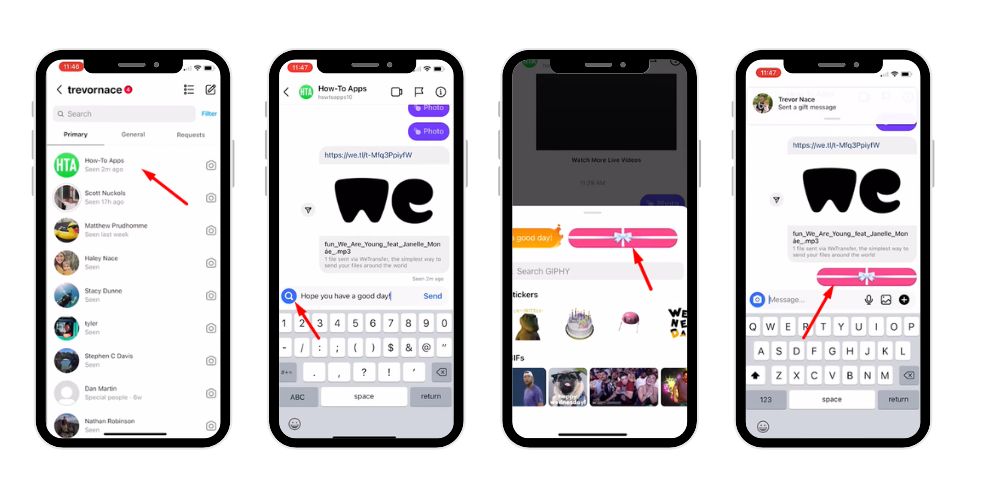
Step 1: Open Instagram Chat
- Start by opening your Instagram app.
- Go to Instagram DMs (Direct Messages) by tapping the paper plane icon at the top right of your feed.
- Open the chat with the person or group you want to surprise.
Step 2: Type Your Message
- In the chat box, type the message you want to send.
- This can be a birthday wish, a thank you note, or even a fun greeting.
Step 3: Tap the Magnifying Glass Icon
- Instead of hitting send, tap the magnifying glass (search) icon on the left side of the text box.
- This opens the Effects and Gift Options menu, which contains animations and special features.
Step 4: Select the Gift Box
- Swipe through the Effects menu until you find the gift box icon.
- Tap the gift box to wrap your message.
Step 5: Send Your Gift Message
- Once selected, your message will automatically appear in the chat as a gift box.
- The recipient must tap it to unwrap and read your message.
Unable to Send Gift Message on Instagram
Many people ask, “Unable to send gift message on Instagram?” on Reddit and other forums. If you’re facing the same issue, don’t worry—here are some effective ways to fix it.
- Update the Instagram App: Make sure your app is the latest version. Older versions may not support gift messages or effects. Updating ensures full functionality and access to new features.
- Check Account Type: Some business or creator accounts have limited access to interactive features. Switching to a personal account in Instagram settings often unlocks the ability to send gift messages.
- Restart the App or Device: Sometimes a simple restart of the Instagram app or your phone/tablet resolves glitches preventing gift messages from appearing.
- Clear Cache (Android) or Reinstall the App (iOS/Android): Cached data may cause features to malfunction. Clearing cache or reinstalling the app refreshes the system and restores full functionality.
- Check Internet Connection: A weak or unstable connection can prevent gift messages from sending. Ensure you have a stable Wi-Fi or mobile data connection.
- Try Another Device: If the issue persists, attempt sending the gift message from a different device. This helps identify if the problem is device-specific.
- Contact Instagram Support: If none of the above works, reach out to Instagram through the Help Center for assistance. They can troubleshoot account-specific issues.
Following these steps usually resolves most problems with sending Instagram gift messages.
Tips for Sending Gift Messages on Instagram
Sending gift messages on Instagram is easy, but using them thoughtfully can make a big difference in how your message feels to the recipient. The following tips help you use this feature more effectively, creatively, and meaningfully in your Instagram DMs.
- Update Your Instagram App: Always keep your Instagram app updated to access the latest features, including gift messages and effects. Older versions may not show the gift box or animation options properly. Regular updates also improve performance, security, and compatibility, ensuring smooth messaging with friends and followers.
- Use the Right Account Type: Some business or creator accounts may face limited access to interactive features. Switching to a personal account in Instagram settings can unlock gift messages. Choosing the correct account type allows full use of effects, making chats more engaging and enjoyable.
- Experiment With Other Effects: Instagram provides multiple effects alongside gift messages, such as confetti, hearts, fire, and animations. Trying different effects adds excitement and creativity to your messages, helping them stand out and feel more interactive in conversations.
- Personalize Your Messages: Enhance gift messages by adding photos, videos, or gifs. Personal touches like birthday clips, short videos, or meaningful images show effort and care. Custom messages feel more thoughtful and leave a lasting impression on the recipient.
- Surprise Your Friends or Followers:
Sending a gift message unexpectedly can instantly brighten someone’s day. Surprise messages show appreciation and kindness, making your Instagram DMs more exciting while helping strengthen relationships with friends, family, or followers.
When to Send Gift Messages on Instagram
Gift messages work best when sent at the right moment. Timing your message thoughtfully adds emotional value and makes the experience more memorable. Below are the most effective occasions to use Instagram gift messages.
- Birthday Wishes: Wrap birthday greetings in a digital gift box to make celebrations more fun and interactive. It adds excitement and makes your message feel special.
- Anniversaries: Celebrate milestones by sending a heartfelt message or video wrapped as a gift. This adds meaning and shows attention to important moments.
- Holidays: Share festive messages during Christmas, New Year, Eid, or other holidays using gift messages to spread joy and warmth.
- Thank You Notes: Show appreciation to friends, family, or colleagues with a wrapped thank-you message. It feels more thoughtful than plain text.
- New Followers: Welcome new followers with a gift message to make them feel valued and appreciated, helping build stronger connections from the start.
Creative Ways to Use Gift Messages
Instagram gift messages offer creative ways to turn simple chats into exciting experiences. With effects, media, and personalization, you can surprise recipients and make every message feel thoughtful and memorable. Instagram offers multiple tools to make your messages unique and memorable:
1. Send Photos or Videos
You can make gift messages more personal by attaching photos or videos. Capture a special moment with your camera, then wrap it in a digital gift box. When the recipient taps to unwrap, they enjoy a fun and memorable surprise, making your Instagram chat more meaningful.
2. Add Fun and Emojis
Enhance your gift messages by adding gifts, stickers, or emojis. Hearts, stars, confetti, or animated gifs make the message playful and visually appealing. These small creative touches increase engagement, make your messages more lively, and help show care or emotion in a fun, digital way.
3. Combine With Other Effects
Instagram allows combining gift messages with other effects like confetti, flying hearts, or fire animations. This double effect adds creativity, making your message stand out in the chat. Using multiple effects shows effort and thoughtfulness, giving the recipient a more enjoyable and interactive experience when they open your message.
4. Send Messages Across Devices
Gift messages on Instagram work seamlessly across Android, iOS, and desktop devices. Whether you send from your phone or computer, the gift appears the same for the recipient. This ensures your surprises and special messages reach friends and followers perfectly, no matter which device they are using.
Why Gift Messages Are So Powerful
Gift messages on Instagram are more than just a fun feature—they transform ordinary conversations into memorable and meaningful experiences. Unlike regular text messages, they combine creativity, interactivity, and personalization, making each message feel special.
- Strengthen Relationships: Sending a gift message shows thoughtfulness and effort. It helps you connect more deeply with friends, family, and followers, making interactions feel personal and heartfelt rather than routine.
- Make Moments Unforgettable: Whether it’s a birthday, anniversary, holiday, or any celebration, wrapping a message in a digital gift box adds excitement and surprise. Recipients are more likely to remember and appreciate these thoughtful gestures.
- Add a Personal Touch: Incorporating photos, videos, gifs, or custom text enhances the emotional impact of your message. Personalization demonstrates care and attention, turning a simple message into a meaningful digital gift.
- Drive Engagement: Gift messages are interactive, encouraging recipients to tap, unwrap, and respond. This creates lively, engaging conversations and strengthens the connection between sender and recipient.
- Show Care and Appreciation: Taking the time to craft a thoughtful gift message communicates love, gratitude, and attention. In a digital world, these small yet meaningful gestures make people feel valued, appreciated, and special.
Using gift messages effectively can make your Instagram chats more lively, memorable, and emotionally impactful.
Conclusion
Instagram gift messages are a fun and interactive way to express your feelings, celebrate special occasions, and surprise your friends, family, and followers. With this guide, you can send gift messages on Instagram effortlessly using your device or computer, adding photos, videos, and emojis to create memorable experiences.
By following these steps and tips, you can make your Instagram chats more engaging and personal. Remember, a small gesture like a gift message can brighten someone’s day, strengthen relationships, and show that you truly care. Start exploring this powerful feature today, and make your messages stand out in a world of millions of Instagram users. With a little creativity, your messages on Instagram will become something your friends and loved ones look forward to opening.
FAQs
How do I send a gift message in Instagram chat?
Open Instagram DMs, select the chat, and type your message. Tap the magnifying glass icon next to the text box, then choose the gift box icon from the Effects menu. Send it, and your message will appear as a wrapped gift, which the recipient can tap to unwrap.
How do you get send gift option on Instagram?
To access the send gift option, ensure your Instagram app is updated. Open a chat in Instagram DMs, type a message, and tap the magnifying glass icon on the left. Swipe through the effects and select the gift box icon. Some business accounts may need to switch to personal.
How do I send gifs messages on Instagram?
In Instagram DMs, type your message or leave it blank, then tap the magnifying glass icon. Search for or select gifts from the Effects menu. Choose a gift, and it will appear in the chat. Tap send, and the recipient will receive a fun, animated message.
Can you send gifs in Instagram direct messages?
Yes! Instagram allows you to send gifs in DMs. Open a chat, tap the magnifying glass icon, and browse available gifts or search for specific ones. Select the gift, and it will appear in the conversation. Gifs make messages more fun, engaging, and interactive.
How do I send text in a gift box on Instagram?
Open a chat in Instagram DMs and type your message. Instead of sending, tap the magnifying glass icon on the left. From the Effects menu, select the gift box icon. Hit send, and your text will appear wrapped as a digital gift, which the recipient can unwrap.