What Happens When You Unsend A Message On Instagram?
Whether the receiver will be notified of the deleted conversation on Instagram depends on different factors:
- If a person receives a DM, they will be notified by message, and they can catch a glimpse of it from the notification window.
- If the person read it right after it was sent while being in the chat.
- There is a possibility that the message is retained on the recipient’s end even if they have network problems, which is a result of third-party application usage or keeping their internet off.
Have you wondered how Instagram removes your deleted communication with a friend? Instagram now lets you delete your chat and choose whether others will get a notification. Read more about what happens when you delete a conversation on Instagram in this article.
- Unsending removes the message for both people: Once you unsend, the message disappears from the chat on both sides as if it was never sent.
- No direct notification is sent: Instagram doesn’t notify the recipient, but they may notice if they saw the notification or message before it vanished.
- Timing matters: If the person already read the message or saw the notification preview, they’ll still know something was sent.
- Deleted doesn’t always mean instantly gone forever: Messages are removed from chats but may remain temporarily in backups or logs for security/legal reasons.
Trying to grow your account on Instagram? Try BuzzVoice’s instant and guaranteed engagement booster services: followers, likes, comments!
What Happens When You Unsend A Message On Instagram?
Imagine sending a message on Instagram and then deciding to take it back. When you choose to unsend, Instagram quickly removes the message from your chat and the other person’s. It’s as if you never sent it. Behind the scenes, Instagram requests its servers to delete the message everywhere.
This happens whether the other person saw the message or not. Now, the message is gone from your and the recipient’s chat history.

Instagram ensures the message is wholly removed without telling the other person directly. However, there are minor signs that might show a message was unsent. For example, if someone sees a notification but then finds no message, or if they see a message disappear, they might guess it was unsent. This intelligent design respects our privacy while keeping communication smooth.
When You Unsend Message on Instagram, Does It Notify Them?
One common concern among users is whether Instagram notifies the recipient when a message is unsent. The answer is no, Instagram does not send a direct notification to the recipient when a message is unsent. However, there are subtle indicators that may suggest to the recipient that a message has been unsent.
These hints can lead to moments where the other person realizes a message has been taken back. Whether it’s noticing a message is gone after getting a notification or seeing it vanish in the chat, these clues can suggest a message was unsent.
Deleting the Messages Individually
If you want to keep a secret from someone on Instagram, you can unsend message on Instagram before they see it. Nonetheless, your direct message may still be visible to them.
Always keep in mind that Instagram only allows you to unsend your messages, not those sent by other users. Only messages you have sent can be managed. If you are unsending messages individually, there is a great possibility that the person might get notified.
Deleting The Whole Thread
Choosing the “Delete” option from a chat will remove it from your account. You can only remove individual messages from your inbox using the unsend function. Furthermore, erasing just one message from the other person will remove the whole discussion.
How To Unsend Messages on Instagram
If you accidentally send a message to someone and would prefer they not see it, you should delete it immediately. The quicker you unsend it, the less likely the recipient will get an IG unsend message notification. In any event, it is not that sure that you will always be able to recall messages on Instagram before the person has seen them. As in the banished clause, you can withdraw a message on Instagram whenever you want to. To unsend a message on Instagram, you can do the following:
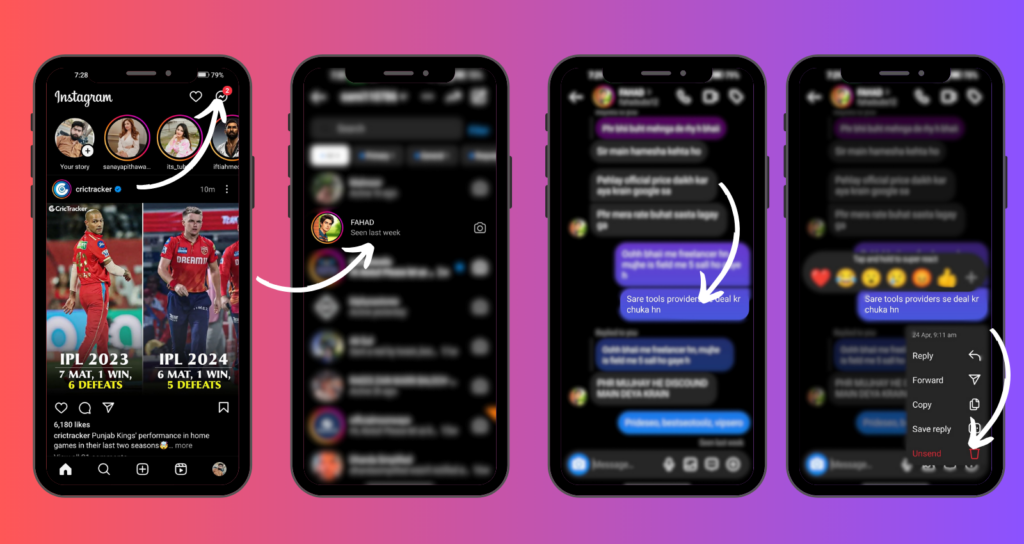
- Step 1: Tap the Instagram icon on your phone’s display.
- Step 2: Click on the icon of an aircraft available at the top right corner to open your messages directly.
- Step 3: Open the chat whose message you wish to delete the message.
- Step 4: To perform an action, you have to move your finger and press and hold the message. Then, bring them up with the instructions “Unsend.” Finally, confirm the deletion.
How To Read Unsent Message
It can be read, but only if the user has an open chat with people or if the notification is in the window. This change will also remove the unsend message on Instagram notification if you deleted it before you read it. The good news is that there are still methods that can make it possible for you to view unsent text messages; thus let’s understand them.
Network Issues
This can be difficult if you or the recipient are slow to post or if Instagram experiences technical difficulties, and thus, the message has to be deleted that way. In the second case, the receiver might still be able to see it. But if you were lucky enough to notice that an incorrect SMS was sent, it’d be allowed to be deleted immediately.
Third-party Apps
Many third-party apps boost Instagram’s efficiency. One example is DM storage, which saves the whole conversation as it proceeds even after IG deleted messages. These practices are useful for communication purposes, but for your safety, you are not encouraged to use them because they take control of your account and messages.
It does not matter that someone erases a message—your messages are not deleted as such after you log out because the app will automatically keep all your communications.
No Connection
If you unsend an Instagram message before the receiver turns off their internet, they may see it in their notification box.
How To Report Unsend Messages
You can report messages as unsent from Instagram, even though you cannot see them. All messages over the last 30 days have been automatically stored by this app. Of course, the truth is that if you don’t send what you think properly, you can’t delete the message and then hide your way by deleting that in the future.
Instagram has strict privacy and confidentiality rules, therefore, before sharing anything personal, keep it in consideration.
What Happens When You Unsend A Voice Message On Instagram?
Unsending a voice message is like unsending a text, but with a twist. Voice messages are more personal. They carry our emotions and tone. When you take back a voice message, you also take back the feelings and expressions you shared.

Texts and voice messages are different. A text leaves words in someone’s mind. But a voice message can have a stronger memory because of its emotions. If someone is listening to your message and you unsend it, they might be more surprised than if it were just a text.
Even though voice messages feel different, Instagram treats them the same as texts. There’s no particular sign that shows you took back a voice message. But the emotional weight of a voice message might make its absence feel more noticeable.
What Happens To The Notification When You Unsend Messages On Instagram?
After you unsend a message, the notification about it doesn’t just disappear. If the person still needs to open Instagram, they’ll still see a notification. But when they check, the message won’t be there.
This can be not very clear. They see a hint that there was a message, but it’s gone when they look. The notification doesn’t say what kind of message it was, keeping the details private. It’s a minor mystery left behind, a sign that something was there, even if it’s not there anymore.
Does Unsending a Message on Instagram Deletes It?
When you unsend a message on Instagram, it is removed from both your and the recipient’s chat history. However, Instagram retains backups of these unsent messages on its servers for a period of time, primarily for legal and security purposes. While the exact duration isn’t specified, it’s standard practice for platforms to maintain such backups temporarily. Therefore, even after unsending, the message may still exist on Instagram’s servers for a limited time before being permanently deleted.
What Instagram Says:
They emphasize that deletion is permanent for users but do not guarantee immediate removal from all systems.
Their policy states that deleted content is removed from “active servers” but may remain in backups or logs for a limited time (not defined).
Instagram does not publicly disclose exact timeframes for how long they retain deleted messages on their servers. However, based on their Privacy Policy and industry practices, here’s what you should know:
Key Factors Influencing Data Retention:
- Legal/Regulatory Obligations
Instagram may retain deleted messages for a period if required by law (e.g., investigations, subpoenas, or government requests). This could extend storage for months or even years. - Backup Systems
Deleted messages might persist in encrypted backups or logs temporarily (e.g., days or weeks) until backups are refreshed. These backups are not accessible to users but exist for operational recovery. - Reported Content
If a message was reported for violating Instagram’s policies before deletion, it may be stored longer for review or evidence. - Third-Party Integrations
If a message was sent to accounts linked to third-party apps (e.g., Facebook Messenger via cross-platform integration), deletion on Instagram might not erase it from other platforms.
User Control:
- You can delete messages via “Unsend” (for individual messages) or “Delete Chat” (for entire conversations), but this only removes them from your visible chat and the recipient’s interface.
- Data requests: You can request a copy of your data via Instagram’s settings to see what they store, but this won’t show retained deleted messages.
Bottom Line:
While Instagram claims to delete messages from active use, assume they could persist in backups or logs for weeks to months (or longer if legally required). For true privacy, avoid sending sensitive content via DMs, as deletion is not guaranteed to be instantaneous or absolute.
Can You Unsend Messages On Instagram After Being Blocked?
When you want to take back messages on Instagram, it depends on if you can get into the chat. If someone blocks you, Instagram stops you from doing much, including taking back messages you sent. They do this to keep things private and safe for everyone.
It might seem complicated if you’re blocked and want to take back a message. But it’s important to respect that the block means the other person doesn’t want to talk. It’s a good idea to consider why you got blocked and respect their need for space. You can’t find a way around this rule because that would go against what Instagram wants: to keep everyone safe and private.
Why Can’t I Unsend a Message on Instagram?
At times, users may encounter difficulties when attempting to unsend a message on Instagram. This could be due to technical glitches, temporary issues with the app, or limitations imposed by Instagram’s policies. If you find yourself unable to unsend a message, it’s advisable to wait and try again later or reach out to Instagram’s support team for assistance.
Final Thoughts
With the unsend message on Instagram, people have more power of ownership and the messages can be sent later when convenient. Therefore, it becomes a beneficial tool. While it is true that it is always a pleasure to be able to control the situation, the price can be high sometimes.
A satisfactory understanding of this important feature became essential as it influences both personal and group discussions, and unsent messages have a possibility to be traced in some cases.
However, Instagram also offers some privacy measures; therefore, you must be well aware of Instagram’s data retention schemes. The key to the enjoyment and safety of social media is to stay alert and cautious!

BuzzVoice
BuzzVoice is the best place to go when you need instant engagement services on social media. Offering a wide variety of packages for Instagram, Youtube, Facebook, Twitter, Soundcloud & Tiktok.