
Can’t Follow on Instagram? This Might Be Why You’re Restricted
“Why can’t I follow people on Instagram? – If you’re having this problem, it’s likely due to the platform’s restrictions designed to prevent spam and ensure genuine user engagement. Understanding these restrictions can help you navigate and resolve the issue. So, why is Instagram not letting you follow others? Keep reading to explore the reasons why this happens and what you can do to fix it.
If you’re looking to leverage your profile on Instagram with likes, views, and comments, make sure to check out BuzzVoice’s Instagram services.
Why Is Instagram Not Letting Me Follow People?
Instagram imposes restrictions on actions such as following, liking, and commenting to prevent spam, ensure security, and maintain the integrity of its platform. Here are the primary reasons why you might be unable to follow people on Instagram:
- You’ve Hit the Daily Follow Limit: Instagram limits the number of accounts you can follow per day (around 150-200 for established accounts).
- Instagram Detected Suspicious Activity: Rapidly following/unfollowing or other bot-like behavior can trigger restrictions.
- Your Account Has Been Temporarily Restricted: Violating community guidelines can lead to temporary blocks.
- You’re Following Too Quickly or Using Bots: Automating activity with third-party tools can result in restrictions.
- Technical Issues: App glitches or unstable internet connections can interfere with following.
- Instagram App Issues: Outdated app versions or cached data can cause problems.
- Internet Connection Problems: A slow or unstable connection can prevent the follow button from working.
You’ve Hit the Daily Follow Limit
Instagram sets specific limits on how many accounts you can follow per day to prevent spammy behavior, depending on the account’s age, activity, and behavior. For established accounts, the daily limit for follows is generally around 150–200 accounts per day. New accounts or those with little activity may have stricter limitations to avoid bot-like behavior.
If you exceed this limit, Instagram will restrict your ability to follow new accounts for 24–48 hours. During this period, you won’t be able to follow more accounts, even if you unfollow others. You will also be unable to follow more people until the block is removed.
Instagram Detected Suspicious Activity
Instagram has algorithms designed to detect suspicious behavior, such as following and unfollowing accounts in rapid succession. If it detects patterns that resemble spammy activity or automated behaviors, such as following hundreds of people, liking, and commenting in such a way that it mimics the behavior of a bot, Instagram may restrict certain actions, such as following, liking, or commenting, to prevent spam and maintain authentic engagement.
Your Account Has Been Temporarily Restricted
If you have violated Instagram’s community guidelines or terms of service, your account may face a temporary restriction. Instagram restricts accounts that violate its rules, which can result in being temporarily blocked from certain activities. This can happen if you’ve engaged in behavior that violates Instagram’s rules, such as spamming, using bots, or engaging in aggressive follow/unfollow cycles.
Instagram typically imposes these restrictions for 24–48 hours, but in some cases, the restriction can be extended if the behavior persists. If your account is blocked, you may be unable to follow, like, or comment until the restriction is lifted. During this period, your account will be limited in various ways, including the ability to follow others.
You’re Following Too Quickly or Using Bots
Following too many people in a short period or using third-party tools or bots to automate your activity can trigger Instagram’s spam filters. Instagram is very strict about the use of automation tools, and if it detects that you’re using them, your account could be flagged, leading to restrictions.
Using a third-party app or party app to manage your Instagram activity, especially those that require your login credentials or automate actions like following or unfollowing, can also result in account restrictions or even permanent bans.
Automated tools typically make users follow, unfollow, and like posts automatically, which is against Instagram’s terms of service. If you’re using any kind of automation tool or following too quickly, it’s important to stop as soon as possible to prevent further consequences.
Technical Issues That Prevent Following on Instagram
Technical glitches can often be the culprit when you find yourself unable to follow new accounts on Instagram. One frequent issue is the “Action Blocked” error message, which can pop up if Instagram detects suspicious activity on your account. This often happens when users follow too many accounts in a short period, which can look like bot-like behavior to Instagram’s systems.
New accounts are particularly vulnerable to these blocks, as Instagram is extra cautious with accounts that haven’t built up much history yet. Using third-party apps to automate follows can also trigger these restrictions, as Instagram aims to prevent spam and keep the platform safe.
To avoid being blocked, users should space out their follow actions, avoid following too many accounts at once, and steer clear of third-party apps that promise to boost followers. Additionally, always make sure your internet connection is stable, as a weak connection can sometimes cause the follow button to malfunction or prevent your actions from registering.
Instagram App Issues: Updates, Cache, and More
Sometimes, the problem isn’t with your account or Instagram’s rules, but with the Instagram app itself. Outdated versions of the app can lead to glitches, including issues with the follow button not working as expected.
To keep things running smoothly, users should regularly update the Instagram app through Google Play or the App Store. If you’re still experiencing problems, clearing the app cache can help resolve hidden bugs or temporary files that might be causing trouble.
On Android devices, you can clear the cache directly in your phone’s settings, while iOS users may need to delete and reinstall the app to achieve the same effect. It’s also important to be cautious with third-party apps that claim to help manage your followers or automate actions—these can lead to Instagram blocks or even permanent bans.
Keeping your Instagram app up to date and avoiding unauthorized apps is key to maintaining a healthy account and avoiding follow issues.
Internet Connection Problems and Instagram
A reliable internet connection is essential for using all of Instagram’s features, including following new accounts.
If your connection is slow or unstable, you might find that the follow button doesn’t respond, or you receive an error message when trying to follow someone. Before troubleshooting more complex issues, users should always check their internet connection to ensure it’s strong and stable.
Switching from Wi-Fi to mobile data (or vice versa) can sometimes resolve temporary connectivity problems. Additionally, using VPNs or proxy servers can interfere with Instagram’s servers and cause unexpected issues, including being unable to follow new accounts.
For the best experience, avoid using VPNs while on Instagram and make sure your connection is steady—this simple step can help prevent many common follow issues and keep your account running smoothly.
How Instagram’s Follow Limits Work in 2026
Instagram has updated its follow limits over the years, and it’s essential to understand how they work in 2026 to avoid running into issues.
Updated Follower Limits and Rules
In 2026, Instagram continues to enforce daily and hourly limits on the number of actions a user can take within the same account. These limits are intended to prevent bots and fake accounts from overloading the platform with automated activity. Here’s how the limits break down:
- Daily Follow Limit: You can follow a maximum of 150–200 accounts per day on Instagram. If you exceed this number, you’ll likely face a temporary block, preventing you from following any additional accounts. Note: If you have a new account, your daily follow limit may be much lower, as Instagram imposes stricter limits on new users to prevent spam.
- Hourly Follow Limit: Instagram also imposes an hourly limit of approximately 10–15 follows per hour. This is to prevent mass following sprees, which are often associated with spammy behavior.
- Total Follow Cap: Instagram also has a global cap of 7,500 accounts. Once you’ve reached that number, you will no longer be able to follow new accounts unless you unfollow others first.
What Triggers Action Blocks
Instagram uses an action block to temporarily limit your activities when it detects suspicious behavior. Here are some common triggers for action blocks:
- Exceeding Action Limits: Performing too many actions, such as liking, commenting, and following, in a short period.
- Suspicious Patterns: Repetitive actions like rapidly following and unfollowing accounts.
- Use of Automation Tools: Using third-party apps, bots, or services to automate likes, follows, or comments.
- New or Inactive Accounts: Newer accounts or those that haven’t been very active are more likely to be restricted when certain thresholds are exceeded.
- Logging in from Multiple Devices or Different Locations: Logging into your Instagram account from multiple devices or being logged in from different locations (especially when using a VPN) can trigger action blocks, as Instagram may see this as suspicious activity.
- Logged in on Several Devices: Being logged in on several devices at once, or logging in and out frequently, can also be perceived as unusual behavior and may result in restrictions. If you encounter minor issues, try logging out and then logging back in to see if it resolves the problem.
Grow your ig account, or other accounts on social media like Facebook, TikTok, X, YouTube, with BuzzVoice services.
How to Fix the Follow Restriction on Instagram
If you’ve been temporarily restricted from following people, there are a few steps you can take to resolve the issue.
Wait It Out (Temporary Ban)
The first and easiest solution is to simply wait it out. Temporary restrictions can last a few hours to a few days, depending on the severity of the violation. Sometimes, you may need to wait longer if the issue persists, especially if you have repeated violations. During this time, avoid taking any further actions that could be seen as violating Instagram’s guidelines, such as liking, following, or commenting excessively. After the waiting period, your ability to follow others should return to normal.
Stop Using Third-Party Tools
If you’ve been using third-party tools or bots to automate your activity, it’s essential to stop using them immediately. These tools violate Instagram’s terms of service and can result in action blocks or permanent account bans. Once you’ve ceased using these tools, give your account some time to return to normal. In some cases, you may need to wait longer before restrictions are lifted.
Clear App Cache and Try Again
Sometimes, app-related issues can cause strange behaviors like following restrictions. To troubleshoot, clear the cache for the Instagram app in your device settings, as this can resolve technical glitches. If the problem continues, try to reinstall the app as it may help eliminate any corrupted data or temporary issues causing the restriction.
Report the Problem to Instagram
If you believe the restriction was imposed in error, you can report the issue to Instagram directly through their help center or contact Instagram support. Here’s how:
- Go to Settings > Help > Report a Problem.
- Describe the issue in detail and submit the report. Instagram will review the situation and get back to you with their findings.
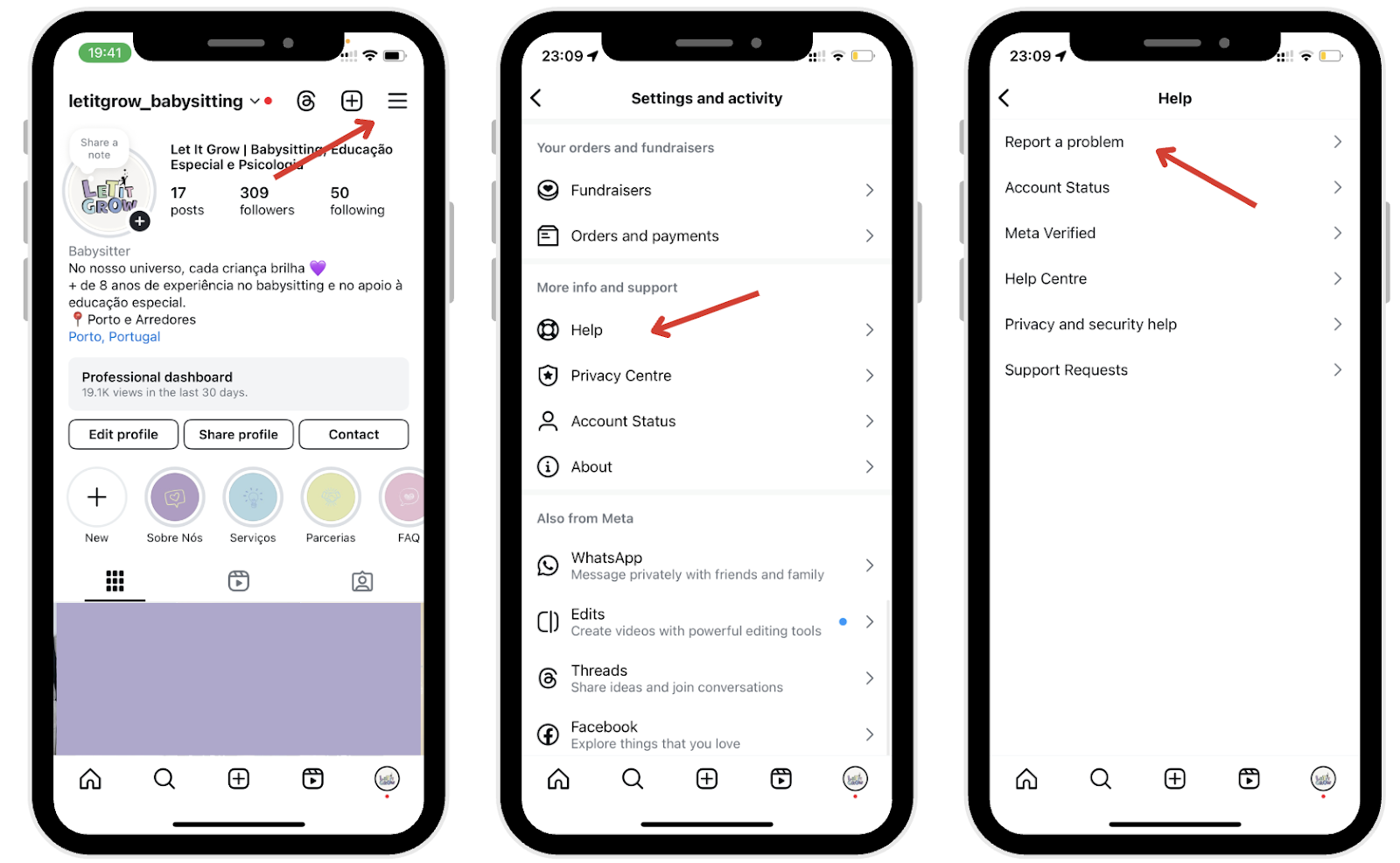
If you are unable to follow people due to a block, follow the above steps to regain access to your account and restore normal functionality.
How to Avoid Following Restrictions in the Future
To prevent future follow-up restrictions, here are some tips to follow:
Follow at a Natural Pace
Avoid trying to follow too many accounts in a short time. If you do, Instagram may flag your account as suspicious. Follow accounts at a natural pace, and don’t try to reach the daily limit all at once.
Avoid Spammy Behavior
Refrain from performing actions like mass liking, commenting, or following/unfollowing large groups of people in quick succession. Instead, leave comments and engage authentically with other users. Leaving a genuine comment on posts is a good way to build relationships and avoid being flagged as spam. Avoid using automation tools or third-party apps that violate Instagram’s terms of service, as these can lead to account blocks or restrictions.
Keep Your Account Verified and Secure
Ensure you use two-factor authentication when logging in. Additionally, keeping your account verified will help prevent it from being flagged as suspicious. Make sure your account information is up to date, add a profile picture for credibility, and ensure you’re following Instagram’s community guidelines. Always comply with Instagram’s terms to avoid restrictions or penalties.
Final Thoughts
Instagram’s restrictions on following actions are in place to prevent spam and abuse. They can be frustrating, but temporary. By adhering to Instagram’s guidelines and using the platform authentically, you can avoid running into follow restrictions and ensure a positive experience on Instagram.
With BuzzVoice you can get organic-like engagement, without being banned (even temporarily) from Instagram.
FAQs About Instagram Follow Limits
How long does Instagram block follow actions?
Instagram blocks following actions for 24–48 hours if you exceed the limits. However, repeated violations or suspicious behavior can lead to longer restrictions or even permanent blocks.
What is the following limit per hour/day in 2026?
In 2026, Instagram allows users to follow approximately 150–200 accounts per day, with an hourly limit of about 10–15 followers.
Will Instagram tell me why I can’t follow anyone?
Instagram typically shows a generic message like “Try Again Later,” but doesn’t always specify the exact reason for the restriction. You may be restricted for exceeding action limits, suspicious behavior, or violating guidelines.
Can using automation tools cause a block?
Yes, using third-party tools or bots to automate actions like following, liking, or commenting can result in action blocks. These tools violate Instagram’s terms of service and may lead to account restrictions.
How do I know if I’ve been restricted?
If you’re unable to follow others and receive the message “Try Again Later,” it means you’ve been restricted. You may also notice limited activity in other areas of the app, such as liking posts or commenting.

BuzzVoice
BuzzVoice is the best place to go when you need instant engagement services on social media. Offering a wide variety of packages for Instagram, Youtube, Facebook, Twitter, Soundcloud & Tiktok.



