How to Share Your Instagram Profile In 5 Steps
Sharing your Instagram profile has never been easier or more convenient. With just two taps, you can instantly send your profile link to friends, family, or colleagues, making it simple to connect and grow your network. Whether you’re promoting your personal brand, business, or creative work, knowing the fastest and most effective ways to share your Instagram profile is key.
In this guide, we’ll walk you through multiple sharing methods—from using the built-in “Share Profile” button and Instagram QR codes, to copying your profile link manually or promoting it through your bio and Stories.
By the end of this guide, you’ll have all the strategies you need to effortlessly spread the word about your Instagram and expand your audience like a pro.
🚀 Boost Your Instagram Presence Before You Share
Make your profile impossible to ignore. Whether you’re growing a brand, promoting your content, or just want to stand out, start by increasing your visibility and credibility:
- 👉 Buy Real Instagram Followers – Grow your audience fast with authentic followers.
- ❤️ Get Instant Likes – Keep every post looking popular and engaging.
- 🎥 Increase Views on Reels & Videos – Amplify your reach and attract new followers.
Start now and turn every profile visit into a connection.
How to Share Your Instagram Profile: Step by step guide
Introduction to Instagram Profile Sharing
Sharing your Instagram profile is one of the simplest ways to help others find and connect with you on one of the world’s leading social media platforms. With over 2 billion active users, Instagram has become a go-to app for sharing photos, videos, and stories, making it essential to know how to share your unique Instagram profile link.
Whether you’re using Android, iOS, PC, or Mac, having your profile link ready means you can easily connect with friends, followers, or potential business partners. There are different ways to share your Instagram profile, such as using links, QR codes, or built-in sharing features. While Instagram’s mobile-first design makes posting and scrolling a breeze, some features—like copying your profile link—aren’t always obvious.
Understanding Your Instagram Profile Link
Your Instagram profile link is a unique web address that leads directly to your Instagram profile page. This link is formatted as https://www.instagram.com/yourusername, where “yourusername” is your personal Instagram username. Understanding and using your Instagram profile link is essential for anyone looking to grow their follower base, connect with new Instagram users, or boost their presence across social media platforms.
Sharing your Instagram profile link is a powerful way to easily connect with others. You can send your profile link via direct message, text message, or email, making it effortless for friends, colleagues, or potential followers to find your profile.
For even greater reach, post your Instagram profile link on other social media platforms like Facebook, Twitter, or LinkedIn. By sharing your Instagram profile link widely, you can expand your audience, increase your follower base, and open up new opportunities for business growth and networking.
Your Instagram profile link is more than just a URL—it’s a key part of your online identity. Make sure to keep it handy and share your Instagram profile whenever you want to connect, promote, or grow your presence on Instagram and beyond.
The Fastest Method: QR Code or Share Button
Instagram offers two quick ways to share your profile:
Share Button:
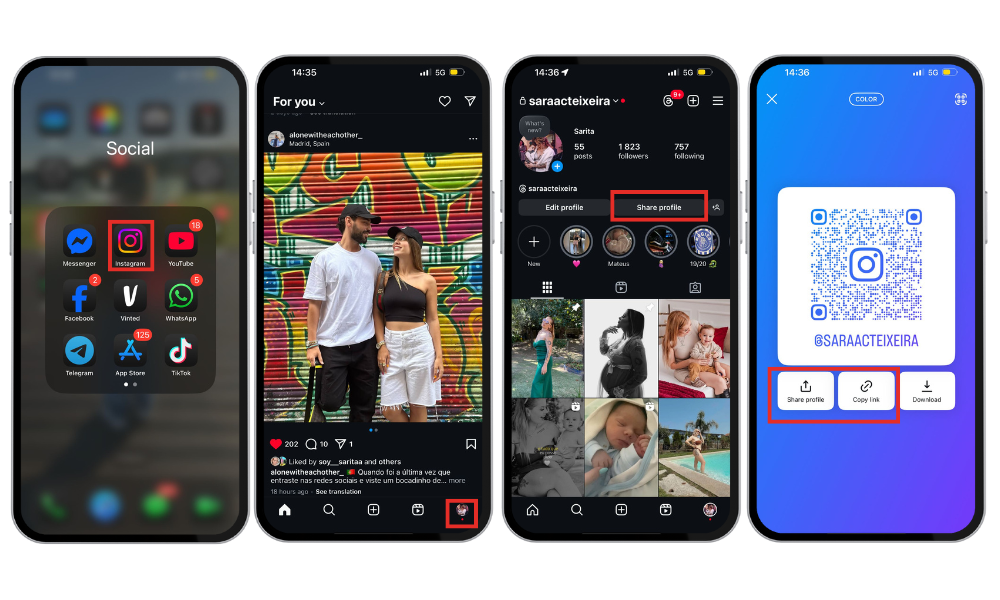
- Open the Instagram app.
- Tap your profile icon at the bottom right of the screen.
- In your profile, look for the share icon or tap the three dots in the top right corner to open the menu.
- Select “Share Profile.”
- Choose between “Copy Link” or “Share via…” from the menu options.
QR Code:
- Follow the same steps above until “Share Profile.”
- You will see a unique QR code for your profile. Instagram makes creating a QR code for your profile quick and easy, allowing you to share your profile visually.
- Share this code with others so they can scan it and access your profile directly.
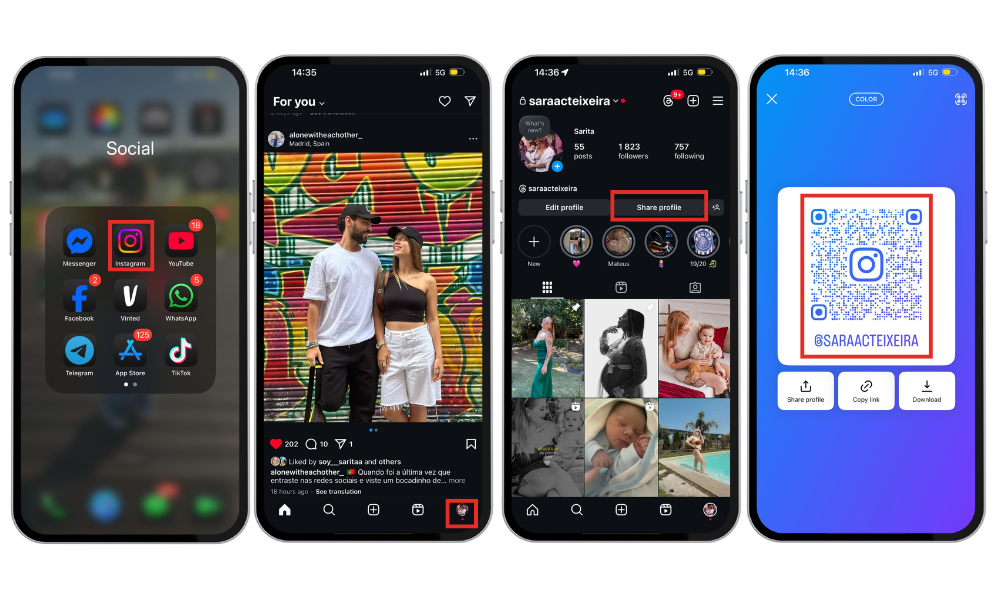
Step-by-Step (iPhone & Android)
On iPhone:
- Open the Instagram app.
- Tap your profile picture.
- Select “Share Profile”.
- Tap Copy Profile URL to copy your profile link, or choose “Share via…”.
Note: The copy profile URL option allows you to quickly copy your Instagram profile link, making it easy to share or promote your profile across platforms like WhatsApp, Facebook, or in messages.
On Android:
Open the Instagram app.
Tap your profile picture.
Select “Share Profile”.
Choose “Copy Link” or “Share via…”
These steps are consistent across both platforms, ensuring a smooth and uniform user experience.
Using Your Profile Link Instead (Manual Method)
If you’d rather share your profile manually, here’s how:
- Open the Instagram app. If you are using a web browser, log into your Instagram account and copy the URL from the address bar.
- Tap your profile picture.
- Select “Share Profile”.
- Tap “Copy Link”.
- Tap paste to insert your Instagram link wherever you like—whether it’s in a message, email, or any other platform. Instagram profile links can be shared using multiple options, such as direct messages, emails, or across various social media platforms to boost your visibility and connect with your audience.
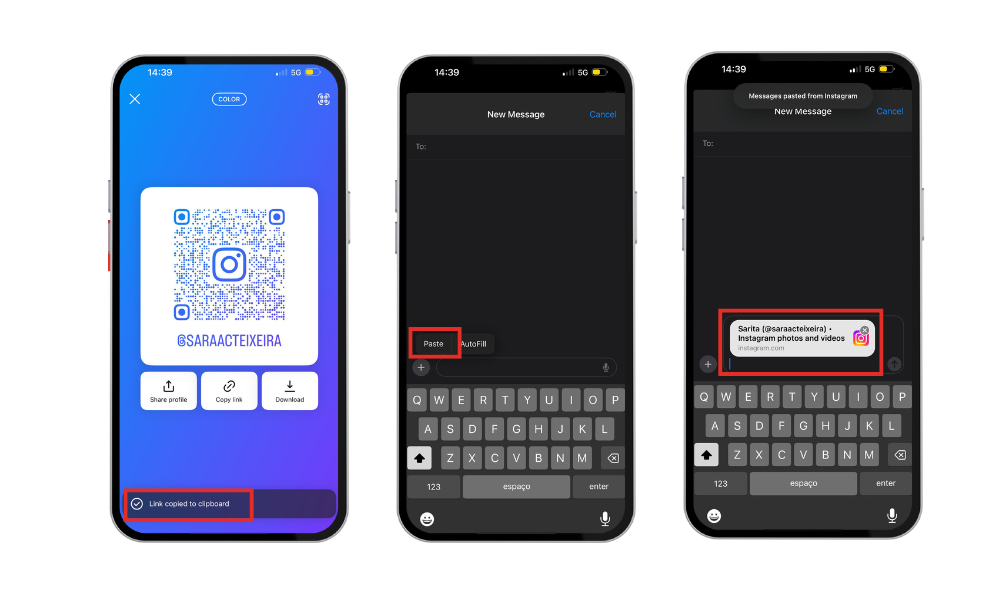
Your new link will look like this: https://www.instagram.com/your_username/
You can also generate a new Instagram profile link or QR code for sharing your profile, making it easier for others to find you. This method is especially useful for personalized sharing or when sending your profile outside the Instagram app.
Boost your Instagram presence effortlessly with Buzzvoice’s authentic followers, auto engagement, and instant likes—perfect for elevating your French-inspired social media content.
Optimizing Your Profile Link
Your Instagram profile link, also known as your Instagram URL, is the direct web address that leads straight to your profile page. It acts as your digital calling card, making it easy for anyone to visit your Instagram profile with a single click. A standard Instagram profile URL looks like this: https://www.instagram.com/yourusername.
This unique link is tied to your Instagram username, so if you ever update your username, your Instagram profile URL will automatically change to match. Keeping your Instagram profile link handy allows you to share it across different social media platforms, embed it on your website, or include it in your email signature.
Sharing your Instagram profile link on various social platforms can help you reach a wider audience. By optimizing your Instagram profile link, you make it easier for others to find and follow you, no matter where you’re sharing it.
Other Ways to Share Your Instagram Profile
In addition to the methods already mentioned, here are more ways to share your Instagram profile effectively: You can also share your profile on other platforms beyond Instagram, such as Facebook, Twitter, WhatsApp, and more.
Copy & Paste Your Profile URL
- Open the Instagram app.
- Tap your profile picture.
- Select “Share Profile”.
- Tap “Copy Link”.
Paste the link wherever you’d like—messages, emails, websites, etc.
Share Through Other Apps (WhatsApp, SMS, Email)
- Open the Instagram app.
- Tap your profile picture.
- Select “Share Profile”.
- Choose “Share via…”.
Select the app of your choice (e.g., WhatsApp, email, Messenger, etc.). You can share your Instagram profile link directly with your WhatsApp contacts for quick access.
Share via Instagram Stories or Bio Link
- Open the Instagram app.
- Tap your profile picture.
- Select “Share Profile”.
- Choose either “Add to Story” or “Copy Link”. Sharing your profile via Instagram Story is a great way to promote your account to your followers and increase your visibility.
- If you choose “Add to Story”, personalize your story with stickers, text, etc., and publish it.
- If you choose “Copy Link”, paste it in your bio or wherever else you want to share it.
Related Article: How To Share Instagram Post To Facebook
Pro Tip: If you want your profile to stand out when shared, consider boosting engagement beforehand using services like BuzzVoice. With real, organic followers and interactions, your profile will look more active and appealing to anyone clicking your link or scanning your QR code.
Using Your Instagram Profile Link Strategically
Sharing your Instagram profile link isn’t just about making connections—it’s a powerful tool for expanding your reach and boosting your brand. You can post your Instagram profile link on other social media accounts like Facebook, Twitter, and WhatsApp, or add it to your YouTube channel’s about section. Sharing your profile link across your various social accounts can help maximize your reach. Including your Instagram profile link in your email signature or sending it via text message makes it easy for contacts to find your profile.
For in-person networking, you can use Instagram’s QR code feature, which lets others scan and access your profile instantly through the Instagram app or a web browser. By sharing your Instagram profile link strategically, you can grow your follower base, increase audience engagement, and drive business growth across multiple platforms.
Common Issues When Sharing Instagram Profiles
Broken Links
Make sure the copied link is complete and correct.
Avoid sharing shortened or incomplete URLs, as they may not work properly.
Private Accounts and Visibility
If your account is private, only approved followers will be able to view your profile.
If you’re looking to boost your visibility or reach more people, consider switching to a public account temporarily.
Sharing Business vs. Personal Accounts
Business accounts offer additional features like analytics, contact buttons, and promotional tools.
Choose the right account type based on your sharing goal—personal use or professional outreach.
Keeping these points in mind ensures a smoother experience for both you and those accessing your profile.
|
Sharing Method |
Best For | Requires the Instagram App? |
|
“Share Profile” Button |
Sending via WhatsApp, email, or DMs |
Yes |
|
Instagram QR Code |
In-person networking, printed materials |
No (only for scanning) |
|
Manually Copy Link |
Customized sharing |
No |
|
Link in Bio or Stories |
Promoting profile on other social networks |
Yes |
Instagram Profile Link and Business
For businesses and professionals, your Instagram profile link is a vital tool for building a strong online presence and driving business growth. A well-optimized Instagram profile link can help you direct potential customers to your profile page, showcase your Instagram content, and encourage audience engagement across multiple social media platforms.
By sharing your Instagram profile link, you can drive traffic to your website, promote your products or services, and connect with your target audience. Instagram offers a variety of features, such as Instagram Stories, Reels, and posts, that you can leverage to share your content and keep your followers engaged.
You can also use your Instagram profile link to share your latest Instagram posts, stories, or reels on other social media platforms, like as Facebook pages and Twitter, expanding your reach and attracting new followers.
Additional Tips
To get the most out of sharing your Instagram profile link, always copy the URL directly from Instagram to avoid any mistakes or broken links. Tailor your sharing approach to your audience and platform—what works on Facebook might differ from what’s effective on LinkedIn or YouTube.
Take advantage of Instagram’s QR code feature for quick, in-person sharing, or use a link-shortening tool like Bitly to make your profile link more visually appealing and easier to remember.
For maximum exposure, share your Instagram profile link across various social media, including Facebook accounts, Twitter, and even your YouTube channel. By following these tips and making the most of Instagram’s sharing features, you’ll be able to grow your online presence and connect with more Instagram users than ever before.
Final Thoughts
Sharing your Instagram profile is quick and easy. Whether using the Share Instagram Profile link button or your unique QR code, you can send your profile in just a couple of taps.
These sharing methods are perfect for:
Growing your online presence
Simplifying personal or professional networking
Promoting content or services
But to truly maximize the impact of each share, your profile must look active and engaging. For creators and businesses looking to make the most impact when sharing their profile, BuzzVoice offers tools to help you grow your following authentically.
By boosting real engagement and attracting organic followers, BuzzVoice ensures your profile looks credible and appealing, so people are more likely to follow after clicking your link or scanning your QR code.
FAQs About Sharing Instagram Profiles
How do I copy my Instagram profile link?
Open your Instagram profile in the app.
Select “Share Profile”.
Tap “Copy Link”.
Your link will be copied to your clipboard and typically looks like:
https://www.instagram.com/yourusername/
Can I share my profile with someone who doesn’t have Instagram?
Yes. Anyone can open your profile link or scan your QR code in a browser—even without an Instagram account. However, to interact (follow, like, comment), they’ll need to be logged into an account.
What is the Instagram QR code and how does it work?
Your Instagram QR code is a personalized image that links directly to your profile. Anyone can scan it using a smartphone camera or QR code reader, and they’ll be redirected to your profile instantly. You can also save your QR code as a photo and share it across different channels.
You can:
- Share it digitally
- Print it for physical materials (flyers, business cards, etc.)
- Add it to presentations or websites
My account is private. Does that affect sharing?
Yes. If your account is private, anyone who clicks your link or scans your QR code will only see:
Your profile picture
Your bio
A request button to follow you
They’ll need your approval to view your posts or stories. This limits visibility but doesn’t stop sharing.
Can BuzzVoice help me before I start sharing my Instagram profile?
Absolutely. If you want to make a strong first impression when people visit your profile via link or QR code, BuzzVoice can help you build up real, organic engagement beforehand. A more active profile increases credibility and the chances of turning views into followers.

BuzzVoice
BuzzVoice is the best place to go when you need instant engagement services on social media. Offering a wide variety of packages for Instagram, Youtube, Facebook, Twitter, Soundcloud & Tiktok.