Instagram has become a powerful social media platform for sharing photos and videos. Many users wonder, “Can you see who views your Instagram videos?”
Generally, viewing someone’s Instagram profile or content is anonymous, and users aren’t notified when someone views their profile or posts. While you can’t see individual viewers, business or creator accounts can access aggregate data like profile visits through Instagram Insights.
In this article, we’ll explain what information about video viewers Instagram provides and how you can check it to satisfy your curiosity.
Does Instagram Show Who Viewed Your Video? An Introduction
Instagram video views are a key indicator of how well your content is performing on the platform. Whether you’re sharing a quick update through Instagram stories, posting a creative Instagram reel, or uploading a video to your feed, the Instagram app tracks how many times your video content is watched.
However, while Instagram allows you to track the total number of views, it does not reveal the identities of individual viewers for most video formats.
This data is especially valuable for creators, influencers, and businesses who want to measure engagement and reach. The way your videos are viewed can also depend on your account type:
Private accounts have more control over who can see their posts.
Public accounts allow all users to access their content.
Additionally, the Instagram algorithm influences which users see your videos, which can significantly impact your video views.
There is a difference between Instagram stories, reels, and regular video posts in how viewer information is displayed:
For stories, you can see who viewed them.
For reels and regular video posts, you can only track total views, not the identities of individual viewers.
How to See Who Viewed Your Instagram Videos?
This has been a burning question for years, and it remains one of the most asked keywords related to Instagram.
The only way you can get close to knowing who viewed your video is by:
Seeing the number of video viewers a video has gotten, and
Checking some of the usernames of profiles that have liked the video posted or uploaded.
Beware of third-party apps that claim to provide all the viewer information. Many of these apps serve ads and may not be trustworthy.
With Instagram, you are only allowed to see:
The number of views on your video, and
A few of the public profiles that have liked the video.
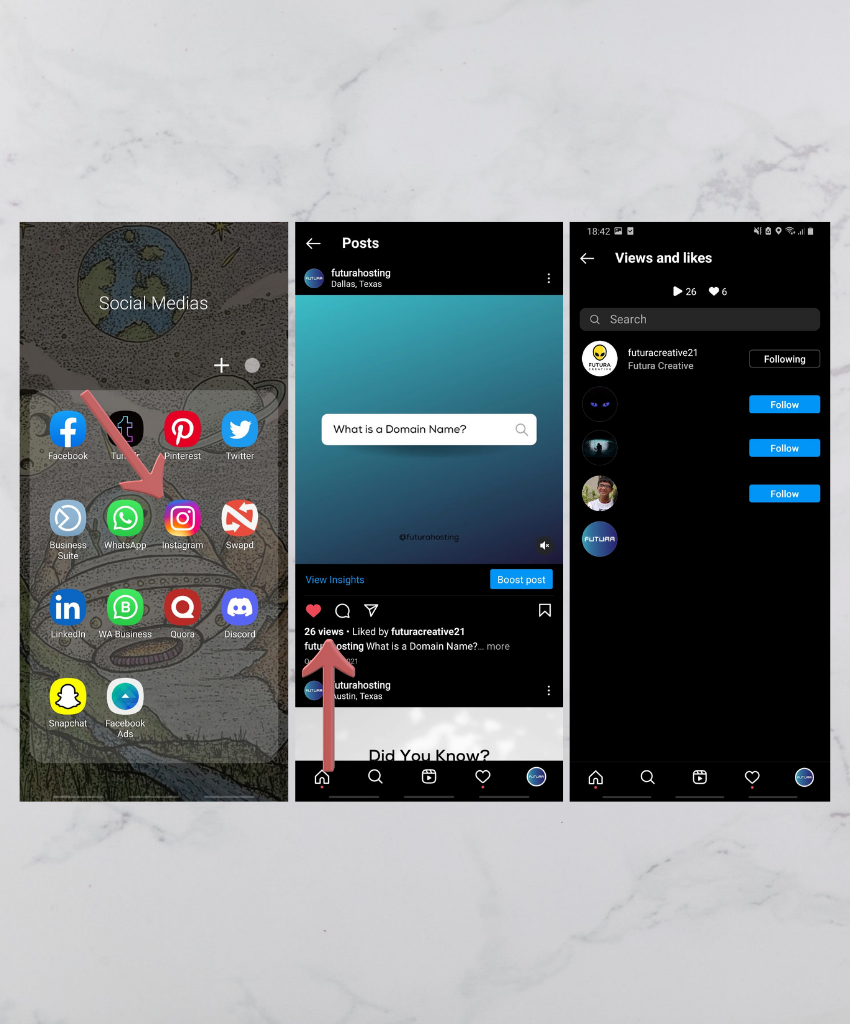
Here’s how you can check this directly through Instagram:
Open the Instagram Application on your device.
Go to your profile and select the video you want to see the stats for.
Look for the view count below the video and click it.
A new window will open showing everyone who has liked your video.
Scroll through the list to see all usernames of people who liked the video.
Important to note: You can only see the usernames of users who liked your video, not everyone who viewed your Instagram video.
Instagram only shows the total number of video viewers for videos you have uploaded and does not provide a list of everyone who has viewed your Instagram video.
So, the answer is clear: You cannot see all viewers due to privacy limitations.
Don’t worry — Instagram does not notify others when you view a video.
I hope this has satisfied your curiosity and helped you understand what information is available about who has viewed your Instagram videos.
How to See Who Viewed Your Instagram Stories?
Seeing who has viewed your Instagram stories is a fairly simple thing to do. Follow this quick step-by-step guide, and you will be able to do it in no time.
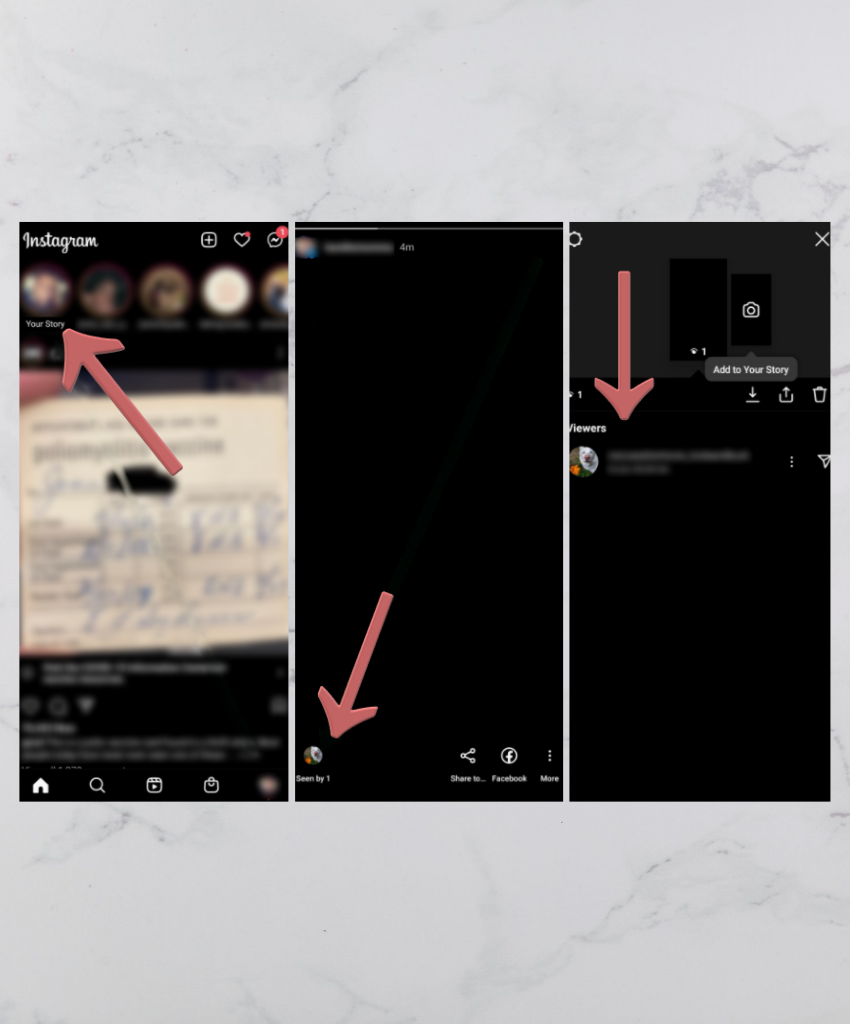
First things first, open the Instagram app on your device.
Click on your story, located at the top left of your screen.
Then you need to swipe up, which will reveal the details pane in the top left corner. Here, you’ll see all the users who have viewed your story.
The list displays the usernames of everyone who has viewed your story. You can also use the search function to quickly find specific usernames in the viewer list.
Each viewer is represented by their profile icon, and you can see the list of everyone who viewed your story.
Next to each viewer’s name, you’ll also find the three dots, which let you access additional options like restricting or blocking that user.
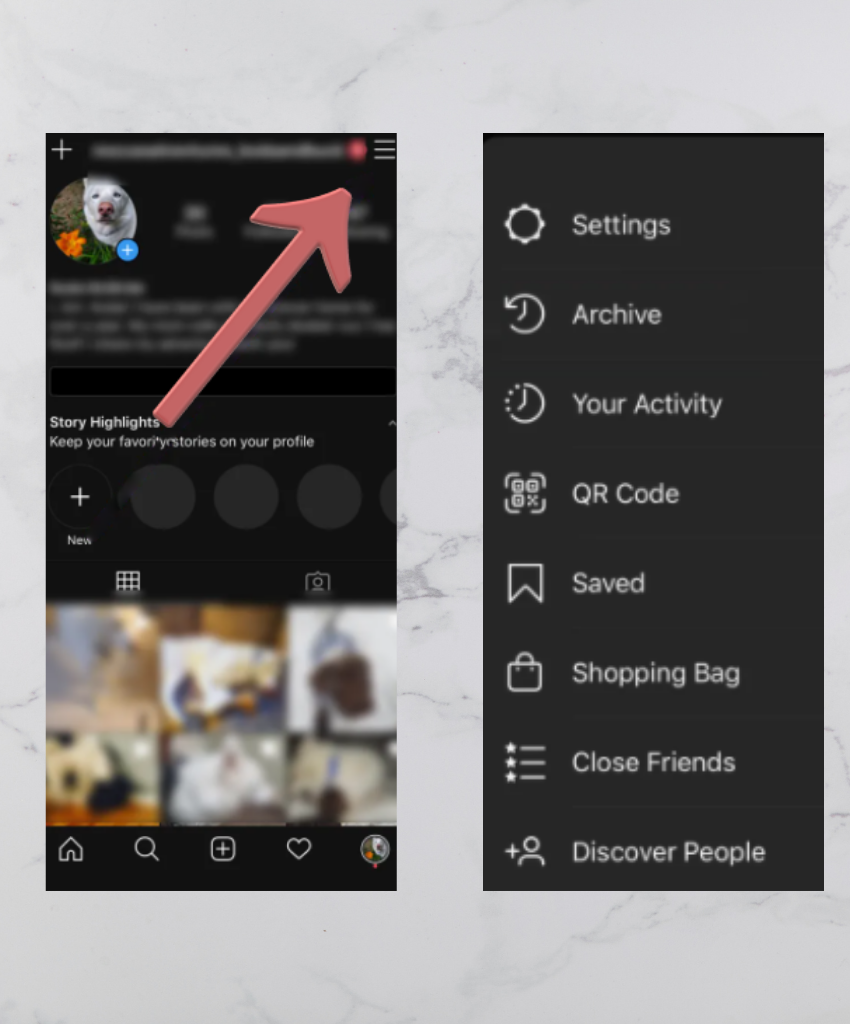
If it has been more than 24 hours since your story was posted, then follow the steps below:
Go to your profile by clicking on the icon with your profile picture at the bottom right of your screen.
Click on the button with three horizontal lines at the top right of the screen.
After the sidebar extends, click on the ‘Archive’ button.
Select the ‘Stories Archives’ tab.
Then, choose the story you want to see the stats for and click it.
Note: Some analytics and insights about who viewed your story may only be available for certain account types, such as Business Accounts.
If you save a story to highlights, you will no longer be able to see the usernames of viewers after the story expires.
Instagram videos help you in various ways. If you’re a personal Instagram user, you share videos to keep your friends and family up to date on what you are doing — maybe a cool place you visited or a fun activity you’re doing.
It helps you get connected and see how many people watched your video, allowing you to understand what percentage of that audience has stayed up to date with you.
Engagement on your videos includes:
Liking
Commenting
Sharing
These are key indicators of interest. Users can engage and interact with your videos, which helps build an engaged community.
For business owners or influencers, video content is essential.
You may want to share images of your products, but sometimes photos don’t fully show what the product does.
Sharing videos helps you demonstrate how to use your products and their benefits.
Different content types have different engagement metrics, such as:
Likes count
View count
These metrics help attract more customers and clients. Advertisers look at views to assess whether your content is effective.
Both Instagram posts and video posts are essential for:
Driving engagement
Analyzing performance on the platform
Popular formats include:
Instagram reels — short videos that track engagement effectively
Stories — designed to engage audiences with short videos and provide insights into viewership and interaction
For editors, filmmakers, or similar professionals, videos are a powerful way to explain your services.
Creating engaging content with both pictures and videos helps explain what you do and how you do it.
Videos make it easier for potential clients to decide whether to hire you, based on your skills and the views your content has gathered.
Helpful metrics include:
Like count
Total view count
Total views
These insights measure the popularity and reach of your videos, even though individual viewer identities remain undisclosed unless users interact by liking or commenting.
So, let’s say you have created a great video explaining a service you offer. How do you find out who has watched it?
Private Accounts and Video Visibility
If you want more control over who can see your Instagram videos, switching to a private account is a smart move.
With a private account, only users you approve as followers can access your posts, including all your video content.
To make your account private, go to your profile page, tap Account Privacy, and toggle the Private Account option.
Add an extra layer of privacy to manage who can view your content.
Closing Thoughts
I hope this article has satisfied your curiosity about who has seen your Instagram videos.
The information provided here will help you reach your goal simply and in a beginner-friendly way.
That’s why we included a step-by-step guide.
Ready to take your Instagram growth to the next level? Try Buzzvoice’s real follower packages today and start building your audience the right way!
Instagram Video Views FAQ (Frequently Asked Questions)
Can I use a third-party application to see who has viewed my videos?
Using third-party apps is not recommended.
Instagram emphasizes that such apps are unsafe, may be scams, and can put your account at risk.
Instagram does not offer this feature directly due to privacy design.
Do I have to pay money to see who has viewed my videos on Instagram?
No payment is required.
Simply tap the profile icon at the bottom right corner of the screen to access your profile.
Select the video you want.
Click on the views counter at the bottom of the video.
What happens if someone posts a comment on my video?
You won’t get notified unless notifications for comments are enabled.
To enable notifications, go to your settings and click on the Notifications tab.
There you can turn on or off notifications for comments.
Note: Notification settings may vary depending on your device and app version.
My friend shared a link to my Instagram video on Facebook and Twitter. How do I find out who saw it?
There isn’t an easy way to find out who has seen your Instagram videos from outside sources.
Instagram only tracks engagement within the app.
The best you can do is find out who has seen your video on Instagram itself.
Is there a limit to the number of times someone can watch my videos?
There is no limit to the number of views you can receive per day.
However, if you post videos very frequently (e.g., every hour), you might reach a daily limit.
If you exceed that limit, you’ll need to wait until the next day to post more videos.
Can someone see if I watch their Instagram video if I don’t follow them?
No, Instagram does not notify users when someone watches their video, regardless of whether you follow them or not. The platform only shows total video views, not the identities of viewers. So, if you watch a video from a public account without following, the person won’t know it was you.
Does Instagram let me see who viewed my Instagram reels?
Instagram does not let users see the specific viewers of their reels. You can only see the total view count and the users who liked the reel, but not a detailed list of all viewers. This protects viewer privacy while providing insights into reel performance.
Can I track who viewed my Instagram video through direct messages?
No, Instagram does not provide a feature to track video viewers through direct messages. While you can send videos via direct message, the sender cannot see who has viewed the video unless the recipient interacts by replying or reacting.
Is it possible to see who viewed my Instagram video after 24 hours?
For regular video posts and reels, viewer identities are never visible. For Instagram stories and video stories, you can only see who viewed them during the 24-hour active period or within the story archive for a limited time. After that, viewer information is no longer accessible.
Can Instagram video views help me grow my profile?
Yes, tracking Instagram video views and engagement helps you understand your audience better. It lets you identify which video content resonates most, allowing you to create more targeted posts, increase followers, and boost overall profile visibility on the platform.
BuzzVoice is the best place to go when you need instant engagement services on social media. Offering a wide variety of packages for Instagram, Youtube, Facebook, Twitter, Soundcloud & Tiktok.