
How Instagram Suggests Friends and Contacts Explained
In 2026, Instagram’s friend suggestion system will have become more advanced than ever. Whether you’re seeing new profiles under “Suggested for You”, the Discover People tab, or even after following someone, Instagram is constantly recommending potential connections based on complex data points.
So, how does Instagram suggest friends? In this guide, we’ll break down exactly how the platform decides who to show you—and how you can control these recommendations if they’re not to your liking.
Want to increase your reach and grow your Instagram following even while you’re taking a break? BuzzVoice lets you instantly promote your Instagram posts and grow your audience faster — without relying solely on the algorithm.
How Does Instagram Suggest Friends: A 2026 Overview
Instagram uses a combination of data sources to recommend new profiles. Instagram’s proprietary algorithms play a key role in generating friend suggestions, leveraging advanced features to enhance user connections. These suggestions appear in several areas, where Instagram’s systems present recommended accounts to users:
- The “Suggested for You” carousel in your feed or after following someone
- The Stories viewer list
- The Search bar as you type
- The Discover People section under your profile menu
These suggestions are powered by the Instagram friend suggestion algorithm, which analyzes many mutual friends, synced contacts, app behavior, location, and even Facebook data. Instagram uses artificial intelligence to analyze user data and improve the accuracy of its recommendations.
Instagram and Facebook are two social media apps that are tightly intertwined, allowing data from both platforms to be used together to enhance friend suggestions.
Introduction to Instagram’s Friend Suggestion Algorithm
Instagram’s friend suggestion algorithm is at the heart of how the platform helps users connect and discover new people. This sophisticated system analyzes a wide range of factors from your Instagram account and other social media accounts, such as Facebook, to similar accounts suggestions you may know, or find interesting.
By looking at mutual friends, shared interests, and your interactions across different accounts, Instagram aims to make your experience more engaging and relevant.
The algorithm doesn’t just stop at who you already know—it also considers your activity, like the posts you engage with, the accounts you follow, and even your connections on other social media platforms.
By constantly refining these factors, Instagram suggests friends who are most likely to enhance your network and help you connect with a broader audience.
As the algorithm evolves, it continues to improve the accuracy of friend suggestions, making it easier for users to find and connect with people who share similar interests or backgrounds.
Where Do Instagram Suggestions Show Up?
You’ll see people you may know on Instagram across different parts of the Instagram app:
After following someone: Instagram shows a follow-up list of similar users.
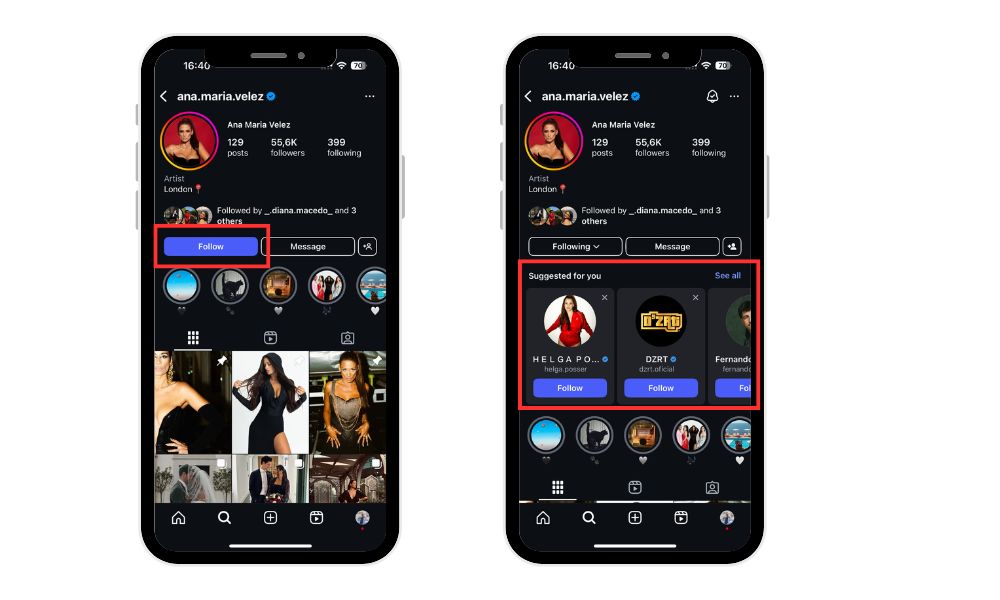
Search bar autocomplete: As you start typing, suggested friends may appear.
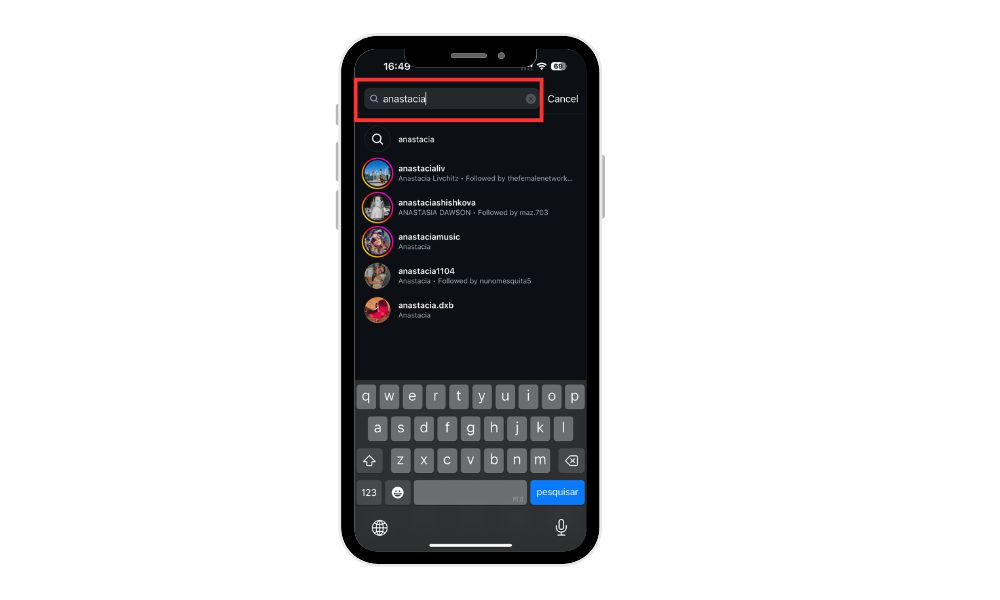
- Top of the Instagram feed: Especially under Stories, Instagram might show a row of suggested profiles.
- Discover People page: Located in your profile menu, which you access by tapping the profile icon, this page pulls from all available triggers to show a full list of suggestions.
Related Article: Find Instagram Profile By Phone Number
What Triggers Instagram Friend Suggestions?
Instagram aims to foster community by connecting users through friend suggestions, making it easier for individuals to discover and engage with others on the platform.
Let’s look at the main reasons Instagram might suggest a particular person.
Instagram analyzes each user’s behavior, interests, and interactions to personalize friend suggestions. The system considers factors such as mutual friends, shared interests, and recent activity to generate relevant recommendations for the user.
These triggers are designed to enhance user experience by making it easier for users to find and connect with relevant people on Instagram.
1. Mutual Friends & Followers
This is the most common trigger. If someone follows a lot of the same people you do—or is followed by them, Instagram assumes you might know them too. You’ll often see this with the “Followed by [mutual friend]” label next to the suggestion.
This mechanism is similar to how Facebook friend suggestions work, where the platform recommends connections based on shared friends and social circles.
2. Synced Contacts
When you enable Instagram contacts sync, the app scans your phone contacts or email contacts to find matches. If someone in your phone contacts uses Instagram, they’ll show up as a suggestion. Likewise, your profile may be suggested to them.
3. Facebook Account Linking
Instagram and Facebook are tightly integrated. If you’ve linked your Facebook account to Instagram, expect to see “Facebook Friends on Instagram” pop up often. These are friends who’ve also connected both accounts.
4. Profile Views and Interactions
Even if you haven’t followed someone, visiting their profile or engaging with their content, such as liking, commenting, or sending direct messages, can trigger a friend suggestion. Instagram tracks these micro-interactions to surface similar or connected users.
Searching for someone or performing searches on Instagram can also influence the suggestion algorithm, even if it doesn’t directly result in a recommendation. Commenting on someone’s posts increases the likelihood of mutual suggestions and greater visibility.
It’s a common misconception that Instagram suggestions are based on stalking; however, the algorithm does not equate profile views or visits with stalking, but rather uses a range of engagement signals to personalize recommendations.
5. Location and Shared Interests
Attending the same event (via geotags), using the same hashtag, or being in the same physical area can also influence friend suggestions. Instagram often considers shared hashtags as a factor in suggesting friends, since using the same relevant hashtags—such as both tagging “Dubai Expo 2026” signals a shared interest or event participation.
Can You Control or Turn Off Friend Suggestions?
Yes, there are a few ways to limit or stop Instagram friend suggestions:
- Turn off contacts syncing:
Go to Settings > Account Center > Contacts and disable syncing. This stops Instagram from using your phonebook for suggestions. - Make your account a private account:
While this won’t remove all suggestions, it reduces your visibility in others’ suggestion lists. - Manage your Facebook connection:
If you don’t want Facebook friends showing up, log into your account and unlink your Facebook account under Settings > Accounts Center > Linked Accounts. - Manage account suggestions in your settings:
You can disable ‘Show account suggestions on profiles’ in your Instagram settings to control who sees your profile as a suggestion and limit the account suggestions you receive. - Clear your search history:
This can reduce suggestions based on past profile visits.
Keep in mind, Instagram suggestions can also be influenced by data from other apps connected to your Instagram account.
Is Instagram Always Accurate in Its Suggestions?
Not always. Instagram’s algorithm is powerful, but far from perfect. Many users report seeing random or irrelevant suggestions, even after limiting synced data. These suggestions may also be influenced by the activity of other users on the platform.
Sometimes, suggestions are based on:
- Someone who viewed your profile
- A shared group chat
- Shared Wi-Fi or Bluetooth proximity (speculative, but suspected)
- Other factors, such as mutual connections, interactions, or shared interests
Instagram’s algorithm may also suggest your profile to certain users based on shared activity or interests.
Instagram doesn’t officially confirm all sources, which makes it tough to control fully. Still, taking steps to disconnect contacts and limit data sharing can help.
Final Thoughts
Instagram friend suggestions in 2026 are driven by a mix of mutual connections, synced contacts, Facebook data, and app behavior. Instagram also uses data from multiple apps to generate suggestions.
Social media apps like Instagram and Facebook play a key role in connecting users and influencing friend suggestions through their algorithms and features. While the algorithm is designed to be helpful, you may want more control over who you connect with—and who sees your profile.
Fortunately, Instagram gives you options to manage and even disable certain triggers like contact syncing or linked accounts.
You can also limit visibility to certain accounts through privacy settings. By understanding how Instagram finds friends, you can take back control of your suggested connections and shape a more intentional feed.
Are you looking to increase your Instagram visibility? Check our Instagram engagement services, you can easily buy Instagram Views, Followers, Likes, Automatic Engagement and Comments to expand your reach.
FAQs About Instagram Friend Suggestions
Why is Instagram suggesting someone I don’t know?
Instagram’s friend suggestion algorithm is based on various signals, including mutual followers, contact syncing, and even recent interactions—like viewing someone’s profile or engaging with similar content.
Even if you’ve never interacted directly, shared connections or behavior patterns (like attending the same event or following similar accounts) may cause someone to show up in your “Suggested for You” list. Instagram may also suggest somebody you haven’t interacted with simply because you have similar activity or more mutual friends.
Does Instagram show suggestions based on who views my profile?
While Instagram hasn’t officially confirmed that profile views trigger friend suggestions, many users report seeing people they recently viewed or who viewed their profile show up in their recommendations.
Visiting profiles may increase the likelihood of being suggested to certain accounts, as Instagram could use this interaction to connect users. This has led to speculation that profile visits and non-public interactions may be factored into Instagram’s suggestion system, even if passively.
Can I stop Instagram from suggesting my profile to others?
You can reduce your visibility in others’ suggestions by taking a few key steps:
- Make your account private, which limits your exposure to only approved followers.
- Turn off contact syncing in your account settings, so Instagram doesn’t use your phone or email contacts to connect you to others.
- Unlink Facebook if you don’t want your Facebook friends to be shown or see you as a suggestion.
- You can also manage or disable account suggestions in your profile settings to further control how your profile appears to others. However, there’s currently no way to fully opt out of Instagram’s suggestion algorithm if you use the platform actively.
Will removing synced contacts affect my suggestions?
Yes, disabling or removing your synced contacts will significantly reduce suggestions based on your phonebook. Once you turn off syncing and delete previously uploaded contacts, Instagram will no longer suggest people based on who’s in your contact list. This also works in reverse—your account may no longer be suggested to others who had your number or email in their phone.
Do mutual follows and interactions affect suggestions?
Absolutely. Mutual friends, likes, and comment activity can all influence who appears in your suggestions. If you and someone else frequently interact with the same accounts or content, Instagram may assume you’re likely to know each other and recommend a connection.

BuzzVoice
BuzzVoice is the best place to go when you need instant engagement services on social media. Offering a wide variety of packages for Instagram, Youtube, Facebook, Twitter, Soundcloud & Tiktok.



