
How to See Who You’ve Requested to Follow on Instagram
Have you ever sent follow requests on Instagram and later forgotten who you sent them to? You’re not alone. Instagram doesn’t show an obvious list of your sent follow requests, but there is a way to find them. It keeps evolving, and while it helps protect privacy, some features—like seeing your pending follow requests—aren’t easily accessible. Maybe you sent requests to dozens of private accounts, and now you’re unsure who accepted or ignored them.
This guide explains how to view your sent follow requests on Instagram, why it’s useful, and how to cancel them if needed. We’ll also explore the Instagram Data Download method (which is the most reliable), alternatives in the app, and answer the most frequently asked questions.
Want to grow your views and reach more followers on Instagram—fast? With BuzzVoice, you don’t have to wait on the algorithm. Instantly boost your content and get noticed today!
Can You See Who You’ve Requested to Follow on Instagram?
Yes, but Instagram doesn’t display a public or visible list in your profile.
To see this list, you must access it through your Instagram data. You can use the ‘Access Data’ feature to view sent requests. Instagram stores this information, but doesn’t show it by default in the app or browser. The list will show users you have ‘followed’ but who have not accepted your request. You can also review your activity log’ to see your follow request history.
There are two methods:
- Using Instagram’s data download tool (most accurate, available on the web or on a computer, where you will see a screen with your account data)
- Checking within the app (limited and sometimes inconsistent; tap the profile icon at the bottom right of the screen, then click on the menu at the bottom to access options)
Related: How Instagram Suggests Friends and Contacts
Understanding Instagram Follow Requests
Instagram follow requests are a key feature that helps users maintain privacy and control over who can see their content. When you send a follow request to a private Instagram account, that user gets to decide whether to approve or deny your request, ensuring that only the people they want can view their posts and stories.
This system gives you more control over your Instagram account and helps protect your personal information.
To see a list of the people you’ve requested to follow, start by going to your profile and tapping the three horizontal lines in the top right corner. Next, select “Settings” from the menu. Scroll down to find the “Security” option and tap on it. In the “Data and History” section, tap “Connections” to view your pending follow requests.
This allows you to keep track of which users you’ve requested to follow and manage your connections more effectively.
Method 1: View Follow Requests via Instagram Data Download
The most accurate way to find your pending follow requests is to download your Instagram data.
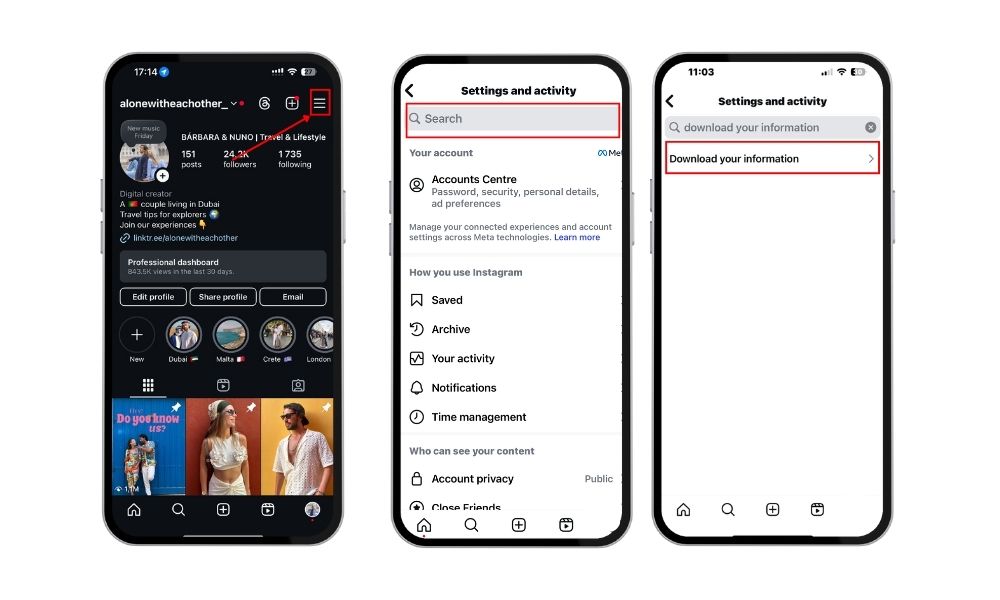
Step-by-Step: How to Download Your Instagram Data
- Open Instagram (Mobile or Desktop).
- Go to Settings and search for Download Your Information.
- Tap Download Your Information (on mobile) or go to the Instagram Data Download page on your computer using a web browser.
- Enter your email address and password to confirm. On desktop, click through the prompts until you see the ‘Get a copy of your information’ screen.
- Instagram will send you a .zip file by email.
- Open the file on your computer and look for the folder: followers_and_following. The files may be located at the bottom of the folder.
- Find the file: pending_follow_requests.html or follow_requests.json. This file acts as a log of your follow request activity.
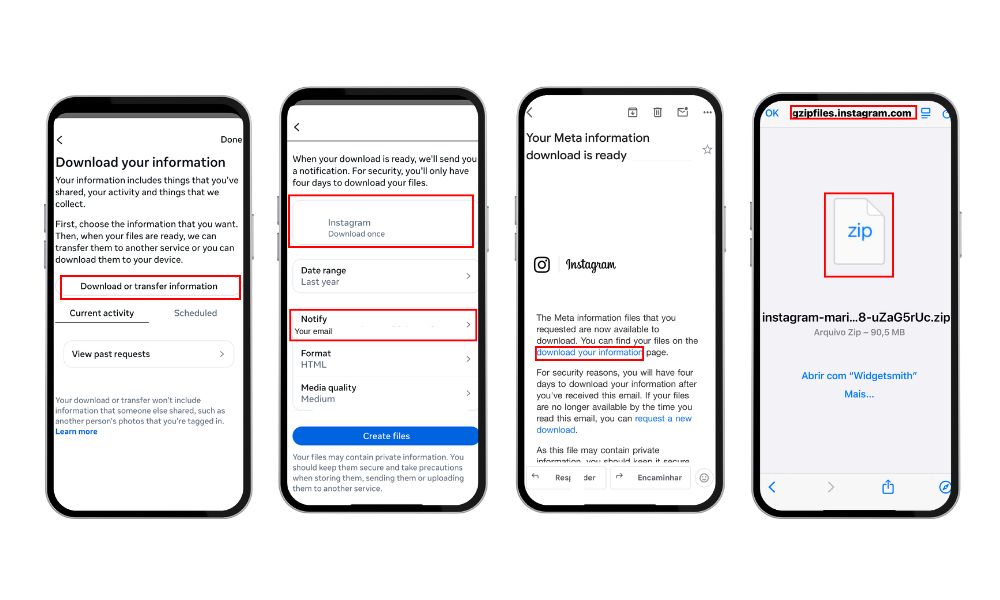
What You’ll See:
- A list of usernames you’ve followed by sending follow requests, but who haven’t accepted yet. This file acts as a log of your sent follow requests.
- It works even if the requests were sent years ago.
Best method for getting your full follow request list in 2026.
Make your Reels go viral and grow your follower count by standing out in the competitive world of social media with Buzzvoice!
Method 2: Using the Instagram App (Limited Results)
While Instagram doesn’t show a full list of sent requests in-app, you can try this:
Steps to Try (Mobile App Only)
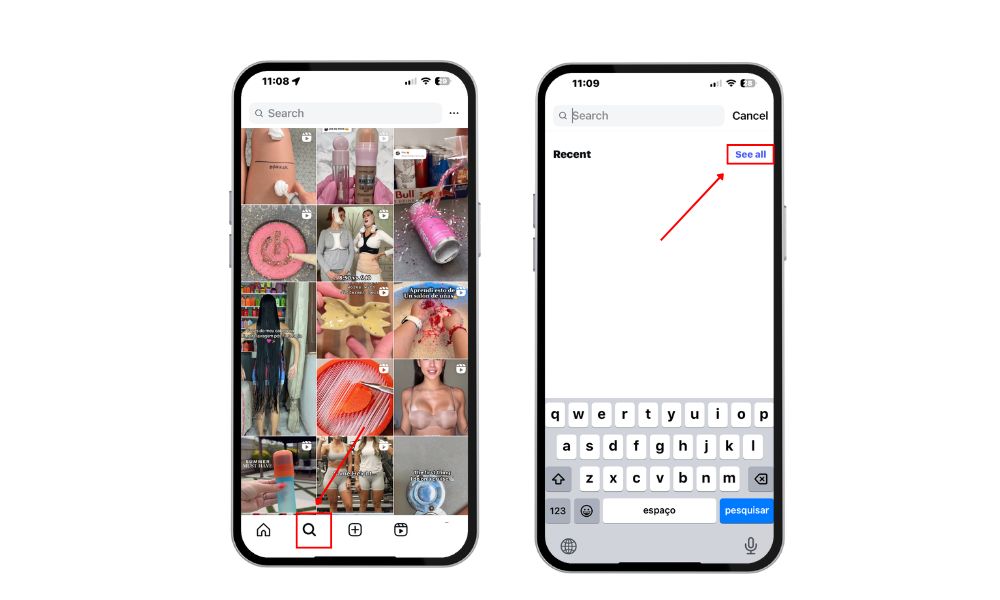
- Tap the profile icon located at the bottom right of the screen.
- You will see a screen displaying your recent activity.
- Tap the Search icon (magnifying glass).
- Tap the search bar and click See All under Recent.
- Some pending private account requests may appear if they were recent, often found at the bottom of the app interface.
This method is not reliable and only shows limited, recent requests.
How to Cancel Current Follow Requests on Instagram
If you downloaded your data and found usernames you don’t recognize or no longer want to follow, you can cancel them manually.
How to Cancel Requests:
- Copy the username from your data file.
- Open Instagram and search for their profile.
- If the follow request is still pending, there will be a screen where the button will say “Requested.”
- Click Requested, then click Cancel Request.
Tip: Instagram doesn’t notify users if you cancel a request.
Related: How to Cancel Follow Requests on Instagram
Why You Might Want to Check Pending Requests
Wondering why this even matters? Here are some reasons to keep your follow request list clean:
- Avoid Spamming: Prevent your account from appearing spammy or aggressive.
- Keep Track of Private/Inactive Accounts: If a user hasn’t responded in months, they may be inactive.
- Improve Engagement Quality: You follow fewer people but focus on accounts you like, which helps enhance your feed and overall engagement.
Exploring Third-Party Apps: Are They Safe or Useful?
Some Instagram users look to third-party apps for extra features when managing their follow requests. These apps often promise to show you a detailed list of your sent follow requests, track the status of each request, and even provide analytics about your account activity.
While this can seem helpful, it’s important to be cautious when using third-party apps with your Instagram account.
Before you use any third-party app to view account data or manage your Instagram follow requests, always check the app’s reviews and ratings in your mobile app store. Make sure to read the privacy policy and see what kind of information the app will access. Some apps may request permissions to view sensitive account data, which could put your privacy and security at risk.
Final Thoughts
While Instagram doesn’t offer a visible “Sent Requests” tab, you can still track who you’ve requested to follow using the data download method. It’s the most reliable and gives a complete view.
To manage your Instagram presence better:
- Regularly review your pending requests
- Cancel ones that are outdated
- Keep your following activity clean and intentional
Grow your Instagram account with BuzzVoice followers, likes, and comments.
FAQs About Instagram Follow Requests
Can people see if I cancel a follow request?
No. Instagram does not send notifications when you cancel a follow request. The person will only know if they previously saw the request. Once canceled, it disappears from their pending list.
Why is Instagram hiding follow requests?
Instagram prioritizes user privacy and has removed some visible follow request features to protect account information. This keeps your requests from being easily visible or exploited by third-party apps.
How long do follow requests stay pending?
Follow requests remain pending indefinitely until accepted or canceled. Even after months or years, if the user hasn’t approved it, the request still exists unless you manually cancel it.
Is there a limit to how many people I can request?
Yes. Instagram may temporarily restrict you if you send too many requests in a short time, usually to prevent spam. While there’s no public number, try to stay under 20–30 requests per hour to avoid issues.

BuzzVoice
BuzzVoice is the best place to go when you need instant engagement services on social media. Offering a wide variety of packages for Instagram, Youtube, Facebook, Twitter, Soundcloud & Tiktok.



